Table of contents
To screen record a permitted ReelShort clip, use iPhone Screen Recording or Android Screen Record, stop, and inspect the saved video. If you're looking for offline downloads, recording is a separate task: the phone's capture button does not guarantee that ReelShort will allow video or audio capture.
I see the appeal of saving a short drama: the scene you want is already playing, and your phone has a recording button. My view is that the useful starting point is the gap between those two facts. A recording indicator tells you the phone is working, not what the app is letting it capture. I'll walk through a short clip check, the symptoms worth investigating, and where desktop episode saving serves a different need.
Can You Screen Record ReelShort? Know the Limits First
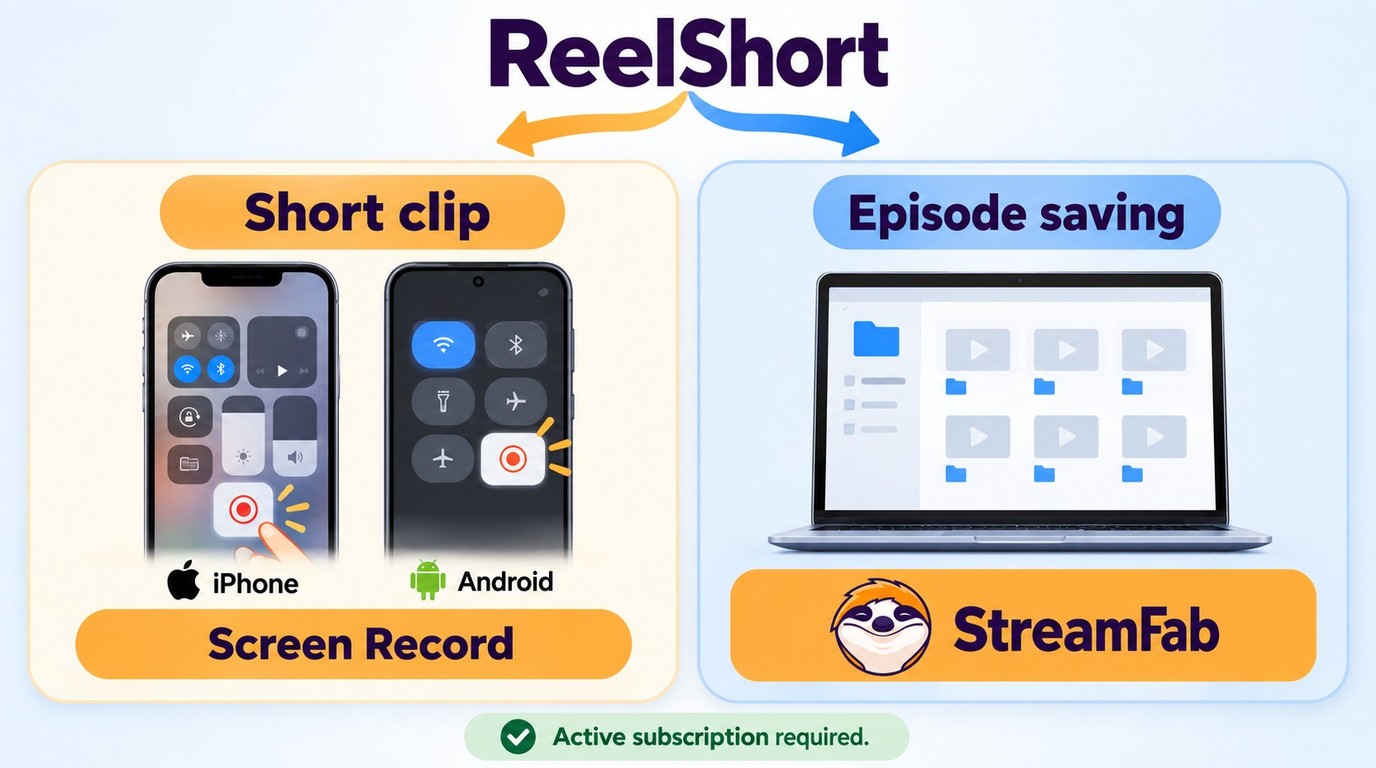
You can attempt a ReelShort recording with your phone's built-in controls when the clip is permitted and the app allows capture. Installing ReelShort is different from downloading episodes: as of October 2026, its official guidance does not describe a built-in video download option.
Recording Controls Are Not a Download Feature or Permission to Copy
The word “download” hides a practical distinction. Downloading the ReelShort app installs the player; it does not put its episode library in your phone's storage. A video file you open in Photos or a media player is a different object from an episode you stream inside ReelShort.
| Option | What It Does | Key Limit |
|---|---|---|
| ReelShort app | Streams episodes | No built-in video downloads described |
| Phone screen recording | Captures allowed playback | Apps can block video or audio |
| Desktop saving software | Creates supported local files | Needs permission and compatible content |
I would treat these as different jobs. For a short permitted clip, the phone's recorder fits the task. For organizing episodes on a computer, a desktop workflow serves another purpose. Neither the presence of a recording button nor a paid viewing account establishes permission to copy a program.
The distinction shows up in real recording attempts. In a May 2025 r/ReelShorts post, a viewer with paid access described the result: “when I started, it gave me a warning and blank screen.” That is an older individual account, not a verdict on every current phone, but it illustrates why viewing access alone is a poor guide to recordability.
An app can treat playback and capture differently. Content protection, including digital rights management, controls how media is accessed or used; a capture restriction can leave the playback visible to you while the recording lacks the program picture. A black frame alone does not identify the exact mechanism. The useful question is what your saved clip contains, not which technical label sounds plausible.
Start with a short permitted segment rather than committing to an episode. That gives you a manageable file to inspect. The next section uses the phone's existing controls and keeps the result check separate from the act of pressing Record.
How to Screen Record ReelShort: iPhone & Android
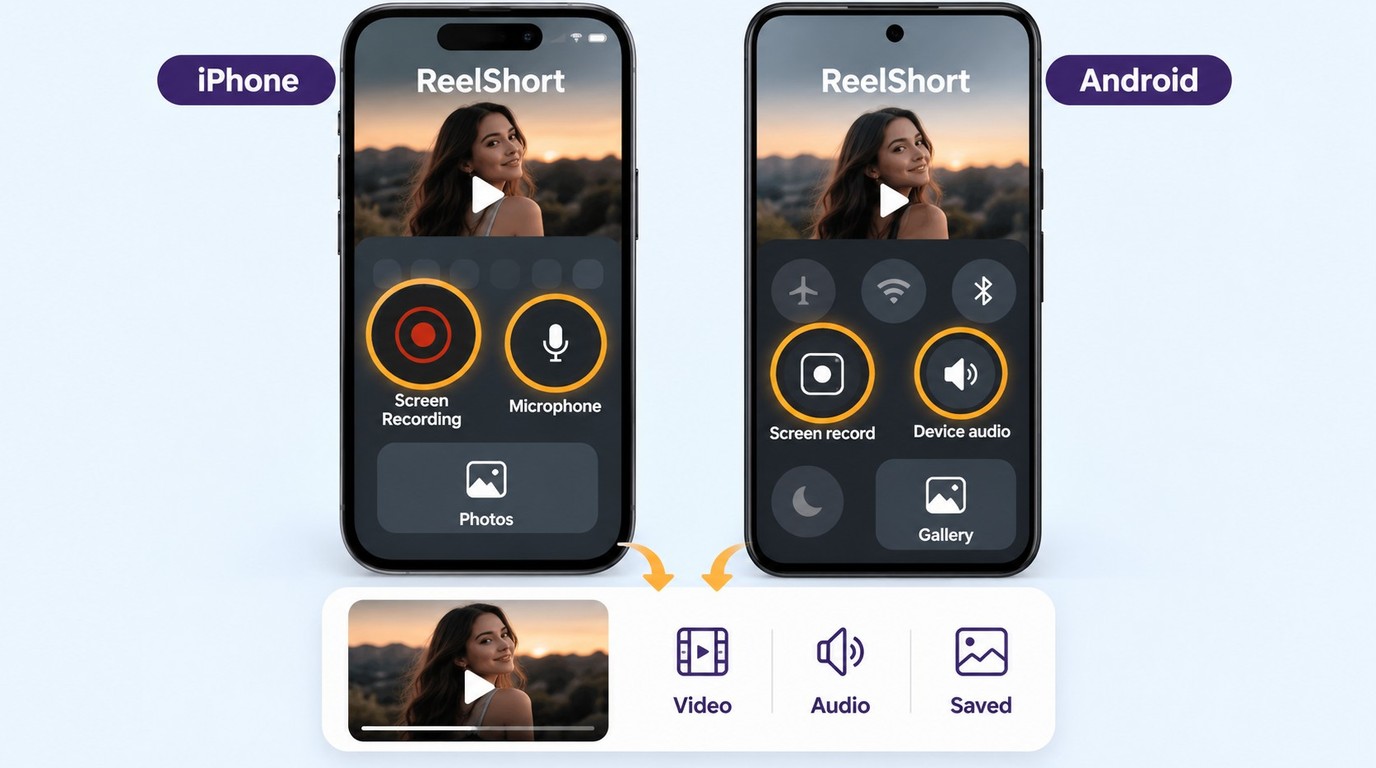
Use iPhone Screen Recording or Android Screen Record to capture a short permitted segment, then review the saved clip for both picture and sound. The controls below start and stop the phone's recorder; they do not establish that a particular ReelShort episode will be captured.
Get the clip ready before opening the recording controls. You need access to the episode, permission to record the segment, available storage, and normal playback. If the scene will not play without recording, handle that playback problem first. A recorder cannot preserve a scene that never reaches the screen.
Keep personal information out of the frame. Silence notification previews, close private overlays, and choose the orientation you want before starting. Listen to the original playback so you know whether the source has sound. These preparations apply to both phones; the real differences are the controls and audio choices.
iPhone Screen Recording: Start, Stop, and Check Photos
The iPhone Screen Recording controls are in Control Center, and completed recordings are saved in Photos. Some apps do not allow audio or video recording, so a successful start is just the beginning of the check.
The microphone is for sound around the phone. It is not a switch that restores internal audio an app refuses to supply. Likewise, screen mirroring and iPhone screen recording do not run together; disconnect mirroring before using these controls.
Android Screen Record: Choose Audio and Check the Saved Clip
Android's built-in screen recording controls start from Quick Settings. Names, available audio sources, and storage locations differ by phone maker and Android version, so follow the options your device actually displays.
Roul Austin's recommendation: Judge the saved clip, not the recording indicator. Check its opening, middle, and ending, including whether speech matches the picture. The phone recorder is enough for a permitted short capture with usable picture and sound; an app-blocked result calls for diagnosis, not a longer recording.
Why Is Your ReelShort Recording Black or Silent?
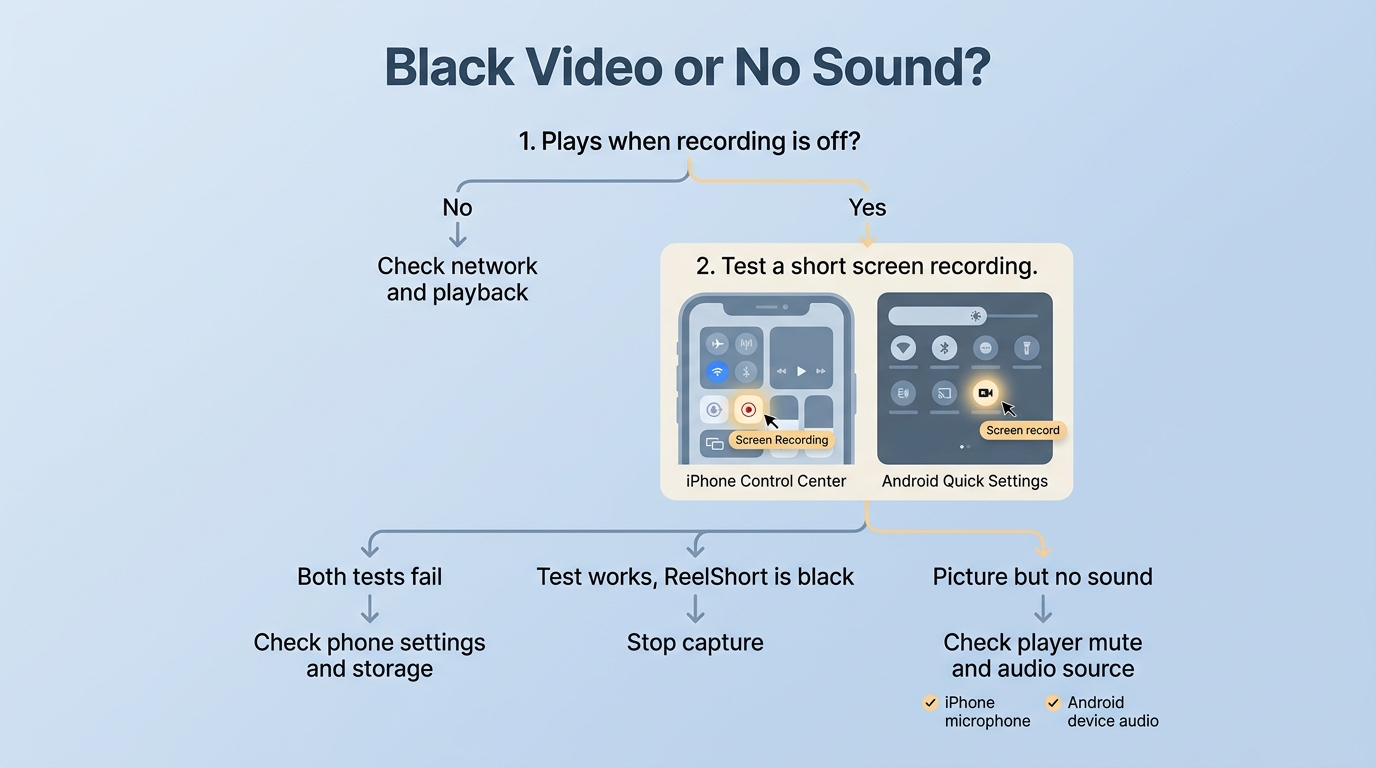
First separate a playback failure from a capture failure: does the episode play normally when recording is off? Then distinguish missing audio from missing video, because an audio-source setting will not restore an app-blocked picture.
Separate a Playback Error from a Capture Failure
A ReelShort network connection error belongs to playback diagnosis first. Stop recording and try the episode normally. If it still stalls or displays the same error, the immediate problem is getting the episode to play, not selecting a different recorder.
Use a simple comparison to narrow the issue. Check whether other ordinary online content loads on the same connection. Reopen ReelShort, and, if the connection itself appears faulty, try a working Wi-Fi or cellular connection. This is a playback check, not a promised fix for restricted capture. Avoid spending more on viewing access just to test whether a recording warning disappears.
If playback works but the saved clip does not, compare it with a brief recording of your own ordinary screen content. For example, record yourself scrolling a note you created without private information. That checks the phone's capture function without another streaming app's playback rules entering the picture.
I would work through the distinction in this order:
- Play the episode with recording off. Note whether the picture and original sound work.
- Record your own screen content. Review that saved clip to see whether the recorder and storage are working.
- Compare the outcomes. If your own content records but the ReelShort clip does not, keep the investigation focused on that playback context. If neither records properly, investigate the phone's recording settings and storage first.
The comparison narrows the next action; it does not name the underlying protection technology. A successful recording of your note proves something about the recorder, not about ReelShort's permission or compatibility. That is why I find this check more useful than repeatedly reinstalling an app and hoping for a different result.
Know When Audio Settings Help and When to Stop
Picture without sound is an audio check, provided capture is otherwise allowed. First make sure the saved video's player is not muted. If the original episode had sound, review the audio source selected before recording: on Android, device audio and microphone audio serve different purposes; on iPhone, the microphone toggle adds environmental sound or narration.
Sound without picture needs a different response. In an August 2025 Reddit post, an Android viewer described a ReelShort recording this way: “all I get is the sound and a black screen.” The report describes that person's symptom. It does not establish what every Android model does today, or prove which protection system caused it.
Stop the capture attempt if ReelShort presents a recording warning, blocks playback, or the saved program image is black while ordinary screen content records normally. Do not treat changing an audio toggle as a fix for missing protected video. The same stop point applies if recording makes the app refuse to play.
Keep a useful failure description if you need support. Note the phone model, system version, ReelShort version, whether the original playback worked, and whether the saved file had picture, sound, both, or neither. Those details separate an actionable support question from “recording doesn't work.” They are observations you can collect, without guessing at the cause.
The phone workflow ends with that diagnosis. Desktop episode organization, covered next, is a separate use case rather than another setting to try on a blocked phone capture.
When Does StreamFab ReelShort Downloader Fit Offline Viewing?
StreamFab ReelShort Downloader fits you if you already have episode access and saving permission and want to organize episodes on a Windows PC or Mac. It is a desktop saving app separate from ReelShort's official app, rather than a phone recording control or an entitlement to additional episodes.

StreamFab ReelShort Downloader preserves vertical short drama content at up to 1080p resolution with AAC 2.0 audio, H.264/H.265 codec support, and MP4/MKV output—ready for offline playback on any device.
Check the Desktop Fit, Output Limits, and Trial
For authorized episode organization, StreamFab ReelShort Downloader supports Windows and Mac and saves ReelShort videos at up to 1080p in MP4 or MKV, giving you local files to manage in a desktop media library. MP4 and MKV are video containers: the format choice concerns how the media is packaged, not permission to use it.
Batch saving makes sense when you are organizing several episodes from the same series. Available subtitles and embedded metadata help keep the dialogue and episode information with those files. That is the benefit I would focus on: less manual sorting when a drama arrives in many short parts. A phone capture of a single scene solves a smaller task.
Use that distinction to choose your next step. If you need a permitted short clip already playing on your phone, stay with the native recording workflow. If you want to download ReelShort videos for authorized desktop viewing, decide which episodes belong in your library and whether MP4 or MKV suits the player you plan to use. The desktop installation and library management belong to that larger task.
The honest quality limit is the source: an up-to-1080p setting does not turn a lower-resolution episode into a sharper master. StreamFab's trial provides 30 days per service with three video downloads per service in total, so you can use an authorized title to assess the available output and library fit.
Use saving software with valid access and permission, follow ReelShort's Terms of Use and applicable US law, and keep saved content for authorized personal offline viewing without redistribution or resale.
For the desktop workflow, try StreamFab ReelShort Downloader from its official product page.
