Table of contents
Short version: NOW TV's official download feature is mobile-only. iOS and Android apps support offline viewing; the Windows Store app, the Mac player app, and the browser are all streaming-only. Boost and Ultra Boost do not change that. If you specifically need a local copy on a laptop, your only practical route is a third-party desktop tool used for content you're authorised to access and within platform terms.
Can You Download NOW TV on a Laptop? The Short Answer
No, not through any official NOW TV app. As of June 2026, the download feature exists on the iOS and Android apps only. The Windows 10/11 Microsoft Store app, the dedicated Mac player app, and browser playback on either OS are all streaming-only. Add-ons like Boost or Ultra Boost upgrade picture quality and concurrent screens; they do not unlock the laptop offline.
Official mobile downloads also come with built-in limits worth knowing up front:
- Saved titles expire after 30 days unplayed or within 48 hours of pressing play (whichever hits first).
- Not every title is eligible. Live sports cannot be downloaded; some on-demand catalogue entries are also excluded by licensing.
- Device limit is 6, with one device swap per month (as of June 2026, check the official NOW help page for the latest).
Which NOW TV Plan Actually Supports Downloads?
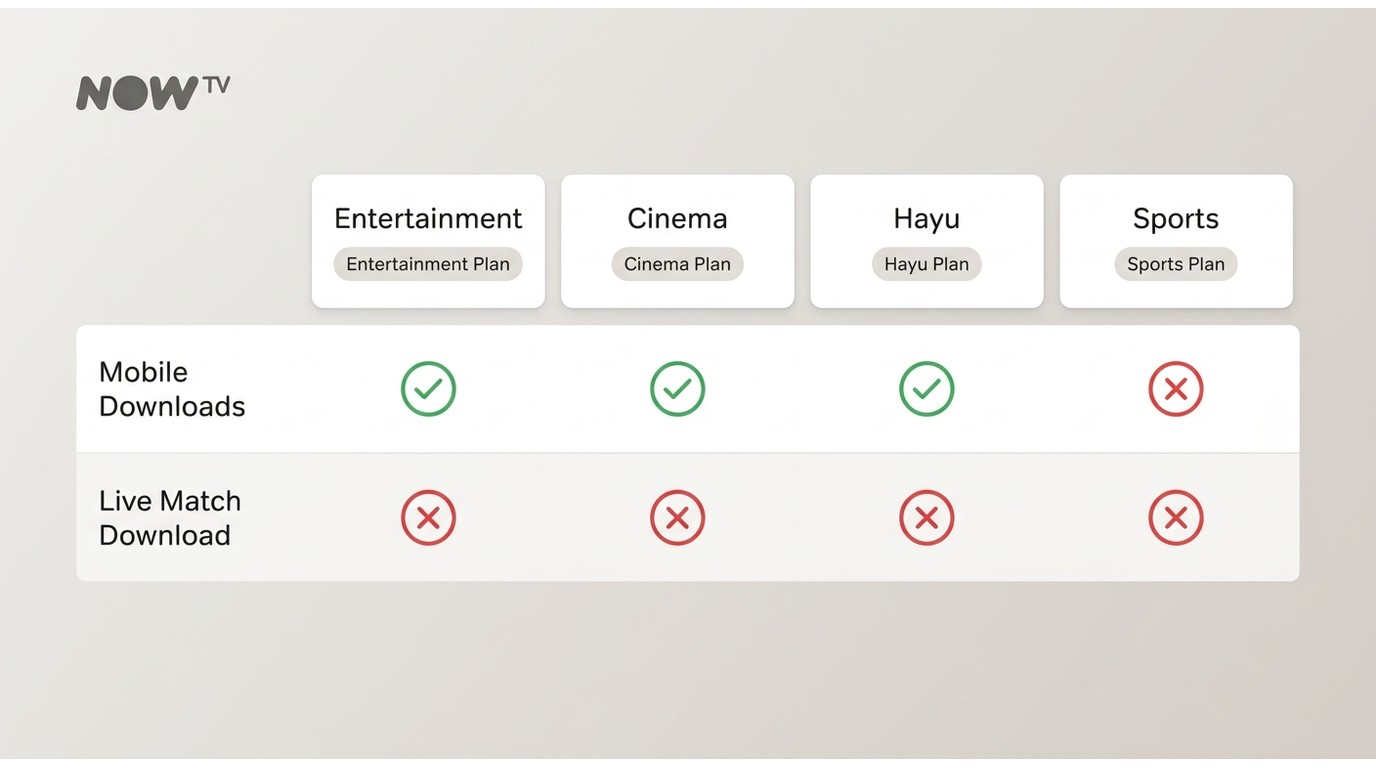
Downloads are tied to the membership you hold, not just the app you install. The split is straightforward: entertainment-style memberships include downloads on mobile; Sports does not. As of June 2026, check the official NOW membership FAQ for current plan details.
Entertainment, Cinema, and Hayu: Downloads Included
If you hold an Entertainment, Cinema, or Hayu membership, the offline download icon appears on eligible titles inside the iOS or Android app. Most series episodes and films in those catalogues are downloadable; a small share of titles are excluded for licensing reasons, and you'll see the icon simply not appear on those.
Sports Membership: On-Demand Only, Live Matches Excluded
Sports works differently. Live matches cannot be saved at all, and only a narrow slice of on-demand sports content may be eligible for download. If you're a sports-only subscriber hoping to grab a match for the train, that path doesn't exist via the official app. I'd flag this as the single most common misread of the NOW lineup: "Can I download sports?" defaults to no in nearly every real scenario.
Boost and Ultra Boost Do Not Unlock Laptop Offline
Worth stating plainly because the marketing copy doesn't: Boost and Ultra Boost are streaming upgrades, full stop. Boost raises streaming resolution to 1080p and bumps concurrent streams to two; Ultra Boost goes to 4K UHD with Dolby Atmos and three concurrent streams (as of June 2026, confirm current tiers on NOW's site). Neither add-on enables offline downloads on a laptop or PC. The download row stays unavailable across Default, Boost, and Ultra Boost.
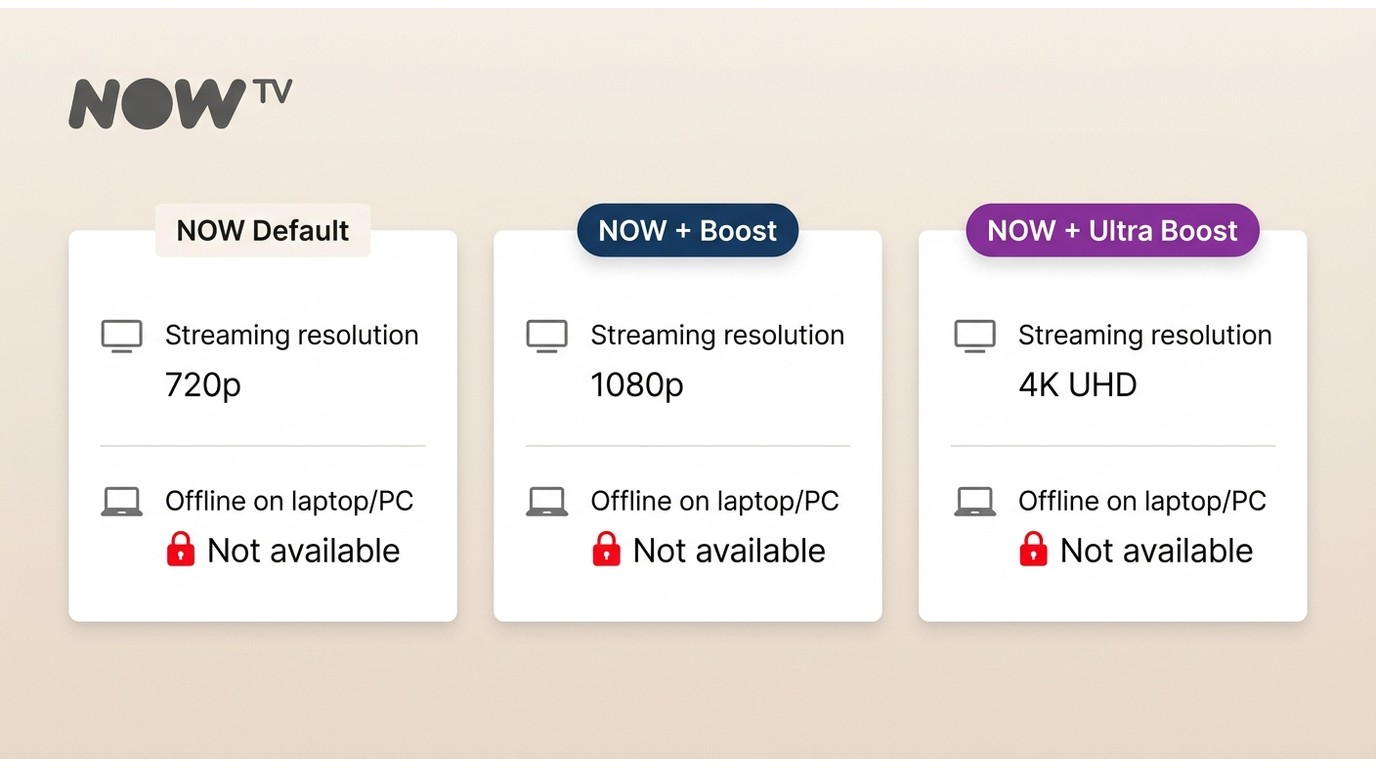
If you bought Boost expecting Windows or Mac offline access, that's the bug in the pricing page, not the bug in your setup.
How to Download NOW TV on Mobile (iOS and Android)
This is the only officially supported offline route. The workflow is the same on iOS and Android with one connectivity difference: iOS lets you download over both Wi-Fi and mobile data, while Android restricts downloads to Wi-Fi only.
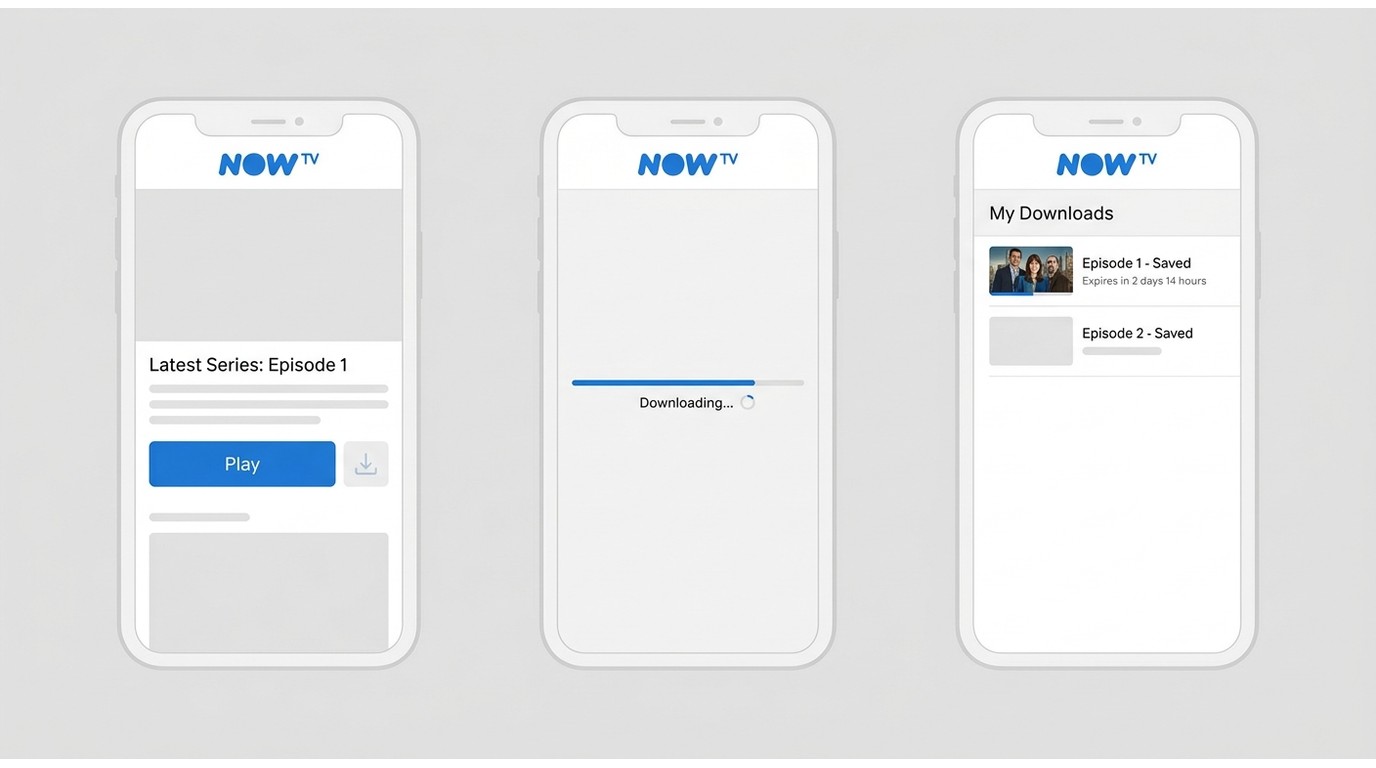
Step-by-Step: Download on the NOW App
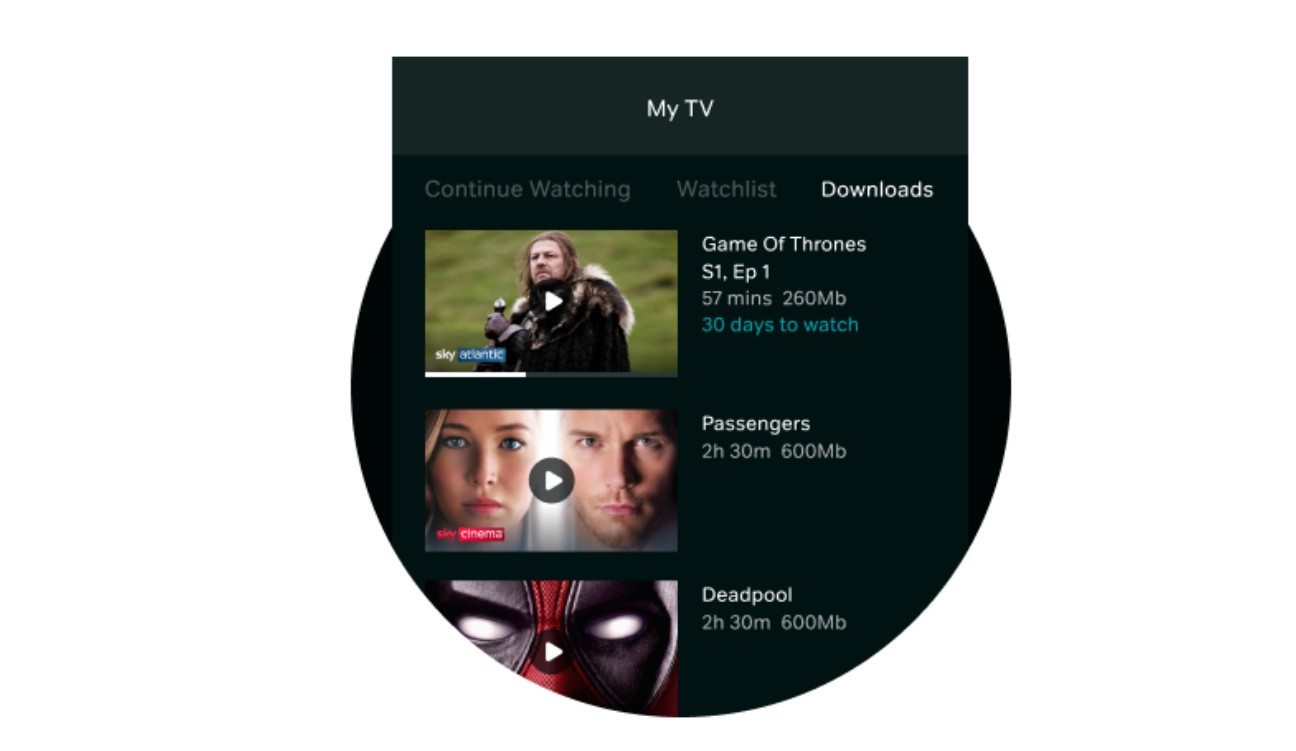
During testing on a Pixel 8 running Android 15 and an iPhone 14 on iOS 18, a 45-minute drama episode finished saving in roughly two minutes on home Wi-Fi (about 200 Mbps down), and the file played back without buffering in aeroplane mode. The Android client now lets you pick SD-card storage as the download path in Settings, which resolves the "device full" error a lot of users hit on phones with stock storage filled (this lands as part of recent NOW Android updates as of June 2026).
Common Download Issues and Quick Fixes
- Download failed: clear app cache, toggle aeroplane mode, and retry. On Android, confirm Wi-Fi is active (mobile data won't trigger the download).
- Download icon greyed out: the title is either sports content, a live event, or excluded by licensing. The plan eligibility table above explains the broader pattern.
- Storage full on Android: switch the download path to the SD card in app settings.
- "Too many devices": remove a device slot from your account online. The cap is 6 devices with one change per month.
Is There a NOW TV App for MacBook? What It Can (and Cannot) Do
Yes, NOW provides a dedicated player app for Mac, and it is the supported way to watch on macOS (browser-only playback is not the path for Mac). But two facts trip up almost every Mac user searching for "download NOW TV on MacBook":
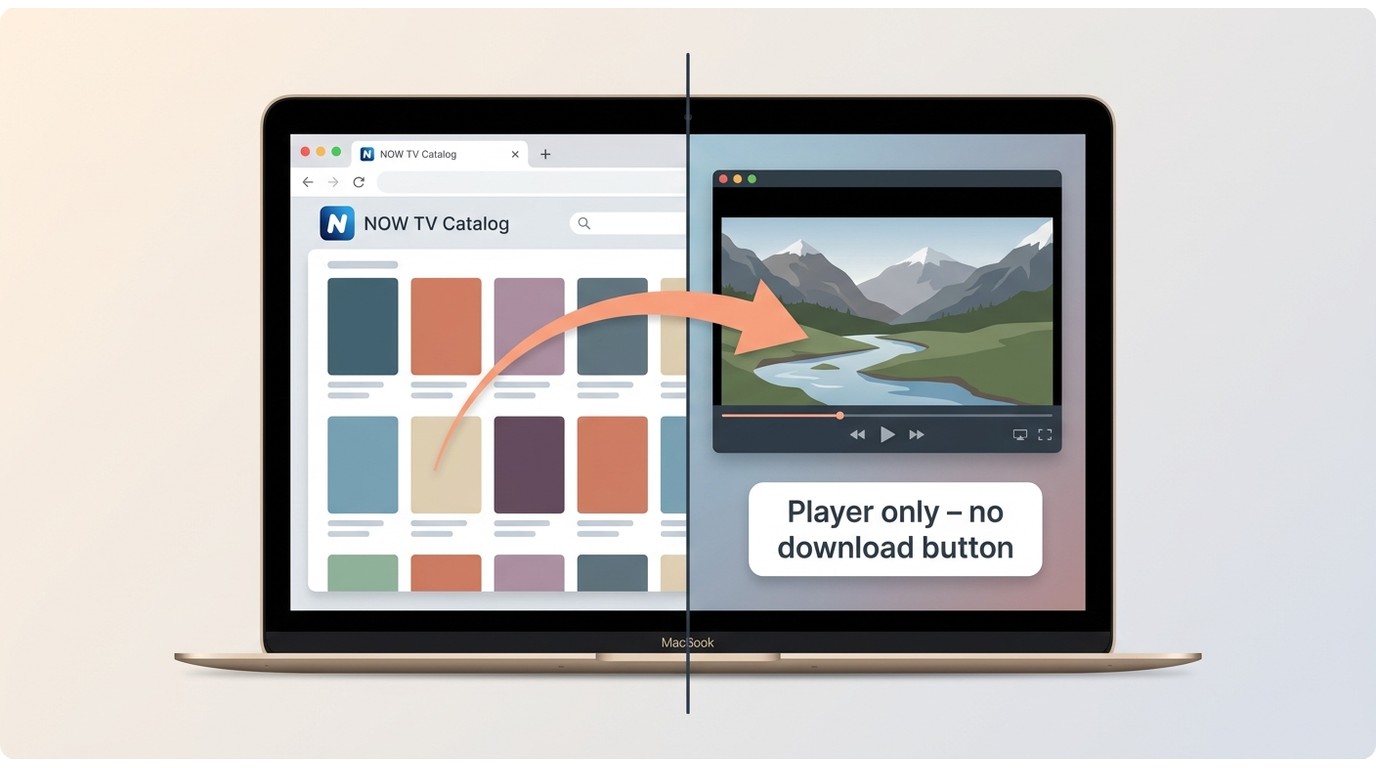
- The Mac app is a player only. You cannot browse the catalogue inside the app. You'll open a browser separately to find what you want to watch, and then it plays through the dedicated app.
- The Mac app is streaming-only. There is no download button, no offline mode, no "My Downloads" folder. As of June 2026, this matches what Macworld and the NOW community forums describe.
So if you want to know if you can save NOW TV to my MacBook for a flight, the official app won't get you there. The remaining path is a desktop tool such as StreamFab NOW Downloader (macOS 12.0 or newer), used for content you're authorised to access for personal offline viewing, where platform terms permit.
Windows 10/11 App vs. Browser: Neither Supports Offline Downloads
The Microsoft Store version of the NOW app on Windows 10/11 is streaming-only. It looks like the mobile app and even uses similar iconography, but there is no download option exposed in the UI. Browser playback (Edge, Chrome, Firefox) on Windows is also streaming-only.
One specific source of confusion: NOW's "supported devices" page lists Windows under streaming capability, which a lot of community threads read as implying download support. It doesn't. Streaming-supported is not the same as download-enabled, and the NOW community forum has years of threads asking the same question with the same answer.
If you need it offline on a Windows laptop, neither the Store app nor the browser resolves it through official channels.
StreamFab NOW Downloader: A Desktop Workaround for Personal Offline Viewing
For Windows and Mac users who specifically need a local file, StreamFab NOW Downloader is one practical desktop option to consider. Positioning it honestly: it's a third-party tool that saves a local copy of eligible streaming content for personal offline viewing, intended for content you're authorized to access (a valid NOW membership), where platform terms and applicable law permit.

Batch download NOW videos at lossless 720p & AAC2.0 audio, and save them in MP4/MKV files.
Tech Specs and Output Quality
For readers who want the spec sheet at a glance (as of June 2026, verify the current build on the product page):
- • Output resolution: up to 720p HD
- • Audio: AAC 2.0
- • File formats: MP4 or MKV
- • Subtitles and audio tracks: retains multi-language tracks and subtitle files where the source provides them
- • Operating systems: Windows 11 and Windows 10; macOS 12.0 or newer
- • Batch and auto-download: queue multiple episodes; new-episode auto-fetch for ongoing series

Step-by-Step: Save a Local Copy with StreamFab
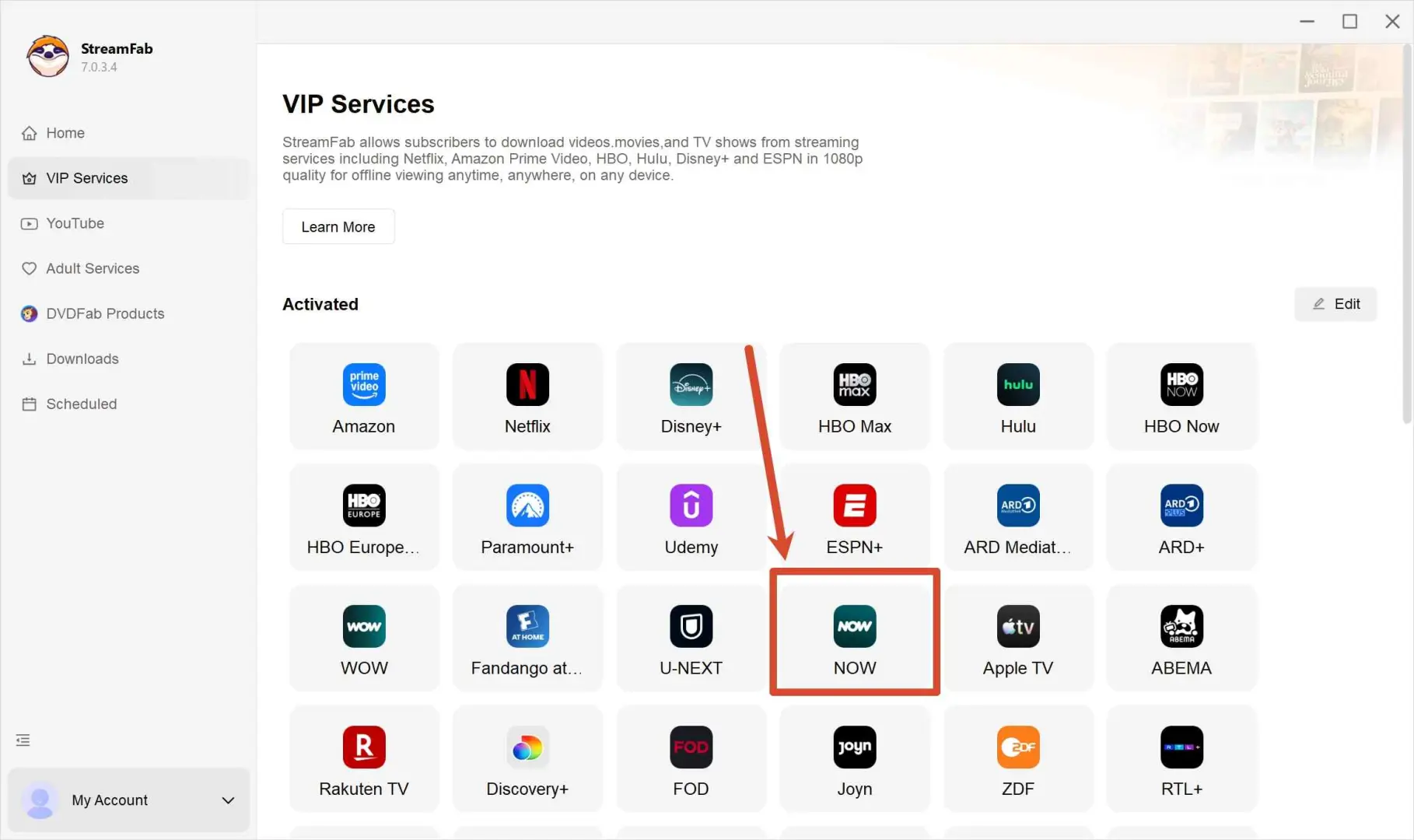
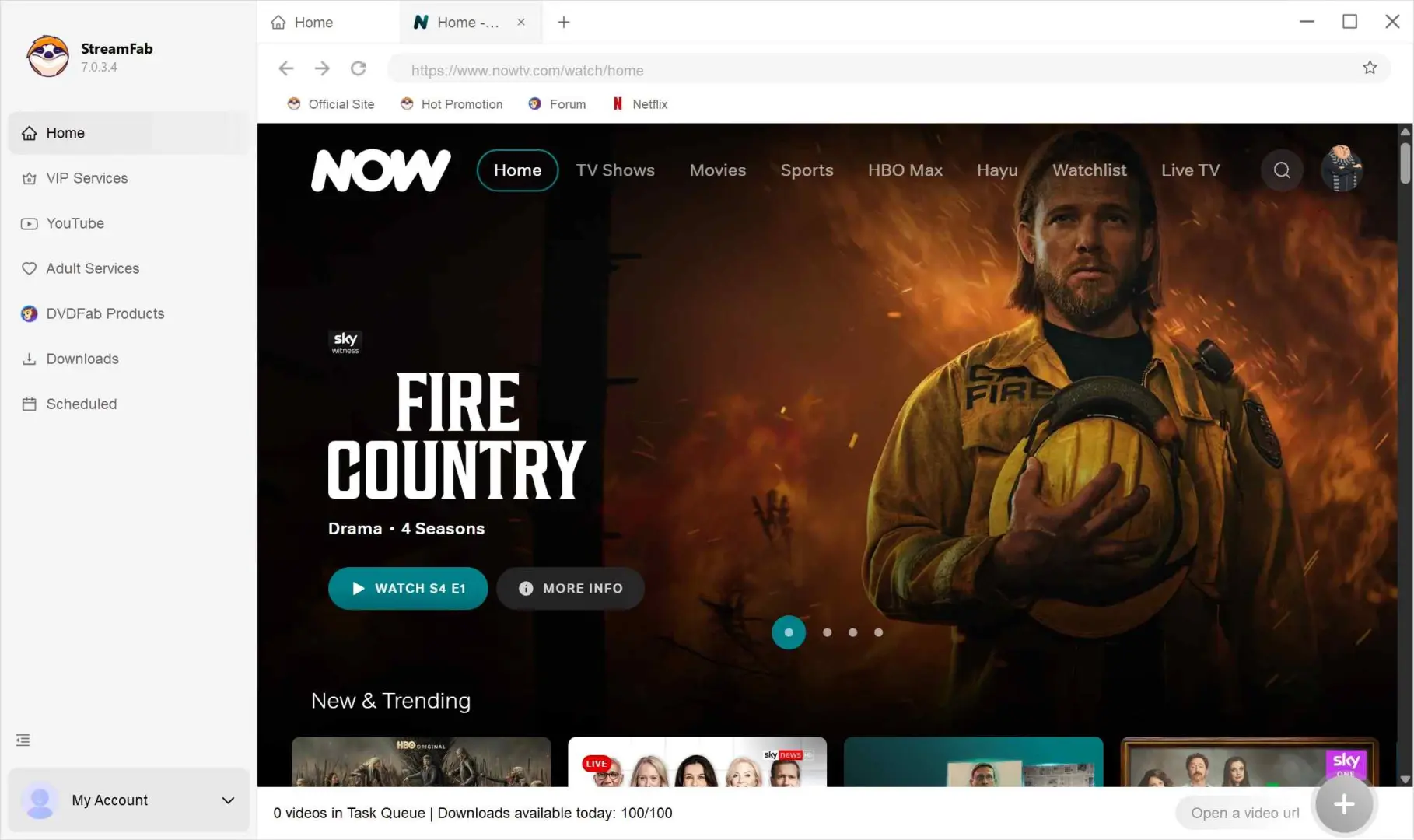
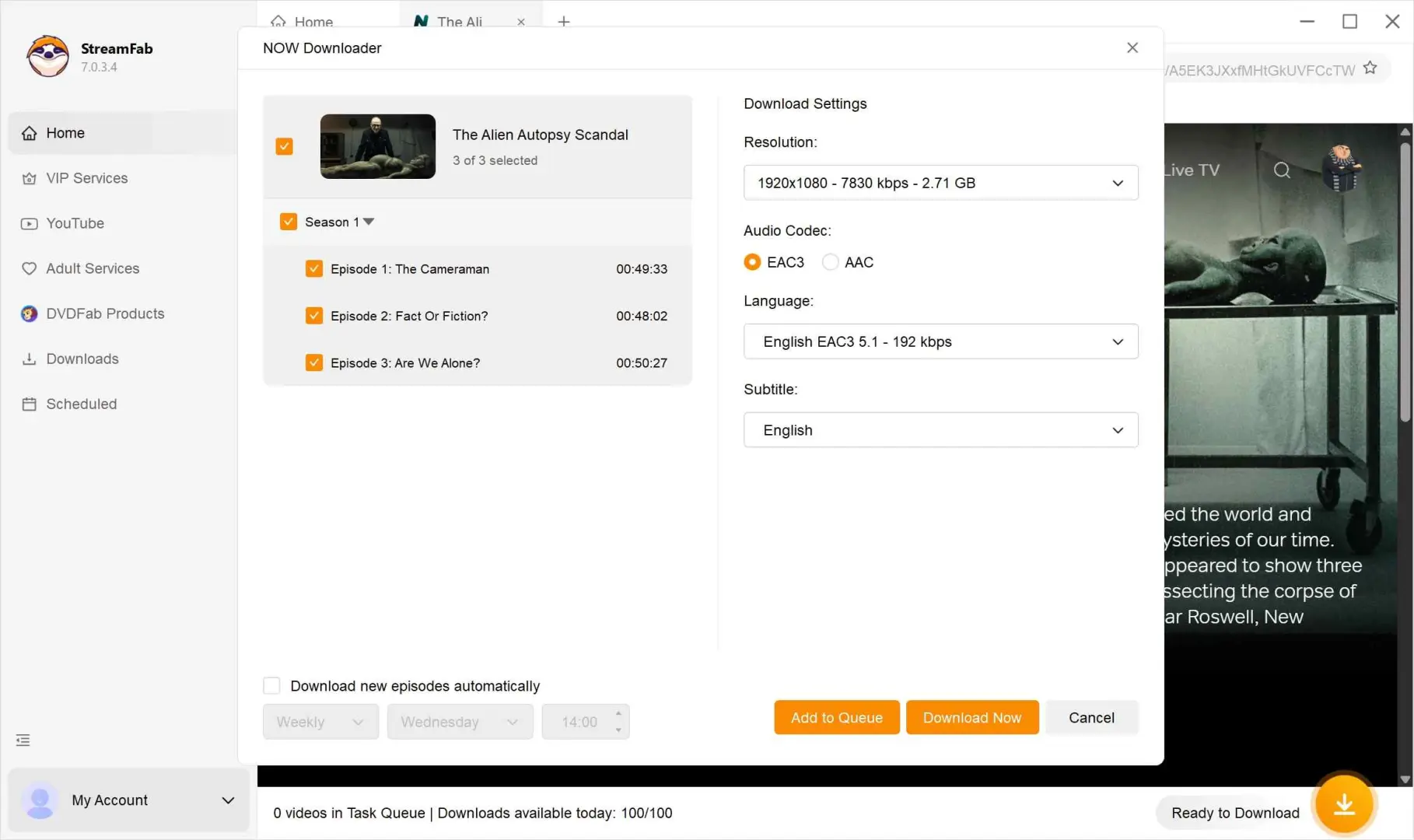
Testing on a MacBook Air (M2, macOS 14) on a 100 Mbps connection, a one-hour drama episode finished in roughly six to eight minutes with the queue running in the background. No interruptions to my regular browsing on the same machine.
Is StreamFab NOW Downloader Safe and Legal to Use?
Two questions readers reasonably ask, and they deserve straight answers to.
Safety: StreamFab installers are malware-free and code-signed. The application runs as a normal desktop app on Windows and macOS, with no kernel-level components or bundled adware. The free trial is the safest way to confirm fit on your own machine before any purchase.
Legality: Using a third-party tool to save a local copy of streaming content may conflict with NOW TV's terms of service, even when the content is on a paid account you control. The tool is designed for content you're authorised to access for personal offline viewing only, where platform terms and applicable law permit. It does not remove or replace the platform's authorisation requirement (an active membership is needed to access the catalogue). Before you use it, the responsible move is to review the current NOW TV terms and applicable local copyright rules. The framing is "one option to consider for personal offline use", not "a guaranteed solution".
Official Downloads vs. StreamFab: Side-by-Side Comparison
The table below summarises the differences that actually drive a decision. As of June 2026, confirm current plan specs on the official NOW pages.
| Criterion | NOW Default | NOW + Boost | NOW + Ultra Boost | StreamFab NOW Downloader |
|---|---|---|---|---|
| Offline on mobile (iOS/Android) | Yes (eligible plans) | Yes (eligible plans) | Yes (eligible plans) | Not applicable |
| Offline on laptop/PC | No | No | No | Yes (Windows and Mac) |
| Max streaming resolution | 720p | 1080p | 4K UHD | Not applicable (saving tool, not a player) |
| Max download resolution | 720p (mobile) | 1080p (mobile) | 1080p (mobile) | 720p (Windows/Mac) |
| Concurrent streams | 1 | 2 | 2 | Not applicable |
| Download expiry | 30 days / 48 hours after play | 30 days / 48 hours after play | 30 days / 48 hours after play | Local file (subject to NOW terms and applicable law) |
| Platforms | iOS, Android | iOS, Android | iOS, Android | Windows 10/11, macOS 12.0+ |
| Local file format | Encrypted in-app only | Encrypted in-app only | Encrypted in-app only | MP4 or MKV |
One callout below the table that the original article hid: neither Boost nor Ultra Boost changes the laptop offline row. That column stays unavailable for every official tier, as of June 2026.
FAQs
Yes. A dedicated NOW TV player app is available for Mac and is the supported playback path on macOS (browser-only does not work for Mac viewing). The Mac app is streaming-only with no offline downloads. Catalog browsing happens in a separate browser session, because the app itself is a video player. Confirm the latest Mac app availability on the official NOW help page.
No. Boost upgrades streaming to 1080p with two concurrent streams; Ultra Boost goes to 4K UHD with Dolby Atmos and three streams. Neither tier enables offline downloads on a laptop or PC. Official offline downloads stay restricted to the iOS and Android apps on the membership plans that support them.
Entertainment, Cinema, and Hayu memberships include the offline download feature on mobile. Sports membership does not support downloads in general use, live matches cannot be saved, and only a small selection of on-demand Sports events may be eligible. Check the official NOW membership FAQ for the current plan breakdown.
Downloaded titles expire after 30 days if unplayed, or within 48 hours of pressing play (whichever hits first). These limits apply to all official mobile downloads regardless of membership tier or Boost add-on.
No. The Microsoft Store NOW app for Windows is streaming-only and exposes no download option. This is a widely reported confusion point because NOW lists Windows under "supported devices", but that label covers streaming capability only, not offline downloads.
StreamFab is malware-free, code-signed desktop software. Legally, using a third-party tool to save a local copy of streaming content may conflict with NOW TV's terms of service. It is intended for content you're authorized to access, for personal offline viewing only, where platform terms and applicable law permit. Review NOW TV's current terms before use.
Update Log
- June 2026: added a dedicated Mac/MacBook section, a Windows app vs. browser clarification, and a Boost/Ultra Boost laptop-offline callout. Refreshed plan-eligibility guidance for Entertainment, Cinema, Hayu, and Sports. Rebuilt the comparison table with download expiry, platforms, and file format rows. Updated all year references to 2026.
- July 2025: noted NOW Android client adding SD-card storage as a download path.
Conclusion
If your offline use case lives on a phone or tablet, the official NOW app on iOS or Android is the right answer, paired with an Entertainment, Cinema, or Hayu membership. If you specifically need offline viewing on a Windows laptop or a MacBook (a gap the official apps don't fill in 2026), StreamFab NOW Downloader is the desktop workaround worth trying via the free trial, for content you're authorized to access and within NOW TV's terms.
