丨SINCE 2019
8th Anniversary
Products
30%
OFF

StreamFab All-In-One

Learn More

StreamFab MyCombo

Learn More
  • International
  • Asia
  • North America
  • Europe
  • More Products
product
international
International
  • YouTube Downloader 40% OFF
  • DRM M3U8 Downloader
  • DRM MPD Downloader
  • Amazon Downloader
  • Netflix Downloader
  • Disney Plus Downloader
  • Hulu Downloader
  • Crunchyroll Downloader
  • Apple TV Downloader
  • Paramount Plus Downloader
  • HBO Max Downloader
  • SkyShowtime Downloader
  • Discovery Plus Downloader
  • YouTube Movies Downloader
  • Plex Downloader
  • DAZN Downloader
  • Udemy Downloader
Adult
  • OnlyFans Downloader
  • FANZA Downloader
  • myfans Downloader
  • MGStage Downloader
  • Pornhub Downloader
  • Caribbeancom Downloader
  • Sokmil Downloader
  • Fansly Downloader NEW
View All Streaming Services >
StreamFab 7
Download
Posts
Store
Member
StreamFab All-In-One

StreamFab All-In-One

Includes 65 StreamFab products, offering the most comprehensive download solutions for streaming videos.
Free Download

Windows 11/10

Free Download

macOS 12.0 or newer

Learn More >
Whoa! Leaving so soon? Before you go, why not try StreamFab?
Best Video Downloader
Download streaming videos from Netflix, Amazon Prime Video, YouTube, and 1000+ other M3U8 or MPD-encrypted streaming websites to watch on any device, anytime, and anywhere.
Free Download
Learn More>
Home > Others

StreamFab Download Limit Explained: What Is It & Can It Be Reset?

  • Stella Smith
  • /
  • 2026-05-21
Why there is a notice on StreamFab saying "You can't download anymore today!". What is it? How it affect your downloads? Can you bypass or reset it for more downloads? This guide covers all about the StreamFab download limit.

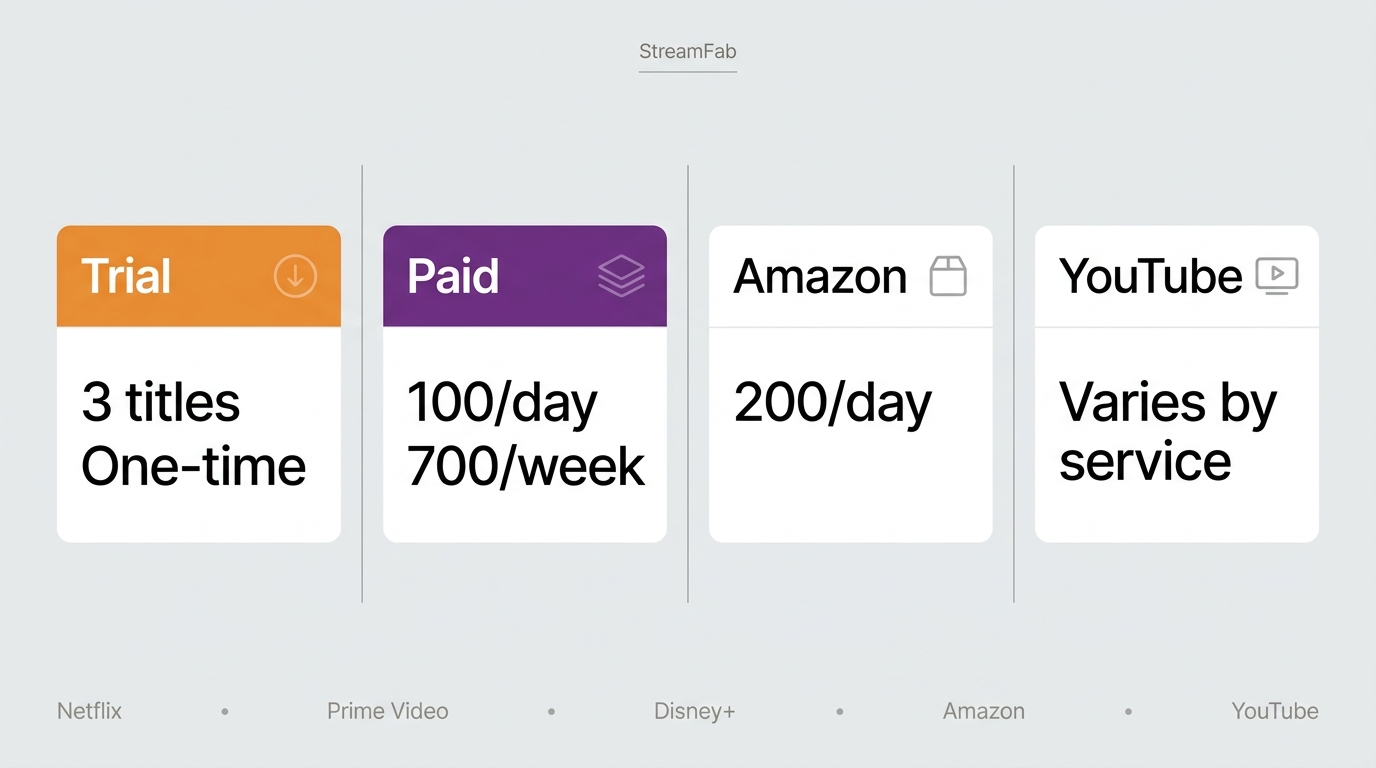
Wondering how many videos you can actually download with StreamFab — and whether there’s a way around the cap? Here’s what you need to know. In short, StreamFab’s paid plan allows up to 100 downloads per day and 700 per week from each streaming service, while the free trial is limited to 3 videos per service over a 30-day window. Neither limit can be manually reset. This article breaks down the exact quotas, explains why they exist, and shares practical tips for stretching your allowance.

 Key Takeaways
  • • Paid quota: 100 downloads per day and 700 per week from each streaming service — Netflix, Prime Video, Disney+, etc. are counted separately (details)
  • • Trial cap: 3 full videos per VIP service within a 30-day trial; no account or credit card required to start (details)
  • • Reset rules: Quotas replenish automatically; daily counter resets each new day, weekly counter at the start of a new week (details)
  • • YouTube exception: The YouTube Downloader has no numeric download cap but outputs at lower quality
  • • Account safety: Limits exist partly to keep your streaming account from being flagged for unusual activity (details)
  • • Verified: Information in this article was checked as of May 2026

Dear users,

We are sorry to do so, but we truly thank you for your patience when encountering the StreamFab download limits. There are account safety & services stability reasons to apply the limits on StreamFab services. Besides, the amount of data a user can download from a service within a certain period is a common practice in other similar products.

If you have further questions or instructions, we welcome you to contact us through the official customer service: support@streamfab.com.

Key facts at a glance: how many can you download today?
1. Paid account (per service)
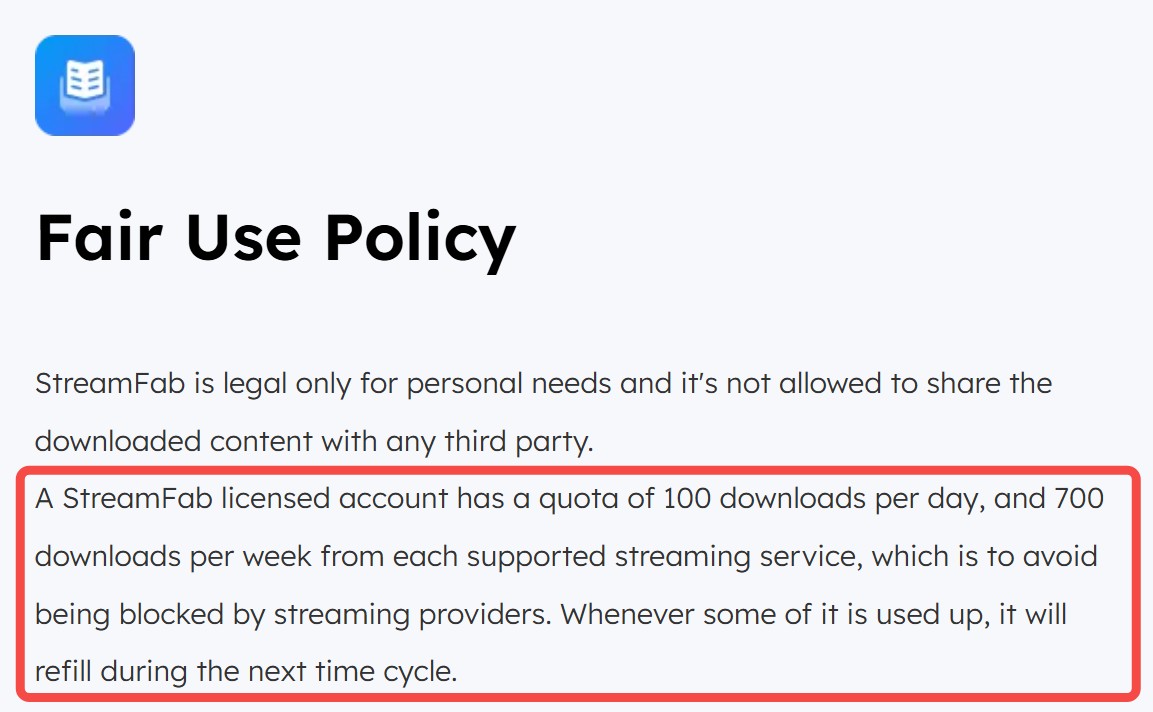
  • Quota: 100 downloads per day and 700 per week from each supported streaming service (Netflix, Prime Video, Disney+, etc. are counted separately). This cap helps avoid your streaming account being flagged. 
  • Reset: You can’t reset it manually. The remaining tokens replenish automatically in the next daily/weekly cycle. 

2. Free trial (trial version)

  • Length: 30-day trial.
  • Limit: During the trial, you can download up to 3 full videos per service; features and quality are the same as paid during the trial. 

What Is StreamFab Download Limit?

StreamFab Video Downloader enables you to download videos from 50+ OTT sites, including Netflix, Hulu, Peacock, and Prime Video. However, there are certain download limitations when using it.

streamfab download limit
StreamFab Video Downloader

Available for over 60+ major OTT services, video downloading & 1000+ common video sites downloads, including Netflix, Amazon, Disney+, YouTube, etc.

  Free Download
  Free Download

1. StreamFab Download Limits [Trial Period]

If a user is on the StreamFab free trial version, they are restricted to downloading only 3 videos from each VIP service within 30 days. No account creation or credit card is needed to start the trial.

streamfab download limit in the trial period

However, not all StreamFab services have limitations. As an exception, YouTube Downloader and YouTube to MP3 offer downloads with no numeric cap, though at lower quality than VIP services.

streamfab download limit: exceptions

2. StreamFab Download Limits [Common]

StreamFab's subscribed users, regardless of which specific VIP service is used, are allowed to download up to 100 videos per day. Once the daily limit is reached, the quota will be refreshed until the next day. In our testing, the counter reliably refreshed each morning, though the exact reset time varied slightly.

Learning the boundaries is essential to avoid unexpected half-finished tasks in queues and awkwardly waiting while attempting to download numerous content, especially TV series. You can easily view the number of downloads left in your daily quota by simply navigating to any VIP page. The information will be displayed in the bottom right corner of the page.
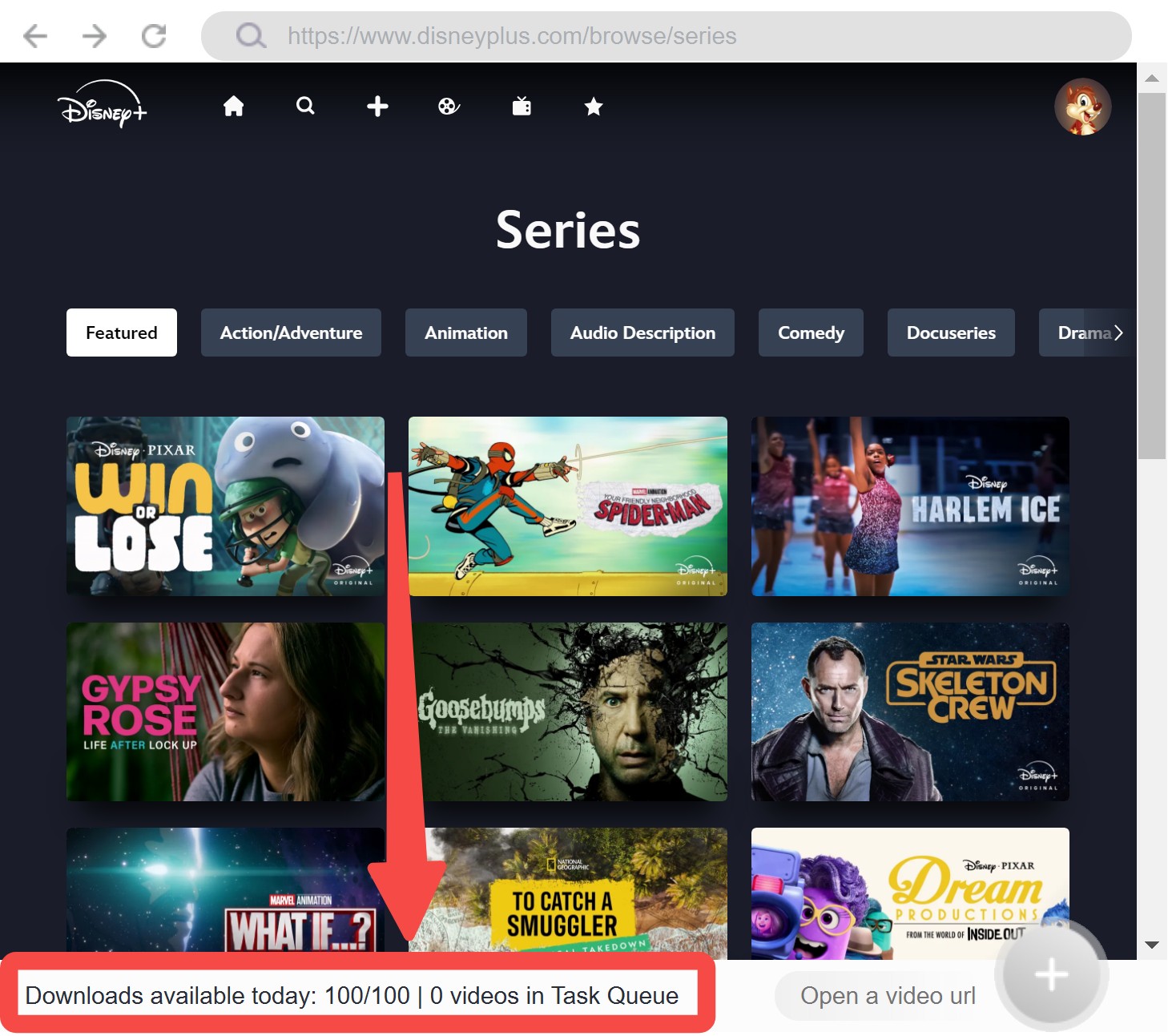
common streamfab download limit

So, before you decide to download another show, check this area to monitor the quota and plan all downloads accordingly. Knowing the daily usage at first would make your management of downloaded videos and download plans simple and efficient, allowing you to get the most out of your StreamFab subscription.

📽️Video Time

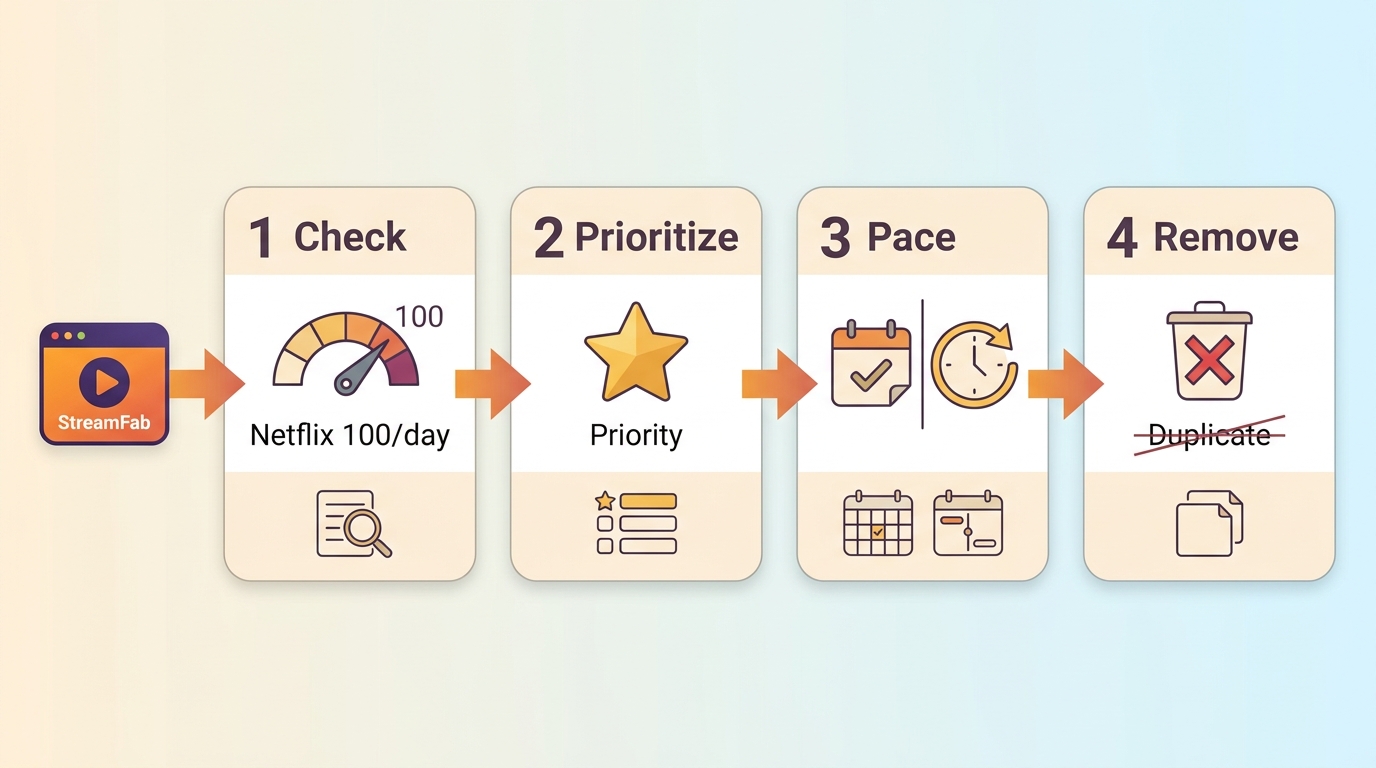
For a concise guide to managing the StreamFab download limit and keeping your account healthy, see StreamFab Pro Tips: 4 Habits for a Smoother Downloading Experience.

Why Does StreamFab Set Download Limit?

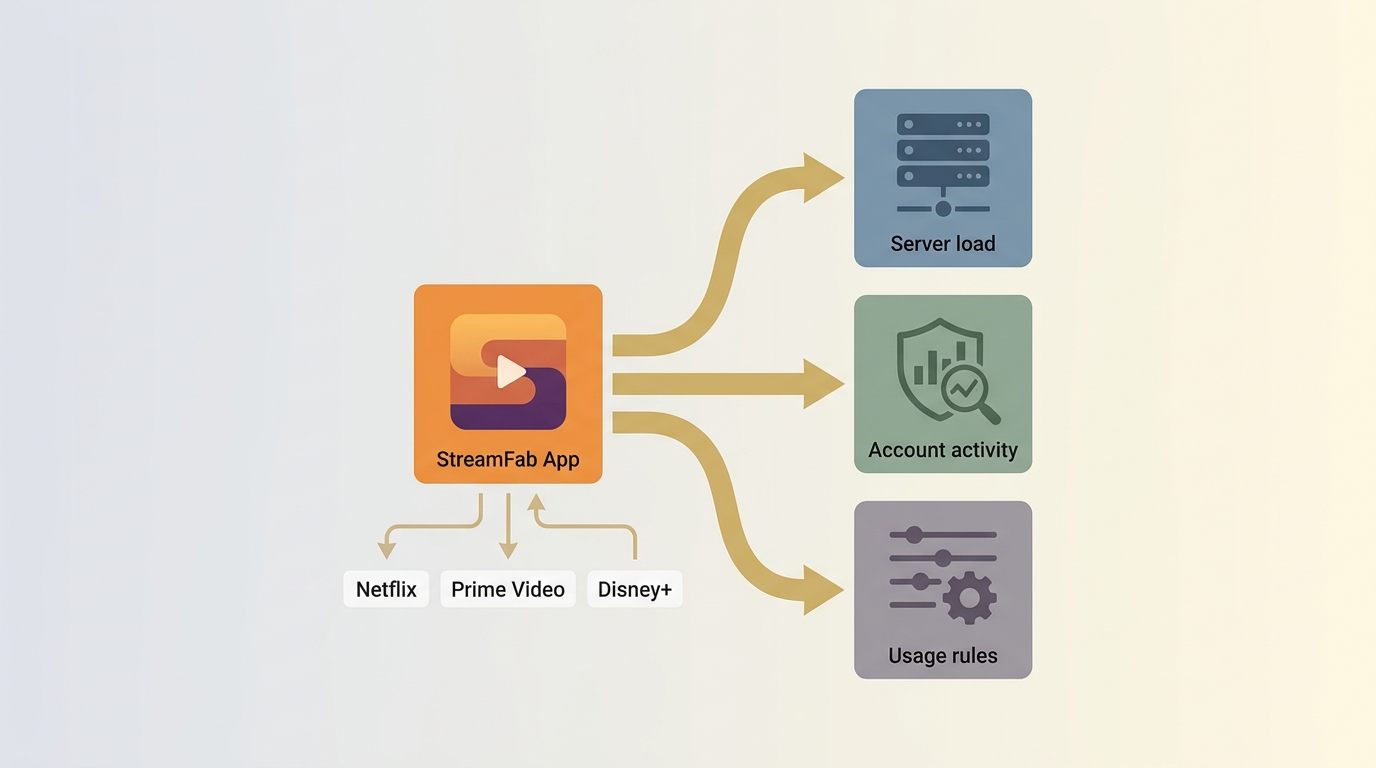
The obvious question after seeing these numbers is why the limits exist at all. On the surface, it can feel restrictive, especially if you planned to queue up an entire season in one night. But the caps are not random. They’re part of a broader balance between user freedom, platform safety, and compliance with streaming services.

tips icon
Actually, most of the competitors or StreamFab alternatives also have the same limitations

1. Managing technical load

The first main reason is to prevent the extreme server pressure of StreamFab. Imagine if individuals were allowed to download unlimited content per day, our download server could become congested. And the final result is that everybody gets a slower download speed, which could affect all users' experience.

Thus, this limit is set to maintain smooth operation and to provide an equal opportunity for all users to utilize the software effectively.

2. Protecting streaming accounts

Streaming providers like Netflix and Disney+ monitor unusual behavior. If hundreds of titles are downloaded in a single burst, it looks very different from ordinary viewing patterns and may trigger account flags. By setting the daily and weekly caps, StreamFab keeps activity closer to what platforms expect from a regular subscriber. In other words, the limit is a safety net designed to lower the risk of your streaming account being suspended or banned.

By limiting the number of downloads, StreamFab Video Downloader keeps download activity within normal streaming behavior patterns, reducing the risk of your streaming account being flagged. For a deeper look at how StreamFab handles user data and safety, see our guide on whether StreamFab is safe to use.

tips icon
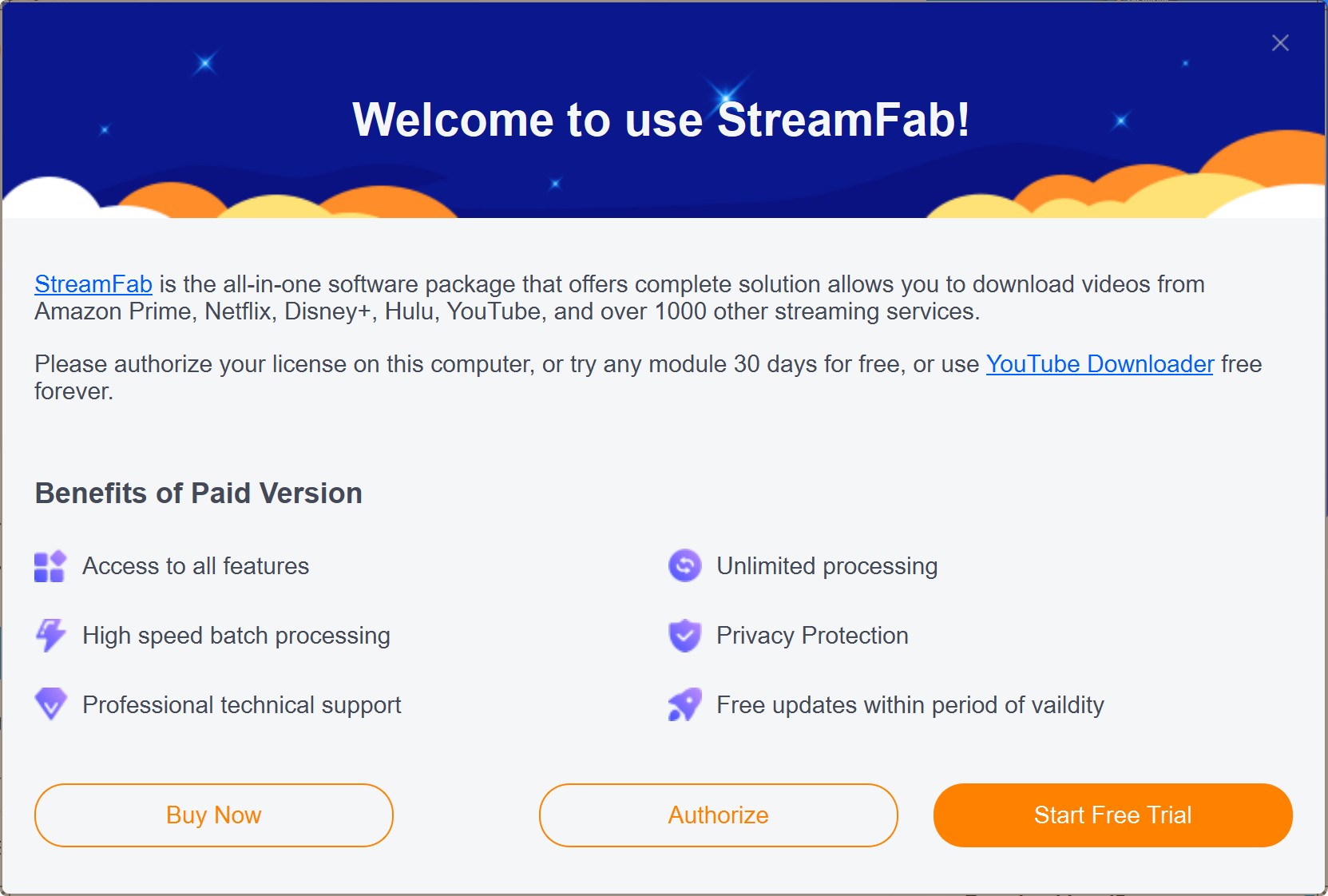
If you’re unsure whether StreamFab suits your needs, the 30-day free trial gives you full access to all features — enough time to evaluate the software thoroughly before committing.

3. Industry-wide practice

It’s worth noting that StreamFab is not unique in doing this. Other recording and downloading tools in the market also impose daily or weekly quotas, though the numbers vary. The idea is always the same: balance heavy users against system integrity and account safety. Community discussions frequently highlight this point: limits aren’t meant to punish but to keep tools usable in the long run.

Can I Reset StreamFab Download Limits?

If you directly jumped to this part with eagerness, I'm sorry to say that the answer may not be so cheerful to you. In fact, the StreamFab download limits work with two overlapping counters:

  • Daily reset: Each service’s 100-download cap refreshes once per new day. After the reset, the counter goes back to “100/100.”
  • Weekly reset: The 700-per-week cap refreshes at the start of a new week. If you’ve reached the weekly ceiling, you won’t be able to start fresh downloads until the weekly cycle turns over.

By the way, caution that many users expect the reset to happen right at their local midnight, but that’s not always the case. The software staggers refresh times to prevent sudden “double-dipping”: downloading heavily just before and after midnight.

In practice, the reset may feel like a rolling 24-hour clock rather than a strict calendar day cut-off. And sometimes the numbers don’t update on screen even though the new cycle has started. If you still see “0/100” after waiting, simply closing and reopening the app usually forces the counter to refresh. This is a display issue, not a delay in the reset itself.

How to reset StreamFab download limit

Anyway, if you hit the daily or weekly limit, new tasks won’t start. They stay in the queue until the next reset. Nothing is lost; you just have to wait for the system to replenish the tokens before downloads resume.

As for the trial users, the download limits are limited to a one-time deal with 3 downloads per service without any chance to be reset as well.

!
Attention! All the StreamFab cracks saying "No Download Limits" or something attractive actually are potentially toxic, so please don't try any of them, for your info and property safety.  

How to Fully Utilize StreamFab Under The Limits?

Before you get practice with StreamFab, I suggest you check the checklist below first to make the most of your quota.

Best Practices for Quota: Do’s & Don’ts
✔ Do’s
  • ✔ Space out your downloads across days/weeks
  • ✔ Use all eligible platforms in parallel
  • ✔ Prioritize urgent or important titles first
  • ✔ Check your remaining quota regularly
✘ Don’ts
  • ✘ Download everything in a single night
  • ✘ Queue the same title more than once
  • ✘ Download extra audio or subtitle tracks unquestioningly
  • ✘ Ignore the weekly platform limit
Separate the essentials from low priority: stretch your quota for what matters most!

With the 4 steps below, you can easily learn how to use StreamFab to download videos from Netflix and other sites for offline viewing under the StreamFab download limit. By the way, you can click the button below to install StreamFab if you haven't already done so.

Step1

Launch StreamFab and you'll see a number of streaming platforms on the homepage. Find the one from which you want to download content. For example, click on Disney+.
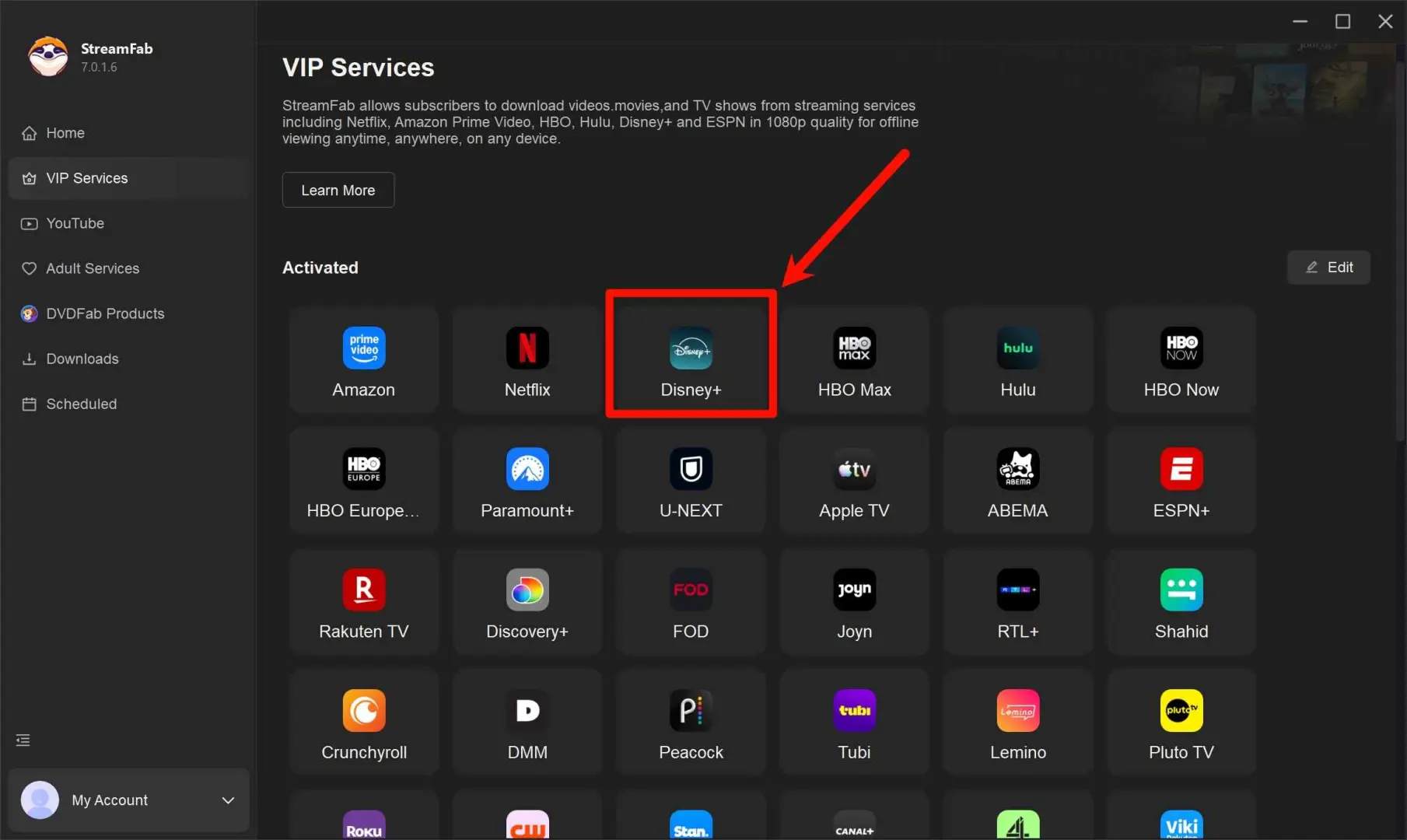
streamfab download limit: how to fully utilize it under the limit

  Free Download Windows 11/10
  100% Safe & Clean
  Free Download macOS 12.0 or newer
  100% Safe & Clean
Step2

The built-in browser will redirect you to the Disney+ website, where you need to log in using your account.
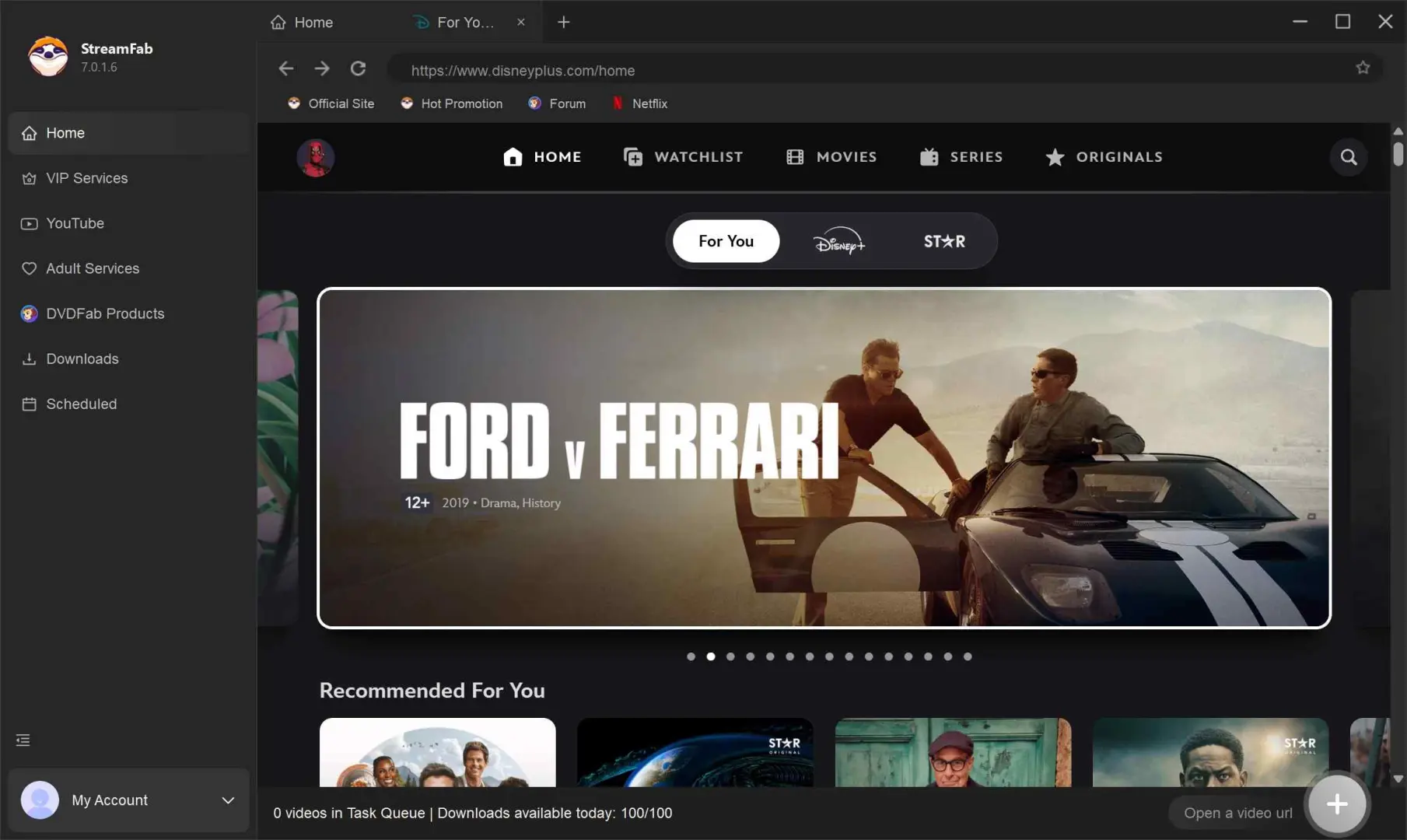
streamfab download limit: how to fully utilize it under the limit

Step3

Browse through and find the movie or TV show episode you want to download. Simply click on the video, and a pop-up window will appear asking you to confirm your download settings and start the download.
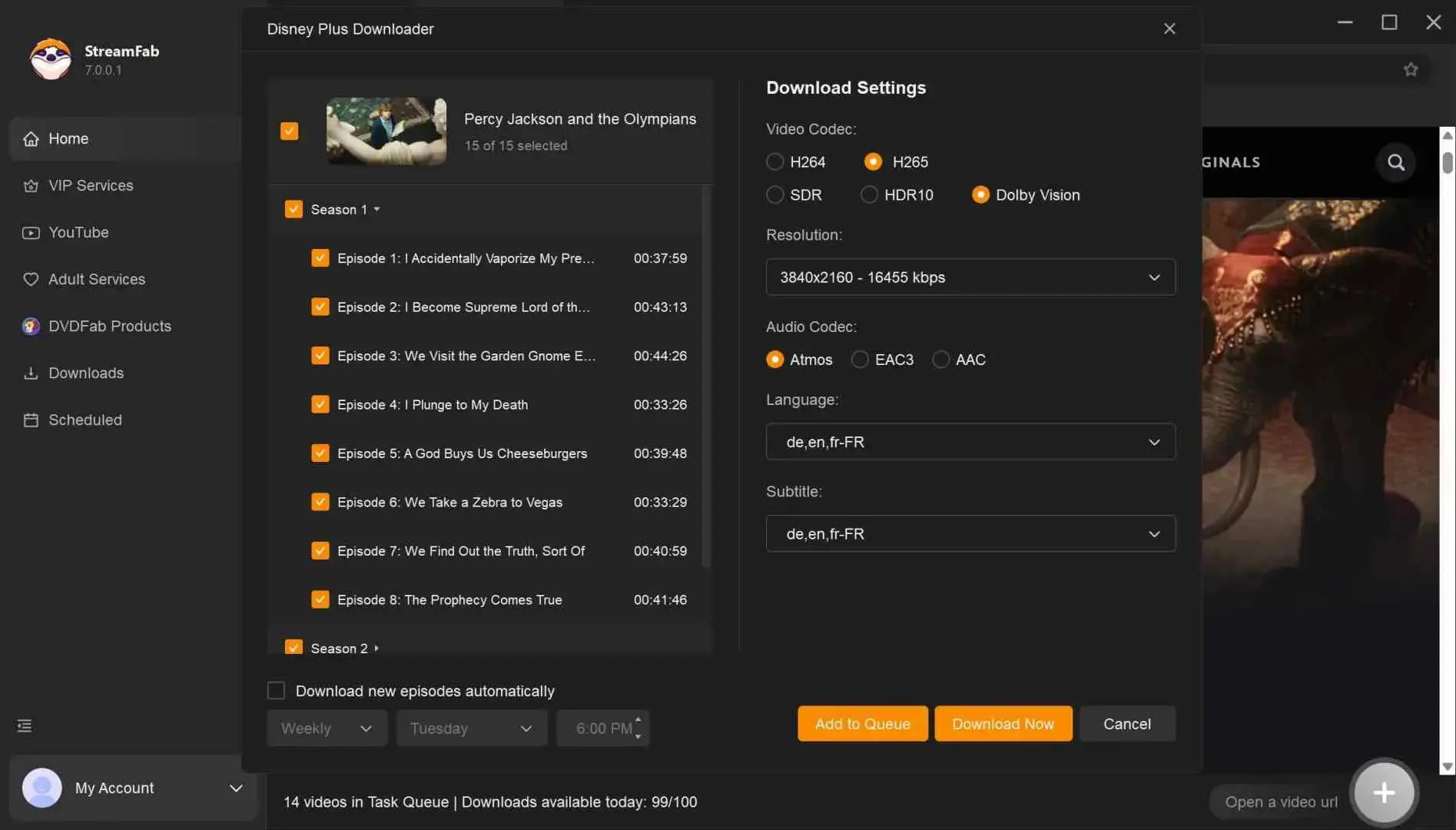
streamfab download limit: how to fully utilize it under the limit

Step4

Click the download now button, and the videos will be downloaded quickly. And you can see how many download quotas are left in the upper left corner.
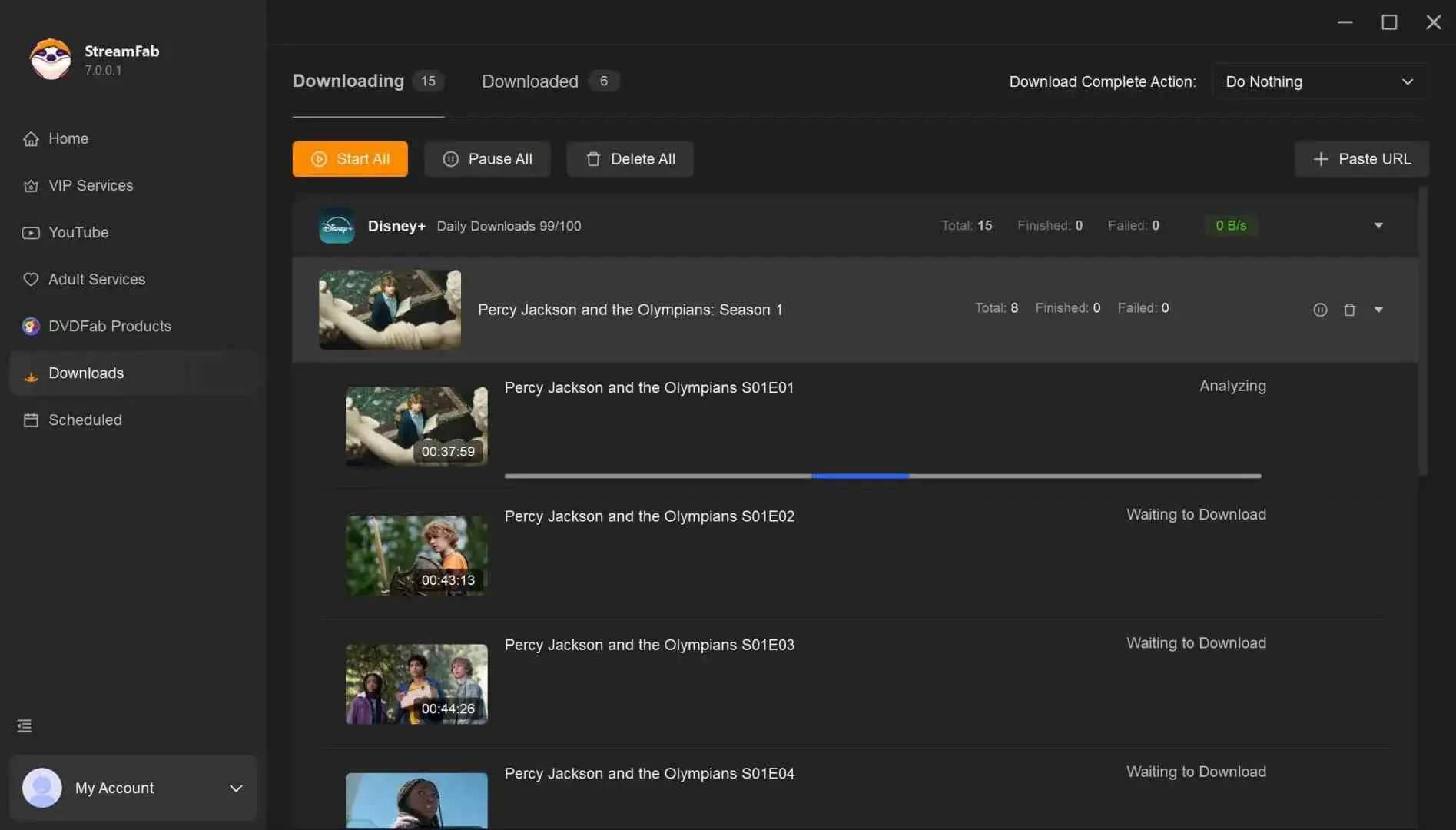

streamfab download limit: how to fully utilize it under the limit

tips icon
Want to learn more about StreamFab? Check this StreamFab review.
Multiply Your Quota with Parallel Platforms
Each platform has its own quota system: use them in parallel to maximize total downloads!
Netflix
100/day
up to 100 titles per day
Max: 700 / week
Prime Video
100/day
up to 100 titles per day
Max: 700 / week
Disney+
100/day
up to 100 titles per day
Max: 700 / week
TIP: Download from several platforms at once for a bigger combined daily quota.
Total Daily Quota = Number of Platforms × 100
avatar
It’s easy to see quotas as a nuisance, but they’re also a reminder that downloading content comes with responsibilities. Think of the download limit as a protective buffer. By respecting it, you get reliable downloads without drawing unwanted attention, and you keep your streaming accounts safe for the long run.
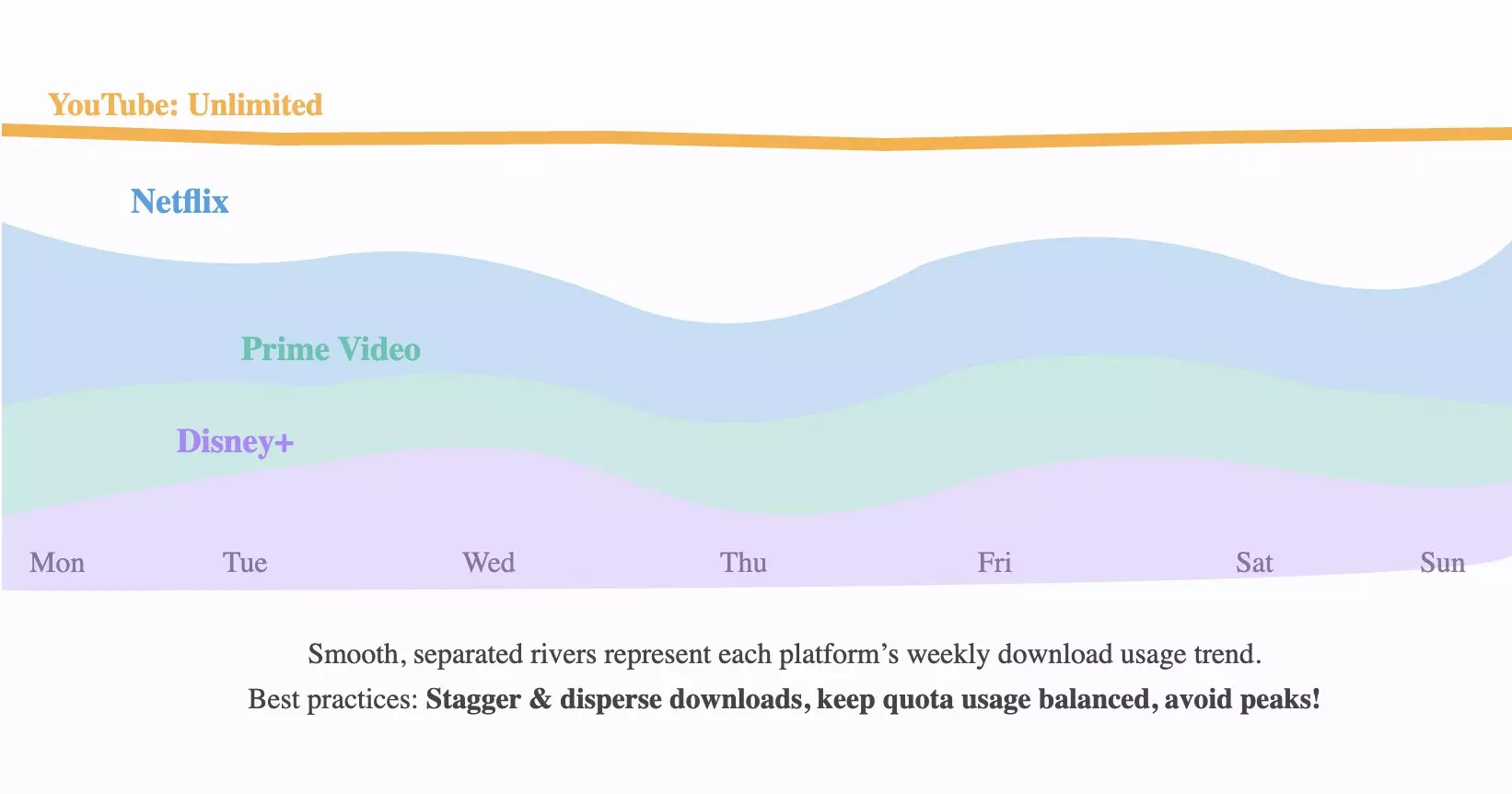
StreamFab Platform Quota Usage (Best Practice: Spread Out Downloads)
StreamFab Platform Quota Usage - Theme River (Best Practice: Spread Out Downloads)

FAQs

1. Why can I only download three titles?

If you’re stopped after just three videos, you’re still on the trial version. The trial cap is 3 per platform over 30 days. The “100/100” you see in the app is the paid-user quota, but it doesn’t apply until you activate a license.

2. Can I manually reset the download limit?

No. The quota is system-controlled. It resets automatically in the next daily or weekly cycle. Reinstalling the app, switching devices, or logging into another account won’t reset it.

3. Do limits on different platforms affect each other?

No. Quotas are per service. Hitting 100 downloads on Netflix doesn’t influence how many you can download from Prime Video or Disney+.

4. Will StreamFab raise the download limits later?

Possibly. The team continually reviews policies and adjusts quotas as infrastructure and service agreements allow. Check the official website for the latest terms.

5. What happens after the StreamFab free trial expires?

Once the 30-day trial ends, you can no longer download from VIP services unless you purchase a license. Videos already downloaded during the trial remain on your device. The YouTube Downloader continues to work with no numeric cap.

6. Does the StreamFab trial require a credit card or account?

No. You can download and start the trial without creating an account or entering any payment information. The trial activates automatically upon installation.

7. Is the StreamFab download limit per device or per account?

The quota is tied to your license and device. Using the same license on a different machine does not grant additional downloads. Each device’s counter operates independently within the license terms.

Final Words

StreamFab’s download limits, 100 per day and 700 per week on a paid plan, or 3 per VIP service during the trial, exist to protect both system stability and your streaming accounts. While neither cap can be manually reset, spacing out downloads across days and leveraging multiple platform quotas in parallel lets you get the most from your subscription.

If you want to experience the full range of features before committing, the 30-day trial requires no account or credit card and gives you access to every supported streaming service.

streamfab download limit
StreamFab Video Downloader

Download videos from 60+ streaming services in up to 1080p/4K with Dolby Atmos audio. Available on Windows and macOS.

  Free Download
  Free Download
 

This article was written based on information verified as of May 2026. Download limits and trial terms may change; please check the official website for the latest details. 

StreamFab Video Downloader

Your ultimate choice to download videos from Netflix, Amazon Prime, Hulu, YouTube and other sites.

Free Download

Windows 11/10

Free Download

macOS 12.0 or newer

Learn More >
Table of contents
What Is StreamFab Download Limit?
    Why Does StreamFab Set Download Limit?
      Can I Reset StreamFab Download Limits?
        How to Fully Utilize StreamFab Under The Limits?
          FAQs
            Final Words
            StreamFab Video Downloader

            Your ultimate choice to download videos from Netflix, Amazon Prime, Hulu, YouTube and other sites.

            Free Download

            Windows 11/10

            Free Download

            macOS 12.0 or newer

            Learn More >
            Table of contents
            What Is StreamFab Download Limit?
              Why Does StreamFab Set Download Limit?
                Can I Reset StreamFab Download Limits?
                  How to Fully Utilize StreamFab Under The Limits?
                    FAQs
                      Final Words
                      TRENDING
                      • StreamFab Alternatives: 5 Options Compared (2026 Update)
                        Malcolm / 2026-05-21
                        StreamFab Alternatives: 5 Options Compared (2026 Update)
                      • StreamFab DRM M3U8 Downloader Review: 2026 Hands-On Test
                        Stella Smith / 2026-05-21
                        StreamFab DRM M3U8 Downloader Review: 2026 Hands-On Test
                      • StreamFab vs. MovPilot: Full Comparison (2026 Updated)
                        Stella Smith / 2026-05-21
                        StreamFab vs. MovPilot: Full Comparison (2026 Updated)
                      • [Official] Why StreamFab Crack Is Risky: Safer Choice Exists
                        Stella Smith / 2026-05-21
                        [Official] Why StreamFab Crack Is Risky: Safer Choice Exists
                      • StreamFab Trial Guide: What You Get & How to Start (2026)
                        Stella Smith / 2026-05-21
                        StreamFab Trial Guide: What You Get & How to Start (2026)
                      • StreamFab Free vs Paid: What You Get Without Paying (2026)
                        Roul Austin / 2026-05-21
                        StreamFab Free vs Paid: What You Get Without Paying (2026)
                      • About
                      • About StreamFab
                      • Editoral Team
                      • Affiliate Program
                      • Company Information
                      • Get Support
                      • Contact Us
                      • User Guide
                      • FAQs
                      • Forum
                      • Policy
                      • Legal Disclaimer
                      • DMCA Policy
                      • Terms of Use
                      • Privacy
                      • Cookies Policy
                      • Purchase Policy
                      • Refund Policy
                      • Subscribe Newsletter
                      • >
                      ©2019-2026 StreamFab.com All Rights Reserved.