Lately, I've seen folks asking if StreamFab is actually safe: worried about malware, their devices, privacy, or getting accounts banned. Since I work as a Content Strategist in streaming tech, I want to tackle these worries one by one. In short, StreamFab is safe for personal use and verified clean by VirusTotal, Norton, and McAfee, with no data collection and a 14-day money-back guarantee. That said, downloading copyrighted content does come with legal nuances you should understand. Here’s the full picture.
- Malware-free: Scanned clean by VirusTotal, Norton 360, and McAfee — see test results
- No data collection: All account data stays on your device — privacy details
- Account safety: Built-in download limits keep activity within normal viewing patterns — how it works
- Legal for personal use: Falls under fair use principles for personal backups of subscribed content — legality explained
Trustpilot
★ 4.6/5
700+ reviews
Total Downloads
100M+
across 180+ countries
Guarantee
14-Day
money-back, no questions
Introduction to StreamFab Video Downloader

Grab videos easily from YouTube, Netflix, Disney+, Crunchyroll, and around 60 VIP services (StreamFab 7 updated). It handles up to 4K HDR quality where supported and works on 1000+ other sites.
StreamFab Video Downloader is basically your all-in-one tool for grabbing and watching videos offline from about 60 OTT sites and over 1000+ global video websites. Now that StreamFab 7 is out, it's really made a mark with some smart tech upgrades and an interface that's just easier to use.
The 2026 update pretty much overhauls how it looks and works:
- New Visual Identity: You can pick between Dark & Light Modes.
- Workflow: Sidebar now collapses, the "Downloads" tab is merged, and managing licenses is less of a headache.
- Customization: Stick up to 24 of your favorite sites in "My Services".
If you're still wondering about stuff, check this quick guide on how to use StreamFab.
Is StreamFab Safe: Security, Privacy & Legality Explained
We know keeping things safe and updated is huge for keeping software clean and usable. That's why StreamFab has a pretty solid track record of pushing out new products, fixing bugs if they pop up, and adding features to keep the experience smooth.
1. Malware Detection
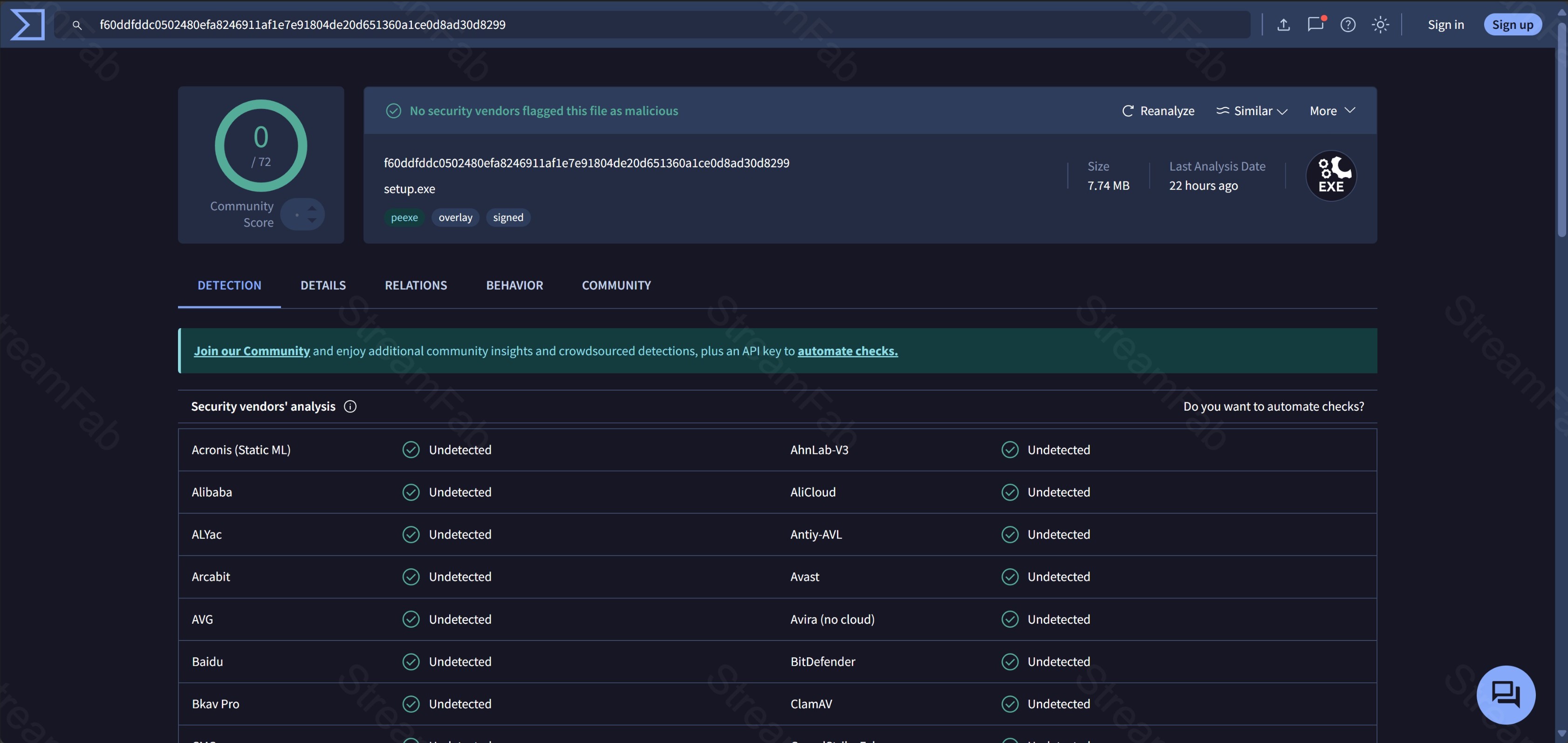
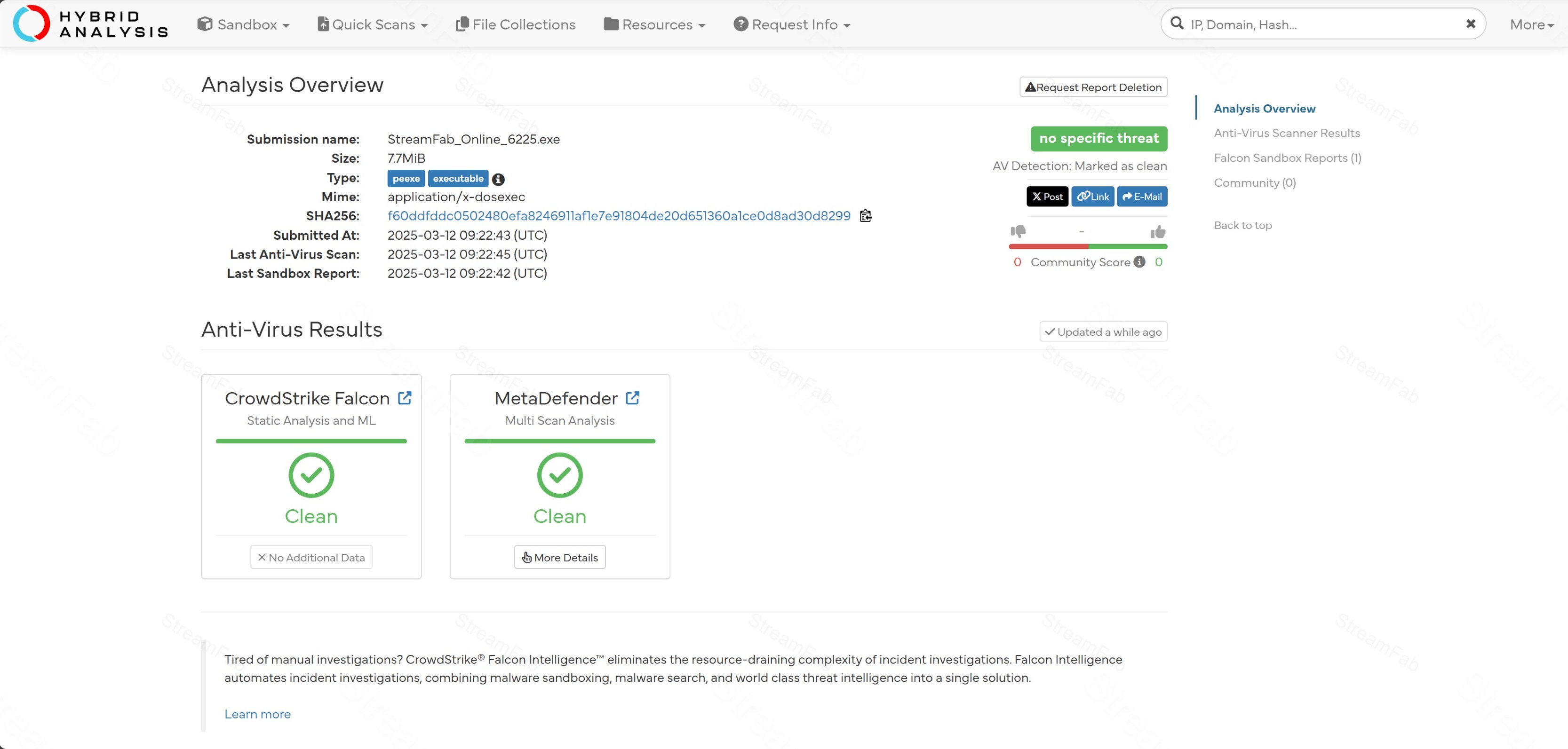
In our testing, StreamFab was verified clean and safe to run. We've put it through the wringer with big-name antivirus tools like Virustotal, Hybrid Analysis, Norton 360, and McAfee. Results show no viruses, Trojans, or malware hiding in the app.
2. Privacy Considerations
According to StreamFab's privacy policy, all account details stay stored on your own device. The company states it does not collect personal user data.
3. Personal Account Safety
"Will using StreamFab get my Netflix or other accounts banned?" honestly, you don't need to stress too much: using StreamFab reasonably usually doesn't trigger bans. To keep things extra safe, the built-in StreamFab download limit helps manage frequency:
- 100 downloads per day (per supported service)
- 700 downloads per week (per supported service)
This makes your downloading look like normal viewing behavior. Basically, as long as you aren't mass-downloading a crazy amount of videos instantly, streaming services generally won't notice anything weird.
4. Device Compatibility
We focus hard on keeping StreamFab stable across devices—because a crash mid-download is the worst. It runs smooth on Windows and regular Macs, and the team optimized it for Apple M1/M2/M3/M4/M5 chip systems too.
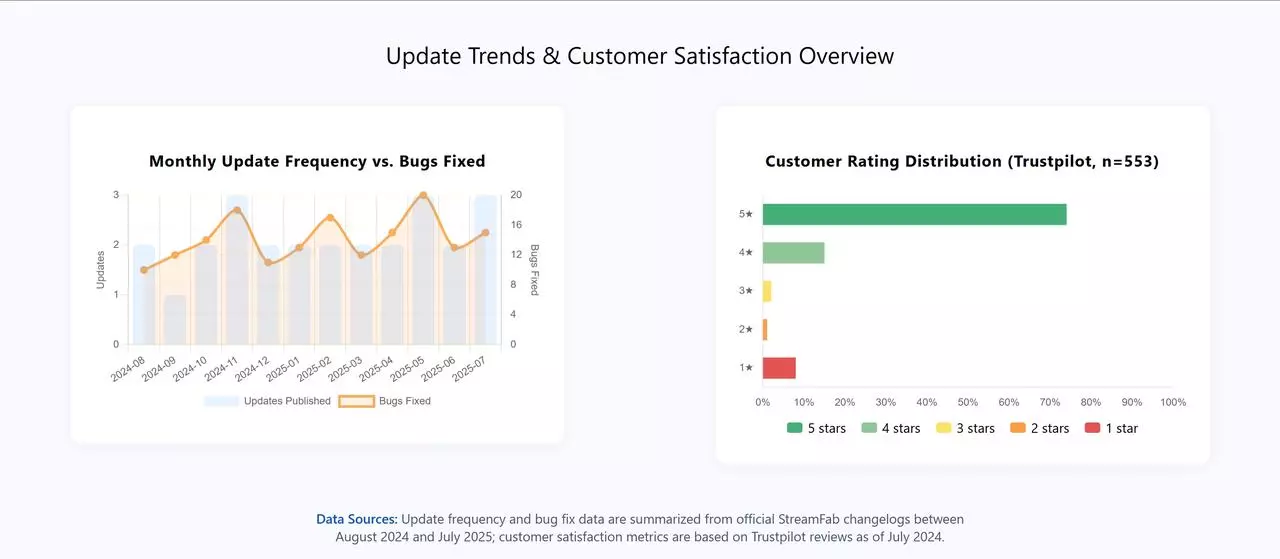
If you do hit a rare crash, a reinstall usually fixes it. Some older versions had hiccups after updates, but the devs are quick—patches typically roll out in a couple of days. The chart below tracks update frequency over recent months, showing how consistently StreamFab pushes patches to stay compatible and safe for your hardware.
5. Legality Check
Is using StreamFab legal? Usually, it falls under "Fair Use" for personal backups. If you download videos from services you legally subscribe to for personal offline viewing only, that's often seen as acceptable. StreamFab stays committed to copyright ethics.
We stick to fair personal use principles, but we also have to remind you to follow each platform's own rules.
✅ Official & Verified
Stay Safe — Download StreamFab from the Official Source
Lifetime access at $299.99 $429.99 (30% OFF) — malware-free, privacy-respecting, with a 14-day money-back guarantee.
Real User Reviews on StreamFab
You might feel one side of the story isn't enough. So if the proof above doesn't convince you, we found some user reviews from Reddit to back it up.
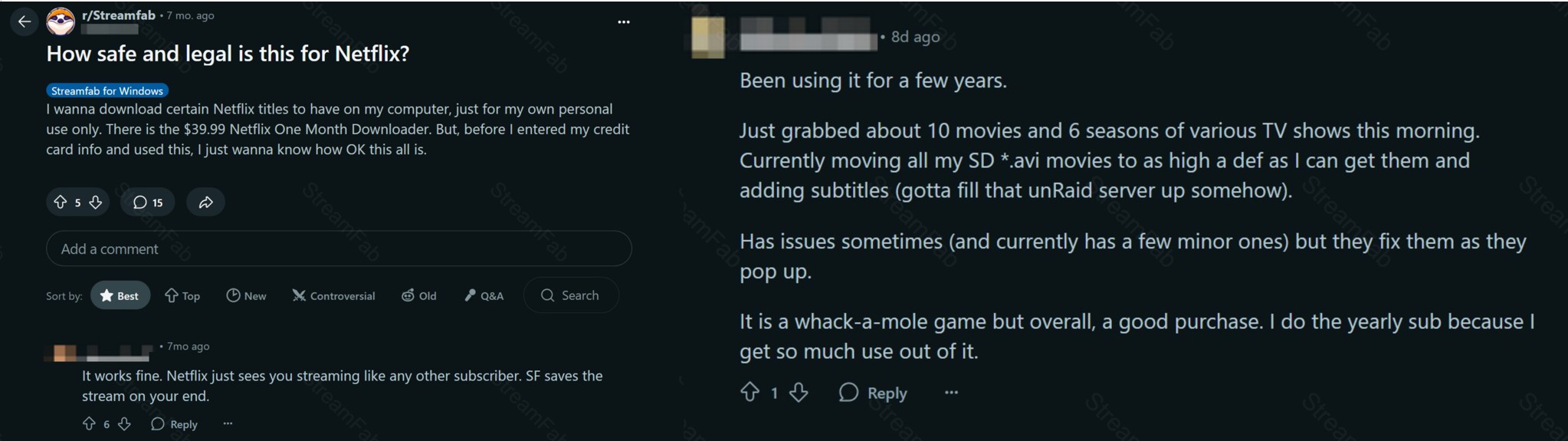
"Ran it through our corporate AV suite before testing — came back 100% clean. I've been using it for 6 months now with zero issues on both Windows 11 and my M3 MacBook. No suspicious network activity either."
"I was sceptical at first because of all the Reddit threads, but the free trial convinced me. Downloaded 3 Netflix movies for a long flight — no account issues, no weird behaviour. Bought the lifetime licence after that."
"Solid and safe. The 4K HDR quality is genuinely impressive. Only minor gripe: occasional DRM updates cause a brief hiccup, but patches drop within a day or two. Way safer than any crack you'd find online."
Based on user feedback from Trustpilot (4.6/5 · 700+ reviews)
FAQs
These are the most common safety and legality questions about StreamFab.
StreamFab is developed by DVDFab, a company that has been in the video software space for over 15 years. The installer has been scanned clean by VirusTotal, Norton 360, and McAfee. The software does not collect personal data, and purchases are backed by a 14-day money-back guarantee. For a full review, see our StreamFab 7 review.
2. Is StreamFab free to use?
StreamFab offers a free trial that lets you download 3 full videos without a credit card. After the trial, a paid plan is required for continued use. For details on the free version, visit the StreamFab free plan page.
3. Does StreamFab track which videos I download?
No. StreamFab does not store user activity externally. Video analysis happens in the built-in browser, which works like a regular browser, and data saves as a local log file on your device. You can inspect it at any time.
4. Can StreamFab get you banned from streaming services?
While the vast majority of StreamFab users have not reported account bans, it’s important to understand that any third-party download tool carries some level of risk. Streaming platforms continuously monitor for activity that deviates from normal viewing patterns. StreamFab’s built-in download limits (up to 100 per day per service) are designed to keep activity within reasonable bounds, but no tool can guarantee zero risk of account scrutiny. For maximum safety, avoid mass-downloading content in short bursts, stay within the built-in limits, and be aware that platform terms of service generally prohibit third-party downloading tools.
5. How can I check if a video downloader is safe?
Upload the installer to VirusTotal before installing. Check independent reviews on Trustpilot or G2. Look for a money-back guarantee and clear privacy policy. Avoid cracked or unofficial versions, which are the main source of malware risk. Note that StreamFab 7 uses cloud-based licence verification, meaning cracked versions cannot authenticate with official servers and simply won’t work, even before considering the malware risks. If you encounter issues with the official version, check our StreamFab troubleshooting guide.
Update Log
This article is regularly reviewed and updated to reflect the latest security information, product changes, and user feedback.
- Updated company background: DVDFab now has over 20 years in the video software industry
- Verified all malware scan results against current VirusTotal, Norton 360, and McAfee databases
- Refreshed user review section with current independent platform feedback
- Rewrote account safety FAQ with expanded ban risk context
- Added StreamFab 7 cloud-based licence verification detail to anti-crack guidance
This update was verified on June 26, 2026. All security claims reflect the latest available data at the time of review. We advocate for personal offline backup in compliance with applicable terms of service.
Final Thought
All things considered, StreamFab 7 really holds its ground when it comes to security and reliability. Most user feedback—especially on Trustpilot and tech forums—backs that up. People say it runs smooth, downloads fast, and doesn't sneak in any shady stuff.
If you check the 2026 stats, it’s accumulated hundreds of reviews on Trustpilot, maintaining a strong rating (obviously, numbers shift). A majority of reviewers gave positive ratings, mostly hyping up the fast support—I even saw a review where a guy got his fix in like a day or two.
Of course, let's be real: no software is flawless. There's still chatter about legality and fair use in the community—and honestly, those conversations matter.
So yes, we recommend StreamFab, but with a small reminder: use it responsibly, stick to platform rules, and stay within legal limits. This guide isn't here to hard-sell you—it's just giving you the full picture so you can decide if StreamFab fits your needs (and conscience).
Ready to Try It Yourself?
Safe, verified, and trusted by 80 million users worldwide. StreamFab is scanned clean by VirusTotal, Norton, and McAfee. It collects zero personal data and backs every purchase with a 14-day money-back guarantee. Download 3 full videos free — no credit card, no risk.
