Yes, you can download Peacock titles, but official downloads have limits. Peacock Premium Plus downloads work for selected titles in supported iOS and Android apps.
- Mobile apps only; laptop and desktop browsers do not offer official offline downloads
- Selected titles display a download icon; availability varies by title and region
- Unwatched downloads expire after 30 days or 48 hours after playback starts
- The account and per-title caps apply; cancellation, sign-out, uninstalling, or availability changes can remove downloads
Use the sections below to compare methods and fix download problems
If you searched for Peacock download options because you need to watch Peacock offline, the key distinction is device support: Peacock handles eligible downloads on a phone or tablet, while readers who want to download Peacock shows on a laptop need a separate desktop workflow. This guide covers both routes, the Peacock download limit, and the checks that solve common failures.

Can You Download on Peacock?
Yes. Peacock Premium Plus downloads are available for selected titles in supported iOS and Android apps, but the files remain inside Peacock and follow account, title, and expiration rules.
Official Download Requirements and Limits
| Requirement or limit | Official Peacock rule |
|---|---|
| Eligible plan | Premium Plus |
| Eligible content | Selected titles that show a download icon |
| Account cap | Up to 25 downloaded items across the account |
| Same-title cap | Up to 10 downloads of the same title |
| Before playback | Up to 30 days |
| After playback starts | Up to 48 hours |
| Early removal triggers | Cancellation, sign-out, app removal, or a change in title availability |
- Eligible plan: Premium Plus for selected downloadable titles
- Supported devices: official iOS and Android apps only
- Availability varies by title and region
- Expiry: 30 days before playback / 48 hours after playback starts
- Limits: up to 25 downloads across the account and 10 of the same title
- Cancellation, sign-out, uninstallation, or availability changes can remove app downloads
My practical read is simple: the official route fits short trips and routine mobile viewing. It is less useful when you need laptop playback, a transferable file, or a library you can organize outside the Peacock app.
Phone, Tablet, Laptop, and Desktop Support
| Device | Official offline download | What to expect |
|---|---|---|
| iPhone or iPad | Yes, in the supported Peacock app | Eligible titles play inside the app while the download remains valid |
| Android phone or tablet | Yes, in the supported Peacock app | Eligible titles play inside the app while the download remains valid |
| Windows laptop or desktop | No official offline download | Streaming works online; a desktop local-file workflow is a separate option |
| Mac laptop or desktop | No official offline download | Streaming works online; a desktop local-file workflow is a separate option |
An official app download is an app-managed offline copy, not a general video file. A desktop workflow can convert Peacock videos to MP4 or save them as MKV, which changes where the file can be played and managed, but it must still be used within authorization, platform terms, and applicable law.
Two Ways to Download on Peacock
There are two practical ways to download shows on Peacock: use the official mobile app for eligible in-app viewing, or use a desktop local-file workflow for supported on-demand titles.
Download with the Official Peacock App
Peacock app downloads are the shortest route when you have Premium Plus, a supported phone or tablet, and a title with the download icon.

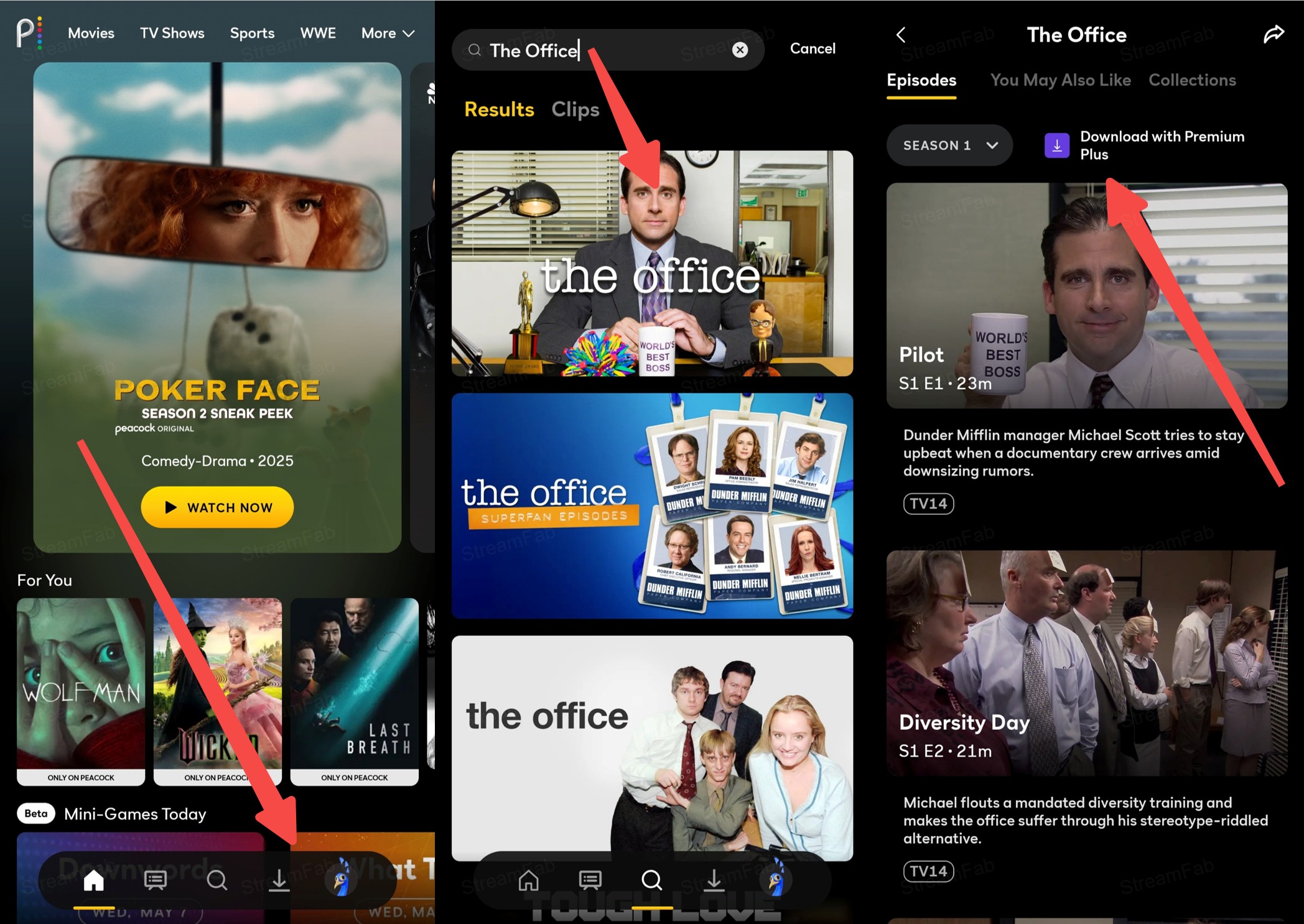
This method is best for Premium Plus members who download Peacock on phone or tablet for short-term viewing. It is not ideal for laptop playback, transferring files between devices, or managing a separate local collection.
Download with StreamFab Peacock Downloader
- Best fit: Windows or Mac users who need portable Peacock files, batch handling, and more control over audio or subtitles.
- Not ideal for: live Peacock programming, linear channels, or anyone who needs an official mobile-only experience.
For content you're authorized to access, where permitted by platform terms and applicable law, StreamFab Peacock Downloader is a desktop alternative for supported Peacock on-demand titles on Windows and macOS. Live broadcasts and linear channels are outside this workflow.

- Download StreamFab Peacock Downloader from the official site and keep the app updated.
- Available on Windows and macOS
- Save supported titles as MP4/MKV with up to 4K UHD, H.264/H.265, and source-dependent HDR or multichannel audio
- Batch-process multiple episodes of supported Peacock shows
- Schedule newly available episodes for supported on-demand series
- Ad handling depends on the title, plan, and available source
- Choose available audio and subtitle languages, including embedded or external SRT options
- Availability and quality depend on the Peacock title, region, account, and current software compatibility
The software can save supported titles as MP4 or MKV using H.264 or H.265, with quality up to 4K UHD where the source allows it. Available video and audio options can include HDR10 or Dolby Vision, Dolby Atmos or EAC3 5.1, embedded or external SRT subtitles, forced subtitles, multiple languages, metadata, batch handling, and scheduled episode processing.
Peacock compatibility can shift after service or software updates. My first response to stalled analysis, an incomplete job, or a missing HDR option is to update the app, retry that title, and verify the finished file before adding the rest of a season.
Launch StreamFab and navigate to the VIP Services section on the navigation menu on the left side, and click the Peacock card from the list.

Sign in to your Peacock account to play the video you are about to download to your computer’s hard disk drive.

As the video analysis finishes, you will get a prompt window showing up, and to download the video, you can click the Download Now button at the bottom of this window.

If you want to add the video to the task queue temporarily, you can opt for the Add to Queue button, and then manually trigger the download process at any time later.

Why Peacock Downloads Are Not Working
Start with eligibility and limits before reinstalling anything. Most missing-button and reached-limit problems can be narrowed down in a few checks.
Fix Missing Buttons and Limit Errors
- Confirm the account has Premium Plus and the title displays a download icon.
- Check whether the device is using a supported iOS or Android Peacock app rather than a laptop or desktop browser.
- Review the Peacock download limit: delete older items if the account has reached 25 downloads or the same title has reached 10.
- Free device storage, reconnect to a stable network, and retry the download.
- Update the Peacock app. If the button remains missing for an otherwise eligible title, sign in again or reinstall the app, knowing that existing app downloads may be removed.
The fastest order is plan, title, icon, device, then limits. Storage and reinstalling come later because they take more effort and do not fix an ineligible title.
Fix App and Desktop Download Failures
- Official app: update Peacock, restart the device, clear the app cache where the operating system allows it, and retry on a stable connection.
- Desktop analysis stalls: install the current StreamFab version, close the unfinished job, reopen the title, and run a single-item retry.
- Job reaches completion but the file is incomplete: play the output from the beginning and near the end before queuing more episodes.
- Quality option is absent: confirm what the source title and account offer; up to 4K, HDR, audio, and subtitle choices are source-dependent.
I prioritize one-title retries over rebuilding a full queue. It isolates whether the problem is the title, the current app version, or the output setting without creating a folder full of uncertain results.
Personal Offline Viewing: Terms and Safety
Use offline-saving features only for content you are authorized to access, where platform terms and applicable law permit it. Keep saved copies for personal offline viewing, and do not share, sell, or monetize them.

StreamFab is the product recommended by this site as an alternative to Peacock's official feature. Download it from the official product page, keep it updated, and scan any installer according to your normal device-security practice. Avoid repackaged installers from forums or file-sharing pages.
Compare Peacock Download Options
The official app favors simplicity on mobile; StreamFab favors desktop file control for supported on-demand content. The table shows the trade-offs without treating either route as universal.

| Peacock plan overview as of July 2026 | Peacock Select | Peacock Premium | Peacock Premium Plus |
|---|---|---|---|
|
Monthly price |
$7.99/month Annual price: $79.99/year |
$10.99/month Annual price: $109.99/year |
$16.99/month Annual price: $169.99/year |
|
Content and download access |
|
|
Everything in Premium, plus eligible offline downloads
|
| Factor | Official Peacock app downloads | StreamFab Peacock Downloader |
|---|---|---|
| Eligible plan or account requirement | Premium Plus and an eligible title | An authorized Peacock account and supported on-demand title |
| Supported devices | Supported iOS and Android phones or tablets | Windows and macOS computers |
| Playback environment | Inside the Peacock app | A compatible local media player |
| Transferable local file | No | Yes, MP4 or MKV |
| Download and title limits | Up to 25 across the account and 10 of the same title | Batch processing is supported; source and account conditions still apply |
| Expiration conditions | 30 days before playback, then 48 hours after starting; other removal triggers apply | Local-file use remains subject to authorization, terms, law, and technical compatibility |
| Output format | App-managed offline copy | MP4 or MKV with H.264 or H.265 |
| Maximum quality where available | Controlled by the Peacock app and title | Up to 4K UHD; HDR10 or Dolby Vision can be available by source |
| Audio and subtitle options | Controlled by the Peacock app and title | Available options can include Dolby Atmos, EAC3 5.1, language selection, embedded subtitles, external SRT, and forced subtitles |
| Batch and scheduled downloads | No season-level desktop queue | Batch and scheduled episode processing |
| On-demand versus live or linear support | Selected downloadable on-demand titles | Supported on-demand titles; not live broadcasts or linear channels |
| Best fit | Short-term offline viewing on a phone or tablet | Peacock desktop download needs and local file organization |
| Not ideal for | Laptop playback or file transfer | Official in-app viewing, live programming, or linear channels |
The practical upshot is not that one method replaces the other. Choose based on where you will watch, whether you need a local file, and how much management you want outside the Peacock app.
FAQs
Open the Downloads area in the supported Peacock mobile app. From there, play or delete an item. Signing out, uninstalling the app, canceling the eligible plan, or a title availability change can also remove Peacock app downloads.
Official offline downloads require Premium Plus and apply only to eligible titles in supported mobile apps. The plan comparison above is timestamped once because prices and plan details can change.
You can watch an eligible item offline inside the Peacock app while its download remains valid. Travel does not extend the expiration window or guarantee that a title will stay available.
The Peacock download limit is up to 25 items across the account and up to 10 copies of the same title. Delete an older item, then retry when a limit has been reached.
Peacock does not provide official laptop or desktop offline downloads. For authorized on-demand content, a Windows or Mac local-file workflow is a separate way to download Peacock movies or episodes.
Ad behavior depends on the plan, title, and available version. Premium Plus is largely ad-free, but limited exclusions can apply, so it should not be treated as a no-ads promise for every download.
Conclusion: Which Peacock Download Option Fits You?
Use the official app when selected titles, a phone or tablet, and short-term offline viewing meet your needs. It is not built for laptop playback or portable files.
Choose StreamFab as a desktop alternative when supported on-demand titles, MP4/MKV files, batch handling, or richer audio and subtitle choices better match your workflow. It is not for live broadcasts or linear channels, and results depend on the title, account, region, and current software compatibility.
