
Getting episodes ready for a trip takes more than installing ReelShort. A ReelShort offline download requires a completed saving step: an explicit app offline option, if offered, or an authorized local-file workflow. Unlocking an episode or replaying a cached clip does not establish reliable offline access.
Can you watch ReelShort offline when your connection disappears? I would settle that question on the device you plan to carry before building an episode queue. My rule is that a download is finished when its destination player opens it without a network, not when a progress bar turns green. I’ll walk through a ReelShort offline download for PC, then the phone transfer and format choices that determine whether those files actually play.
ReelShort Offline Downloads: What the App Actually Offers
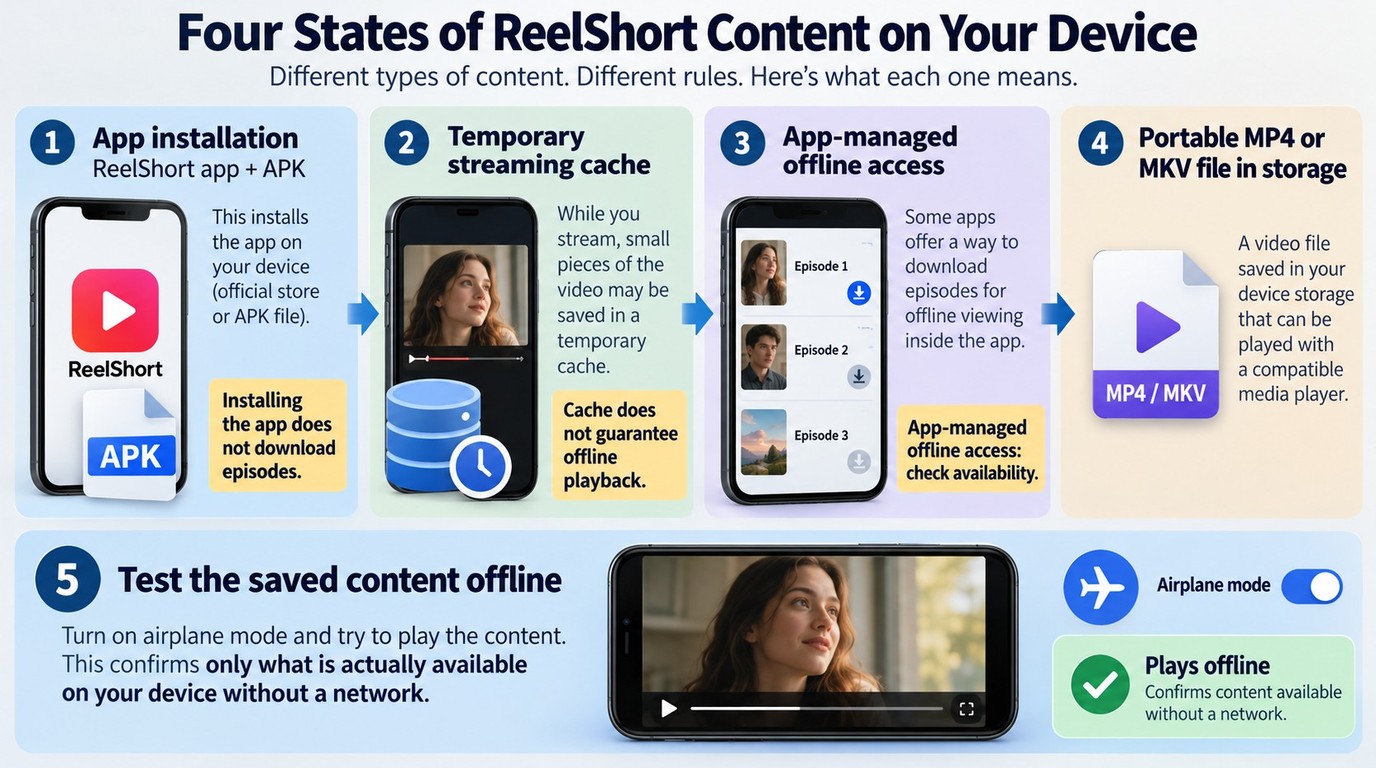
Installing ReelShort puts the app on your device; unlocking an episode gives your account access to that episode. Neither action automatically creates a portable video file. For app-based offline viewing, use a dedicated offline control if your episode offers one, rather than assuming streaming cache will serve the same purpose.
Separate App Installation, Streaming Cache, and Video Files
The word “download” needs an object here. ReelShort offers short, vertical dramas, but downloading its app is different from downloading the episodes you intend to watch. A store listing’s install button delivers software, not the series you were browsing.
On Android, an APK is an application package. It installs an app; it is not an MP4 containing a drama. That distinction matters when a search for a ReelShort offline-download APK takes you to an installation page instead of a video-saving workflow. Having the app icon on your phone answers the installation question and nothing more.
Streaming cache serves a different job. An app temporarily stores data to support playback, but seeing yesterday’s thumbnail does not establish that the complete episode is ready offline. I would not plan a trip around a cache. An explicit offline item and a successful disconnected playback check are much clearer evidence of readiness.
A local video file is something you can locate in storage and open with a compatible player. Its folder, extension, and completed contents matter. An app-managed offline item, if offered, belongs to that app’s playback system; do not assume you can copy it into another player like an ordinary video file.
One Reddit poster in r/Vertical_Dramas described the need plainly: “I don’t have any subscriptions to reelshort, dramawave, etc but I was wondering if anyone has success downloading movies to watch offline. I’m thinking about wanting to watch a few on an upcoming roadtrip or flight and wanted to see if there’s been any success within the community.”
The destination device is the useful part of that question. A saved item on your computer does not prepare your phone until the phone has its own playable copy.
Confirm Your Episode Access Before Starting
Begin with the exact episode, not the series page. A preview that plays freely does not establish access to later episodes. Open your selection through your ReelShort account and resolve any normal sign-in, coin, or subscription prompt before starting a saving task.
A purchase mismatch is an account problem first. Confirm which account is signed in and which purchase channel issued your receipt. One Reddit poster in r/ReelShorts wrote, “I noticed that I was being charged for a reelshort subscription from both the app and reelshortsw which I assume is the website.” If your own receipts look inconsistent, match each transaction to its account and seller before purchasing again.
Use the official viewing flow for access questions. Keep the receipt and episode details together when contacting the relevant support channel. Once the selected episode plays normally, you have a starting point for the desktop workflow below.
Download Episodes with StreamFab ReelShort Downloader on Windows or Mac
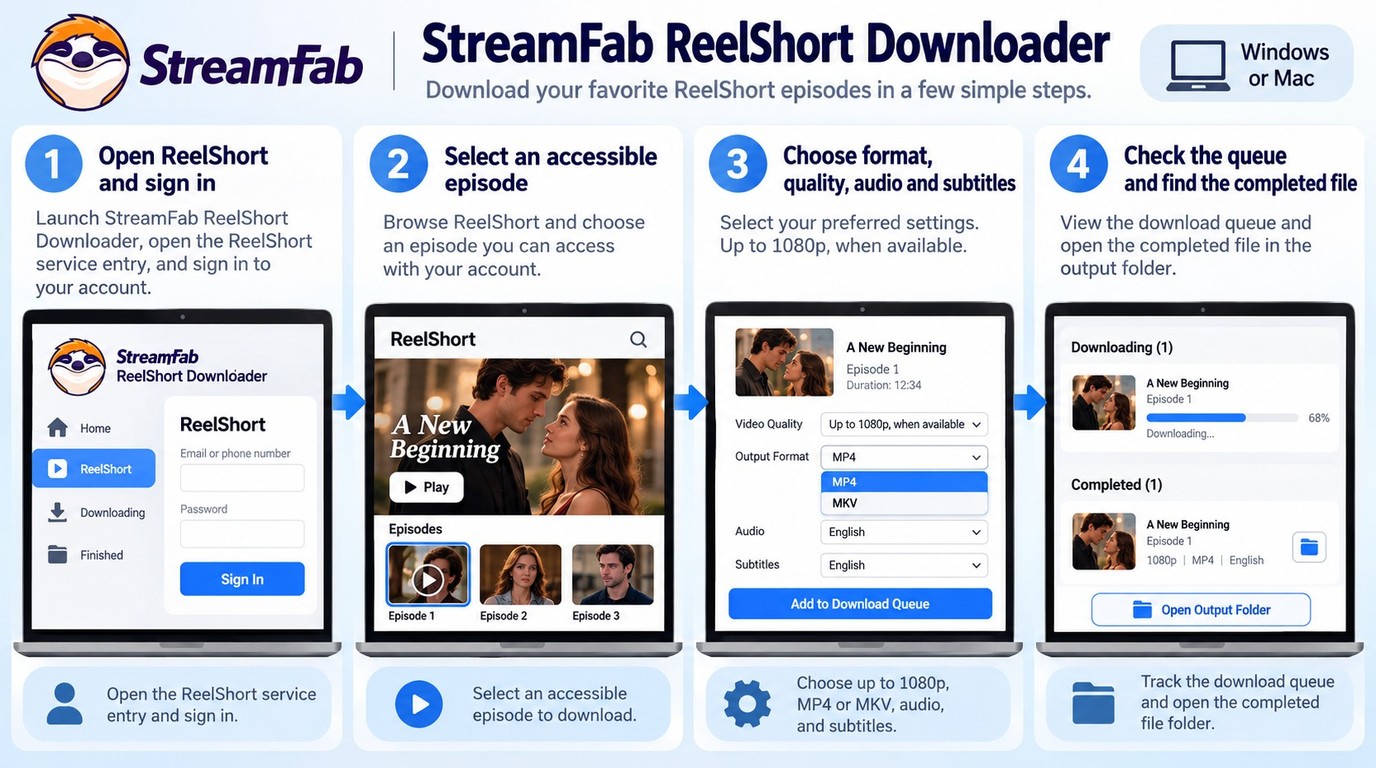
The downloader saves accessible episodes as local files on Windows or Mac. Open ReelShort in the tool, select your episodes and output settings, and download to a folder you can find afterward. Check one completed episode before expanding the queue.

StreamFab ReelShort Downloader preserves vertical short drama content at up to 1080p resolution with AAC 2.0 audio, H.264/H.265 codec support, and MP4/MKV output, ready for offline playback on any device.
You need a supported computer, the official installer, a working internet connection during saving, sufficient storage, and a ReelShort account that can play your selected episodes. The downloader works separately from ReelShort’s official app; this is a desktop file workflow rather than an export from the mobile app’s private storage.
1. Open the Downloader and Sign In to ReelShort
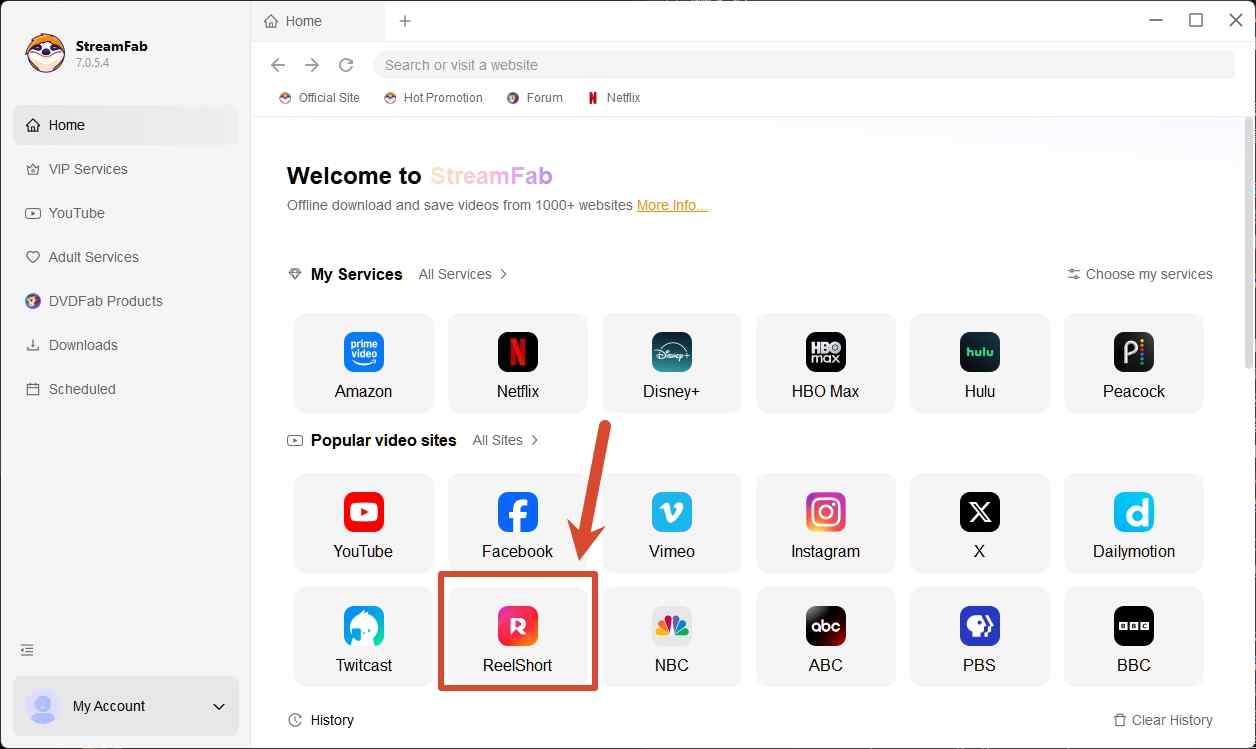
Start with the downloader running on your computer. Open ReelShort through its supported service entry, sign in through the ReelShort account flow when prompted, and navigate to the series you intend to save. Choose an episode you can already watch.
Do not start with an inaccessible episode and hope a queue will resolve access. A thumbnail, trailer, or unlocked opening chapter says little about the next chapter’s status. If ReelShort requests authentication or payment, complete the normal platform flow and return to the episode.
A web-to-app prompt also needs attention. One Reddit poster in r/ReelShorts wrote, “So I bought some coins on the website. But after a while I am not able to watch the episodes on the website anymore, I just get a pop up saying: ‘For a better experience, switch to our app.’”
Follow that viewing instruction and confirm the account in the app. If your desktop session still cannot play the episode, resolve the session or purchase issue through ReelShort’s account support before resuming. A paid receipt does not make every viewing interface interchangeable.
2. Select Episodes and Output Preferences
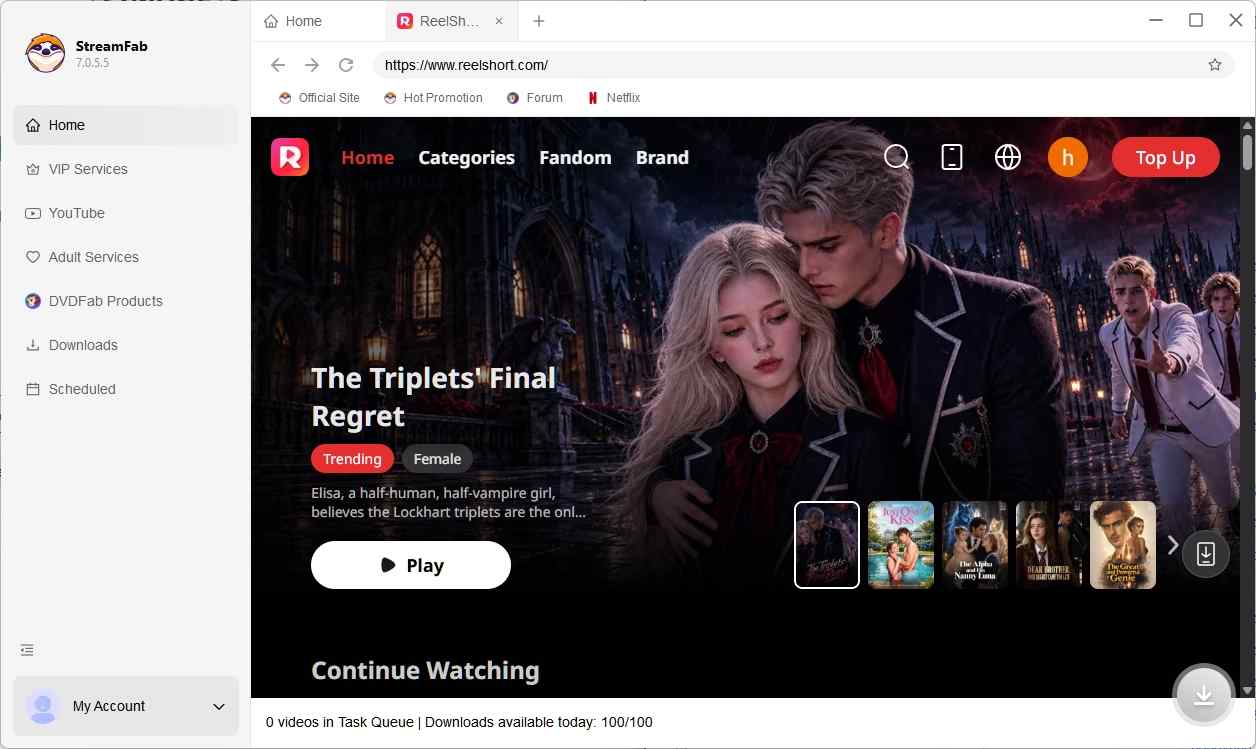
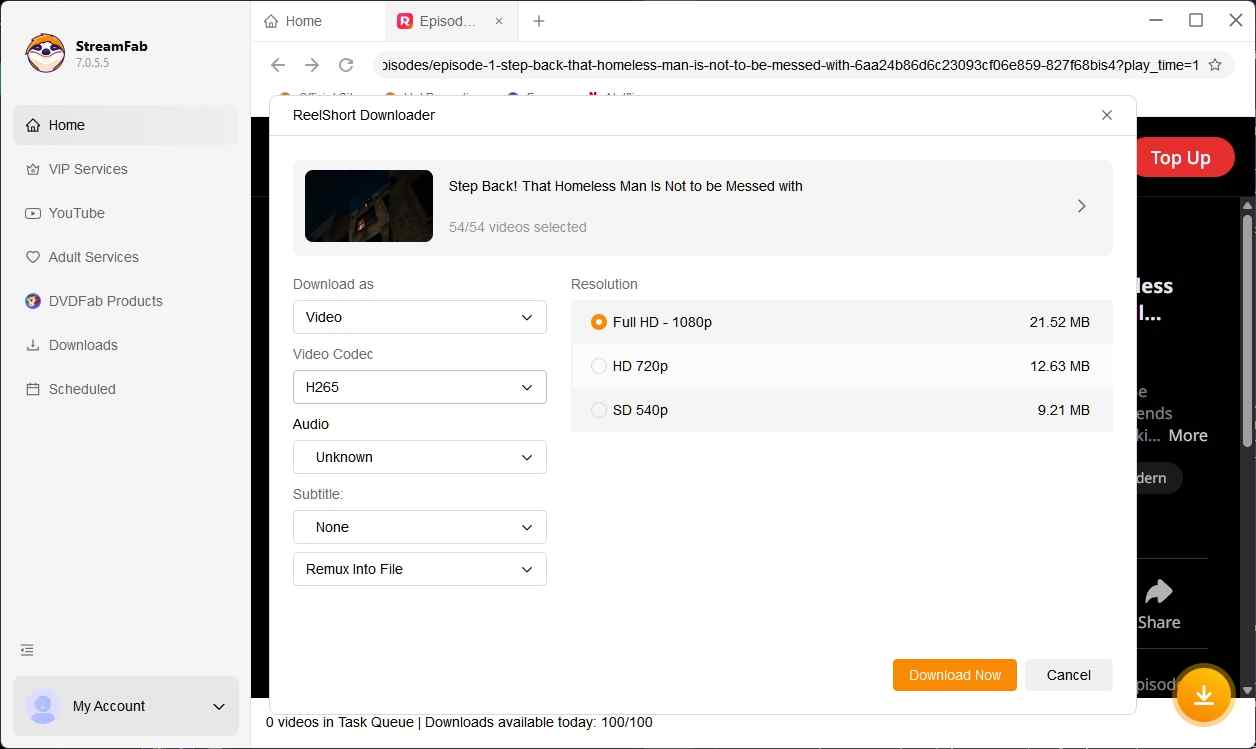
Let the downloader identify the selected video, then configure a small first task. Use this order:
- Select one accessible episode. Keep the rest of the series out of the initial queue so you can inspect the result.
- Choose the available video quality. The ReelShort module supports up to 1080p; select from the quality offered for your episode.
- Choose MP4 or MKV and the video encoding. Match those choices to your intended player; the format section below explains the differences.
- Select the available audio language and subtitles. Choose the tracks you actually need on the viewing device.
I would keep these settings consistent for the first batch. Changing the container, codec, and player at once makes a failed playback attempt harder to diagnose. A maximum resolution describes the module’s ceiling, not a way to add detail missing from the source.
3. Start the Queue and Save the Files
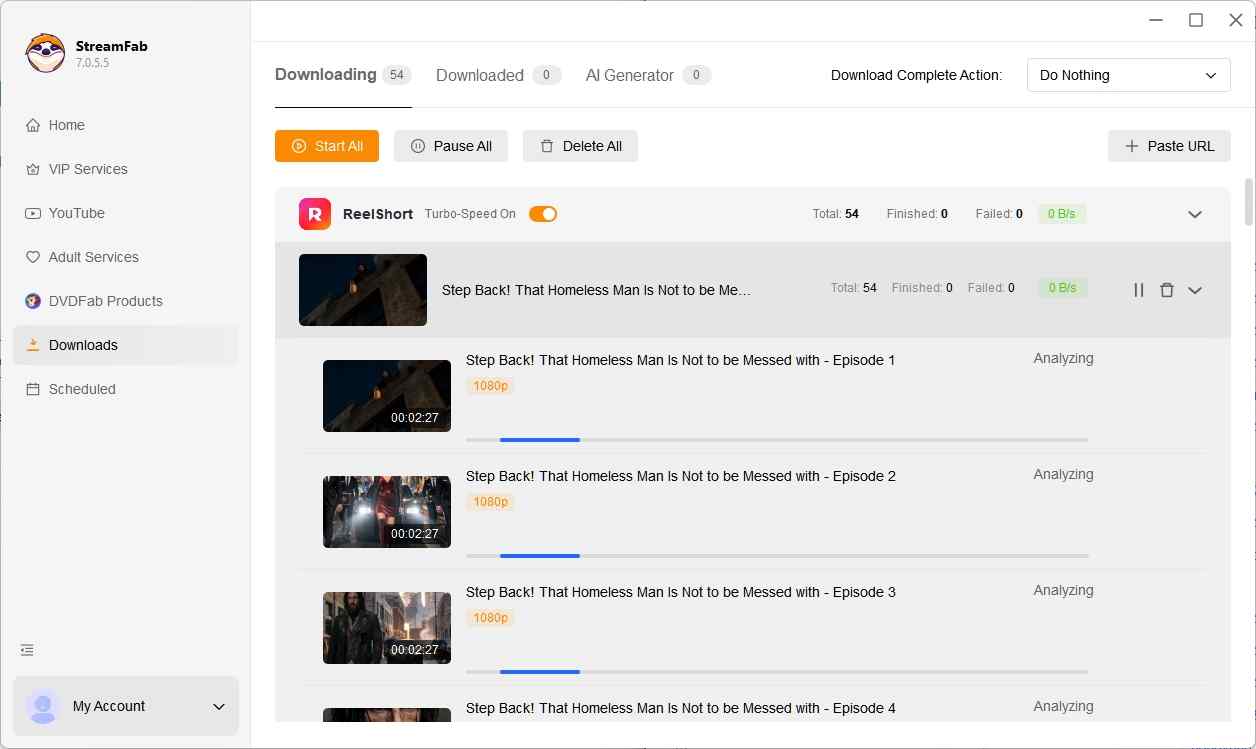
Choose a recognizable local folder before starting. A series folder helps you find the result without relying on task history. Start the download and leave the downloader, the network connection, and the required account session available until the task finishes.
Batch downloads reduce repeated episode selection once your settings are correct. For followed series, the module also supports automatic downloads of new episodes. Keep the computer and application available for those tasks; following a series does not turn a shut-down computer into a background service.
If identification fails, check normal episode playback before repeating the job. An expired session calls for signing in again through the expected account flow. If playback works but the task still fails, use the current official software update and its troubleshooting guidance to address compatibility.
4. Check One Completed Episode Before a Larger Batch
Open the actual saved file, not its webpage. I would make this the checkpoint before adding the remaining episodes:
- Locate the completed video in your chosen folder and match its episode number to your selection.
- Open it in your intended player and check the duration, beginning, and ending.
- Listen to the selected language and enable the subtitle track you need.
- Confirm the picture and available resolution meet your intended viewing setup.
The practical result should be an identifiable episode you can open again. If it is a preview, an unfinished file, or the wrong language, correct that setting before repeating it across a series. Once the sample is right, queue the remaining accessible episodes and move on to the destination-device check.
Watch Local ReelShort Files on Android or iPhone
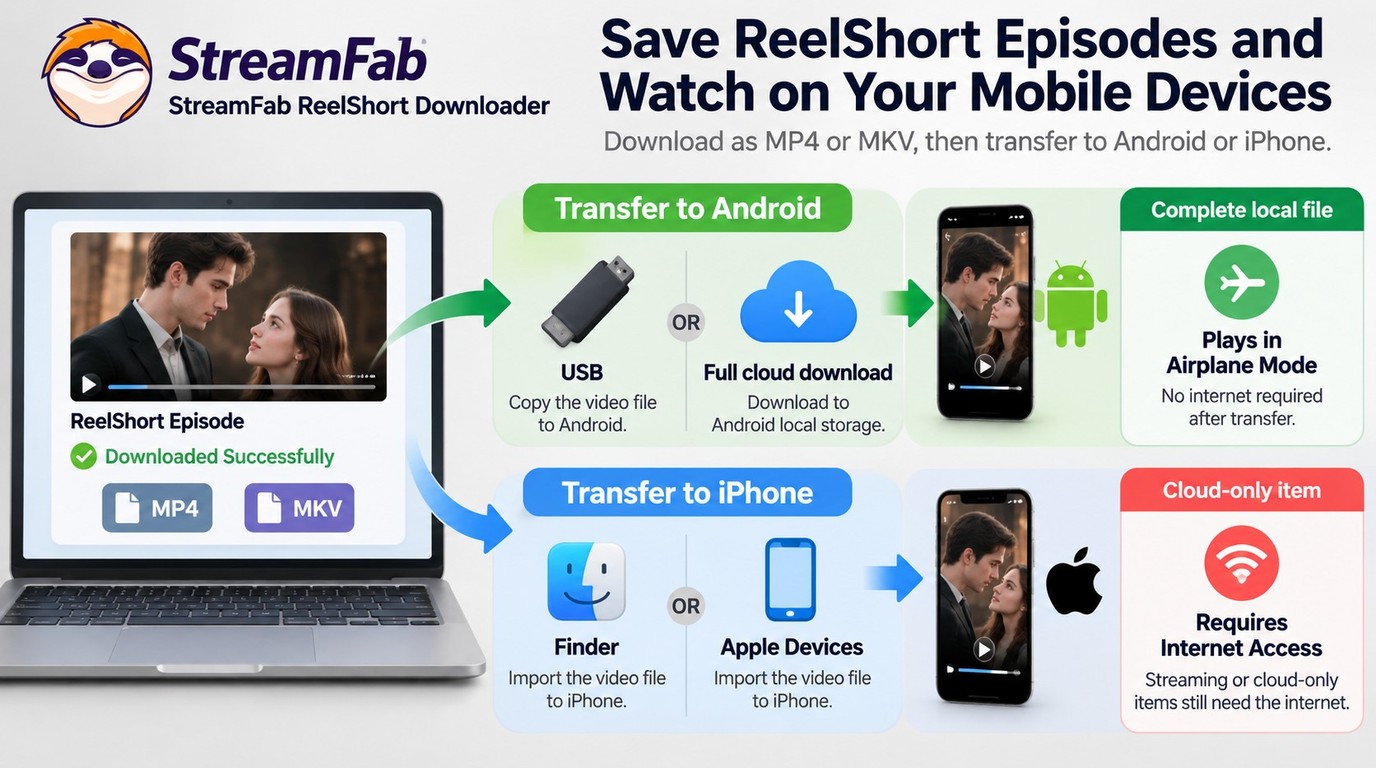
To watch a saved episode on Android or iPhone, copy the completed desktop video into storage your phone can access, then open it with a compatible player. A cloud listing alone is not a local copy. The phone needs the complete file before you disconnect.
Android: Use a Local File, Not an APK Shortcut
Keep saving and playback separate on Android. The ReelShort desktop module runs on Windows and Mac; your Android phone is the receiving device in this workflow. You do not need a downloader APK merely to play an existing video file.
Use a transfer route that your computer and phone support. A USB connection with Android’s file-transfer mode is one option. Cloud storage is another, provided you download the full video onto the phone afterward. In either case, choose a folder you can reopen from the phone’s file browser or player.
Work through the transfer in order:
- Locate the finished desktop file. Confirm that it is the episode you checked, rather than a shortcut or partial download.
- Copy it to the phone. Use a supported cable connection or transfer app and leave enough space for the complete file.
- Wait for completion. If you used cloud storage, download the video into local storage or the player’s offline area.
- Open the phone’s copy. Launch the video from that location in a player that supports its container and codec.
The useful distinction is where the video bytes live. A file visible in a remote folder still needs its contents downloaded. Copying a webpage link instead of an MP4 just moves the streaming requirement to another screen.
iPhone: Match the File to the Player
Choose the receiving player before transferring to iPhone. The app needs to accept imported files and support the container and encoding you selected. A file saved in Files and one imported into a player’s storage are different destinations, even on the same phone.
Use Finder on a Mac, Apple Devices on Windows, or another supported sharing route when the receiving app supports it. Transfer the completed episode into a location that app can open. If you use cloud storage, make the full video available locally rather than relying on its thumbnail or preview.
Check the file from inside the destination player. A video sitting in a folder the player cannot access is a file-location problem, not necessarily a bad download. Import or move it using the receiving app’s supported process before changing the desktop output settings.
For a player with uncertain support, MP4 with H.264 is a practical starting choice. If an MKV or H.265 file will not open, use a player that supports that combination or save a sample in a compatible format. Renaming the extension does not convert the video.
Check Playback Without Wi-Fi or Cellular Data
Test on the phone you will actually carry. I consider the workflow complete at disconnected playback, not at the transfer progress bar. Airplane mode helps, but confirm Wi-Fi is off too; phones can use Wi-Fi while airplane mode is enabled.
- Confirm the transfer has finished and the video is stored locally.
- Turn off Wi-Fi and cellular data.
- Close the player, reopen it, and launch the saved episode from its local location.
- Check the beginning, a middle section, and playback near the end.
- Confirm sound, the selected subtitles, and the episode number.
A failed check should narrow the next action. If the file is missing, inspect the destination folder. If it is present but will not open, check transfer completion and player compatibility. If the picture plays but the language is wrong, inspect the audio and subtitle controls.
Keep the computer copy until the phone passes this check. Use the sizes of your completed files to plan storage for the remaining episodes. That avoids estimating capacity from episode count alone and having to repeat a download after an incomplete transfer.
Choose MP4 or MKV, Then Check Audio and Subtitles
Choose MP4 or MKV according to your player, then match the video codec, audio language, and subtitles to that setup. The container does not determine picture quality by itself. I would use MP4 with H.264 for a phone player whose support is uncertain, and MKV when my library player supports it.
Choose a Container and Codec Your Player Supports
Treat the container as packaging. MP4 and MKV hold video, audio, and related tracks; the video codec describes how the picture is encoded. A player must understand both. An .mp4 extension does not tell you whether the video inside uses H.264 or H.265.
StreamFab ReelShort Downloader supports Windows and macOS, saving up to 1080p video in MP4 or MKV with H.264 or H.265 video and AAC 2.0 audio. That gives you a choice of files for a compatible phone player or desktop library. Select the combination your destination device can decode.
Use this table to match the available settings to the playback job:
| Decision | Available Choice | Best Fit | Playback Check |
|---|---|---|---|
| Container | MP4 | Common mobile playback | Check codec support |
| Container | MKV | Flexible local libraries | Check player support |
| Video codec | H.264 or H.265 | Match your device | Check decoder support |
| Video quality | Up to 1080p | Available source quality | Inspect the completed file |
| Audio | AAC 2.0 | Available language track | Preview the selected language |
| Subtitles | Download supported | Offline dialogue access | Check language availability |
StreamFab’s official ReelShort Downloader product page, as of September 2026.
The useful choice is the one your player opens correctly. If H.265 playback fails or struggles on your device, try the supported H.264 option. If MKV is rejected, choose a player that accepts it or save another sample as MP4; changing the filename cannot change the container.
Keep quality expectations tied to the source. A maximum 1080p setting does not turn a lower-resolution source into additional original detail. Likewise, switching from MP4 to MKV does not make the same encoded picture sharper.
Confirm the Audio Language and Subtitle Track
Choose the dialogue language before starting a batch. The ReelShort module supports audio-language selection and subtitle downloads, but you need the track actually offered for that episode. AAC 2.0 is stereo audio, so it is the relevant playback target here rather than a multichannel specification from another service.
Check subtitles in the completed file’s player. An included track sometimes needs to be selected manually. If your output uses a separate subtitle file, keep it alongside the matching episode during transfer; if it uses an embedded track, select that track in the receiving player.
Listen to a passage of dialogue and display the subtitles together. That catches a wrong-language selection before it spreads across a queue. A subtitle option on one episode also does not establish that every episode in the series has the same languages.
Keep Episodes Organized Without Repeating the Download Steps
Keep the series name and episode order easy to recognize. Use a series folder and retain a consistent episode-number pattern when organizing copies. Do not remove the extension while renaming files; it helps you identify their format later.
Metadata embedding supports library organization beyond the filename. Your media player decides which embedded details it displays, so inspect its library entry after adding a sample. I would keep recognizable filenames even when metadata is present; they remain useful when a different player interprets the tags differently.
When StreamFab ReelShort Downloader Fits Your Needs
StreamFab ReelShort Downloader fits you if you already have episode access and want a Windows or Mac workflow for a local library or computer-to-phone transfers. It brings episode selection and file-output settings into the same desktop task. For phone viewing entirely within ReelShort’s own available offline controls, keep that simpler app workflow.
Fit the Desktop Workflow to Your Viewing Needs
Batch saving is useful when you are preparing several episodes with the same playback settings. Instead of repeating the selection job for each chapter, you can apply a checked configuration to the queue. I would use that convenience after the first file plays correctly, because repeating the wrong subtitle choice efficiently is still the wrong subtitle choice.
Use the desktop path when you need files you can organize and transfer. Keep the ReelShort account cost and the software license separate; a paid StreamFab plan covers the tool, not the platform’s viewing charges.
Get the Windows or Mac installer from the StreamFab ReelShort Downloader page to start your first episode.
