
A 4K badge on a movie does not guarantee a StreamFab 4K download. I would choose the service module first, then check the title’s available quality. StreamFab supports native 4K on compatible services; the subscription, region, title, and module version determine whether that option appears.
You can use StreamFab to download 4K videos for personal offline viewing of content you’re authorized to access, where permitted by platform terms and applicable law. It is a third-party alternative to official platform downloads. The service matrix, download steps, and output settings below help you prepare a playable file.

I would keep the original resolution rather than enlarge a 1080p file. Upscaling changes the pixel dimensions; it does not recover detail from a native 4K source.

Can StreamFab Download 4K?
Yes. StreamFab supports native 4K downloads from compatible service modules on eligible titles. A service’s 4K catalog and the quality offered in the download dialog are separate things. Start with the title you want to save.
- Supported services: Disney+, Max (HBO Max), Hulu, Apple TV+, and Paramount+ support up to 4K on eligible titles.
- Netflix and Amazon Prime Video: Module releases affect available quality. Use the title’s download dialog and the current release notes when diagnosing a missing resolution.
- Output: StreamFab for Windows and Mac saves MP4 or MKV files, with H.264 or H.265 video and Dolby Atmos on supported titles.
Free Download macOS 11.0 or later
Which Services Offer 4K?
Disney+, Max, Hulu, Apple TV+, and Paramount+ offer a route to 4K through their dedicated modules. The 4K streaming limits start with your subscription and the title’s regional availability. A higher subscription tier does not turn an HD source into 4K.
VIP Modules vs Browser Downloads
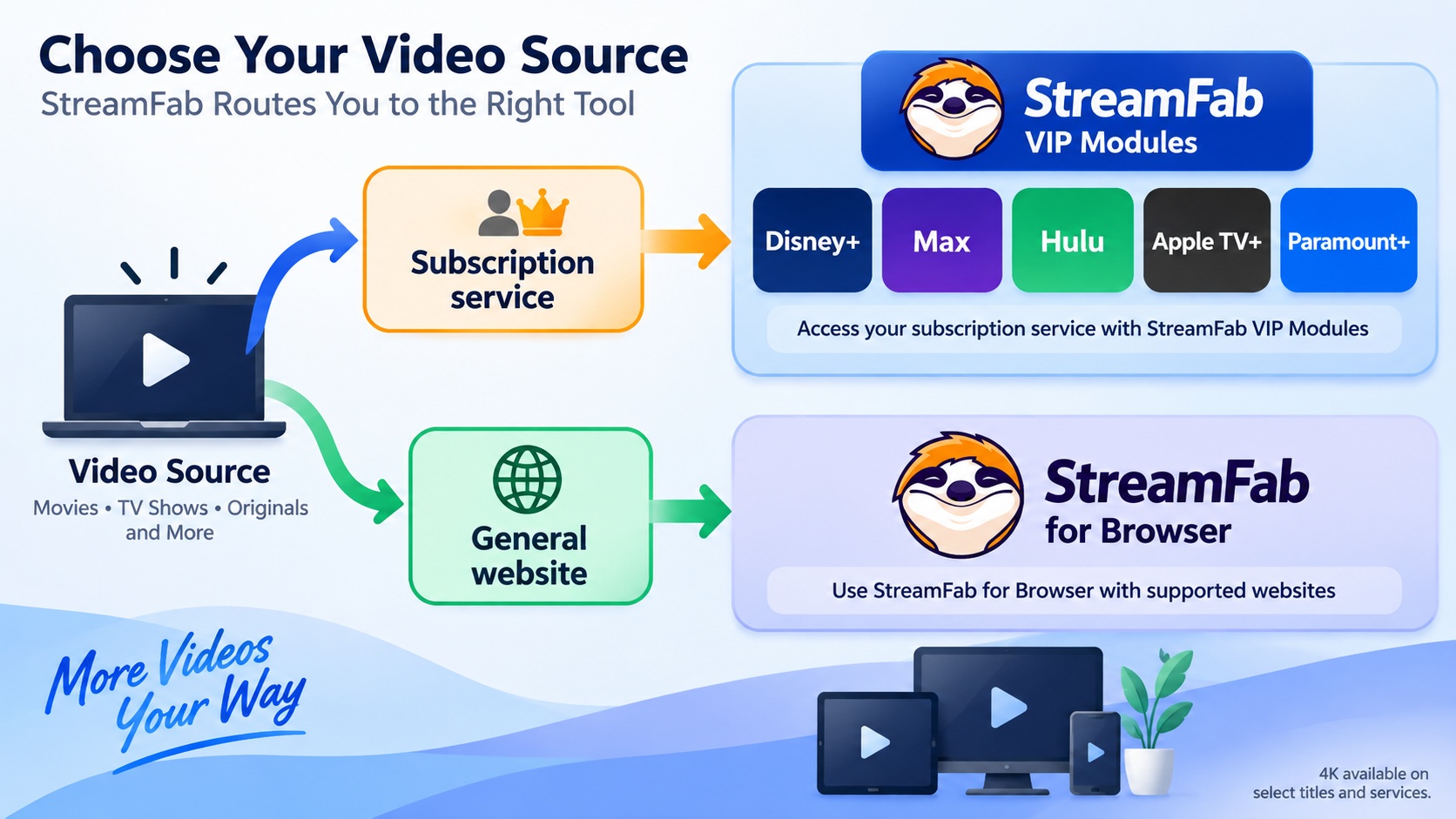
VIP modules handle individual subscription services; StreamFab for Browser handles a separate browser workflow. Choose the matching VIP module for the streaming account you use. A 4K video downloader’s product-wide resolution label does not describe every website.
I would use the dedicated service module for a subscription movie. Its sign-in and title-selection flow matches the steps below. For a supported general website, use the Browser path and select the quality offered for that page.
Current 4K Support Matrix
The service module sets the available download choices. The matrix summarizes service scope as of September 2026; your title’s dialog supplies the actual resolution, HDR, and audio selections. Use StreamFab’s release notes to resolve differences after an update.
| Service/module | Resolution scope | Subscription/title requirement | Region and version |
|---|---|---|---|
Disney+ | Up to 4K | 4K-enabled plan and title | Regional catalog; installed module |
Max (HBO Max) | Up to 4K | 4K-enabled plan and title | Regional catalog; installed module |
Hulu | Up to 4K | Selected 4K titles | Regional catalog; installed module |
Apple TV+ | Up to 4K | Eligible 4K title | Regional catalog; installed module |
Paramount+ | Up to 4K | Eligible plan and 4K title | Regional catalog; installed module |
| Netflix / Amazon Prime Video | Title’s available download quality | Active subscription; selected title | Module-specific release status |
A title’s audio and HDR choices belong to that title. The StreamFab Netflix Downloader review explains the Netflix-specific output options. For another service, open its module before choosing your format.
System Requirements and Storage
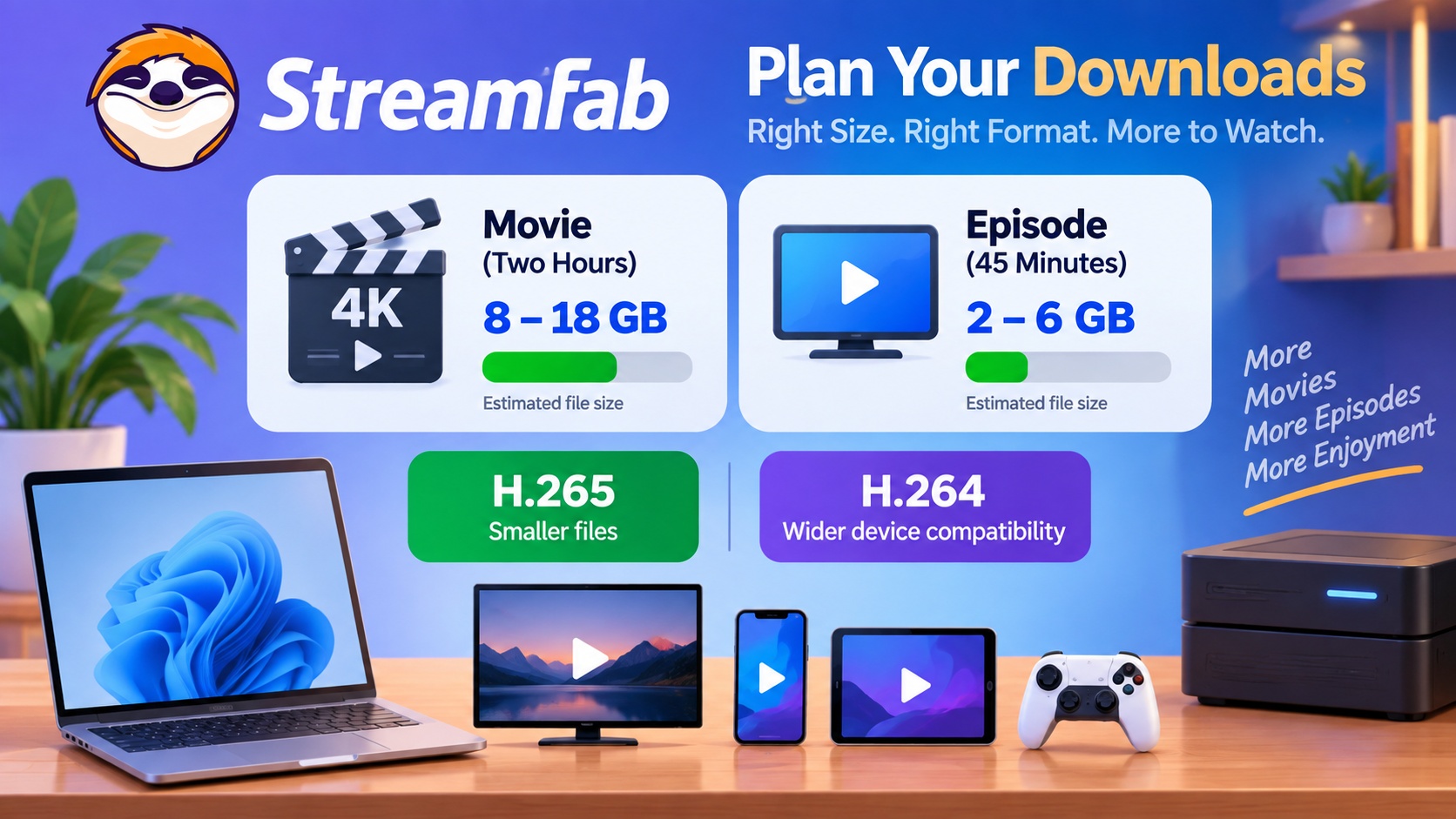
A Windows or Mac computer, available disk space, and a compatible player are the practical prerequisites. Budget 4K storage space before starting a queue. The ranges below are planning estimates from example movie and episode lengths, not download-size guarantees.
| Item | Planning guidance | What to do |
|---|---|---|
| Computer | Windows or Mac | Use the installer for your system |
| Playback | Player supporting your selected codec | Try a file on the intended device |
| Movie, about two hours | Roughly 8–18 GB | Leave additional free space |
| Episode, about 45 minutes | Roughly 2–6 GB | Multiply by the planned episode count |
| Connection | Stable internet access | Keep the connection active during downloads |
Check the output drive before selecting an entire season. Longer episodes and additional audio tracks consume more space; leave room for temporary files as well as completed downloads.
I would choose the format for the device that will play the file. A smaller file is little help when your TV cannot decode it. The output table below separates storage efficiency from playback compatibility.
Download a 4K Video
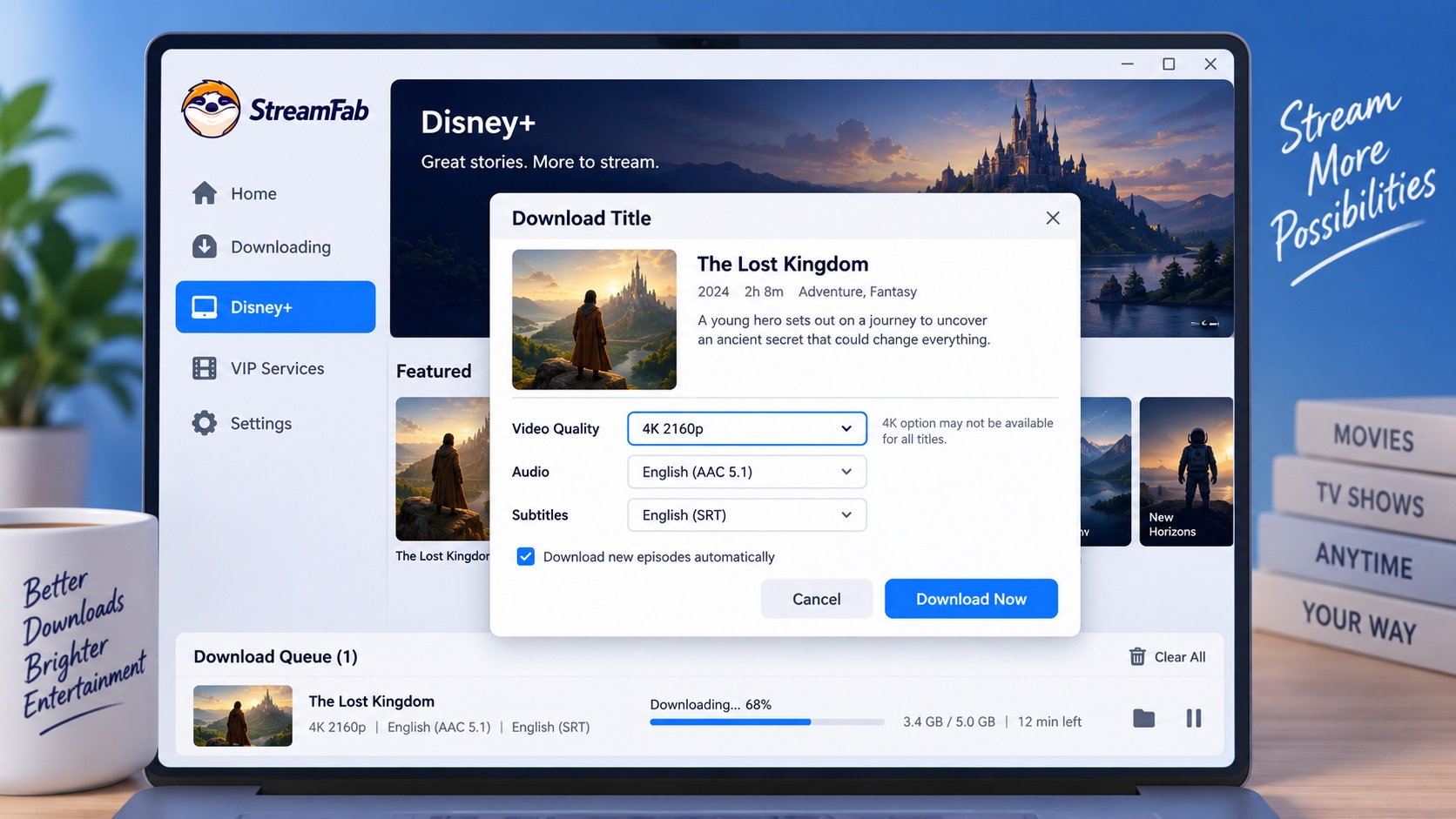
Use the dedicated service module to download 4K videos from your streaming account. Have your authorized account ready and confirm free disk space first. Select the offered source quality, then choose the audio and subtitles you need.
Install StreamFab
Download the official Windows or Mac installer using the button below. Run the installer and open StreamFab.
100% Safe & Clean100% Safe & CleanChoose a Service and Sign In
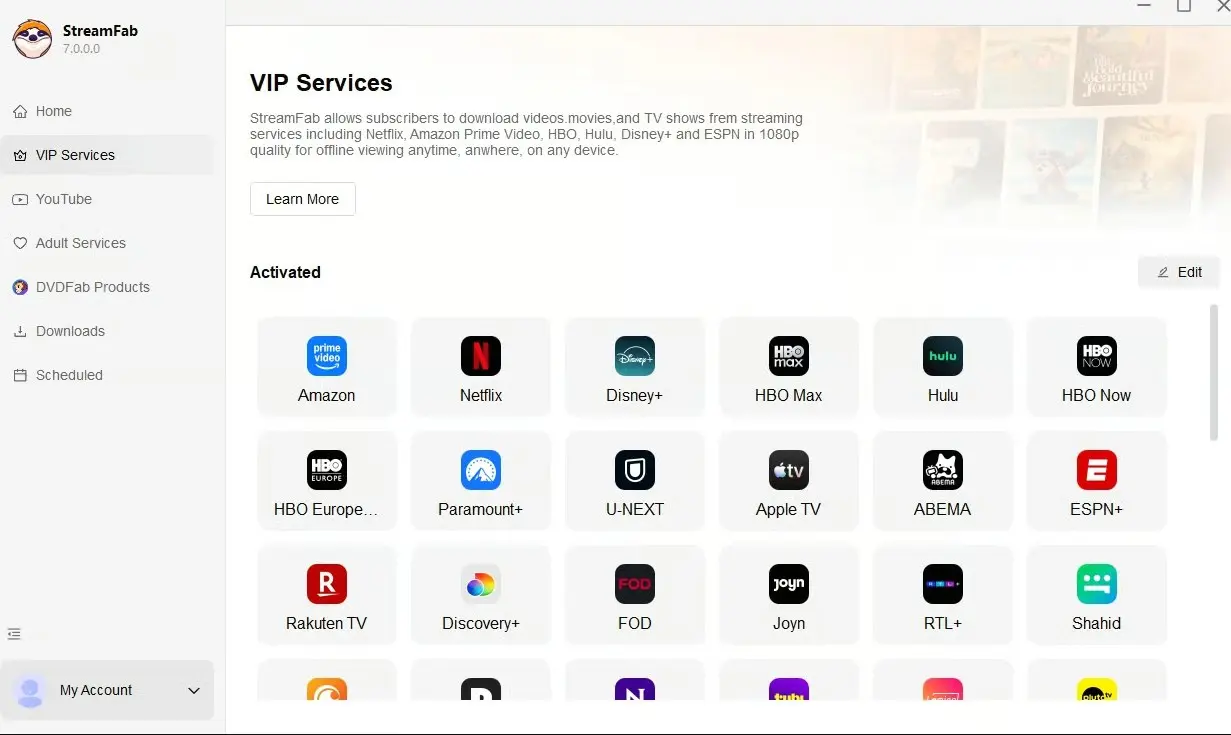
Select your streaming service in StreamFab Downloader. The built-in browser opens that service; sign in with your valid account.
Open the Title
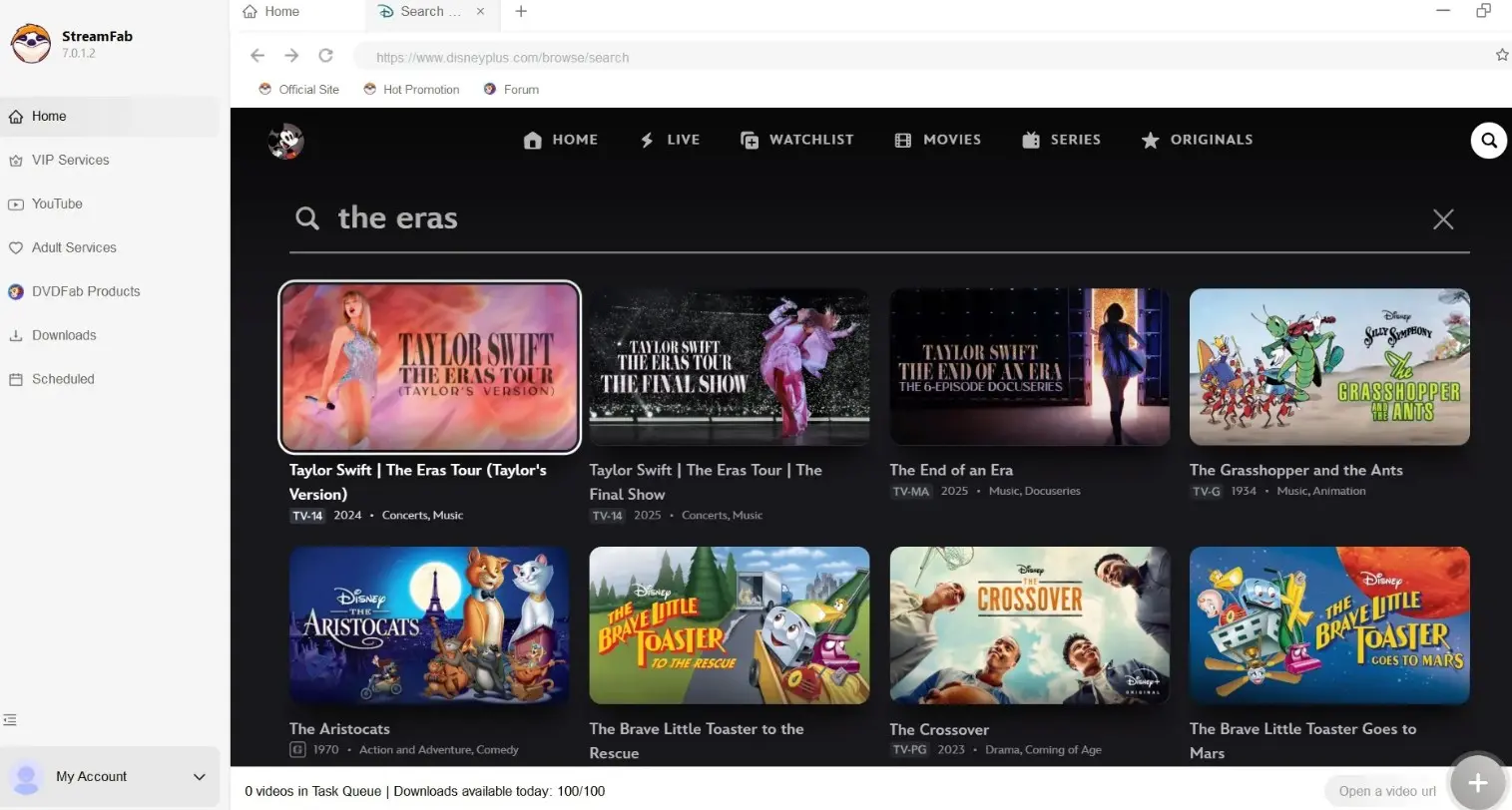
Search or browse to the movie or series you want to download. For a movie, click play to open the download dialog. For a series, open the season page and select episodes, or use Select All for the season.
Select 4K Quality
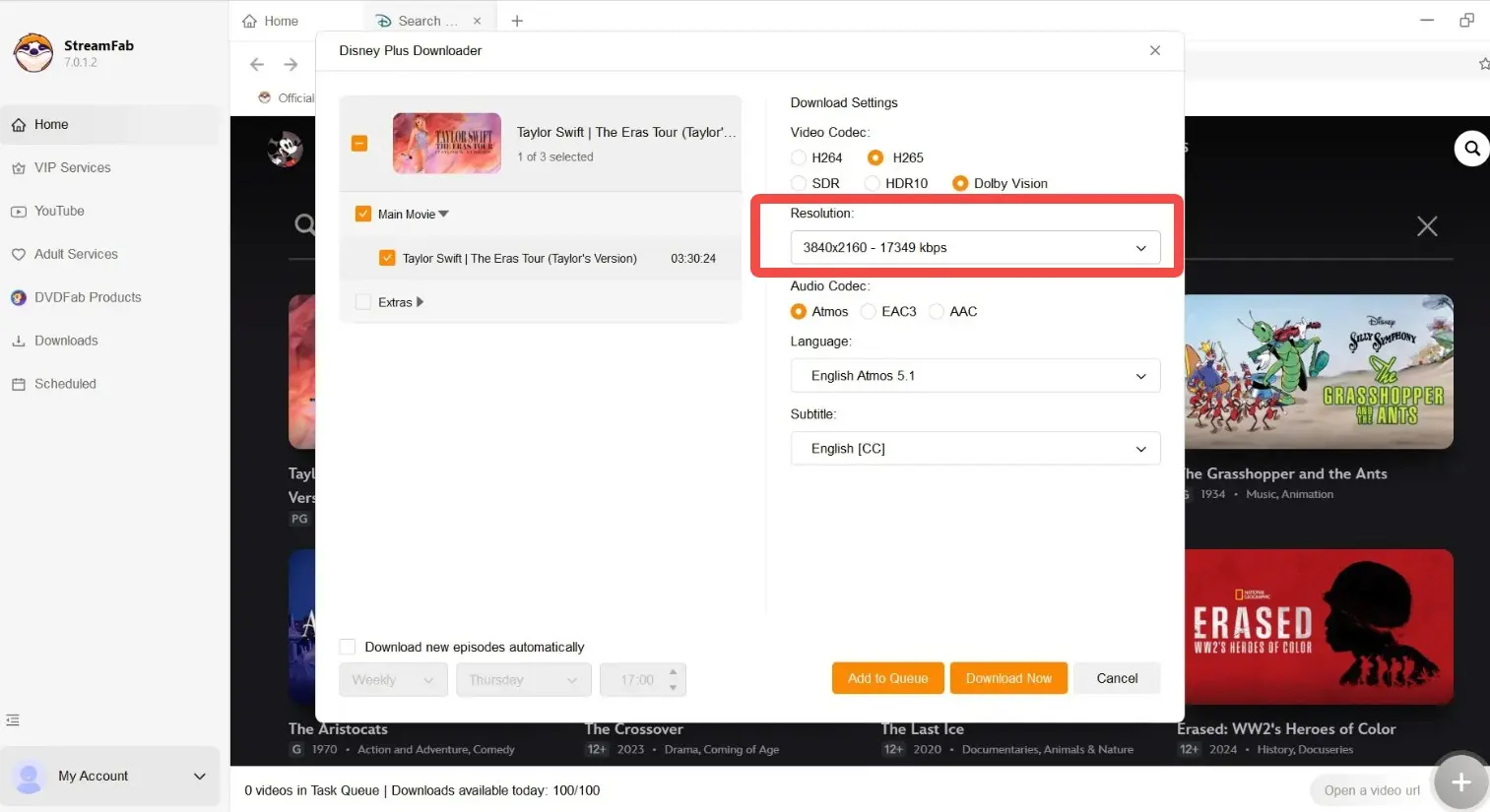
Set Video Quality to 4K (2160p) when offered. Select your preferred audio track and subtitle language, then click Download Now. A missing 4K option calls for the checks below, not an upscale.
Monitor and Find the File
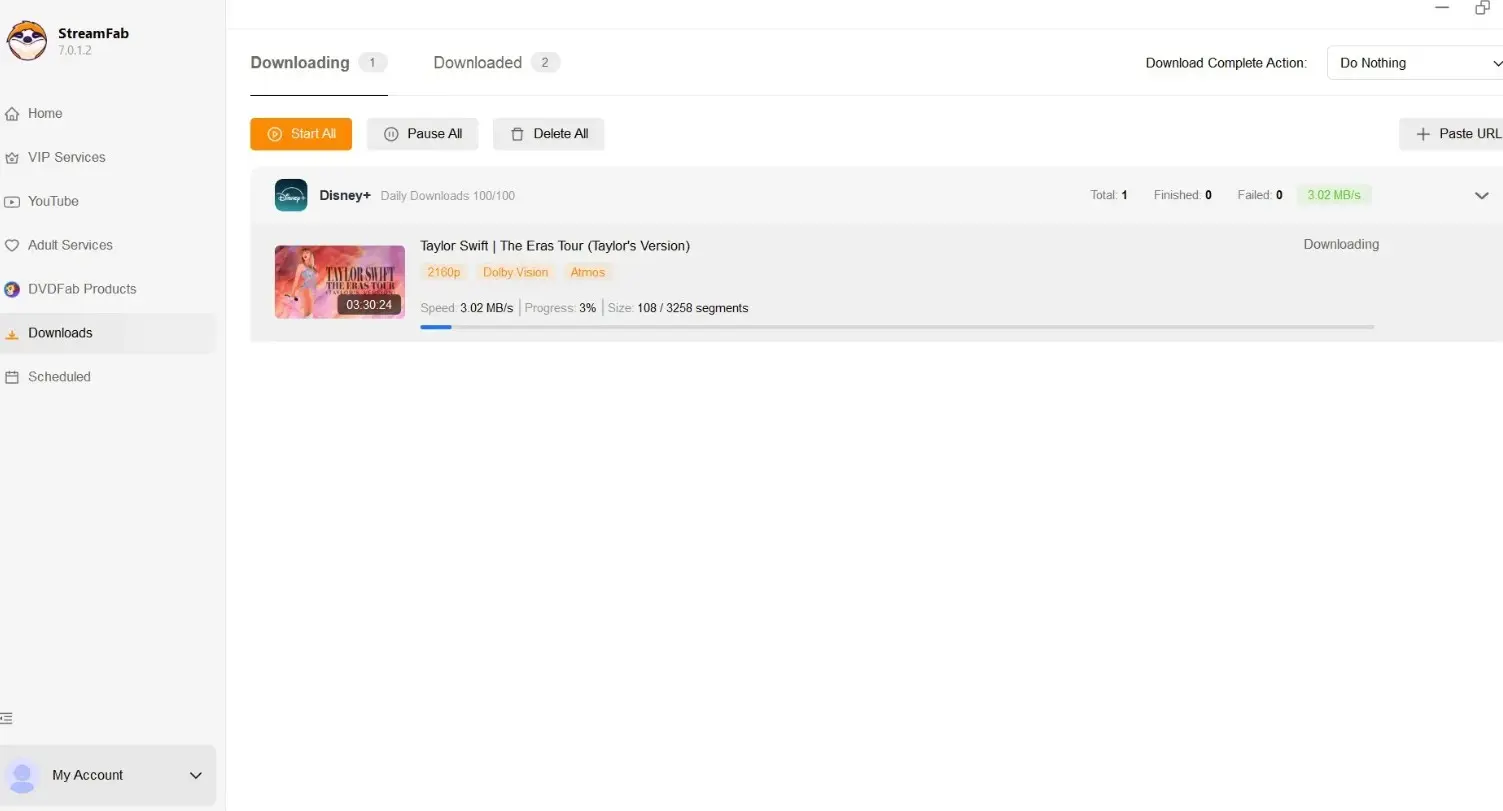
The queue shows download progress. When the item completes, click its folder icon to open the save location. Play the file on your intended device and confirm that the picture, sound, and subtitles work together.
The StreamFab usage guide explains the wider interface, including queue management and general settings. For this workflow, keep the selected service and output quality in view.
Choose 4K Output Settings
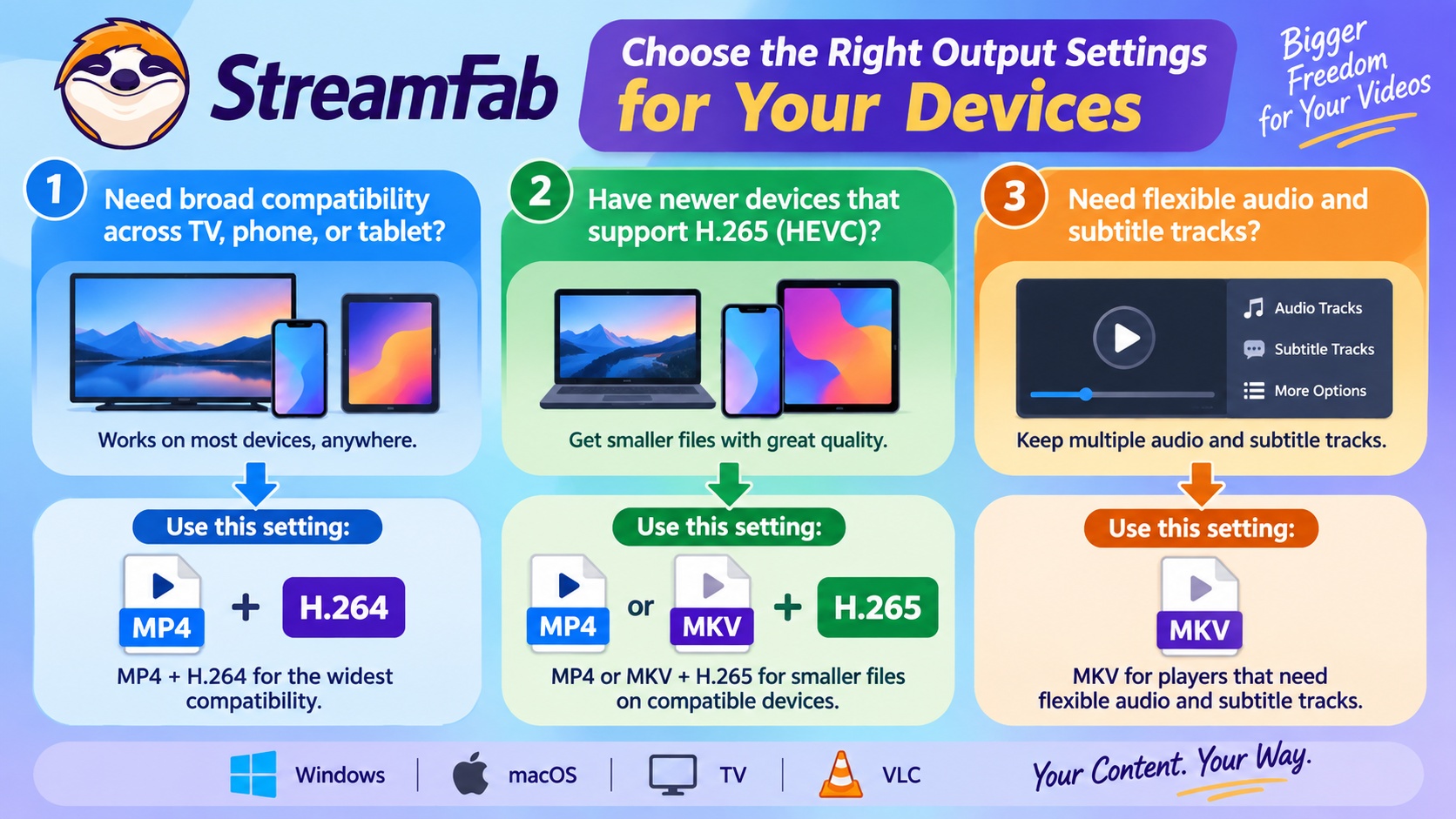
Choose MP4 for broad playback compatibility or MKV for a player that supports its track handling. For H.264 vs H.265, older hardware favors H.264; compatible newer devices make H.265 useful for storage efficiency. Your playback device decides the useful combination.
- MP4 | TVs and portable devices | Broad container compatibility | Player supports the selected codec
- MKV | Compatible media players | Multiple tracks and metadata | MKV-capable player
- H.264 | Older playback hardware | Wider decoding compatibility | Allow extra storage
- H.265 (HEVC) | HEVC-capable devices | Storage efficiency | HEVC decoding support
HDR and Dolby Atmos must be present in the source title. A container change does not create either feature, and a DD+ label alone does not establish Atmos. Choose an explicitly available Atmos track and use a player and audio setup that support it.
My preference for MP4 vs MKV is practical: start with what your TV or player opens reliably. Choose MKV when your player supports it and you need its track flexibility.
Why 4K Falls Back to 1080p
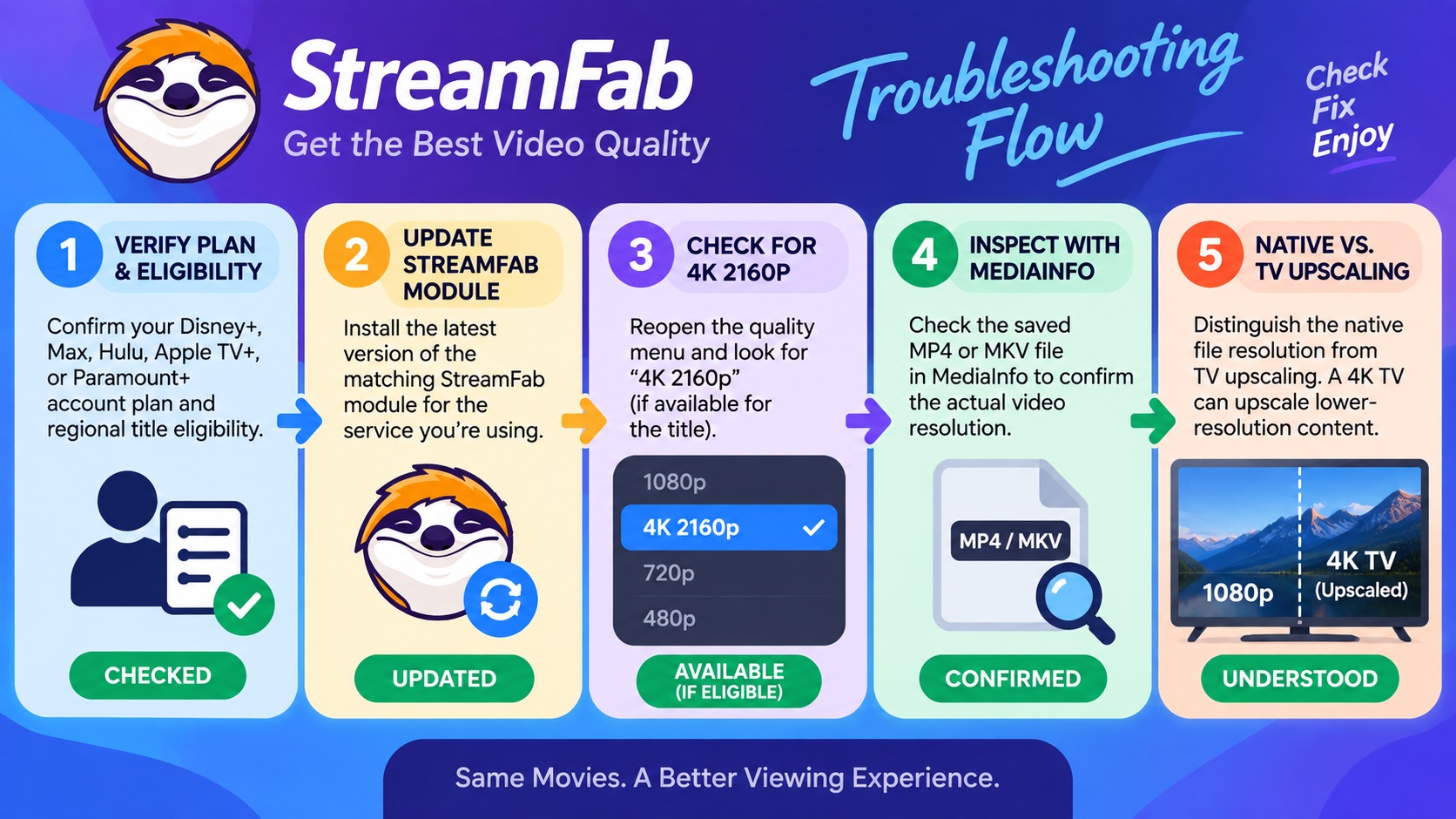
A missing 4K option and a file that plays at 1080p need different checks. Begin with the service account and title, then inspect the module, selected resolution, and saved file. A 4K display alone does not establish native 4K.
- Check your subscription: Confirm that your plan includes 4K for the selected service before changing download settings.
- Check the title: Open the exact movie or episode and look for its UHD or 4K designation. Another season or edition is a different source.
- Check regional availability: Confirm the title is offered in 4K in your location. A VPN connection does not establish regional viewing rights.
- Update StreamFab and read the release notes for the affected service module. Retry the same title after a relevant compatibility fix.
- Reopen the download dialog and confirm the selected quality. If 4K is absent, save an available resolution or retry after a module update.
- Inspect the saved file’s video properties in your player or MediaInfo. Separate file resolution from your display’s output resolution; scaling an HD file does not restore native 4K detail.
Installation failures and crashes require different fixes. The StreamFab troubleshooting guide covers those system-level problems so you can restore the application before retrying the title.
4K Download Trial and Plan Fit
The StreamFab trial gives you 30 days and three video downloads per streaming service, counted across that service’s trial period, as of September 2026. The trial includes the paid version’s quality options. Choose your intended service and a title you actually want to watch.
A service-specific license fits a single streaming library; All-In-One fits regular offline viewing across multiple services. Your streaming subscription remains separate. Use the download below to start with your preferred service, then choose the coverage that matches your viewing routine.
4K Download FAQ
Conclusion
A useful StreamFab 4K download starts with an eligible title and ends with a file your device plays correctly. For regular offline viewing across services, choose the matching modules and output settings. For a single library, start with that service’s workflow.
Keep the completed file’s output folder easy to find so you can open it in your preferred player before your next offline viewing session. complete StreamFab review
Download StreamFab for Windows or Mac and start your first authorized offline download with the service you use most.
Free Download macOS 11.0 or later