
A UHD purchase is not a guarantee of a 4K file. StreamFab Fandango at Home Downloader offers a desktop route to download Fandango movies for authorized offline viewing, but I would judge its value by the saved title’s resolution and playback on your own device.
StreamFab Fandango at Home Downloader runs on Windows and Mac and saves MP4 or MKV files. It is a third-party alternative to Fandango’s official download feature, for personal offline viewing of content you're authorized to access, where permitted by platform terms and applicable law.


Quick Summary: Is StreamFab Worth It for Fandango at Home?
StreamFab is a practical fit for managing authorized Fandango titles as local files. Its advertised ceiling is up to 4K, not a promise about each movie. Use the trial on the titles you own and inspect the completed files before building a larger queue.
- Resolution: Up to 4K is the module’s capability ceiling; check the completed file’s pixel dimensions for the actual result.
- HDR: HDR10 and Dolby Vision support are separate from resolution. Check the file’s HDR information and the target display’s playback.
- Audio: EAC3 5.1 and AAC 2.0 are supported output formats. Select the audio track offered for your title.
- Format: MP4 and MKV give you local-file choices. Confirm codec and subtitle playback on the device you intend to use.
Free Download macOS 11.0 or later
Why Downloading Fandango at Home Movies to PC Is Difficult
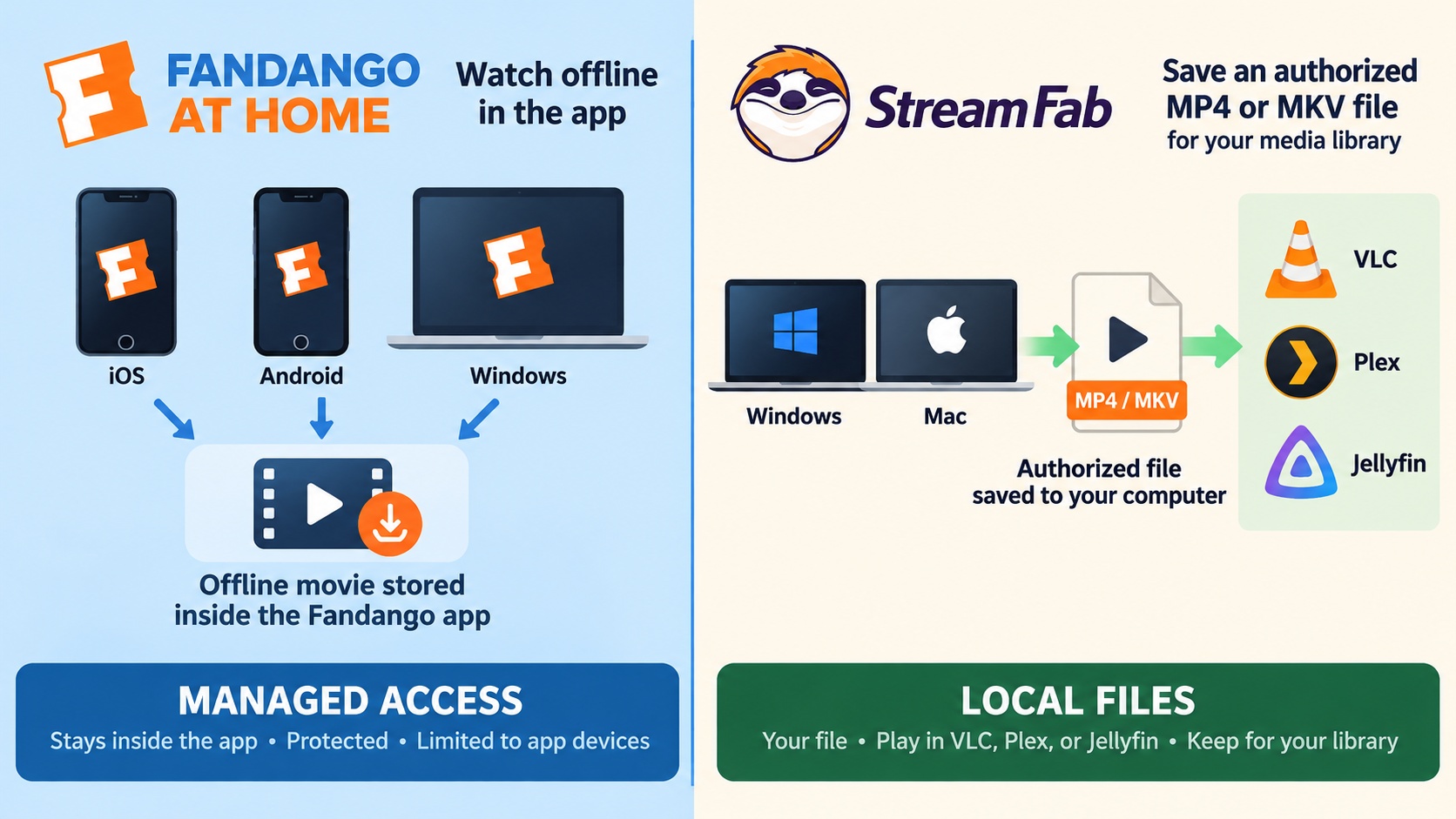
A Fandango desktop app and a portable video file serve different purposes. The U.S. Microsoft Store offers Fandango: Movies & Series for Windows. That app’s existence does not establish an MP4 or MKV export workflow.
Fandango at Home, formerly Vudu, sells and rents individual titles. A purchase gives you access through the service; it does not turn the movie into a file in your computer’s Videos folder. Rentals also have a viewing window. You should read the window attached to the specific rental before starting playback.
- Mobile offline viewing: Eligible downloads stay inside the Fandango app on iOS or Android. They are managed downloads, not ordinary MP4 files for a media library.
- Windows access: The Store app provides a Windows entry point. Treat installation, offline playback, and video-file export as separate functions.
- Quality entitlement: The edition in your library matters. A store page advertising UHD does not upgrade an HD or SD purchase.
Watching Fandango at Home offline on PC and mobile involves different playback paths: a managed app download stays with the app, while an authorized local-file workflow lets you choose a compatible player.
How StreamFab Fandango at Home Downloader Works
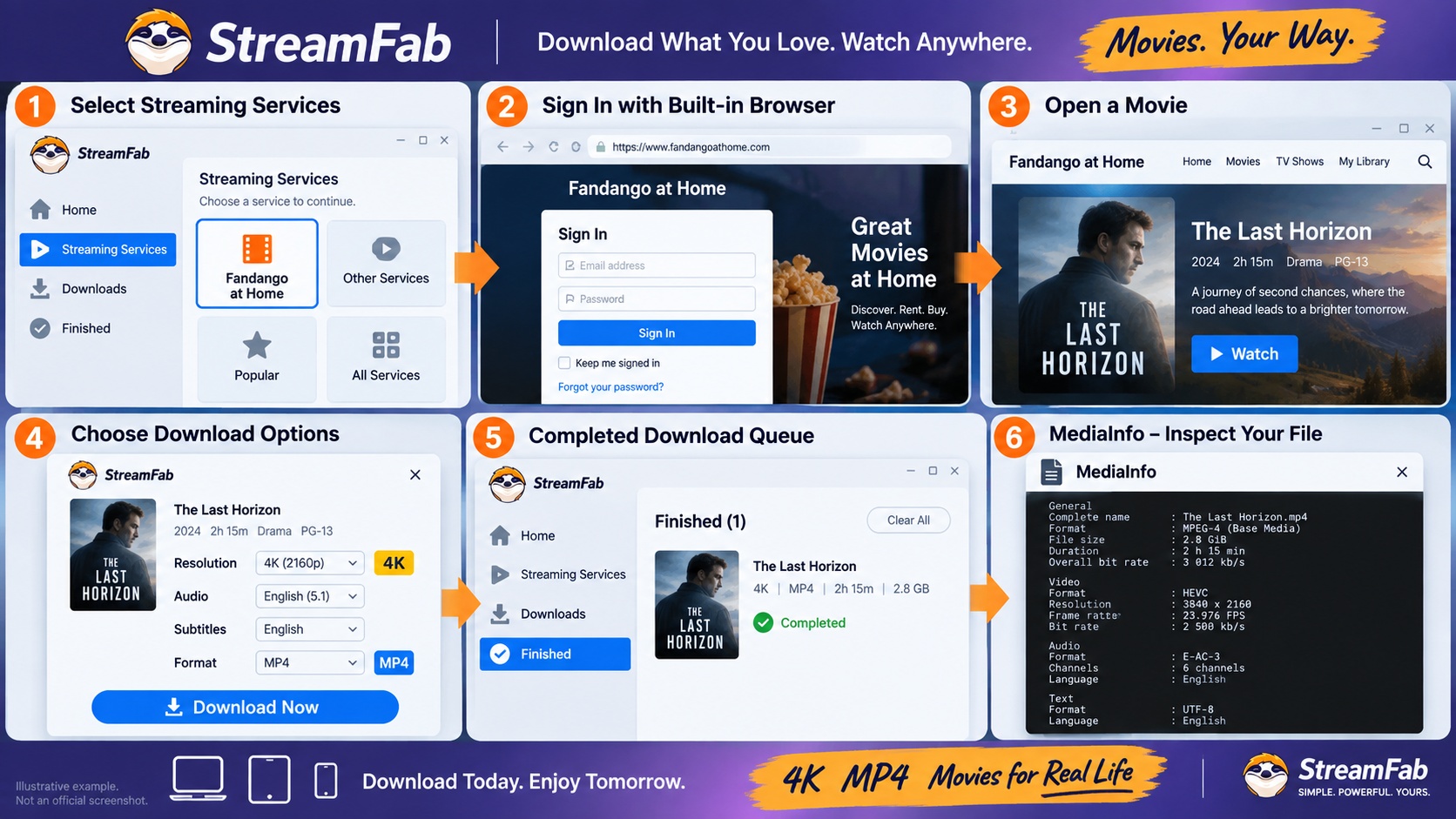
StreamFab’s desktop application opens Fandango inside its built-in browser and saves selected titles to your computer. You choose the output settings before downloading. Windows and Mac versions provide this desktop workflow.
As of September 2026, the product page also offers an “Also Available on Browser Extension” entry. Choose the desktop application for the built-in-browser steps below; choose the extension entry to start from the browser installation route. These are distinct entry points, not a promise of matching settings or output.
1. Before You Begin
You need an active Fandango account with access to the purchased or rented title. Sign in and confirm that the movie plays. Use a Windows or Mac computer with enough free storage for the completed file.
StreamFab’s built-in browser opens Fandango at Home. After you select a title, the download dialog offers the available video, audio, and subtitle settings, and the application saves the selected output to your drive.
Key Capabilities of the Fandango at Home Module
A local library needs more than a file that downloads successfully. Check playback, tracks, and storage together. Saving Fandango to MP4 or saving Fandango to MKV changes the container; it does not turn an HD source into UHD.
The StreamFab setup and download workflow places service selection, sign-in, and output choices inside the desktop application. Keep the output folder easy to find so you can inspect the first completed movie.
- Library details: Check the title and episode metadata in your Fandango Plex library or Jellyfin library.
- Tracks: Play the selected subtitles and switch between any saved audio tracks. Confirm the language you wanted is present.
- Playback and storage: Inspect the actual file size, aspect ratio, and direct-play status on your target client. Allow enough drive space before queuing more titles.
Step-by-Step: Download Fandango at Home Movies with StreamFab
Start with one title you already own. Complete the download and playback check before adding a larger queue.
Fandango at Home is primarily a U.S. service. Confirm that your account can play the title in your location before starting the download.
Download and install StreamFab. Use the official Windows or Mac download button. Run the installer and follow its prompts. On Windows, right-click the downloaded installer, open Properties, then inspect Digital Signatures and the signature details before running it.
100% Safe & Clean100% Safe & CleanOpen the Fandango at Home module. Launch StreamFab, select Streaming Services in the left panel, and choose Fandango at Home. The built-in browser opens the service.
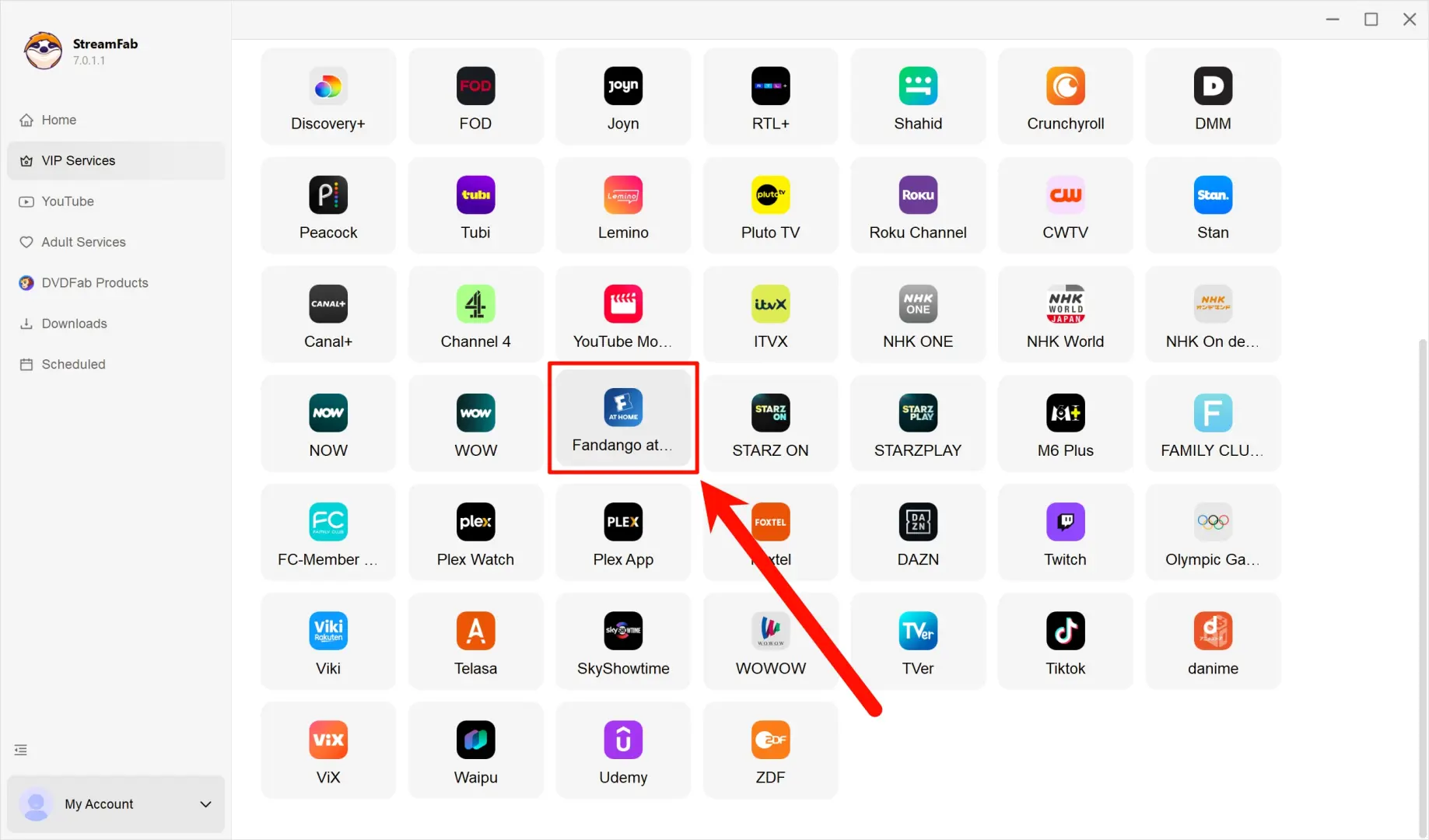
Sign in and choose your movie. Enter your Fandango at Home or legacy Vudu credentials in the built-in browser. Navigate to the purchased or rented title and open its detail page.
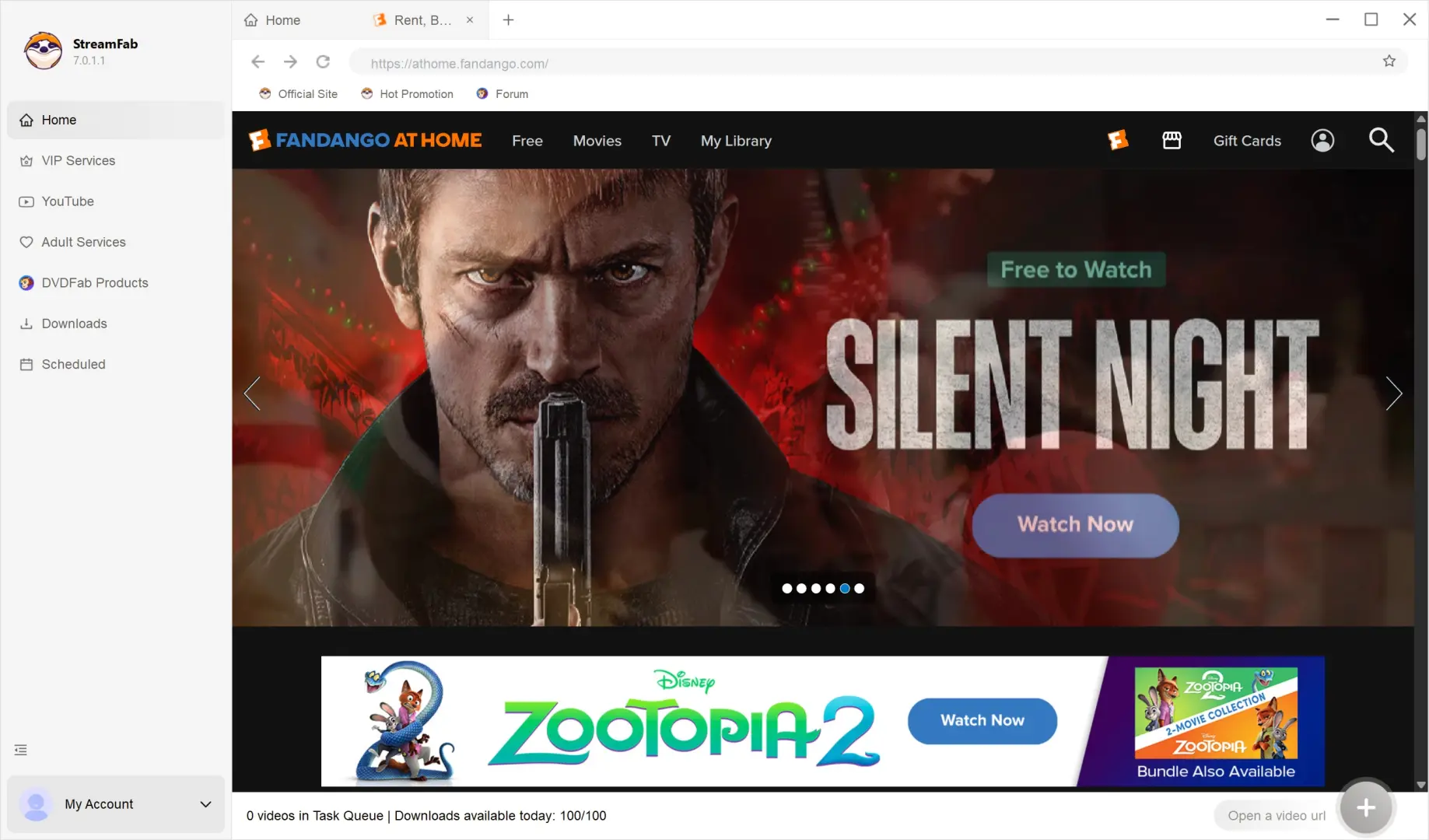
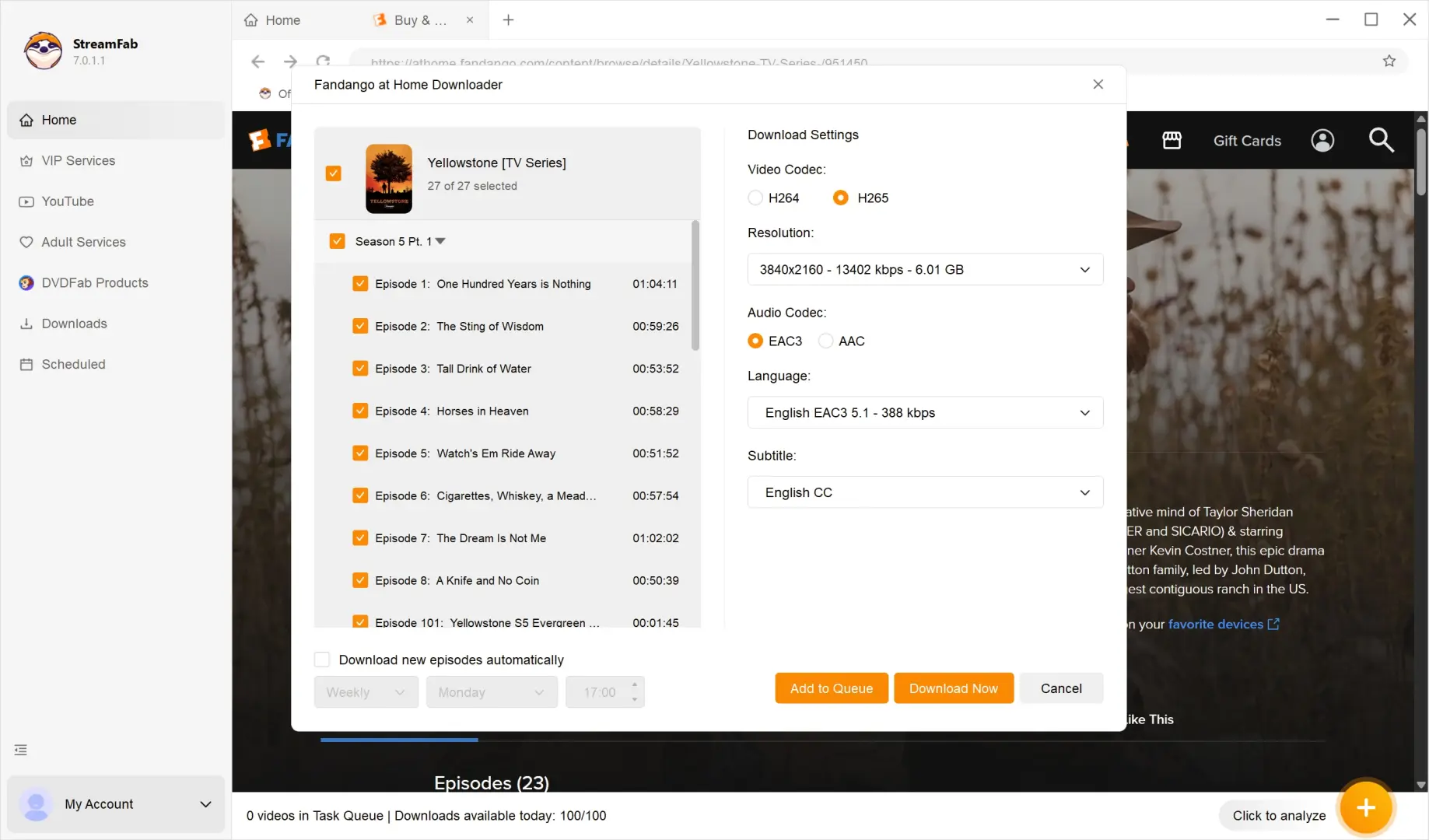
Select the output and start downloading. Play the title to open the download dialog. Choose an offered resolution, audio track, and subtitle language, then select Download Now. A requested 4K setting is not the final file measurement.
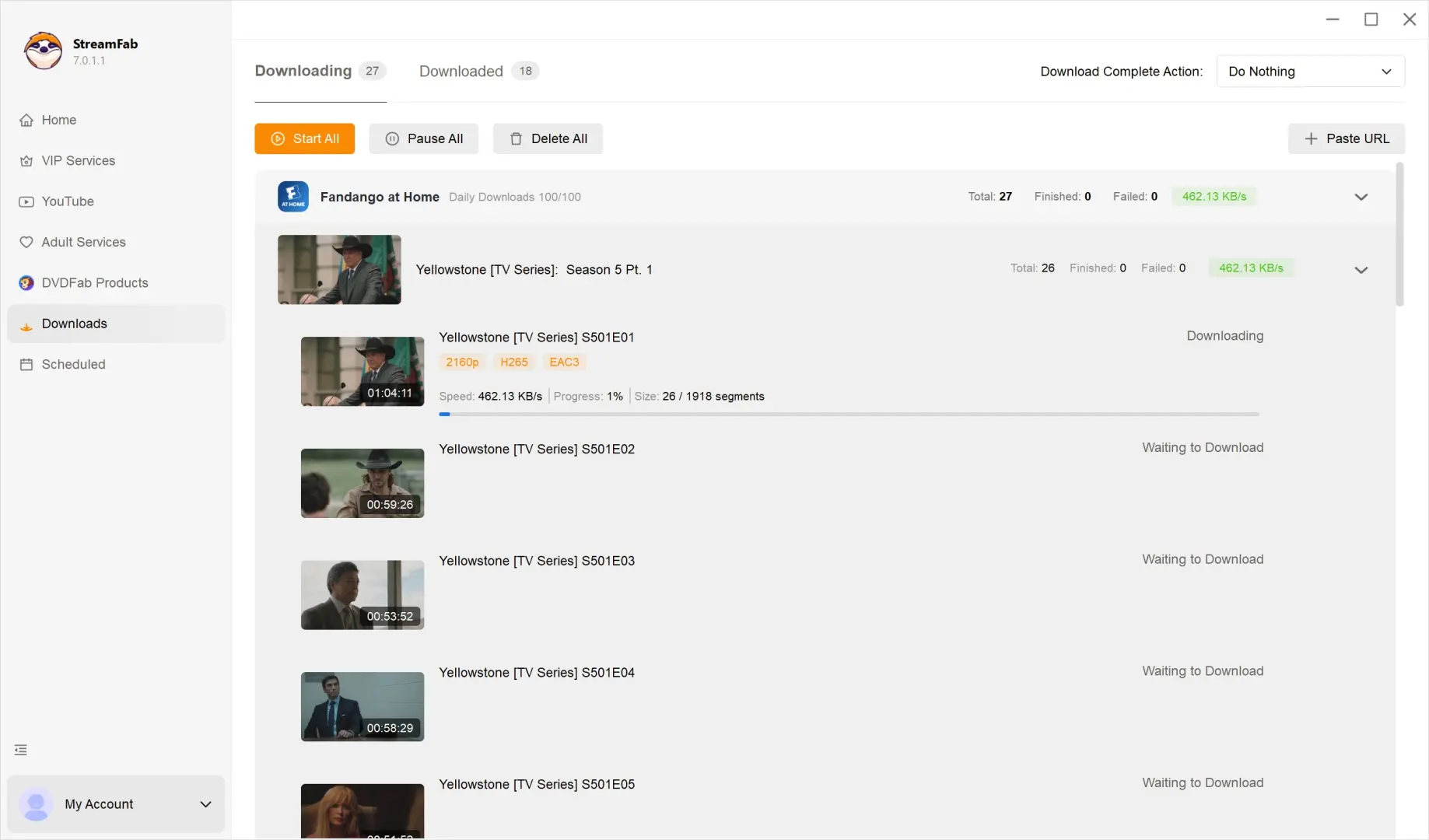
Open the completed file. Watch the download queue for completion. Click the folder icon beside the finished item to open its save location, then play the movie and inspect its MediaInfo details.
Output Quality Check: 4K HDR, Codec, and Audio Results
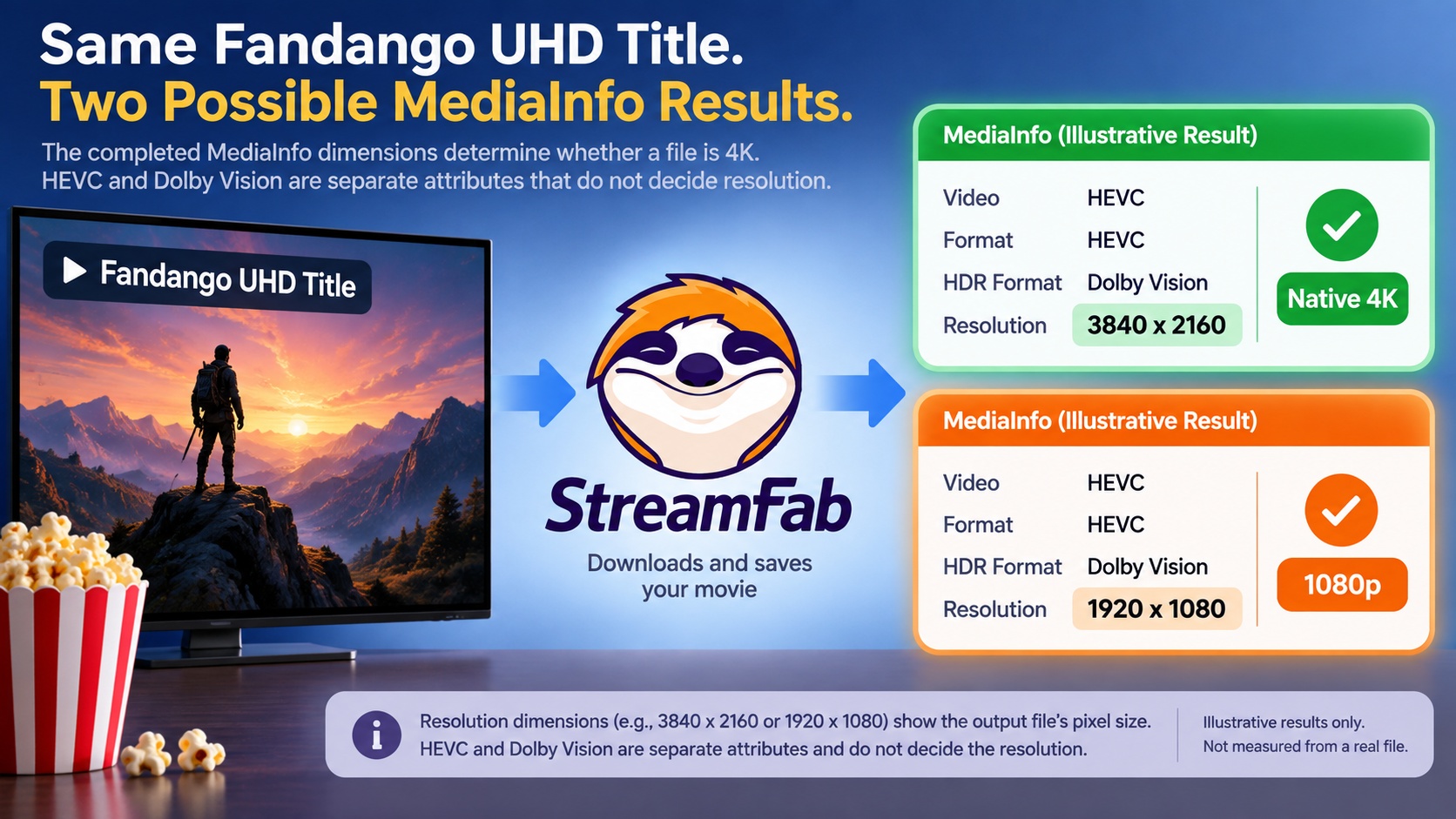
Pixel dimensions settle whether a saved movie is 2160p or 1080p. HDR and codec labels answer different questions. I would trust the completed file’s MediaInfo dimensions over the UHD store badge when judging a Fandango 4K download.
Start with your UHD purchase and the offered 4K and H.265 settings. After downloading, compare those choices with the file’s pixel dimensions, codec, HDR information, and audio tracks in MediaInfo.
| File check | What to record | What it tells you |
|---|---|---|
| Pixels | Width and height | Actual saved resolution |
| Video | Codec and video bitrate | Encoding and data rate |
| HDR | HDR format and profile | HDR information in the file |
| Audio | Codec, channels, and language | Saved audio track |
| Playback | Aspect ratio and direct-play status | Fit with your target player |
| Context | Title, entitlement, app version, and test date | Conditions for repeating your check |
One forum user described a UHD title producing a 1920×1080 H.265 file with Dolby Vision and Atmos. That is an individual account, not a universal output limit. Use your trial download to check your own title; Dolby Vision information by itself does not establish 4K resolution.
The Fandango at Home bitrate in MediaInfo describes the saved video’s data rate. Record that value separately from pixel dimensions. Neither a larger file nor a higher bitrate turns 1920×1080 into 3840×2160.
StreamFab vs. Other Ways to Save Fandango at Home Content
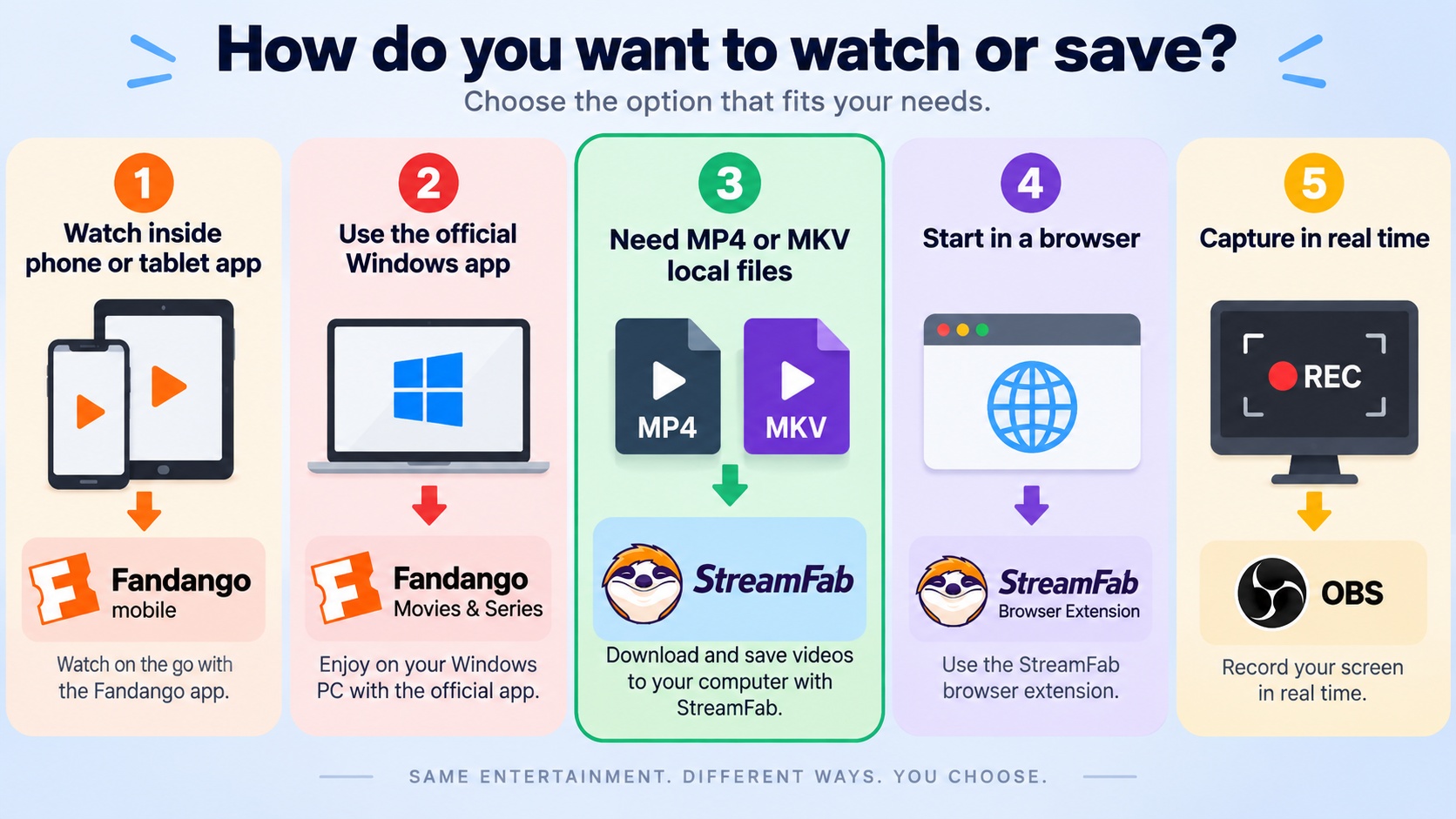
Choose the mobile app for eligible in-app offline viewing and StreamFab desktop for an authorized MP4 or MKV workflow. The Windows Store app and StreamFab’s extension provide additional entry points. For a local library, choose a workflow that saves video files.
Official mobile app: Choose this for a movie you want to watch inside Fandango on your phone or tablet. Managed downloads remain tied to the app’s viewing conditions.
Fandango: Movies & Series for Windows: Choose the U.S. Microsoft Store app for the official Windows application. Keep that access path separate from exporting a movie to a general-purpose player.
StreamFab desktop: Choose this for Windows or Mac file management with MP4 or MKV output. The module supports up to 4K; your trial file supplies the title-level resolution result.
StreamFab browser extension: The product page provides a browser-extension installation entry alongside its desktop downloads. Choose that entry to begin the browser route.
Screen recording: Recording captures playback in real time, so a full movie requires its running time. For a local library, I prefer the desktop download workflow’s file and track choices over a manual recording session.
Pricing and Free Trial
The Fandango module and All-In-One cover different service needs. The standalone option targets Fandango at Home; the bundle covers multiple supported services. Choose the scope that matches what you actually watch.
The standalone Fandango at Home module covers this service, while All-In-One combines multiple supported service modules in one plan. official StreamFab Fandango at Home Downloader page
The StreamFab free trial lasts 30 days and includes three video downloads per streaming service, counted cumulatively during the trial. Desktop trial features match the paid version, including available quality settings, batch downloads, subtitles, and MP4/MKV output. The limit is the download count.
Known Issues and Troubleshooting Tips
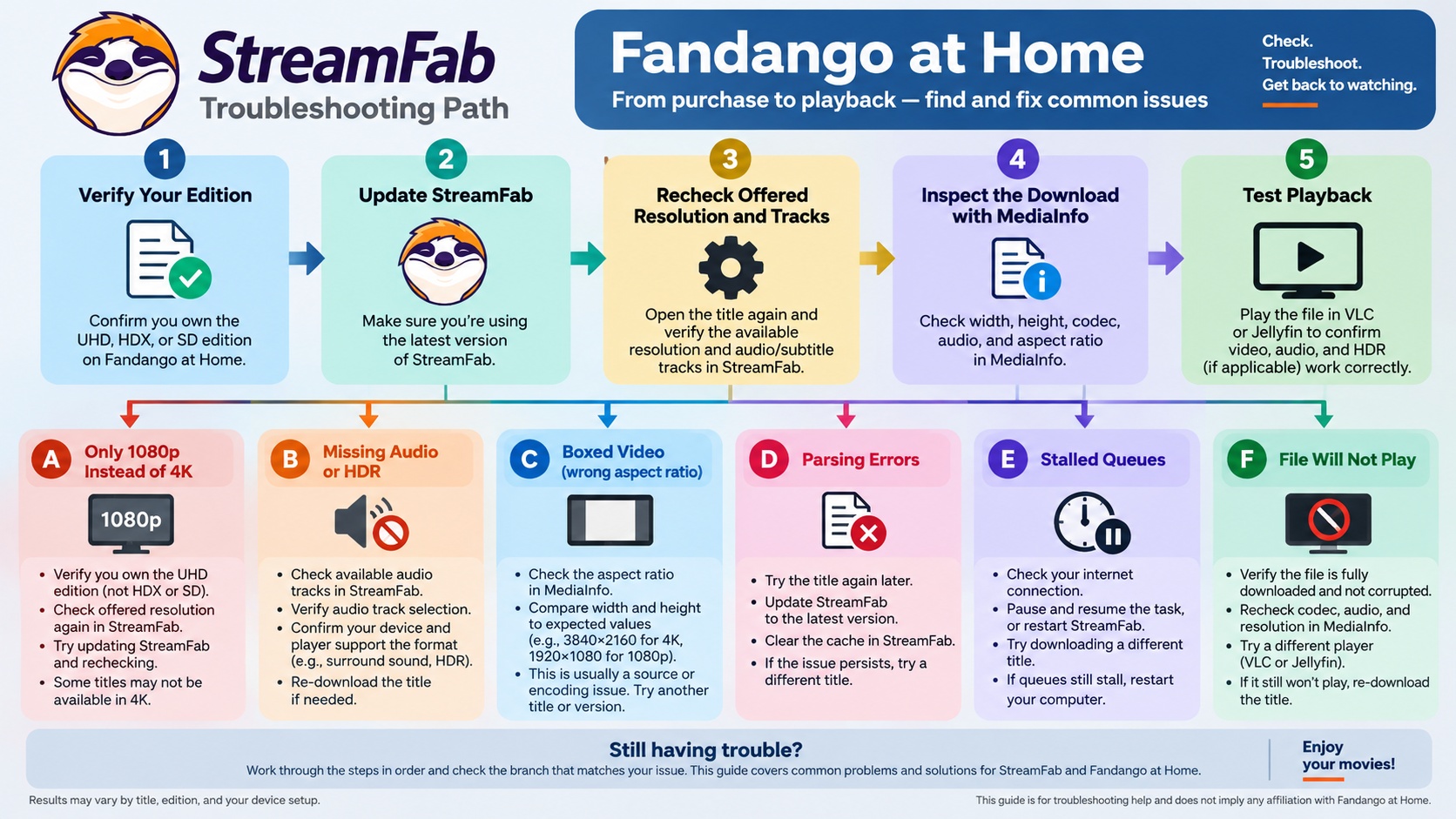
Start troubleshooting with the title and the finished file. Confirm your purchase tier, record the app version, and compare the requested settings with MediaInfo. A concrete symptom gives you a useful next action.
- H.265 or Dolby Vision is missing: An individual forum report described this on an owned UHD movie. Reopen the title and inspect the offered codec and HDR choices; select a listed option rather than assuming the UHD badge supplies it.
- An audio track is missing: A forum post raised audio-manifest freshness as a concern on particular titles. Reload the title and inspect the audio list again. Compare the selected track with the completed file’s codec, channel count, and language.
- A UHD title produces 1080p: Confirm the edition in your account, then check the saved width and height. Retry that exact title after updating StreamFab; retain the original file details for comparison.
- The movie appears boxed in: A forum user reported black bars on all sides in Jellyfin and VLC. Check the file’s display aspect ratio, reset player zoom or crop settings, and compare playback in another player before downloading again.
- An SD title fails: Confirm which edition your account owns and request an offered quality. Avoid treating a higher-quality store listing as the edition already in your library.
- The saved file will not play: Try another player, then retry with hardware acceleration disabled if that setting is available. Compare the new file with the failed one before changing more settings.
- A parsing error appears: Clear the built-in browser’s cache, restart StreamFab, and sign in again. Reopen the title before starting a fresh download.
- The queue stalls: Restore the network connection, then use Resume on the stalled item when offered. Confirm the completed file opens after the queue finishes.
The Fandango download troubleshooting guide connects title-specific failures with compatibility and update checks. Keep the title, app version, and requested settings together when following those steps.
App-wide crashes need a different diagnosis. The StreamFab not-working troubleshooting steps address startup and system-level failures rather than one movie’s output.
Frequently Asked Questions
Conclusion
StreamFab Fandango at Home Downloader fits an authorized local movie library on Windows or Mac. For a 4K purchase decision, the useful result is the completed file you can play, not the maximum resolution on a product page. Use the trial to check an owned title on your intended player.
StreamFab Fandango at Home Downloader is a service-specific module within StreamFab. Choose it for Fandango titles, or consider All-In-One when your regular viewing spans multiple supported services. complete StreamFab review
