For desktop viewers who want local Paramount+ files, StreamFab Paramount Plus Downloader is a useful fit: the June 2026 test snapshot reached up to 4K with HDR and Dolby Atmos on supported titles. It is less suitable for occasional mobile viewing, and results remain title-, build-, plan-, and region-dependent.
Paramount+ has grown into one of the major streaming platforms in the United States, offering a library that spans CBS originals, Showtime content, live sports, and a growing catalog of movies and exclusive series. But when it comes to downloading content for offline viewing, the official feature has some notable limitations, including mobile-only access, a 25-title cap, and downloads that expire after 30 days.
StreamFab Paramount Plus Downloader is a Windows and Mac desktop tool for saving supported Paramount+ videos as standard MP4 or MKV files. In the June 2026 test snapshot, supported titles reached up to 4K, and tested output included HDR10+, Dolby Vision, and Dolby Atmos audio, none of which the official mobile download feature preserves in a portable local file; other titles were limited to 1080p or lower. The output files are saved locally for personal offline viewing and can be opened in compatible media players.

※The content described in this article assumes compliance with applicable copyright laws and the terms of service of the respective streaming providers. It is intended solely for legitimate personal use within authorized viewing rights.
Quick Summary: Is StreamFab Paramount Plus Downloader Worth It?
In the June 2026 test snapshot, supported Paramount+ titles reached up to 4K with HDR and Dolby Atmos, while other titles were limited to 1080p or lower. Results can change by StreamFab build, title, account plan, region, and current Paramount+ compatibility. The tool also requires an active Paramount+ subscription to access content for download. The dated quality section is more useful than a universal promise because Paramount+ results are tied to the StreamFab build and the specific title.
If you want the short answer before reading the full review:
- 🟢 Resolution: Downloads at up to 4K UHD on supported titles, while other titles may be limited to 1080p or lower.
- 🟢 HDR: HDR10+ and Dolby Vision may be retained in the output file on supported titles, subject to the current build and source availability.
- 🟢 Audio: Dolby Atmos, EAC3 5.1 surround, or AAC 2.0 stereo may be available at download time, depending on the title and account.
- 🟢 Format: MP4 (H.264) or MKV (H.265/HEVC) — plays in VLC, Plex, Kodi, and most smart TVs without conversion.
- 🟡 Limitation: Results and supported titles vary by build, title, plan, region, and current Paramount+ compatibility; an active Paramount+ subscription is required.
Free Download macOS 11.0 or later
Current Reliability and Buyer Feedback
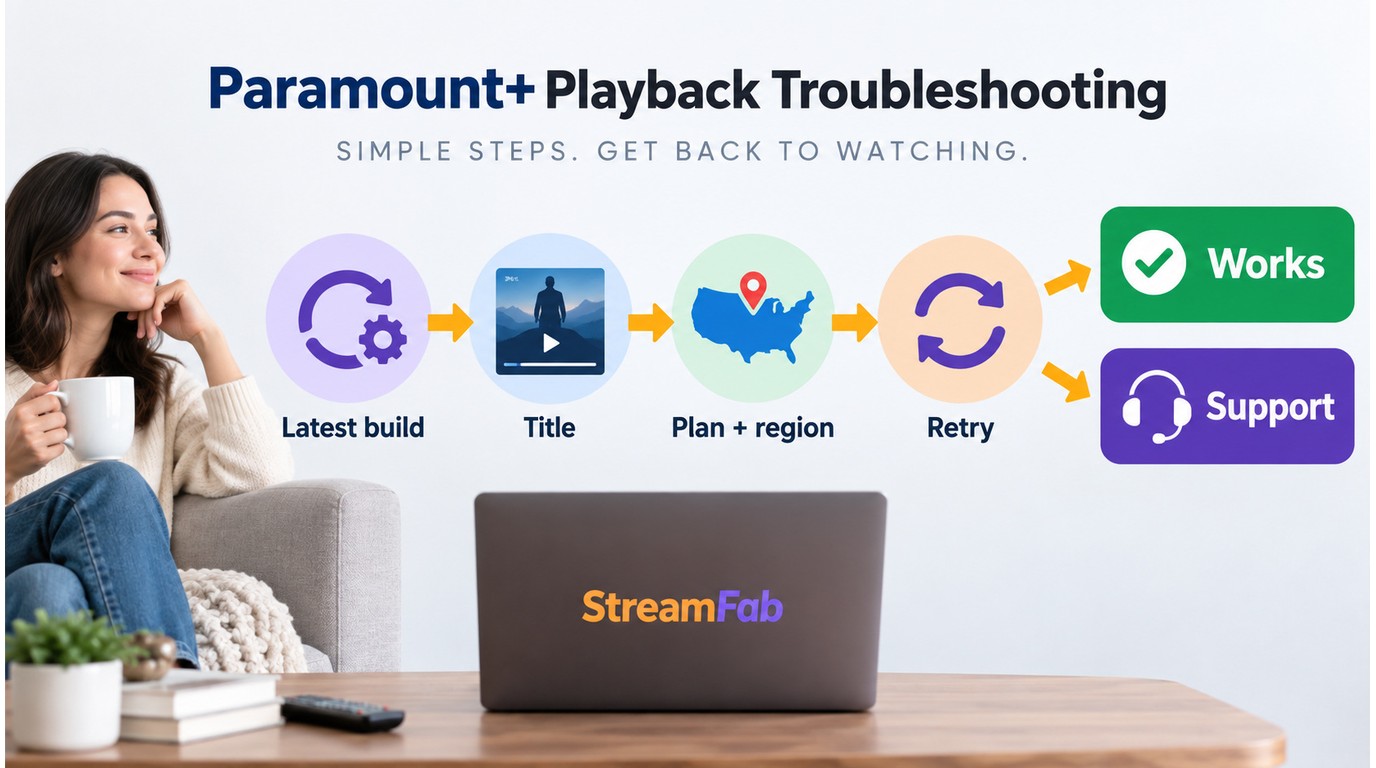
User discussions from 2026 present a mixed but useful picture of StreamFab reliability. Some Paramount+ titles have regained higher-quality support after earlier quality caps, while other users describe title-level failures, repeated retries, or analysis errors. These reports describe individual experiences rather than a universal result, but they matter when a download tool is part of a paid offline-viewing workflow.
What Recent Users Report
The recurring pattern is interruption rather than a single fixed outcome: one title may process successfully while another requires a retry or remains unavailable. Users have also connected temporary quality limits and slower recovery after platform changes with the value they expect from a paid downloader.
What the Feedback Means for Buyers
For a current Paramount+ title, install the latest version after checking the StreamFab updates, then retry a supported on-demand title and use the official troubleshooting path if the problem continues. The free trial is the practical way to check the titles, plan, and region that matter to you; purchase terms are covered by StreamFab's refund policy.
My view is that StreamFab fits desktop viewers who value local-file playback and can accept occasional update-related interruptions. If you only need occasional mobile viewing, Paramount+'s official download feature remains the simpler starting point.
Why Paramount+'s Official Downloads Fall Short
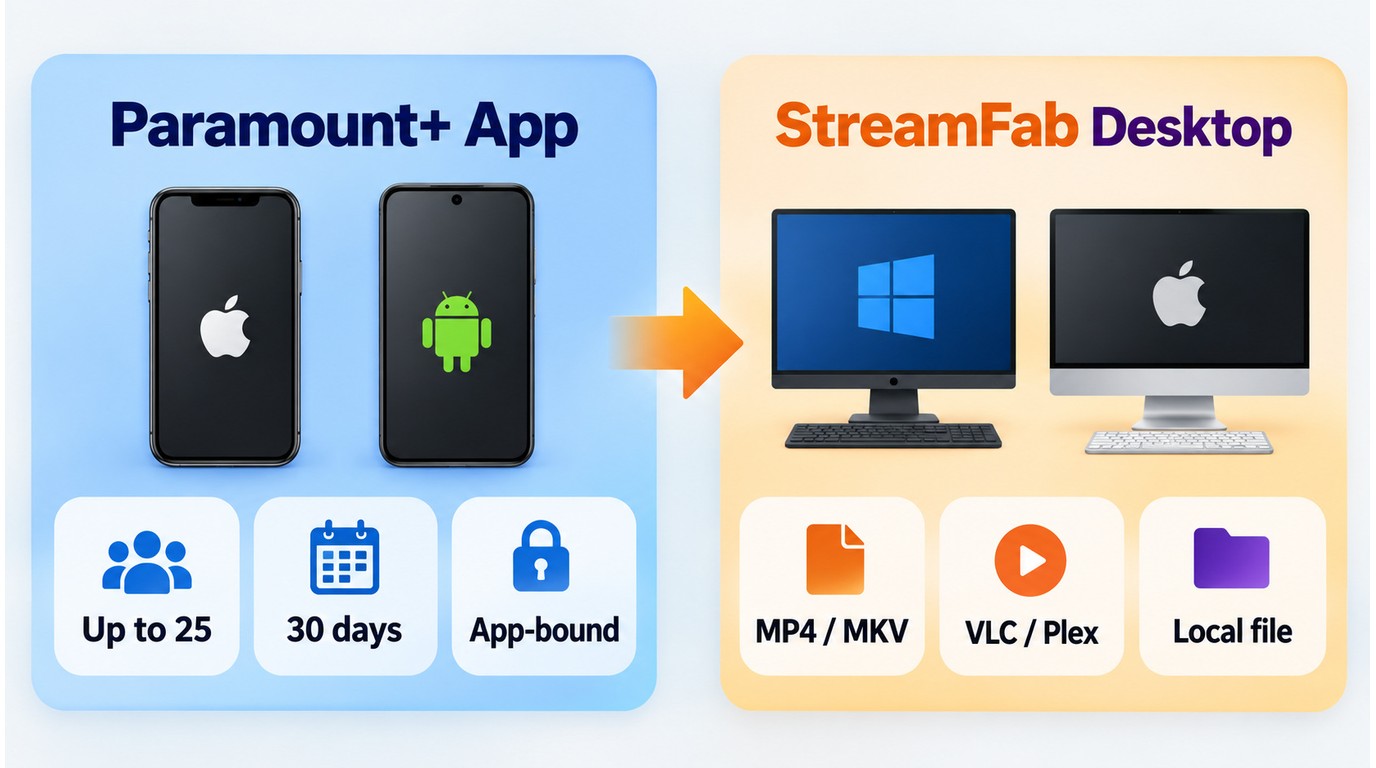
Paramount+ does offer an official download feature, but it is designed for app-managed mobile viewing rather than a desktop local-file workflow. The main limits are straightforward:
- Mobile-only access: Official downloads are available through the Paramount+ mobile app, not as standard files for Windows or Mac.
- Title and plan limits: The feature is available to Premium subscribers, with a 25-title limit. Essential plan subscribers do not get the official download feature.
- Limited offline window: Downloads can expire after 30 days, with a shorter playback window after viewing begins.
- App-bound playback: Official downloads remain managed inside the Paramount+ app rather than opening as MP4 or MKV files in a general media player.
- Connectivity reports: Some Paramount+ users report that app-bound downloads may be inaccessible when the app cannot authenticate without a connection. That is reported app behavior rather than a universal result, but it helps explain why a standard local-file workflow can be useful during travel.
For occasional phone or tablet viewing, the official feature remains the simplest fit. For viewers who want local-file playback on a PC, Mac, or compatible media setup, a desktop workflow addresses a different use case.
How StreamFab Paramount Plus Downloader Works
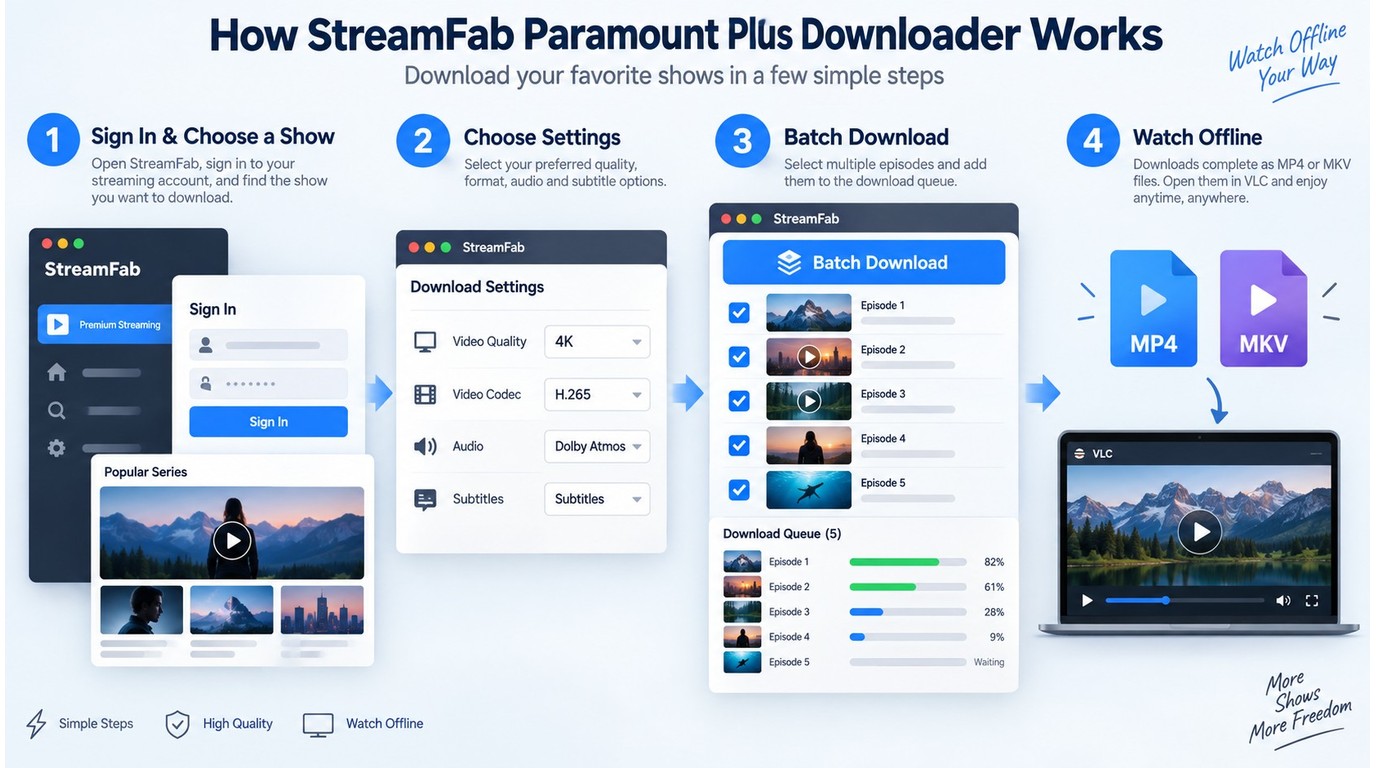
For content you are authorized to access, where permitted by platform terms and applicable law, StreamFab is a Windows and Mac desktop option for saving supported Paramount+ on-demand titles as local MP4 or MKV files for personal offline viewing and local archiving. The available quality and formats depend on the title, account, region, current build, and Paramount+ compatibility. Use authorized access and authorized content only, do not redistribute saved files, follow applicable law and platform terms, and remember that the specifics depend on your use case. StreamFab uses recording technology to create the local-file workflow described here.
1. Before You Begin
StreamFab requires an active Paramount+ subscription (Essential or Premium) to access content for download. The tool uses your Paramount+ login credentials within its built-in browser. Use a Windows or Mac computer, and expect higher-resolution downloads to need more local storage and steadier system resources.

StreamFab uses a built-in Chromium browser to navigate the Paramount+ website. After you sign in and select a supported on-demand title, it saves the available video, audio, subtitle, and metadata options as an MP4 or MKV file on your computer.
This creates a different workflow from screen recording. Screen recorders like OBS capture whatever appears on your monitor and re-encode the video, so HDR and surround-audio results depend on the capture setup. StreamFab saves supported on-demand titles as local MP4 or MKV files, with the available quality determined by the title, account plan, region, current build, and Paramount+ compatibility.
Key Capabilities of the StreamFab Paramount+ Module
- Up to 4K UHD output: The June 2026 test snapshot reached up to 4K on supported titles, while other titles were limited to 1080p or lower depending on the build, title, plan, region, and current Paramount+ compatibility.
- HDR preservation: HDR10+ and Dolby Vision metadata may be carried through to the output file on supported titles (MKV container recommended for HDR).
- Dolby Atmos audio: Dolby Atmos, EAC3 5.1, or AAC 2.0 may be available when supported by the title, account, and current compatibility.
- Batch download: Queue entire seasons for automatic sequential download.
- Subtitle handling: External SRT files or embedded subtitles in all available languages.
- Metadata retention: Title, cover art, episode numbers, and cast information preserved for Plex/Kodi library organization.
- Ad removal: Downloaded output can omit ads for supported ad-supported content, subject to the current title, plan, and compatibility.
For a broader walkthrough of the StreamFab interface beyond the Paramount+ module, see this guide to using StreamFab.
Step-by-Step: Download Paramount+ Videos on PC or Mac
First-time setup takes about three minutes. After that, downloading additional titles is straightforward — select, configure, and start.
Paramount+ is available in approximately 40+ countries. If your Paramount+ account has geographic restrictions on certain content, those same restrictions apply when using StreamFab — the tool accesses the same catalog your account can see.
Step 1: Download and install StreamFab
Use the official StreamFab download button above for Windows or Mac. Run the setup wizard and follow the prompts — installation completes in under two minutes on most systems.
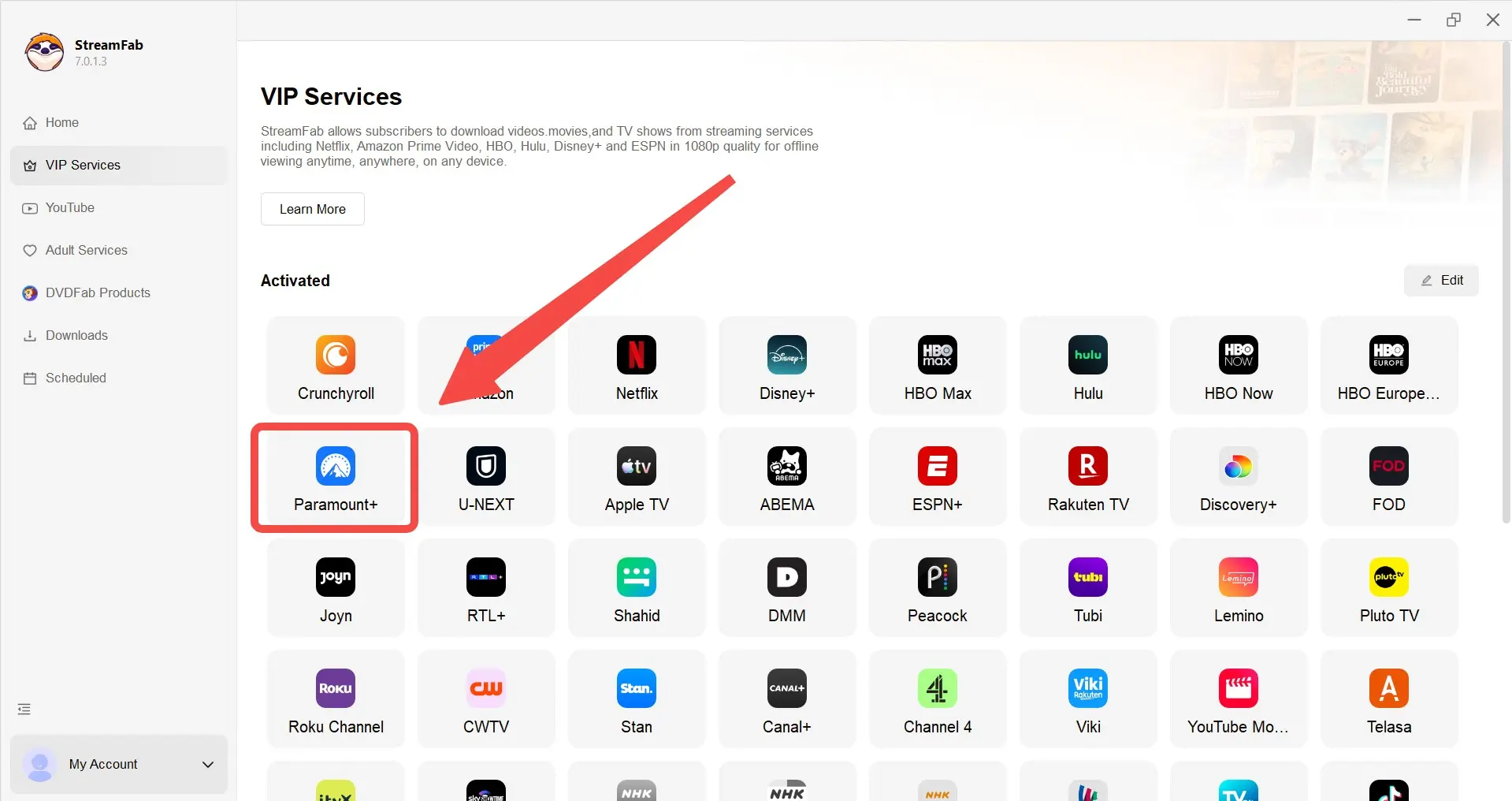
Step 2: Open the Paramount Plus module & Sign in to your Paramount+ account
Log in with your Paramount+ credentials (Essential or Premium — both work). StreamFab does not store your password outside of its local browser cache. Navigate to a supported on-demand movie or TV show in the Paramount+ catalog. For series, open the season page to see all available episodes.
Step 3: Configure and start the download
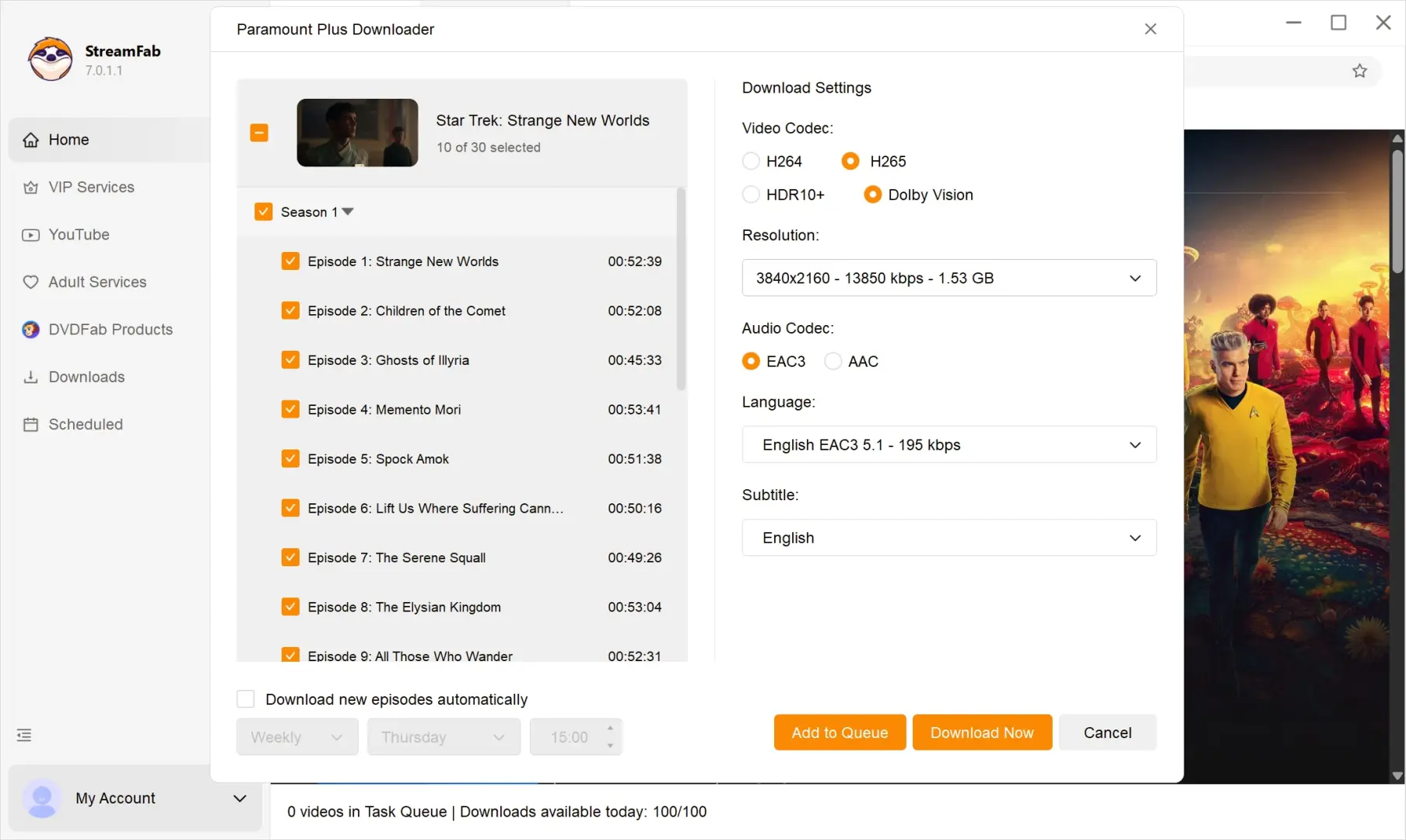
Click the play button on a title. StreamFab displays a download dialog with options for resolution (up to 4K if available), video codec (H.264 or H.265), audio track (Dolby Atmos/EAC3 5.1/AAC), and subtitle language. Select your preferences and click Download Now. For batch downloads, add multiple episodes to the queue and start them all at once.
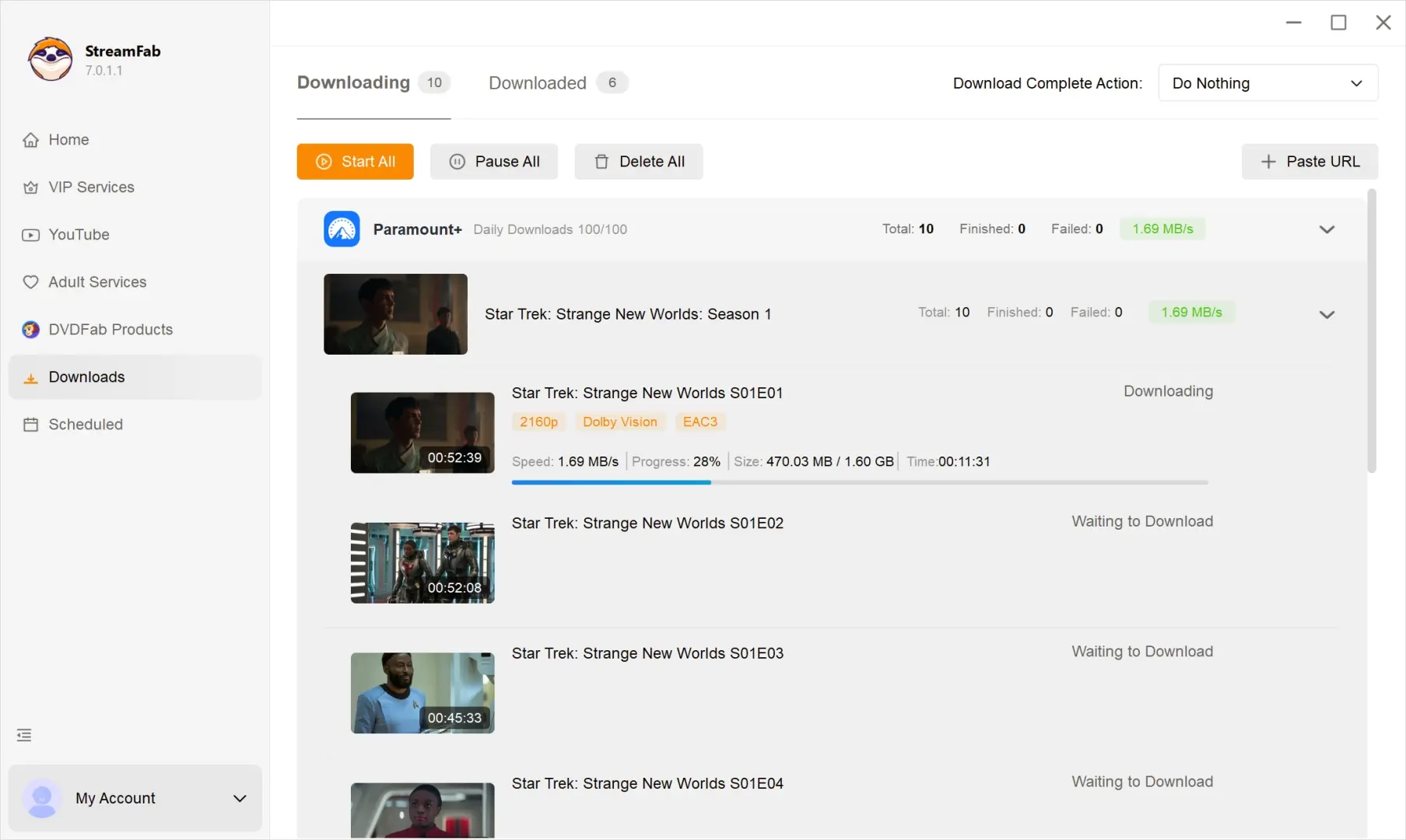
Step 4: Locate your completed files
When downloads finish, click the folder icon next to any completed item to open its save location. The default path is C:\Users\[username]\Videos\StreamFab on Windows. Files can be played in VLC, Plex, or another media player that supports the selected container and codec. HDR playback also requires a compatible display and playback chain.
Output Quality Check: 4K, HDR, and Atmos Results
The June 2026 snapshot covered Paramount+ movies with 4K Dolby Vision, series episodes at 1080p, and Essential-plan content with ads. The results below describe the tested StreamFab build and supported samples rather than every title in the catalog.
Tested on Windows 11 (24H2), StreamFab v7.0.1.3, Paramount+ Premium plan (US library). Additional tests ran on the Essential plan to check ad handling. HDR output verified on an LG C3 OLED display via Plex. Test date: June 2026.
Spec | Observed result (June 2026) |
|---|---|
Maximum resolution | Up to 4K UHD on supported titles; 1080p or lower on other samples |
| Video and HDR | H.264 or H.265; HDR10+ or Dolby Vision on supported titles |
| Audio | Dolby Atmos, EAC3 5.1, or AAC 2.0 when available |
| Files and subtitles | MP4 or MKV; SRT external or embedded subtitles |
| Quality snapshot | 4K HDR and Atmos reached on supported test samples; title-level results varied |
| Test scope | Windows 11 24H2; StreamFab 7.0.1.3; US Premium; LG C3 via Plex |
The June 2026 snapshot reached up to 4K with HDR and Dolby Atmos on supported Paramount+ samples. Other titles were limited to 1080p or lower, which reflects the source available for that title as well as the account, region, and current platform compatibility.
On the tested Dolby Vision-capable display, supported files retained HDR metadata and multichannel audio when played through Plex and a compatible receiver. That result applies to the tested build and samples, not as a universal match for every Paramount+ stream.
For Essential plan users, ad handling was checked on the tested download samples. The browser preview can still show the normal ad experience, while downloaded output may be handled differently by the current build and title.
Note: 4K content on Paramount+ is limited to select titles, primarily flagship originals and major theatrical releases. Much of the catalog tops out at 1080p. StreamFab can save the highest available quality it can access for each supported title under the current build, account, region, and platform conditions.
StreamFab vs. Official Downloads vs. Screen Recording
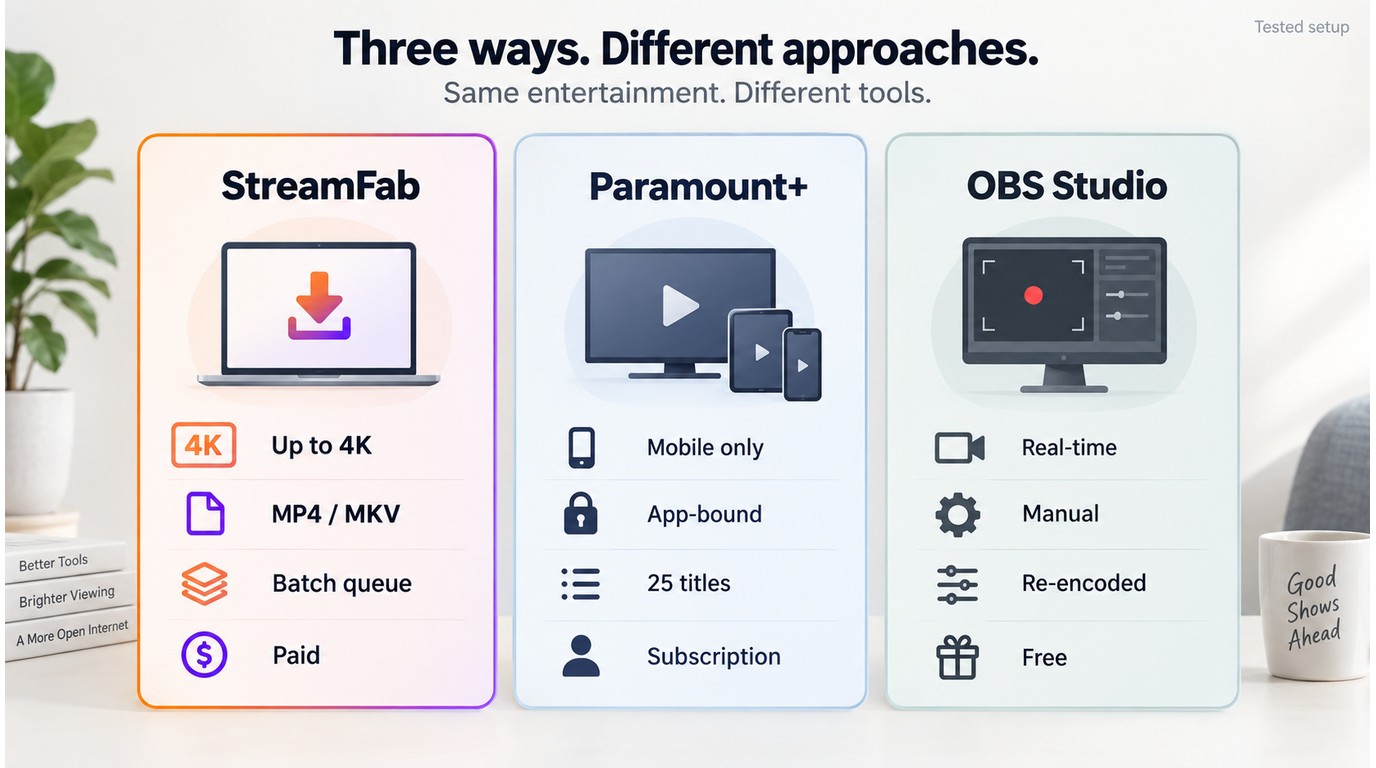
StreamFab fits viewers who want a desktop workflow for saving supported Paramount+ on-demand titles as local MP4 or MKV files for personal offline viewing. The official feature remains practical for occasional mobile viewing, while OBS Studio is a free option for real-time recording when basic capture is enough. Each approach has a different trade-off in quality, control, and convenience.
For local-file viewing, I would favor StreamFab when title-specific quality and batch handling matter. For a few mobile downloads, the official Paramount+ app may be simpler. OBS Studio makes more sense when avoiding a paid tool matters more than unattended downloads or source-quality preservation.
| Feature | StreamFab Paramount+ Downloader | Official Paramount+ Downloads | OBS Studio |
|---|---|---|---|
| Device and workflow | Windows and Mac; local files | iOS and Android; app-managed | Windows and Mac; real-time recording |
| Output format | MP4 or MKV | Protected in-app download | Recorded video file |
| Maximum observed quality | Up to 4K on supported titles | Mobile-focused; title and plan limits apply | Based on display and capture settings |
| Audio and subtitles | Atmos or EAC3 when available; SRT options | Managed by the Paramount+ app | System audio; manual subtitle capture |
| Batch and timing | Season queues and scheduled tasks | Individual app downloads | Real-time, title by title |
| Access and cost | Paid; free trial available | Premium at $13.99/month as of September 2026 | Free and open source |
Official app downloads are managed inside the service, while local MP4 or MKV playback depends on the chosen device, codec, HDR format, audio format, applicable law, and platform terms.
Pricing and Free Trial
StreamFab offers the Paramount Plus Downloader as a standalone module or as part of the All-In-One (AIO) bundle that covers all supported streaming platforms.
StreamFab's free trial lets you check supported Paramount+ titles before choosing a paid module or bundle. official StreamFab Paramount Plus Downloader page
Before purchasing, StreamFab offers a 30-day free trial for each streaming service, with up to three trial video downloads per service. Trial functionality matches the paid version for supported quality, batch processing, subtitles, and MP4/MKV output, with the limit applying to the number of trial downloads. See the StreamFab free trial guide for details on what the trial includes.
The value depends on your viewing pattern. If you download full seasons or regularly need local files for flights and trips, a desktop workflow can justify the added cost more readily. If you watch only a few titles occasionally on a phone, the official Paramount+ download feature may be the simpler choice. I see the strongest fit in households that already use multiple streaming services and want one workflow for supported on-demand titles.
Known Issues and Troubleshooting
No download tool works perfectly on every title across every platform update. These are the issues most likely to affect the Paramount+ module and the practical steps to try when they appear.
- 4K not available on some titles: Only select Paramount+ originals and major theatrical releases stream in 4K. If StreamFab offers only 1080p for a title, the source available to that account may be limited by the title, plan, region, build, or current platform compatibility. You can check the platform's "4K Ultra HD" category and use the trial to check the specific title.
- Login session expires: If Paramount+ prompts you to re-authenticate inside the StreamFab browser, simply sign in again. Session cookies expire periodically, which is normal Paramount+ behavior. If the prompt continues, install the latest update and use the troubleshooting guide.
- "Unable to parse this video" error: Clear StreamFab's built-in browser cache (Settings → Browser → Clear Cache), restart the application, and retry. This most commonly occurs after a Paramount+ platform update. If the error remains, review recent StreamFab updates and follow the troubleshooting steps.
- Download stalls or crashes mid-file: Switch from GPU to CPU decoding in Settings → Advanced → Hardware Acceleration. GPU conflicts with certain driver versions (especially NVIDIA 550+ on Windows) can cause incomplete downloads. If the issue persists, use the troubleshooting guide before retrying the title.
- Dolby Atmos not appearing as an audio option: Atmos availability depends on the title and your StreamFab version. Ensure you are on the latest version and that the title actually supports Atmos on the Paramount+ platform. Select MKV as the output container, as MP4 has limited Atmos compatibility.
- Essential plan content shows ads in preview but not in download: The built-in browser preview can show the normal ad experience, while downloaded output may be handled differently by the current build and title. If the result differs from the available download options, update StreamFab and retry the supported on-demand content.
The StreamFab not working troubleshooting guide covers application crashes, installation problems, and general errors beyond the Paramount+ module, while the broader StreamFab review explains product-wide capabilities and fit.
Frequently Asked Questions (FAQs)
Does StreamFab work with the Paramount+ Essential plan?
StreamFab can process supported on-demand titles available to a signed-in Essential or Premium account. Source quality and available features depend on the account plan, title, region, and current Paramount+ compatibility. Essential plan users can receive ad handling during download, while 4K and HDR availability depends on the specific title and plan.
Can I download Paramount+ live TV and sports with StreamFab?
StreamFab's Paramount+ module supports on-demand movies and TV episodes. Live TV channels and live sports broadcasts are not supported for download. If a live sporting event or CBS broadcast is later published in the Paramount+ library, it may become available as a supported on-demand title.
Why Does StreamFab Show Only 1080p for Some Titles?
The detailed June 2026 quality snapshot above covers supported samples and their lower-resolution exceptions. Available quality can change with the StreamFab build, title, account plan, region, and current Paramount+ compatibility, so install the latest StreamFab update and retry the specific on-demand title after a platform change.
Can I Play Saved MP4 or MKV Files on Another Device?
For content you are authorized to access, where permitted by platform terms and applicable law, supported on-demand titles can be saved as local MP4 or MKV files for playback on devices that support the chosen container, codec, HDR format, and audio format. You can keep the saved file unchanged when the destination device supports those specifications. Keep the files for personal use, do not redistribute them, and follow the applicable platform terms.
Where Should I Download the StreamFab Installer?
Obtain the installer from the official StreamFab Paramount Plus Downloader page. For the broader question of whether StreamFab is safe , review the publisher information shown by Windows or macOS before installation and avoid installers distributed through unofficial download sites.
Conclusion
StreamFab Paramount Plus Downloader is one module within the broader StreamFab platform, which supports 40+ streaming services. For a full overview of StreamFab's capabilities across all supported platforms, read the complete StreamFab review.
StreamFab Paramount Plus Downloader is a practical choice for Windows and Mac viewers who want to save content they are authorized to watch as local MP4 or MKV files. The June 2026 snapshot reached up to 4K HDR with Dolby Atmos on supported titles, but the available result remains tied to the title, account plan, region, StreamFab build, and current Paramount+ compatibility.
Choose the official Paramount+ app for occasional mobile downloads, OBS Studio for free real-time recording, and StreamFab when local-file playback, season queues, and subtitle options matter more. In my view, the desktop workflow offers its clearest value to viewers who can accept occasional update-related interruptions. Start with the 30-day trial, which includes up to three Paramount+ video downloads, to check the specific titles that matter to you.