If you landed on this StreamFab Amazon Downloader review because the Prime Video app keeps downloads locked inside Amazon's rules, the short answer is this: StreamFab is built for Windows/Mac users who want 1080p direct download, MP4 and MKV output, and a clear look at limits before buying.
StreamFab Amazon Downloader directly downloads supported Amazon Prime Video streams and saves selected local files for authorized personal offline viewing on your computer. This review looks at the quality result, the Amazon download limits, the free trial path, the FAQs readers usually check before installing, and the buyer-fit question before you install it.

The most common concerns people raise are whether the quality holds at 1080p, whether the tool is safe to install, and whether it keeps working after Amazon updates its platform. This review covers all three questions based on hands-on testing.

This article walks through how StreamFab Amazon Downloader works, the actual output quality observed, a step-by-step usage guide, pricing, known limitations, and how it compares to alternative methods, so you can decide whether it fits your use case before buying. The content described in this article assumes compliance with applicable copyright laws and the terms of service of the respective streaming providers. It is intended solely for legitimate personal use within authorized viewing rights.
Quick Summary: Does StreamFab Work on Amazon Prime Video?
The short answer is yes: in the documented test range, StreamFab downloaded supported Prime Video titles at up to 1080p.
- 🟢 Resolution: Save up to 1080p from Amazon Prime Video on compatible titles.
- 🟢 Audio: EAC3 5.1 surround audio preserved on supported titles; AAC 2.0 stereo as fallback.
- 🟢 Format: MP4/MKV (H.264 or H.265) — plays in VLC, Windows Media Player, Plex, and most TVs without conversion.
Detailed Review: How StreamFab Amazon Downloader Works
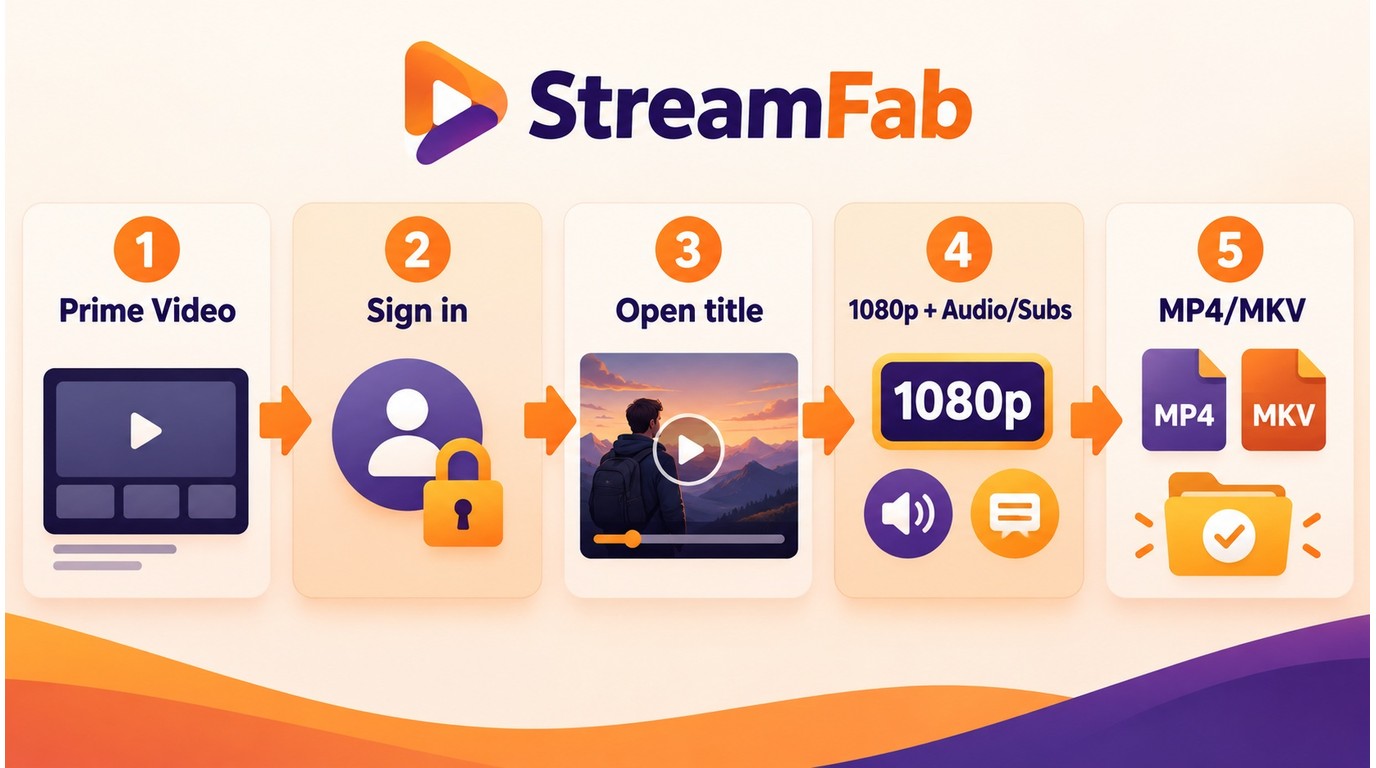
Understanding the mechanism helps you set realistic expectations for quality and compatibility before you run your first download. The how to use StreamFab workflow is easier to follow once you know what the Amazon module is designed to deliver.
The clean use case is narrow on purpose: save content you are authorized to watch locally, where platform terms and applicable law permit personal offline viewing. Do not use any downloader for DRM removal, unauthorized copies, permanent saving claims, or unrestricted saving claims; those are not legitimate use cases and can be unlawful.
StreamFab Amazon Downloader requires an Amazon account authorized to access the title, including an active Amazon Prime Video subscription where applicable. It downloads content your account is authorized to access and does not provide access to titles outside your authorized access. A Windows 10/11 or Mac computer is required.

StreamFab Amazon Downloader directly downloads supported Amazon Prime Video streams, can filter detected ad breaks during downloading, and saves selected MP4 or MKV output for personal offline viewing of titles your account can access.
- Batch download: Queue an entire season and walk away; each episode saves automatically, with Auto-Download available for new episodes.
- Subtitle selection: Choose from available subtitle tracks in SRT or embedded form, and preselect preferred subtitle languages. If the default track already matches your playback setup, leave it unchanged.
- Audio track selection: For multi-language titles, preselect preferred audio languages before downloading.
- Metadata and filenames: Movie titles, season and episode numbers, cover art, and cast and crew metadata help organize media-server libraries.
- Format output: MP4 or MKV container with H.264 or H.265 video, for supported Prime titles, Channels, rentals, purchases, extras, trailers, and bonus clips available to your signed-in account.
The Amazon module uses the same core interface described in the complete how to use StreamFab guide.
Step-by-Step: Download Amazon Prime Video with StreamFab
The process takes about two minutes to set up for the first title. After that, queueing additional downloads is a single click.
Active VPNs can cause StreamFab's built-in browser to load a different regional version of Prime Video, which may affect available titles and audio tracks.
Step 1: Download and install StreamFab
Get the installer from the official StreamFab download button below (Windows or Mac version). Run the installer and follow the on-screen prompts. Installation takes under two minutes.

Step 2: Open the Amazon Prime Video module
On the StreamFab home screen, click StreamFab Downloader, then select Amazon Prime from the service list on the left panel. The built-in browser will open and navigate to Amazon Prime Video automatically.

Step 3: Sign in to your Amazon account & Navigate to the title you want to download
Log in inside the built-in browser as you would on any browser. Your login session is saved so you only need to do this once. Browse or search for your movie or series. Click on the title to open its detail page.

Step 4: Click "Download" or press Play to trigger the download dialog
For movies, click the play button — StreamFab will detect the stream and show a download dialog. For series, you will see a list of episodes; select the ones you want (or "Select All" for a full season) and click Download Now. Set your preferred resolution (1080p recommended), audio track, and subtitle language in the dialog before confirming.

Step 5: Wait for the download to complete, then find your file
Progress appears in StreamFab's download queue. When complete, click the folder icon next to any finished item to open its save location. The default folder is C:\Users\[username]\Videos\StreamFab on Windows.

Output Quality: Resolution, Codec, and Audio Results
We tested StreamFab Amazon Downloader on a selection of Prime Video titles in June 2026 to document the actual output quality. Below are the results.
Tested on Windows 11 (23H2), StreamFab v7.0.x, active Amazon Prime Video subscription (standard plan). Titles tested included a mix of Amazon Originals and licensed content.

| Spec | Result |
|---|---|
| Maximum resolution | 1080p (1920×1080) |
| HDR output | SDR output in this test |
| Video codec | H.264 or H.265 |
| Audio | EAC3 5.1; AAC 2.0 fallback |
| Subtitle format | SRT external or embedded |
| Container | MP4 or MKV |
The 1080p output is visually clean on a 55-inch display — no visible encoding artifacts on well-mastered titles. File size reflects codec, bitrate, duration, audio tracks, and the available source stream; size alone does not establish visual quality. The absence of HDR is the most notable limitation for home theater users who have 4K HDR displays and want to match the source quality.
StreamFab vs. Other Ways to Save Amazon Content
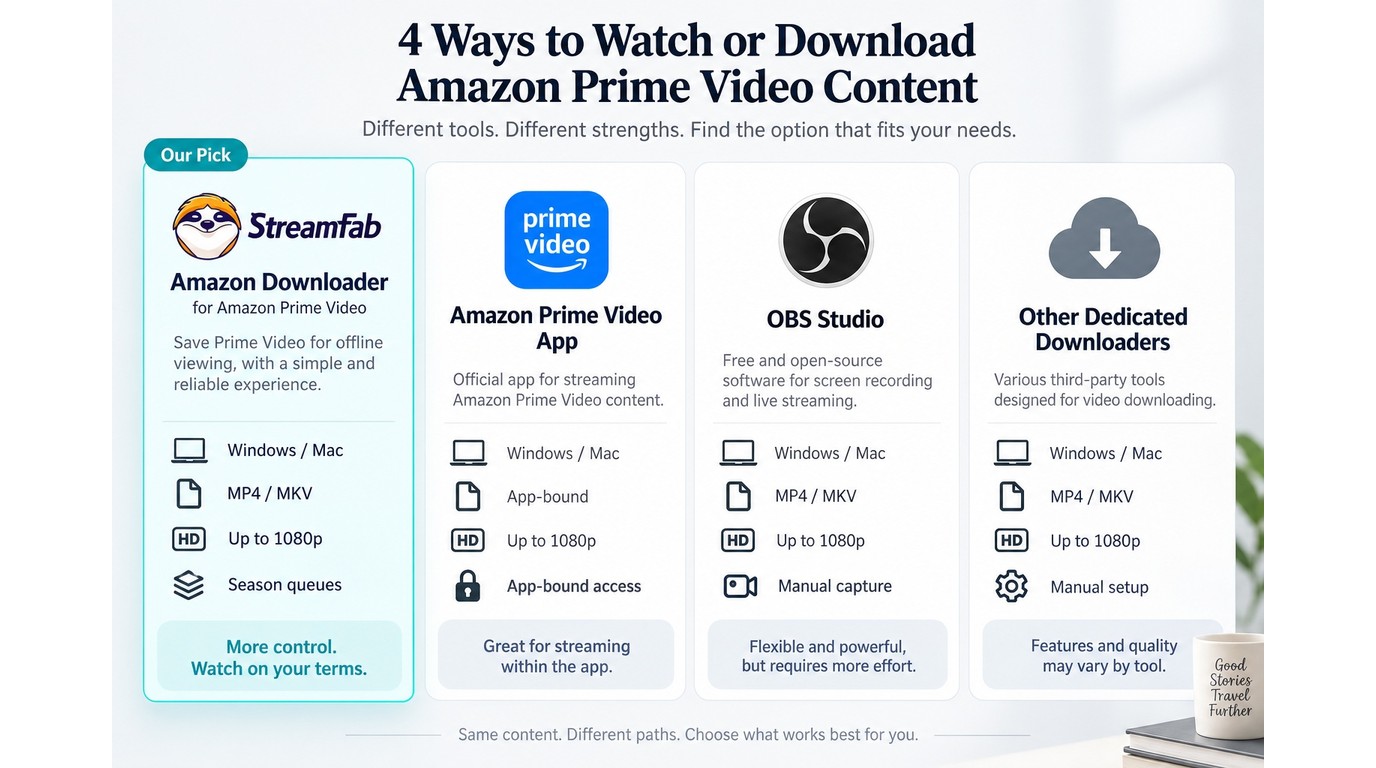
StreamFab is not the only option people explore when trying to save Amazon Prime Video titles for authorized personal offline viewing. Here is how it compares to the official app, OBS Studio, and other dedicated Amazon downloaders at the method level.
| Method | StreamFab Amazon Downloader | Amazon Prime Video app | OBS Studio | Other dedicated downloaders |
|---|---|---|---|---|
| Best fit | Desktop local-file workflow | Lowest-friction app viewing | Manual screen capture | Compare by service support |
| Device workflow | Windows / Mac desktop | Amazon-supported apps | Desktop recording setup | Varies by product |
| Output format | MP4 / MKV local files | App-bound offline access | Recorder-created files | Usually MP4 / MKV |
| Quality ceiling | Up to 1080p | Amazon app rules | Screen and settings limited | Check stated Amazon support |
| Batch support | Season queues supported | Within app limits | Manual per title | Varies by product |
| Access limitations | Authorized personal offline viewing | Under Amazon's app rules | Real-time and error-prone | Terms and reliability vary |
The Prime Video app provides app-bound offline access under Amazon's rules, while StreamFab provides an MP4 or MKV local-file workflow for authorized personal offline viewing; readers comparing the broader category can use our StreamFab alternatives guide alongside the platform-specific StreamFab Netflix Downloader review when they also need Netflix behavior.
Which Amazon Download Option Fits You?
Use the Prime Video app if you mainly watch on supported phones, tablets, or desktop apps and do not need to manage files outside Amazon's offline system. It is the simplest path and keeps you inside Amazon's own download workflow.
Use StreamFab Amazon Downloader if your priority is a Windows or Mac desktop workflow that saves authorized Prime Video content as MP4 or MKV files for personal offline viewing. In that scenario, the value is not a universal "best" label; it is file control, season queues, subtitle choices, and a clearer path for organizing a local media library.
Use OBS Studio only when you already understand real-time capture settings and can accept manual setup, possible frame or audio issues, and one-title-at-a-time recording. Other dedicated Amazon downloaders are worth comparing when you need a different interface or license model, but judge them by Amazon support, output format, update pace, and trial limits rather than by a feature list alone.
Pricing and Free Trial
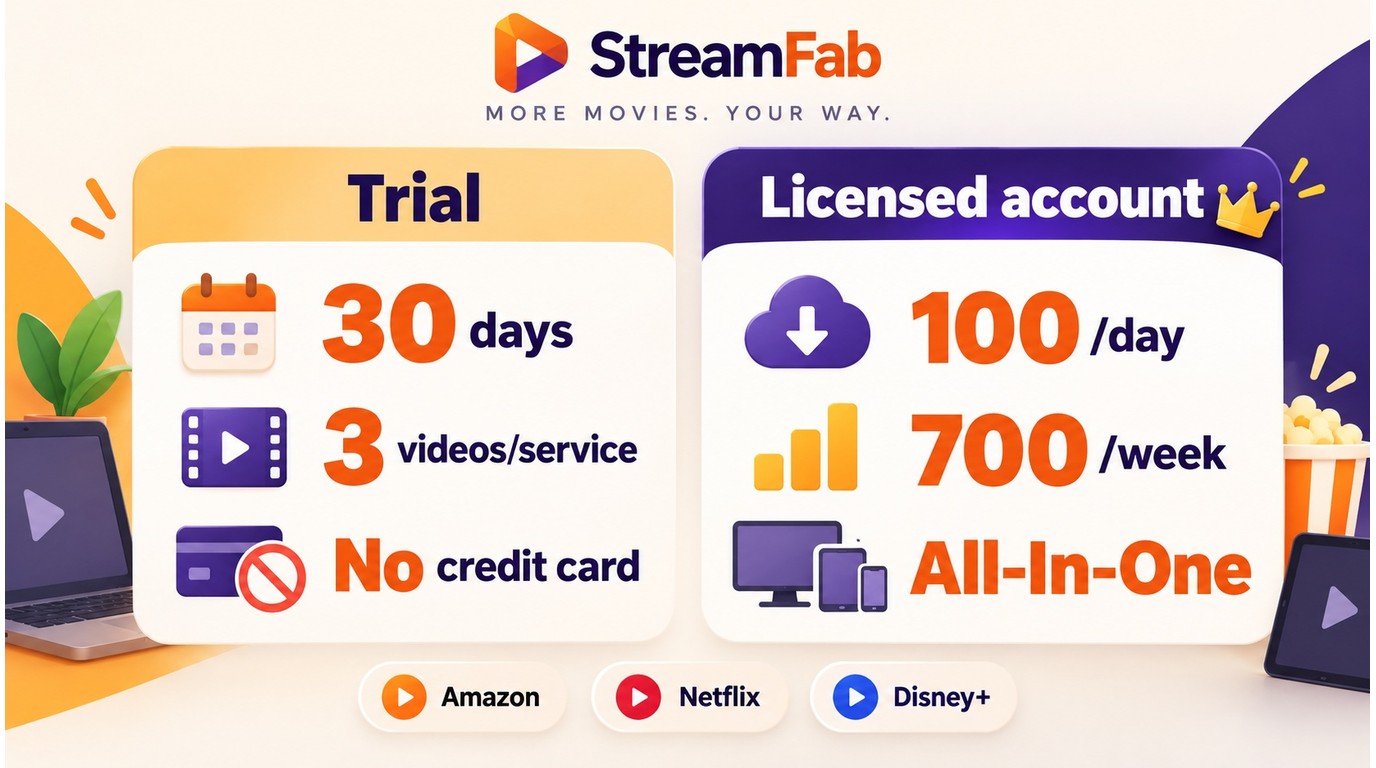
StreamFab operates on a per-module or bundle subscription model. The Amazon Downloader is available as a standalone module or as part of the All-In-One (AIO) bundle. Before purchasing, the StreamFab free trial lets you test the Amazon Downloader on the specific titles you care about: the 30-day trial includes three downloads per supported service, and a licensed account has a quota of 100 downloads per day and 700 per week for each supported service.
| Plan state | What is included | Limit |
|---|---|---|
| Free trial | Full features for supported services | 30 days |
| Trial downloads | Per supported streaming service | 3 videos |
| Trial sign-up | Start testing before purchase | No credit card |
| Licensed account | Daily quota per supported service | 100 downloads |
| Licensed account | Weekly quota per supported service | 700 downloads |
The StreamFab download limit policy matters most if you queue seasons across more than one service, because each supported service has its own daily and weekly counter.
Most users who download from more than one streaming service find the All-In-One bundle significantly more cost-effective than buying individual modules. The AIO bundles all platform-specific downloader modules (Amazon, Netflix, Disney+, and more) under a single license.
Known Issues and Troubleshooting
Amazon troubleshooting usually comes down to title or session access, network interruptions, stream segmentation, and quota state. Here are the most common issues users encounter with the Amazon Downloader module and what to do about each.
| Title shows 1080p in Amazon UI but downloads at 720p | Some titles may provide a lower stream to the signed-in account, title, device session, or region. Confirm the title plays at the expected quality in Amazon's own player, then retry the download in a fresh StreamFab session. |
| Subtitles missing in the output file | At the download dialog, confirm you selected a subtitle track before clicking Download Now. If the track was selected and is still missing, switch the subtitle format from "embedded" to "SRT" in settings. |
| Download stalls mid-way | Usually a network interruption. StreamFab can resume interrupted downloads; check the queue, right-click the stalled item, and select Resume. |
| Stream cannot be analyzed | Sign out and back in inside the built-in browser, disable VPN or proxy routing, then try a fresh session or another device if the same Amazon title still fails. |
| Multi-part stream detects one segment | Some live, sports, or split streams may expose only the first segment. Try opening the next part directly in Amazon, then analyze that segment separately. |
| Quota counter looks wrong | Check whether downloads were queued under another service module or device session, then wait for the next quota cycle if the daily or weekly limit has been reached. |
For Amazon analysis issues where the tool cannot identify the stream at all, the StreamFab can’t analyze guide covers the session, access, and log checks to run before retrying. If the problem is broader (the app itself not launching or crashing), the StreamFab not working troubleshooting guide covers system-level fixes.
Amazon Account Warnings and Usage Boundaries.
Installer safety and Amazon account behavior are separate questions. Use the official StreamFab installer for software integrity, then treat Amazon access as a platform-account issue governed by Amazon's terms, your subscription status, and applicable law.
There is no universal queue size that can be described as safe for every account. Keep queues modest, download only content your account is authorized to access, avoid redistribution, and use saved files for personal offline viewing where permitted by platform terms and local law. Do not attempt to remove or circumvent DRM, and do not use unauthorized copies; those actions can be unlawful.
If Amazon changes playback behavior and a title suddenly stops analyzing or downloading, update StreamFab first and then follow the troubleshooting path above. That sequence is boring, but it prevents you from chasing settings that are not actually the cause.
FAQs
Conclusion
In the documented test, StreamFab saved supported Amazon Prime Video titles at up to 1080p with EAC3 5.1 audio when those streams were available to the account and title. The workflow is straightforward: log in, browse, click download, and the file is waiting in your Videos folder when it's done.
The limitations to keep in mind are the 1080p ceiling and the occasional title that may fail after Amazon playback changes. Use the free trial to confirm title fit on your own account, and use the troubleshooting path when compatibility changes interrupt a download.
StreamFab Amazon Downloader is one module within the broader StreamFab platform, so choose it when Amazon is your main desktop offline-viewing use case. complete StreamFab review
If you want to try it before buying, the 30-day free trial includes 3 downloads per supported service, so you can check title and setup fit before choosing a license for authorized personal offline viewing.
Free Download macOS 11.0 or later