Disney+ offline downloads stay inside its app, which leaves a gap when you want files on a computer. My recommendation is straightforward: use the app for mobile viewing; choose StreamFab Disney Plus Downloader for an authorized desktop MP4 or MKV workflow.
This StreamFab Disney Plus Downloader review covers setup, quality choices, library organization, and the trial. A 4K label alone is not a reason to choose a tool. The useful question is whether your chosen title offers the tracks and resolution you need.

I would start with a title you actually plan to watch offline. Its available resolution, audio language, and subtitle options tell you more about the fit than a headline quality claim.

Quick Answer: Does StreamFab Work on Disney+?
StreamFab Disney Plus Downloader is a Windows and Mac app that saves qualifying Disney+ titles as MP4 or MKV at up to 4K. Your subscription, the title, and its available stream determine the offered quality. Use the trial with your intended title to select an available tier.
- Resolution: Select 4K, 1080p, or 720p from the options offered for your title.
- Audio: Select Dolby Atmos, EAC3 5.1, or AAC 2.0 when provided with the title.
- Format: MP4 and MKV support local playback in compatible players.
Disney+ App Downloads and Local Files
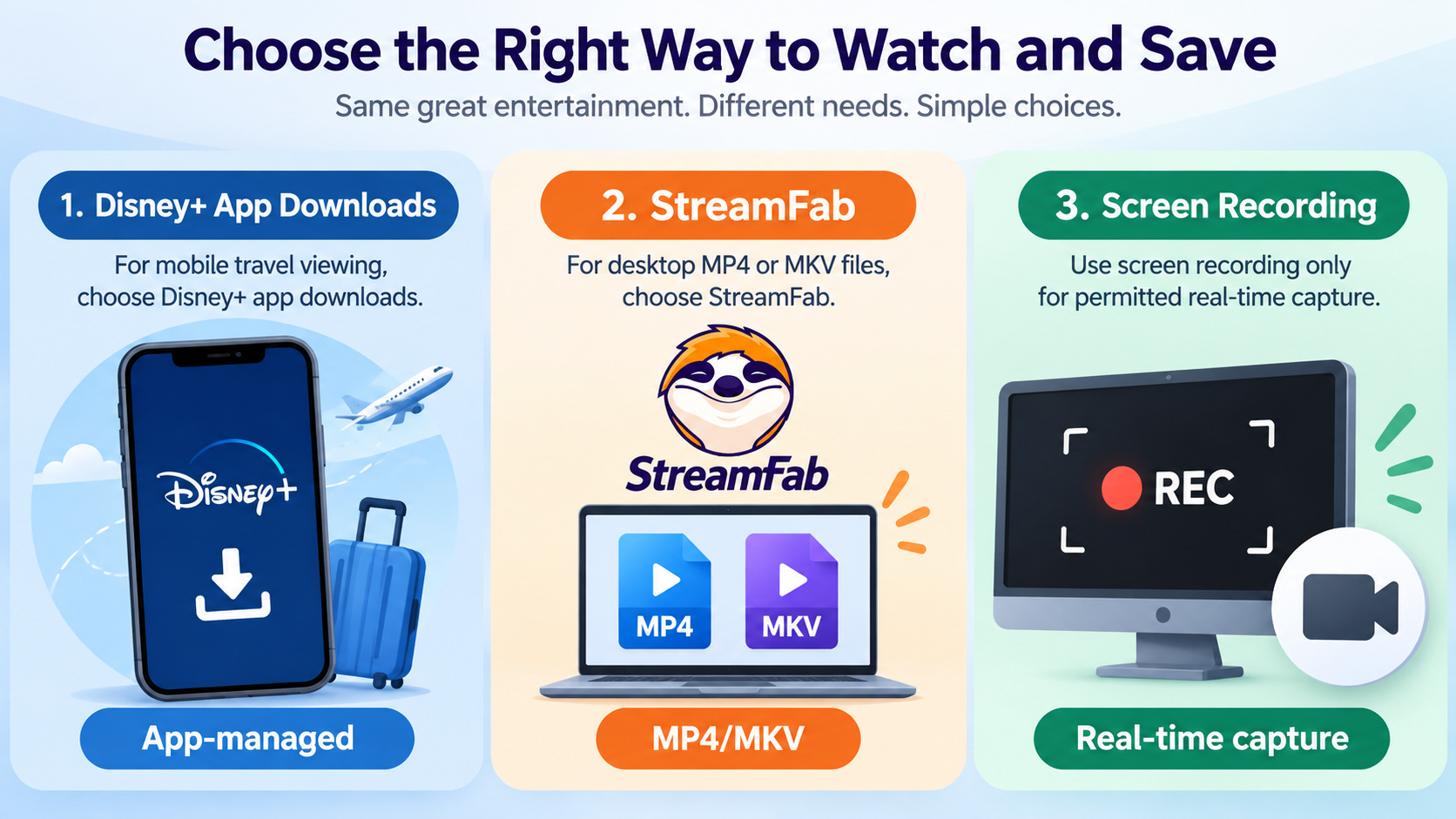
Disney+ app downloads and local video files serve different viewing needs. The app manages its own offline library; a desktop workflow saves files to your drive. For a trip with a phone or tablet, I would use the eligible app download feature.
Official App Eligibility and Expiration
Disney+ download limits include eligible plans, supported devices, account status, and periodic online checks. Downloads remain app-managed. An active subscription does not automatically make every device or plan download-eligible, and downloaded titles remain subject to expiration and catalog availability.
Use the Downloads area on a supported mobile device to manage offline titles and reconnect the app when it requests an account check. Windows and Mac browsers do not provide the mobile app's official download workflow. Chromebook eligibility follows its Disney+ app support, rather than the Windows or Mac installer.
When a Desktop Workflow Helps
A desktop workflow is useful when you want a file on your own drive and a choice of local player. StreamFab provides that MP4 or MKV workflow. A real-time screen recorder instead records playback over the running time and requires a permitted, capturable source.
| Method | Workflow | Quality basis | Playback | Good fit |
| StreamFab Disney+ module | Save selected titles | Up to 4K; title and plan | MP4 or MKV | Desktop library |
| Official Disney+ app | In-app download | Eligible plan, title, device | Disney+ app | Mobile offline viewing |
| Real-time screen recorder | Record during playback | Capturable source and recording settings | Recorder's output file | Authorized screen capture |
Track handling also differs. StreamFab offers selectable audio and subtitles; the Disney+ app manages tracks within its player. A screen recorder records its configured audio input and visible picture, so it is not the same workflow as selecting separate subtitle files.
How the Disney+ Module Works
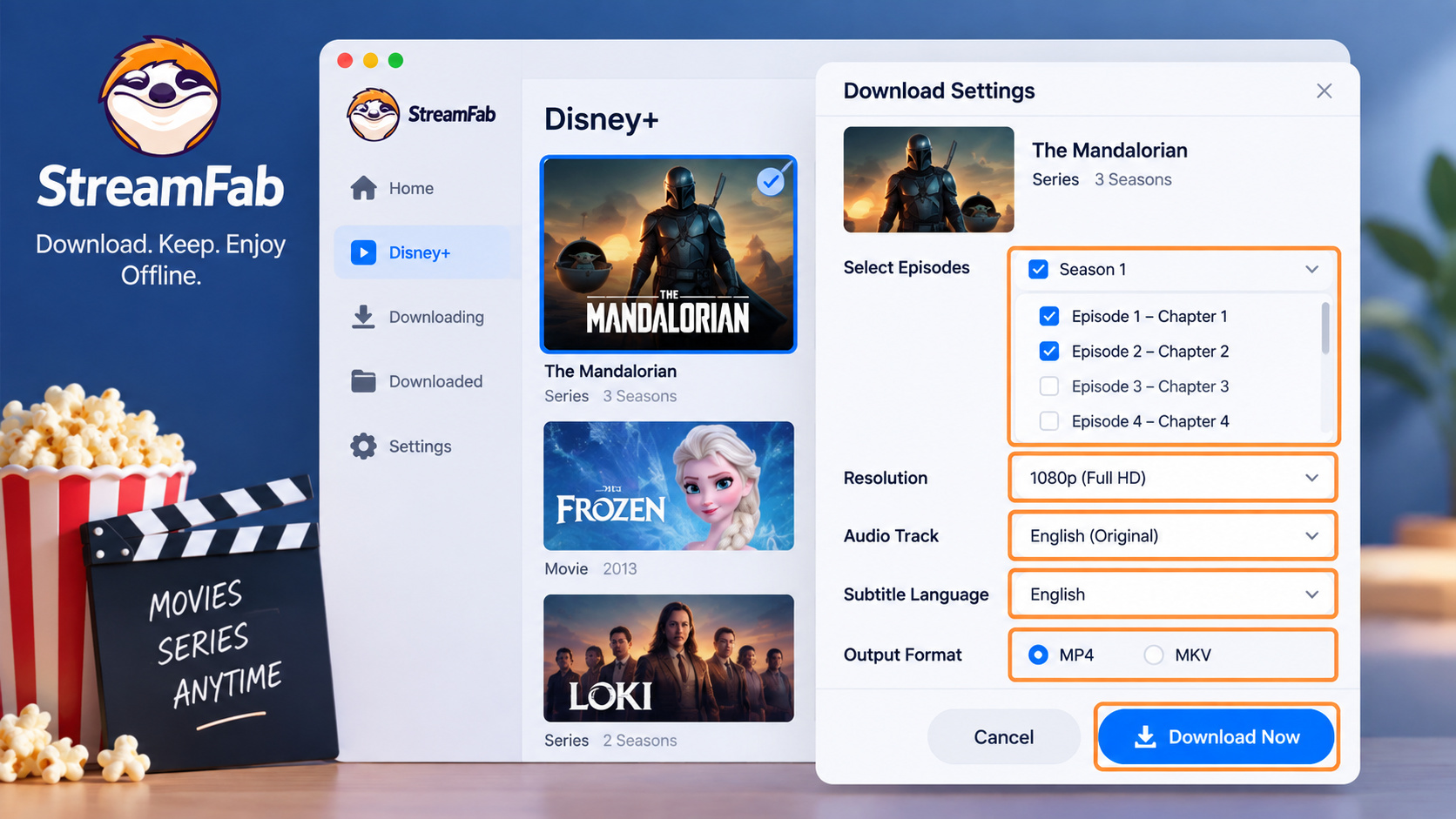
The Disney Plus downloader opens Disney+ inside StreamFab, lets you choose a title, and saves it using the options you select. Start with a working account. Confirm that the title plays before creating a download task.
Use an active Disney+ subscription, content you are authorized to watch, and a supported Windows or Mac computer. Your subscription must include access to the selected title.

Save qualifying Disney+ titles as MP4 or MKV on Windows or Mac, with the available resolution, audio track, and subtitles you select. StreamFab brings title selection and the download queue into one desktop workflow for personal offline viewing.
The StreamFab interface and settings connect service selection, output preferences, and your download queue. Set the output folder before adding a season so the episodes land together.
Setup and Download Workflow
Keep the title's settings visible before confirming the task. This is where you choose the available quality and language tracks.
Disable an active VPN if the Disney+ page fails to load or your login loops, then retry with your normal connection. Confirm that the expected account and regional catalog load before selecting a title.
Download and install StreamFab. Run the Windows or Mac installer and follow its prompts.
100% Safe & Clean100% Safe & CleanOpen the Disney+ module. On the home screen, click StreamFab Downloader, select Disney+ from the service list, and sign in through the built-in browser.

Choose a movie or episodes. Start the movie to open download settings. For a series, select episodes or Select All, then choose Download Now. Select the offered resolution, audio track, and subtitle language before confirming.

Open the finished file. Wait for the queue to mark the task complete, then click its folder icon to open the save directory. Use that folder rather than assuming a default path.

Devices and Operating Systems
The Disney+ module supports Windows and Mac desktops. Choose the matching installer. For an unsupported device, use a supported computer for this workflow or the eligible Disney+ app for mobile viewing.
- Windows: Use the Windows desktop installer.
- Mac: Use the Mac desktop installer.
- Phones and tablets: Use eligible Disney+ app downloads for mobile-only viewing.
- Chromebooks: Do not use the Windows or Mac installer; app-based viewing follows the device's Disney+ compatibility.
What Quality Can You Expect?
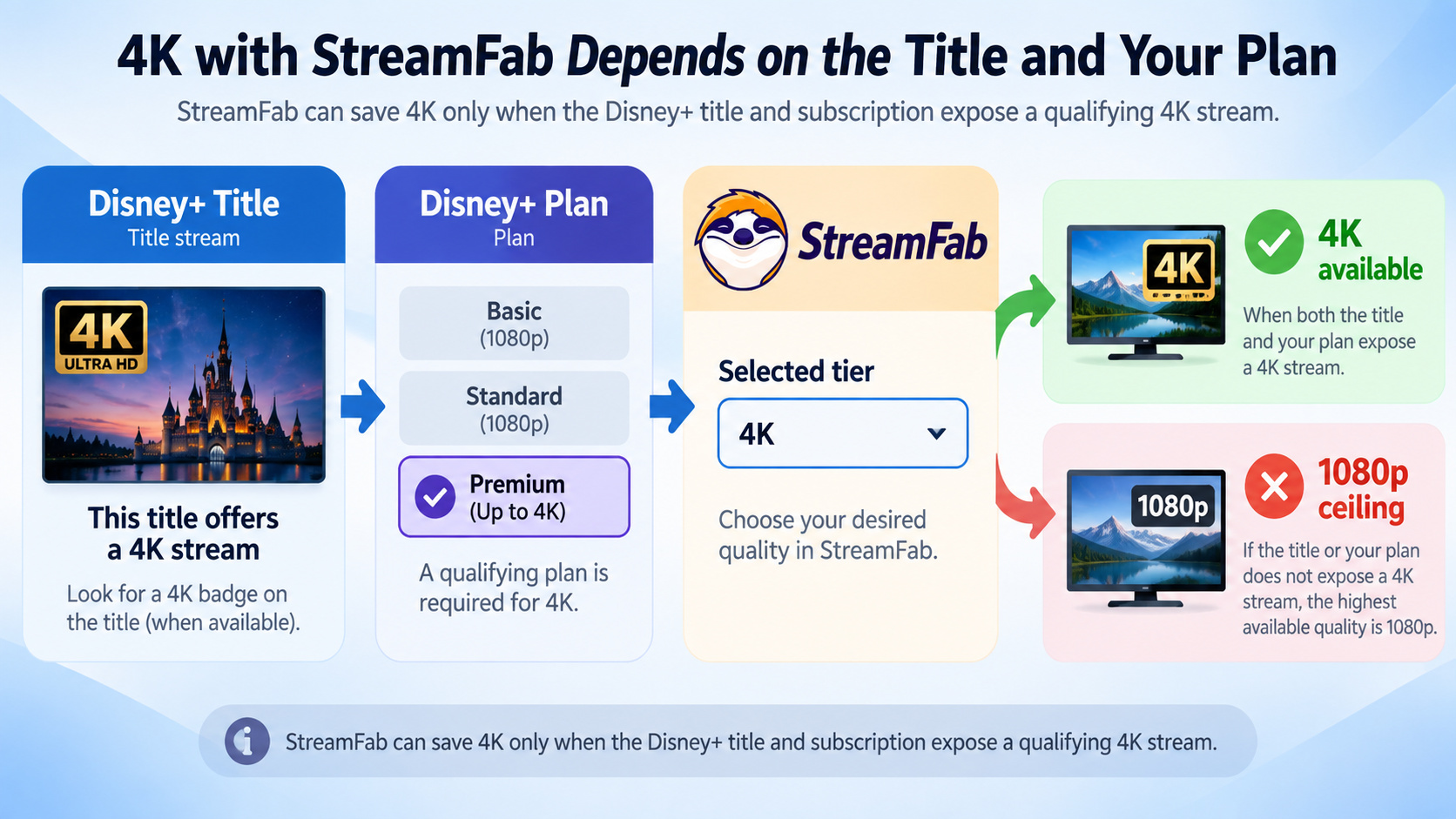
StreamFab 4K output is an upper capability, not the result for every title. Choose from the resolution and tracks offered in the download dialog. The trial gives you a direct way to inspect a saved file on your own playback setup.
Resolution, HDR, and Title Availability
The available stream sets the quality ceiling. A 1080p title does not become native 4K by choosing a larger output target. For StreamFab 4K downloads, start with a title and subscription that offer 4K, then select the offered tier.
Open the selected title's download dialog, inspect its resolution and tracks, then play the saved file on your intended device. Select an offered lower tier when 4K is unavailable.
| Setting | Module capability | Your selection |
|---|---|---|
| Resolution | 4K, 1080p, 720p | Offered title tier |
| HDR | HDR10, Dolby Vision, Dolby Vision & HDR10+ | Available title format |
| Audio | Dolby Atmos, EAC3 5.1, AAC 2.0 | Offered language and track |
| Subtitles | External SRT or embedded | Available subtitle language |
| File format | MP4 or MKV; H.264 or H.265 | Player-compatible combination |
I would choose the resolution the title offers and confirm playback before queuing a season. That avoids discovering an incompatible format after filling the folder.
Audio, Subtitles, and File Formats
Disney+ subtitle languages and audio languages are separate selections. Choose both before starting the task. Use an external SRT file when you want a separate subtitle file; embedded subtitles keep the selected track inside the video container.
MP4 or MKV alone does not determine Atmos playback. Your selected audio track, player, and audio equipment must support it. Try the saved file on the intended setup, and select an available compatible track if you hear no audio.
Batch Downloads and Media Libraries
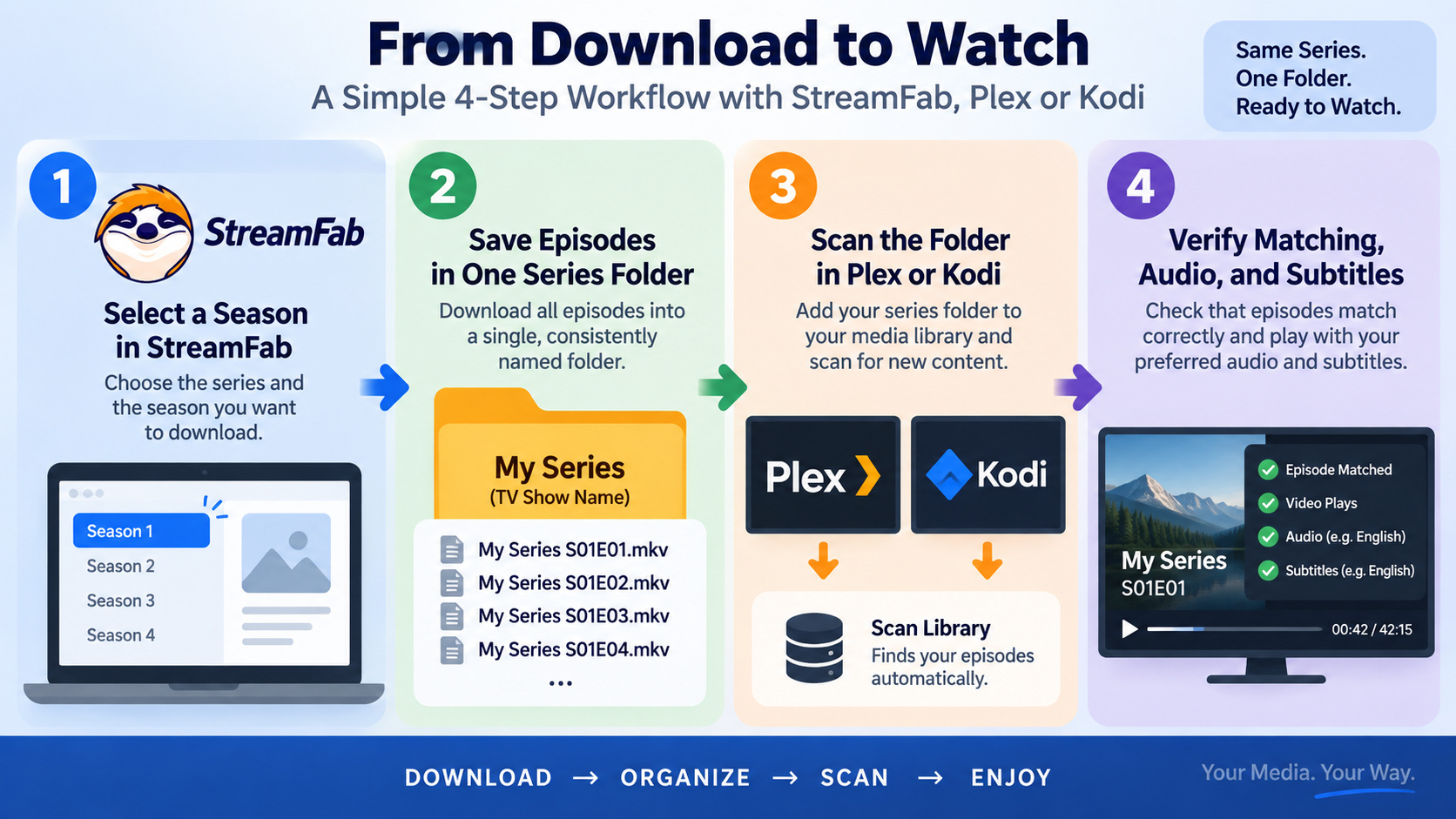
Batch downloads organize a season as a queue rather than a series of separate jobs. This suits a desktop library. Set the destination folder first, then select the episodes and language tracks you want together.
- Resolution: Choose an offered tier for the selected titles.
- Audio: Select a supported track for your playback equipment.
- Subtitles: Choose an external SRT file or embedded subtitles.
- Batch selection: Queue selected episodes or a full season.
- Language: Choose the audio language before starting the queue.
- Output: Select MP4 or MKV for the player you use.
Scheduling New Episodes
StreamFab supports scheduled workflows and following newly released episodes. Keep the computer available for the scheduled task and retain authorized access to the series. Check the queue afterward so you know which episodes finished.
Metadata for Plex and Kodi
StreamFab supports metadata writing to help organize saved videos. Start with one series folder. In Plex or Kodi, add that folder to your TV library and inspect how the first episode is matched before importing the rest.
- Keep episodes for the same series in one consistently named folder.
- Make the show name, season, and episode identifiable in the filenames.
- Add the folder to your library, scan it, and correct a mismatched title before expanding the library.
A file appearing in a library is separate from successful playback. Open an episode and check its selected audio and subtitles on the device you intend to use.
Pricing, Trial, and Plan Fit
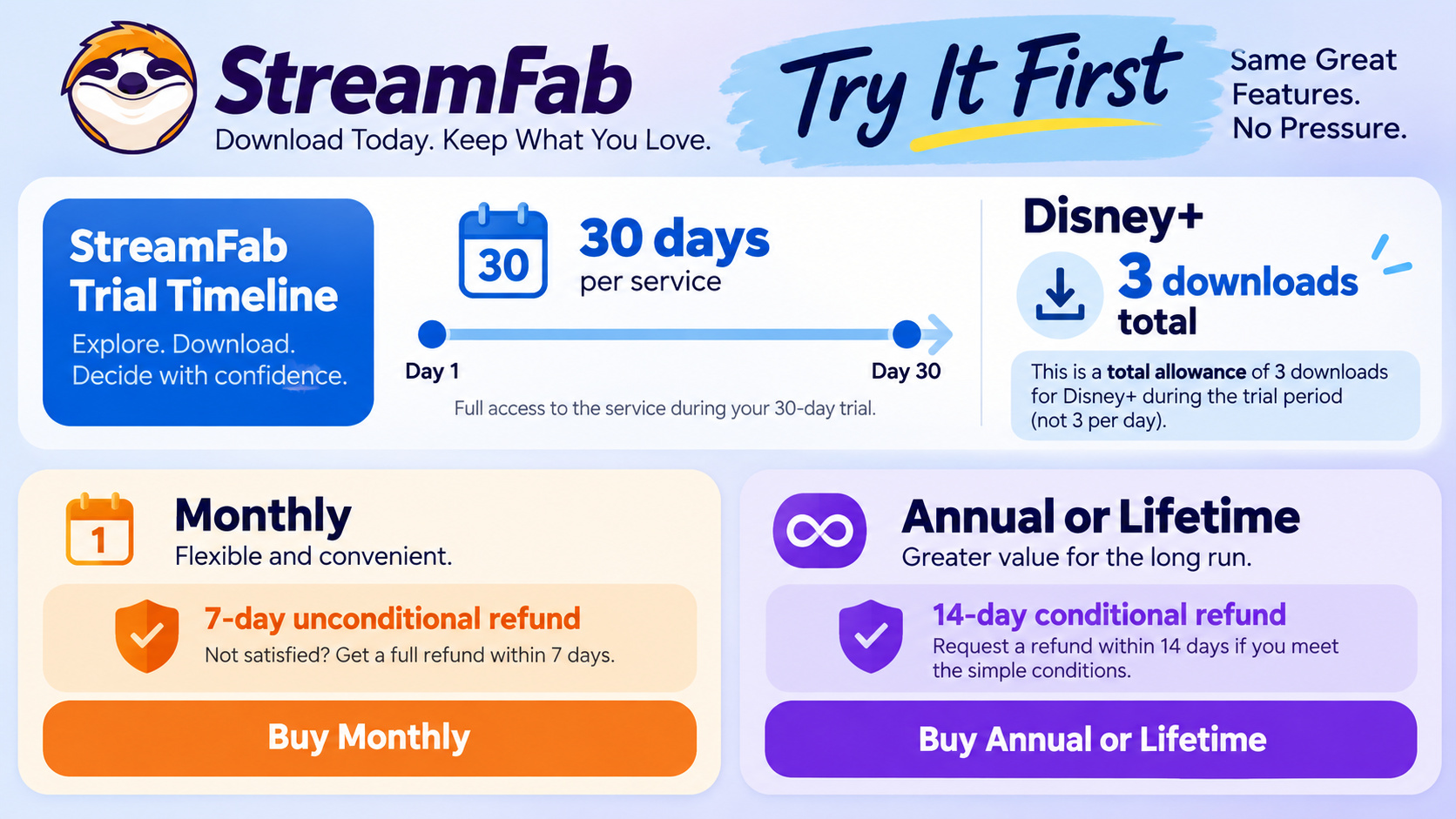
The StreamFab free trial runs for 30 days per streaming service and includes three video downloads per service in total. As of July 2026, the trial and refund terms below apply. The trial supports the paid version's quality options, batch tools, subtitles, and MP4/MKV output.
Choose the Disney+ module for a Disney+-focused library, or the All-In-One bundle for supported services beyond Disney+. The trial limit is counted per service across the trial period; reinstalling does not reset it.
Monthly subscriptions have a seven-day unconditional refund window. Annual and lifetime purchases have a 14-day conditional window for duplicate purchases, mistaken purchases, unresolved technical issues, or billing errors. Those are different purchase terms.
The StreamFab free options include the limited trial; three Disney+ downloads are a total allowance, not a daily allowance. Choose titles that represent the format and languages you plan to use.
A broader library introduces service-specific choices. The StreamFab Netflix Downloader review covers the Netflix module's viewing workflow, which is separate from Disney+ title availability.
For a library that also includes Prime Video, the StreamFab Amazon Downloader review addresses that module's setup. A bundle does not make different services' available tracks identical.
Updates, Limits, and Troubleshooting
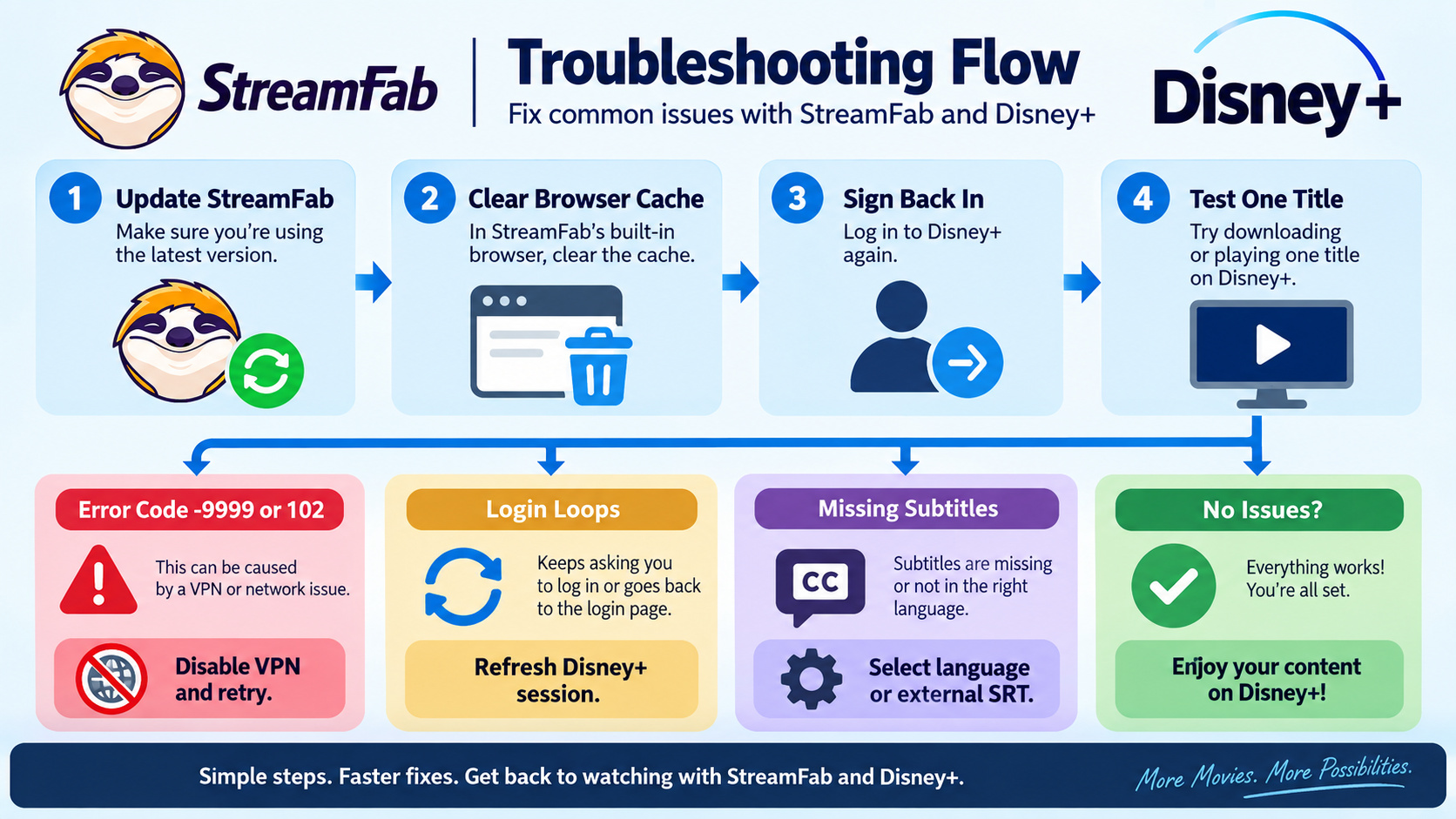
Disney+ player or delivery updates can interrupt title analysis, login, or retries. Start with an updated StreamFab installation, then refresh the browser session. I would resolve a failing single-title task before adding more episodes to the queue.
- Update StreamFab. Install the current version and review its update notes for Disney+ compatibility fixes.
- Refresh the session. Clear the built-in browser cache, restart StreamFab, and sign back in to Disney+. Confirm playback, then retry one title.
- Use the troubleshooting or support route. If the failure persists, record the exact message, title, operating system, and StreamFab version so support can identify the affected task.
For connection errors, a VPN check is useful. In my September 2026 tests on Windows 11 with StreamFab 7.x, most -9999 and 102 errors cleared after disabling a VPN client. For those error codes, retry on your normal connection before changing download settings.
A missing subtitle track needs a different fix. Confirm that a language was selected rather than No Subtitle, then try an external SRT file if embedded subtitles do not appear in your player.
FAQs
Conclusion: Who Is It For?
StreamFab Disney Plus Downloader fits a desktop Disney+ library with local MP4 or MKV files and selected language tracks. My recommendation is to start with a title you want to watch, select its offered quality, and play the result on your intended device.
A Disney+ series library benefits from consistent episode folders and playback settings. Confirm those choices on the first episode before expanding the queue. complete StreamFab review
Start your Disney+ trial download with content you are authorized to save for personal offline viewing.
Free Download macOS 11.0 or later
