Reliable internet isn’t always at hand. On long flights, in rural stays, or on camping trips, I still want the Netflix queue, so Netflix offline viewing is the point. Popular titles like Dept. Q or Squid Game can also rotate out of the library without much notice.

Like many readers, I’ve asked, is there a dependable way to download Netflix movies on a laptop in 2026? After testing the current options and reading the community threads that keep resurfacing, here is what genuinely works to watch Netflix offline on Windows and Mac, plus the one laptop where Netflix on Chromebook still handles downloads through the official app.

Netflix Downloads on Laptop: What Actually Works in 2026
Only Chromebooks still download Netflix through the official app. Windows and Mac lost in-app downloads with the July 2024 PWA release, so laptop users on those platforms rely on a desktop alternative that saves a local MP4 for personal offline viewing.
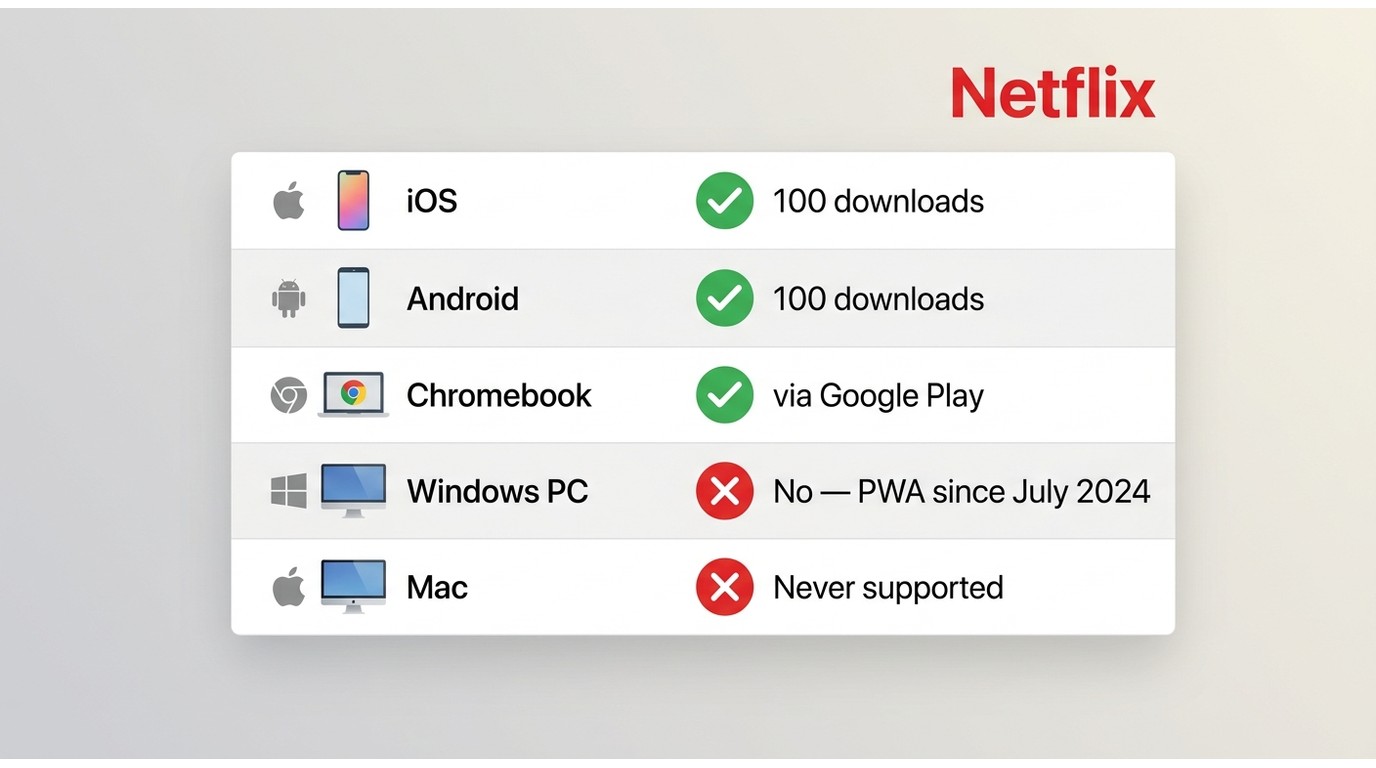
- iOS, Android, and Chromebook: supported by the Netflix app. Ad-free Standard and Premium plans allow up to 100 active downloads per device; the Standard with Ads plan allows 15 downloads per device per calendar month on supported mobile devices (as of June 2026, subject to Netflix changes).
- Chromebook: the only laptop platform where the Netflix Android app on Google Play still supports offline downloads (details in the section below).
- Windows and Mac: no offline download inside the Netflix app since the July 2024 PWA transition. A desktop alternative that outputs MP4 or MKV is the practical workaround.
As of June 2026, see Netflix’s Help Center for current plan rules.
If you want the official mobile app steps as a quick reference (they apply to iOS, Android, and Chromebook), open the Netflix app, sign in, use search to find the title, tap the Download icon, then find the file under Downloads. The full step-by-step for the laptop context lives in the Chromebook section below.
Prerequisites before you try any Netflix download route on a laptop:
- Netflix account: You’ll need an active Netflix subscription. Ad-free Standard and Premium plans support up to 100 active downloads per device; the Standard with Ads plan allows 15 downloads per device per calendar month on supported mobile devices (as of June 2026, subject to Netflix changes). Chromebook uses the Android app and follows the same caps. Full detail lives in the Netflix Download Limits, Expiry, and Plan Rules section below.
- Storage: Keep enough free space on the drive or SD card that will hold the files.
- Network: A stable connection during the initial download (a license check needs internet).
- Title availability: Not every Netflix title is downloadable; licensing varies by region and by title.
Chromebook Downloads via the Official Netflix App
The Chromebook is the one laptop platform where Netflix still supports offline downloads through the official app. It works because the Chromebook runs the Netflix Android app from Google Play, so downloads behave the same way they do on a phone or tablet.
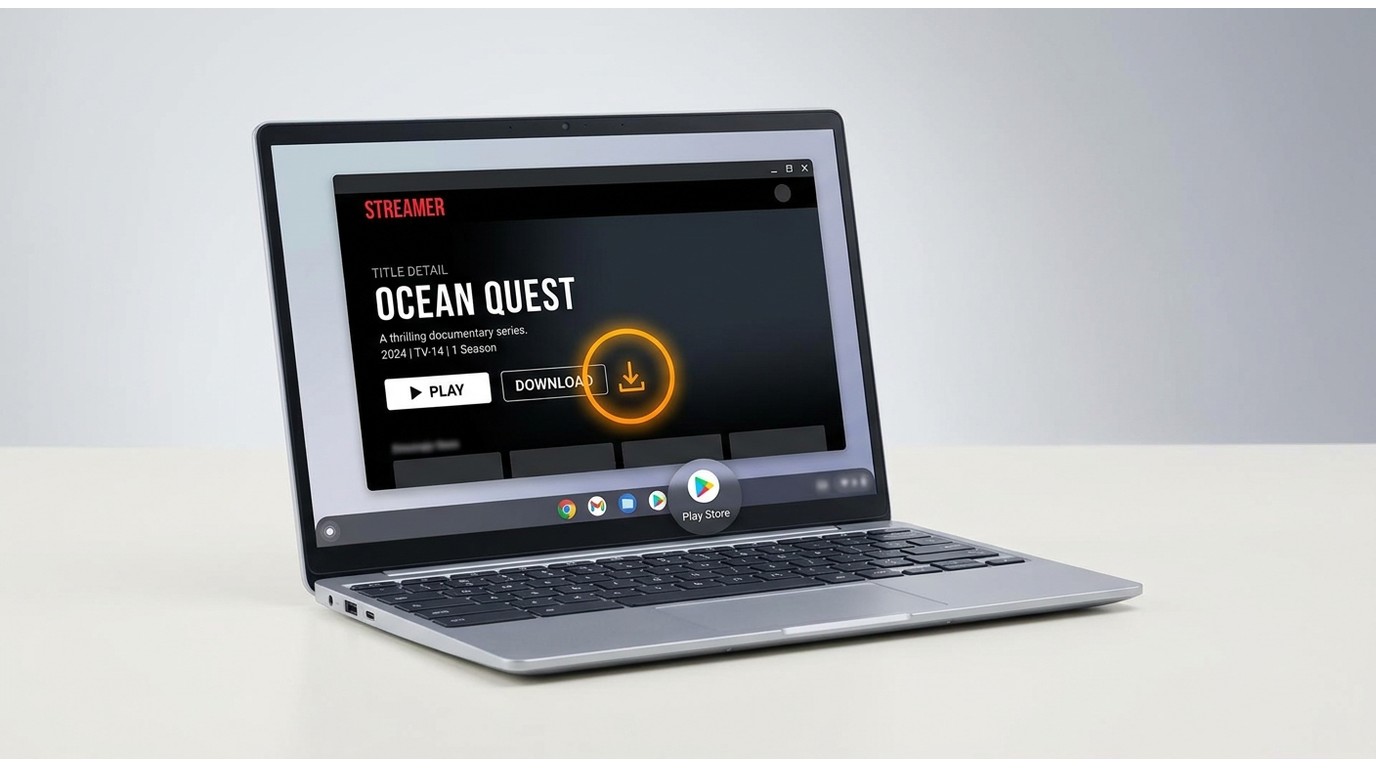
- Active Netflix subscription: the same per-plan download caps apply (up to 100 active downloads per device on ad-free Standard and Premium; 15 per device per calendar month on Standard with Ads).
- A supported Chromebook with the Google Play Store enabled.
- Free storage for the offline titles you plan to keep.
- A stable network for the initial download and license check.
- Netflix expiry rules still apply: many titles expire 7 days after download start; some allow 30 days unwatched; and 48 hours after playback begins.
In practice, if the assignment is “watch on a laptop tomorrow” and your device is a Chromebook, this is the least-friction path. You do not need a third-party tool at all, and there is nothing to sideload. As of June 2026, subject to Netflix changes, verify the current status on Netflix’s Help Center.
Desktop Alternatives for Windows and Mac Users
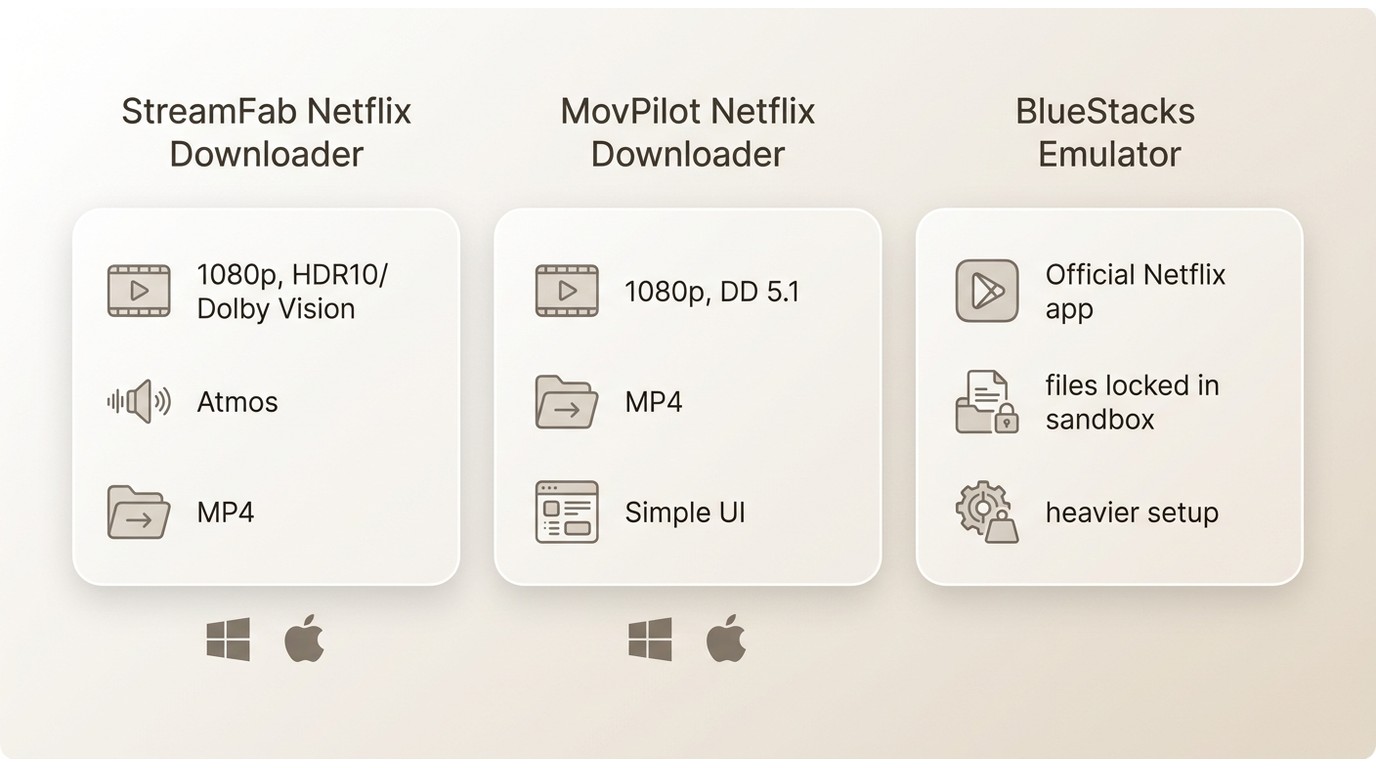
When official Netflix downloads are not available on Windows or Mac, three desktop routes come up in practice: a full-featured desktop alternative, a simpler desktop alternative, and running the mobile Netflix app inside an Android emulator. Each has a clear “best for” profile.
1. StreamFab Netflix Downloader: Local MP4, HDR, and Atmos
- • Best for: Windows and Mac users who want a laptop-friendly offline library with HDR and Atmos preserved.
- • Not ideal for: users who only need the mobile-locked downloads Netflix already provides on iOS, Android, or Chromebook.

Download Netflix videos as 1080p MP4/MKV files with EAC3 5.1 audios to watch offline on any device.
StreamFab Netflix Downloader is one of the more reliable desktop alternatives for Windows and Mac users who want to save a local copy of titles they’re authorized to access for personal offline viewing, where permitted by Netflix’s Terms and applicable law. On a Netflix MP4 download workflow, its HDR10 and Dolby Vision preservation plus Dolby Atmos audio put its output ahead of most Windows and Mac tools and close a real gap since the Windows Netflix PWA became stereo-only in July 2024.
It is not the only path, but on a laptop where multichannel audio and a portable file both matter, few options land in the same place. (See our StreamFab Netflix Downloader review and background on how Netflix protects its content library for the longer read.)
- 1080p output; HDR10 and Dolby Vision preserved where the source supports it.
- Dolby Atmos audio is retained on titles that carry it (the Windows Netflix PWA is stereo-only since July 2024).
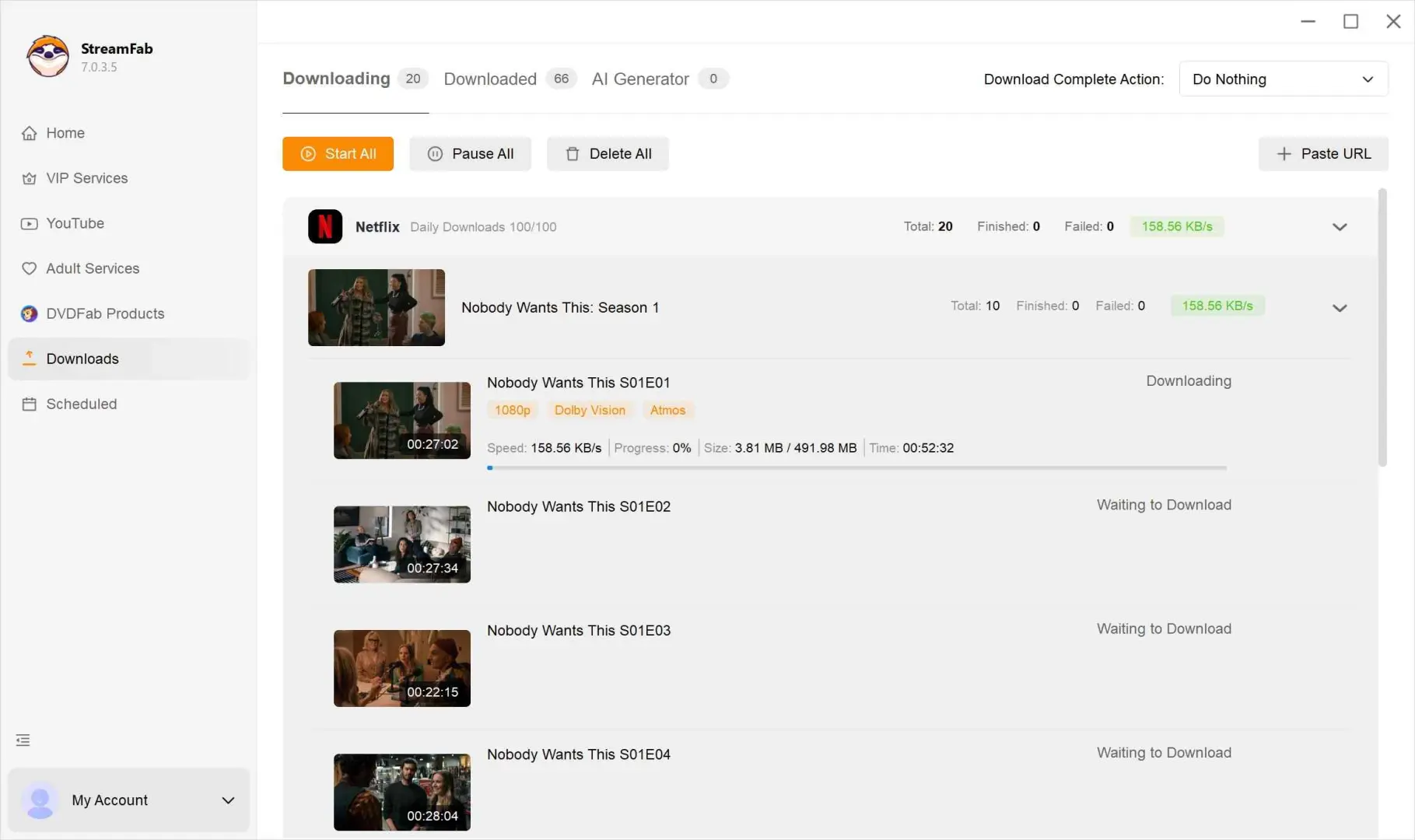
- Batch downloads and scheduled overnight runs for a full season.
- Multi-language subtitles as SRT or embedded.
- MP4 or MKV output, playable in VLC or on a smart TV via USB.
- Clean on author-run Norton and Kaspersky scans (2026-06).
- Full version is paid; the free trial is limited in scope.
- Windows and macOS only; no Linux build.
- Batch runs are network-heavy; overnight scheduling is the sensible pattern.
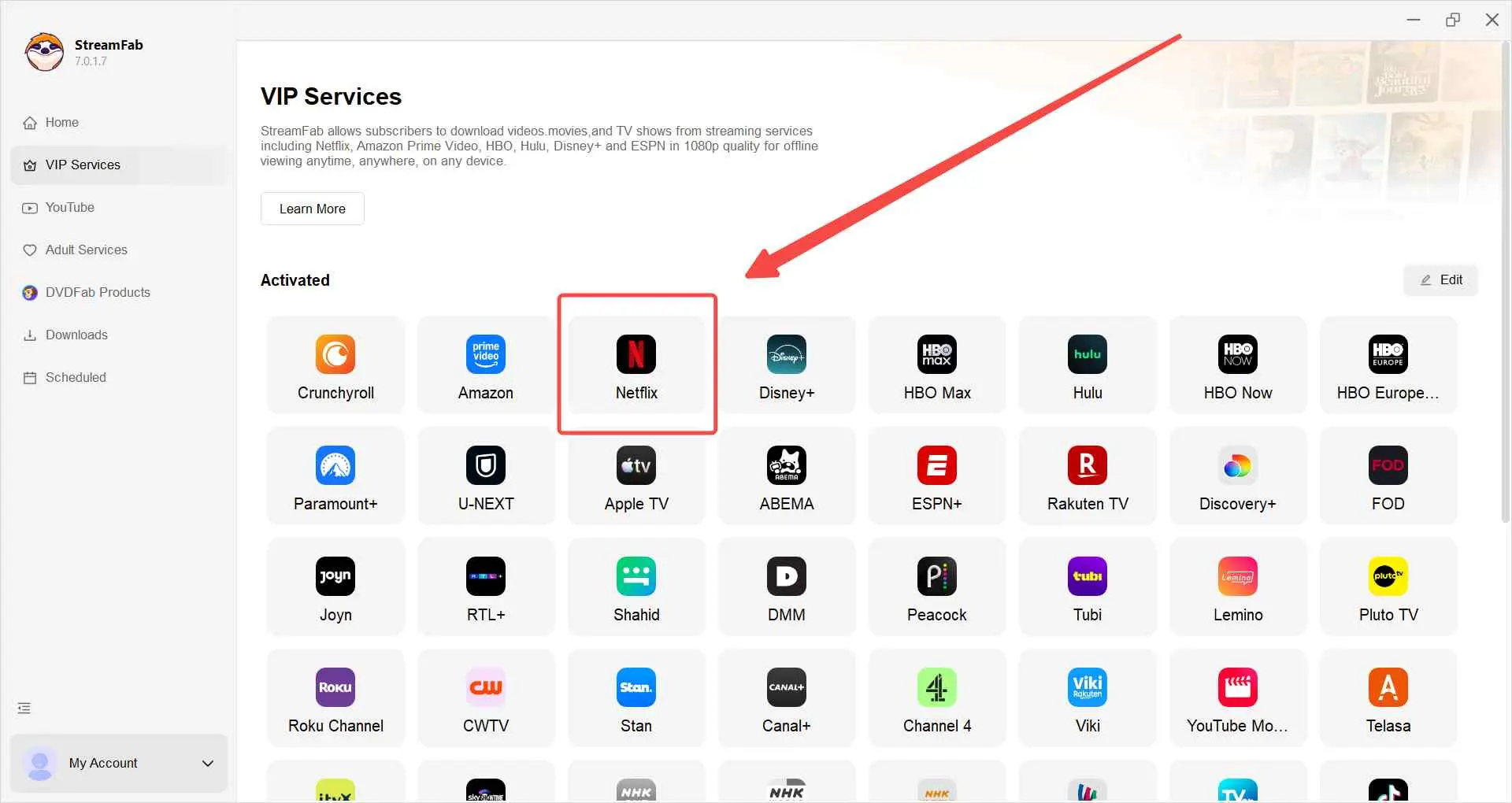
Open the built-in Netflix panel and sign in to your Netflix account.
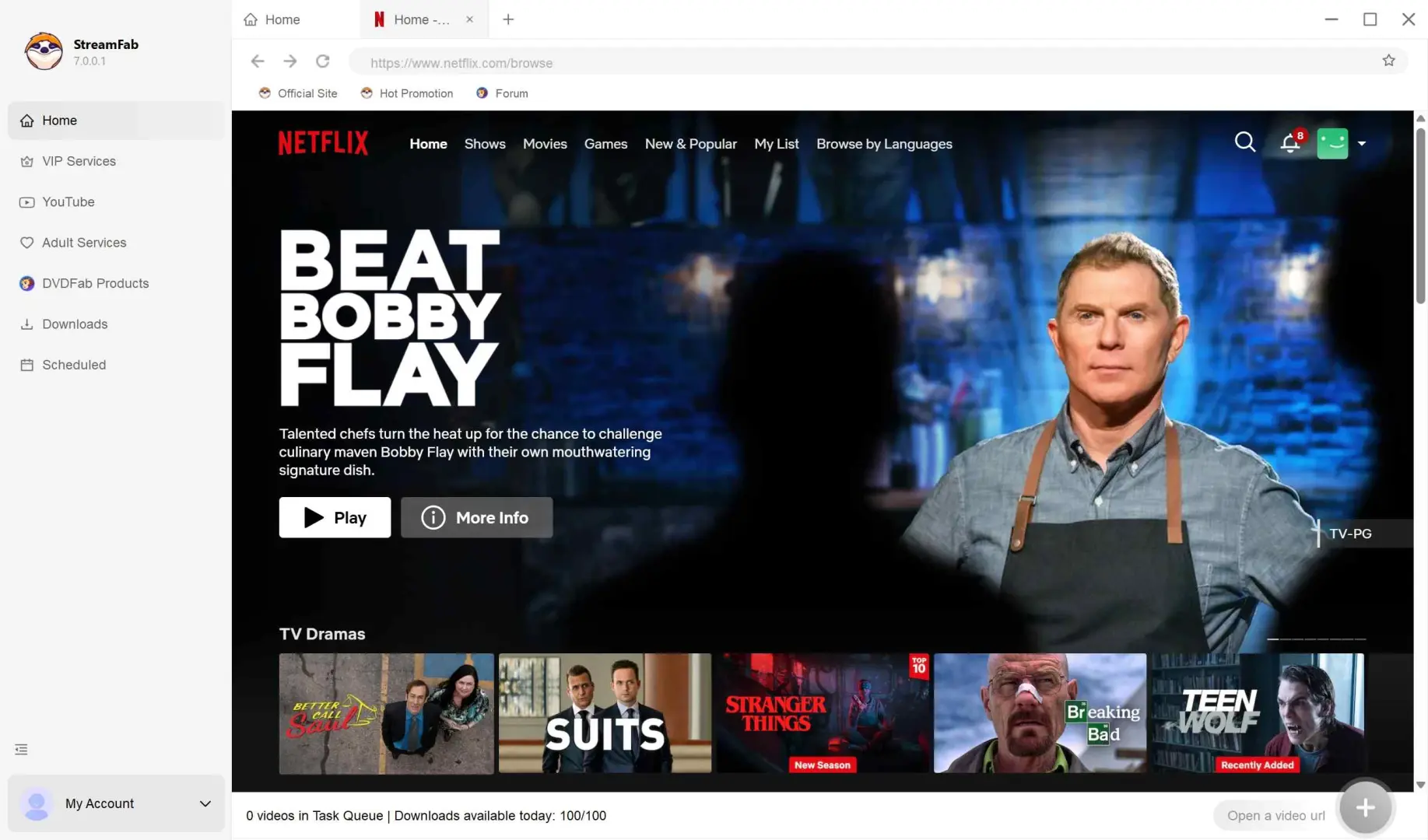
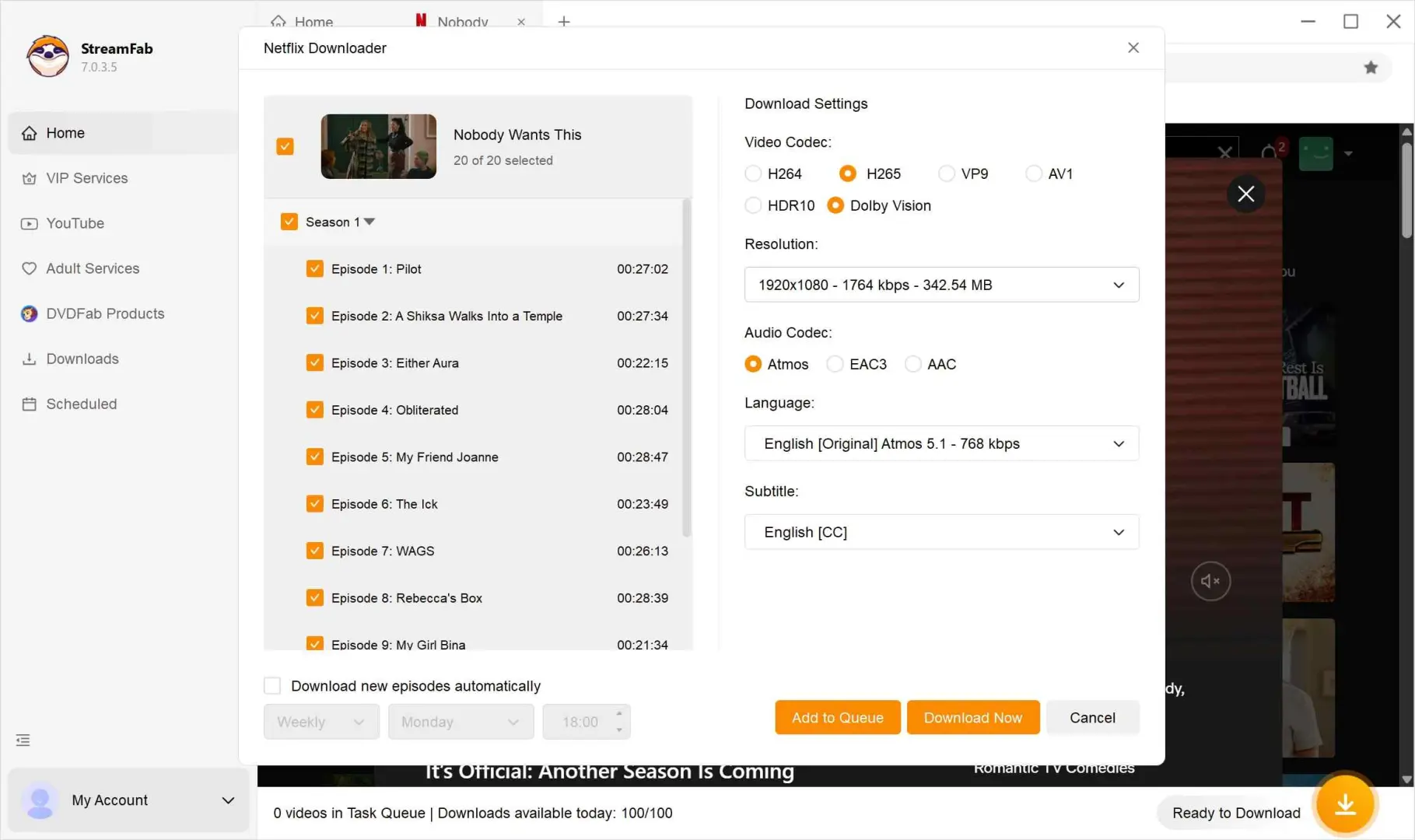
Find the title, then confirm the quality (1080p), audio track (Dolby Atmos where available), and subtitles.
Start the download; scheduled batch runs handle a full season overnight.
- Output is MP4 or MKV, so if you want to transfer Netflix to USB, play it in VLC, or watch it on a smart TV via USB (or with Plex on your own network), there is no in-app timer to manage.
- For a long trip, you keep a personal local file on your own drive; there is no 48-hour post-playback countdown fighting your schedule.
- Use it only for content you’re authorized to access with an active subscription; personal offline viewing only. Do not share, re-upload, or redistribute.
2. MovPilot Netflix Downloader: Simpler, Standard 5.1
- • Best for: users who want a straightforward workflow at standard 5.1 audio.
- • Not ideal for: readers who value HDR10, Dolby Vision, or Dolby Atmos, or who want a very active batch queue.

MovPilot Netflix Downloader is a simpler desktop alternative for Windows and Mac. It handles 1080p output with Dolby Digital 5.1 audio, and the interface is deliberately narrow: pick a title, pick a quality, download. If you don’t care about HDR or Atmos, that trade may suit you.
- 1080p output with Dolby Digital 5.1 audio kept intact.
- Straightforward interface, fewer settings to configure.
- MP4 or MKV output for portable playback.
- Clean on author-run Norton and Kaspersky scans (2026-06).
- No HDR10, Dolby Vision, or Dolby Atmos support.
- Slower observed download speeds in author testing than StreamFab under the same network.
- In-app search occasionally struggles with newer titles; a direct URL paste is more reliable.
Download the video downloader
Install MovPilot Netflix Downloader on Windows or Mac; sign in.

Open the built-in Netflix panel and sign in.

Find the title, select 1080p, and find the Dolby Digital 5.1 audio track.

Start the download and check the file in your saved folder.
3. Android Emulator: Mirrors the Mobile App Experience
- • Best for: users who insist on the official Netflix mobile app UI on a laptop and don’t mind heavier setup.
- • Not ideal for: modest hardware, users who want portable files, users who want to skip the Netflix expiry timer, or anyone who finds emulator configuration painful.

An Android emulator such as BlueStacks lets you run the official Netflix mobile app on Windows or Mac. The trade-off is real: heavier system load, longer setup, slower downloads that still expire under Netflix’s mobile rules, and files locked inside the emulator sandbox (so you can’t move them to a USB drive or a smart TV). Netflix has also blocked emulator playback in the past, so reliability can vary by emulator version and by title. As of June 2026.
Install BlueStacks on Windows or Mac and complete first-run setup.

Open the Play Store inside BlueStacks; sign in with a Google account.

Install the Netflix Android app and sign in.

Find a title, tap the Download icon, and check the file under the Netflix Downloads tab, which lives inside the emulator sandbox.

Compare the Netflix Download Methods on Laptops at a Glance
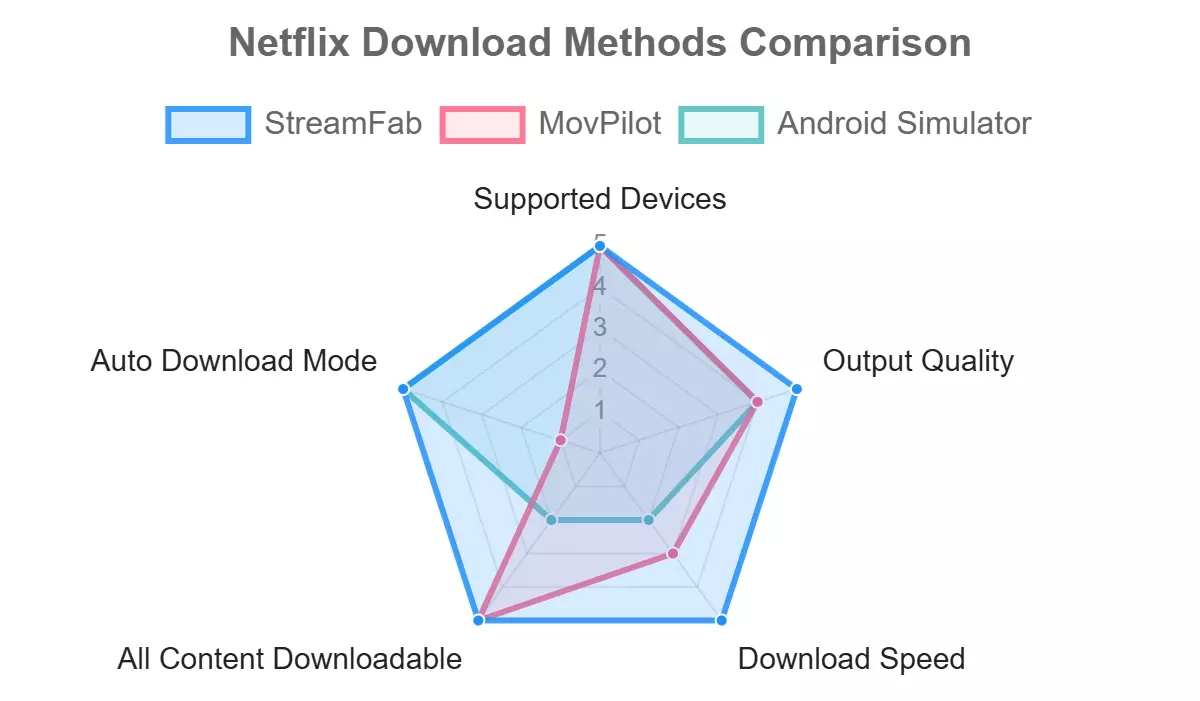
Match the method to your device and your priority: quality, simplicity, or sticking with the official app UI.
| StreamFab Netflix Downloader | MovPilot Netflix Downloader | Android Emulator (BlueStacks etc.) | Netflix Official App (Chromebook) | |
|---|---|---|---|---|
| Supported Devices | Windows 11 or 10, macOS 12+ | Windows 11, 10, 8.1, 8, 7 and macOS 12+ | Windows or Mac (heavy footprint) | Chromebook, iOS, Android |
| Output Quality (max) | 1080p | 1080p | 1080p | Up to platform max (varies by title and plan) |
| Audio (max) | Dolby Atmos | Dolby Digital 5.1 | Up to Dolby Digital 5.1 | Stereo on Windows PWA since July 2024; up to 5.1 where mobile or Chromebook supports it |
| Container / Portability | MP4 or MKV (VLC, USB, TV playback OK) | MP4 or MKV | Encrypted files inside the emulator sandbox | Encrypted .NFV files inside the Netflix app |
| Persistence | Local file on your drive; no in-app timer | Local file on your drive; no in-app timer | Expires per Netflix rules; sandbox-locked | Expires per Netflix rules (7–30 days unwatched; 48 hours after playback) |
| Batch / Auto Download | Yes: batch and auto-schedule | Yes: batch; no auto-schedule | No | Partial (smart downloads on mobile) |
| Safety (Norton + Kaspersky scan, 2026-06) | Clean | Clean | Depends on the emulator (BlueStacks widely used) | Not applicable |
| Best for | Laptop-friendly offline library with HDR and Atmos preserved | Simpler workflow at standard 5.1 audio | Users who insist on the official mobile UI on a laptop | Chromebook owners who accept Netflix’s per-plan caps and expiry |
| Not ideal for | Users content with mobile-locked downloads on the Netflix app | HDR or Dolby Atmos users | Modest hardware; users who dislike sandbox-locked files | Windows or Mac users (no in-app download support) |
As of June 2026, Netflix’s plan rules and app behavior may change; check Netflix’s Help Center for the latest.
- StreamFab:
- MovPilot:
- Android Emulator:
- Chromebook (official):
Why Netflix Removed Downloads from Windows and Mac
Netflix Windows download support ended in July 2024. Netflix migrated its Windows desktop app to a PWA built on Edge WebView2 in that release and removed offline downloads at the same time. macOS never had a native Netflix app, and the browser client has never supported downloads. If you have looked recently, the button is not hidden. It is gone.

- Rollback does not work. Guides that tell you to sideload the old UWP Netflix app are outdated. Netflix decommissioned that app entirely, so the Download button either fails to appear or the app returns an authentication error. As of June 2026.
- Windows PWA is stereo-only. Dolby 5.1 playback was dropped in the same 2024 transition, so even streaming quality is narrower than it used to be on Windows.
- macOS never had it. There is no rollback to attempt; if you are on a Mac you have always been on the browser client, which has never allowed offline downloads.

- Every “get downloads back on Windows” workaround I have tried since late 2024 has come up empty. The topic keeps trending on forums because the missing feature keeps disappointing travelers. Later research, later attempt, same result.
Netflix Download Limits, Expiry, and Plan Rules
Whether you use the official Netflix app on a Chromebook or a desktop alternative on Windows and Mac, the Netflix download expiry rules and plan caps still shape the picture. Here is the structured version so you can plan around it.
- Plan caps: Ad-free Standard and Premium: up to 100 active downloads per device. Standard with Ads: 15 downloads per device per calendar month on supported mobile devices.
- Expiry: Many titles expire 7 days after you download them; some allow up to 30 days unwatched. Once playback begins, you have 48 hours to finish before the file expires.
- Device requirement: Mobile (iOS, Android), tablets, and Chromebooks via the Netflix Android app support official downloads. Windows and Mac do not (since the July 2024 PWA transition).
- Region and title availability: Download availability varies by licensing and by account region; not every title is downloadable everywhere.
Source: Netflix’s Help Center, as of June 2026. Netflix’s plan rules and app behavior may change; confirm current figures first.
Practically, this means for a two-week trip, either don’t press play until you board or use a desktop alternative that stores a local copy instead of relying on the 48-hour post-play window.
FAQs
Many titles expire 7 days after you download them; some allow up to 30 days unwatched. Once you press play, you have 48 hours to finish before the download expires. Renewing requires an internet connection while you’re signed in on an active plan. Ad-free Standard and Premium plans allow up to 100 active downloads per device; the Standard with Ads plan allows 15 downloads per device per calendar month on supported mobile devices. As of June 2026, subject to Netflix changes. See Netflix’s Help Center for the latest.
Netflix’s Windows app switched to a PWA (Edge WebView2) in July 2024 and offline downloads were removed in that release. macOS never had a native Netflix app, and the browser client has never supported downloads. Rolling back to the old UWP app does not work; it’s decommissioned. Every “get downloads back on Windows” guide I have tested since late 2024 has come up empty. As of June 2026.
Yes. Chromebook runs the Netflix Android app from the Play Store, which supports offline downloads the same way phones and tablets do. Per-plan caps apply (up to 100 active on ad-free plans; 15 per device per calendar month on Standard with Ads), and Netflix’s expiry rules still apply. As of June 2026, subject to change.
Yes, on supported mobile devices, 15 downloads per device per calendar month (as of June 2026, subject to change). Ad-free Standard and Premium allow up to 100 active downloads per device. Netflix’s legacy Basic plan availability depends on your region; check Netflix’s Help Center for the current line-up.
Official Netflix app downloads are stored inside the Netflix app as encrypted files and cannot be transferred to a USB drive or an external player; they’re tied to the Netflix app on that device. If you save a local copy with a desktop alternative that outputs MP4 or MKV (for content you’re authorized to access with an active subscription, for personal offline viewing, where permitted by Netflix’s Terms and applicable law), you can play the file with VLC, on a smart TV via USB, or in Plex on your own network. Do not share, re-upload, or redistribute.
The Netflix app’s downloads expire based on Netflix’s rules (many titles 7 days after download; some 30 days unwatched; 48 hours after playback starts), which can be inconvenient for a long trip. If you need a laptop-friendly offline library that isn’t governed by in-app timers, a desktop alternative that saves a local MP4 or MKV is one practical workaround for Windows and Mac users for content you’re authorized to access with an active subscription for personal offline viewing, where permitted by Netflix’s Terms and applicable law. Do not share, re-upload, or redistribute.
Netflix app downloads stay inside the app itself (Chromebook via the Android app, which is not available on Windows or Mac since July 2024), so that offline library is locked to the app. A desktop alternative that outputs MP4 or MKV saves the file to a folder you choose, then plays it with your preferred local player. Follow Netflix’s terms and local copyright law: personal offline viewing only.
Conclusion
Here is the 2026 laptop landscape in one sentence: Windows and Mac no longer download Netflix natively; Chromebooks do (via the Android app). Windows and Mac users choose among a desktop alternative or an Android emulator.
- Chromebook: Best for Chromebook owners who accept per-plan caps and expiry. Not ideal for: Windows or Mac users.
- StreamFab: Best for: Windows and Mac users who want a laptop-friendly offline library with HDR and Atmos preserved. Not ideal for users content with mobile-locked downloads.
- MovPilot: Best for users who want a simpler workflow at standard 5.1. Not ideal for: HDR or Dolby Atmos users.
- Android Emulator: Best for users who insist on the official Netflix mobile UI on a laptop. Not ideal for: modest hardware; users who want portable files.
So, if your laptop is a Chromebook and per-title expiry is fine, skip the third-party route entirely. If you’re on Windows or Mac and hitting the expiry timer mid-flight is a real pain, a desktop alternative that outputs a local MP4 or MKV solves that specific problem, no more, no less.
