Crunchyroll’s official downloads are app-managed, device-limited, and time-limited; Windows and Mac still lack an official offline path. StreamFab Crunchyroll Downloader is worth considering when you need local desktop files, provided its 1080p ceiling, download quotas, and update-dependent compatibility fit your routine.
Desktop viewers usually need answers to three questions: what the official app limits, what local files change, and whether subtitles, batch season downloads, quotas, safety, and trial terms fit the way they watch.

Quick Summary: Is It Worth It?
StreamFab makes the strongest case for regular desktop viewers who want local files, styled subtitles, and season-level queues. The official Crunchyroll app remains the simpler route for occasional offline viewing on supported mobile or console apps.
- Official offline route: Best for supported mobile or console apps when app-managed downloads fit your trip.
- Desktop file route: StreamFab saves up to 1080p H.264 video with AAC 2.0 audio as MP4 or MKV on Windows and macOS.
- Anime-specific strength: SRT, ASS, and hard-subtitle choices give you more control over dialogue and on-screen text.
- Workflow: Batch season downloads and scheduled episode monitoring reduce repetitive setup.
- Limits: 1080p maximum, 100 downloads per day and 700 per week per service, plus temporary gaps after platform changes.
- Verdict: Worth considering for regular desktop viewing; occasional phone-only viewing is better served by the official app.
StreamFab All-In-One combines the Crunchyroll module with other supported streaming modules in one desktop package.
What Is StreamFab Crunchyroll Downloader?
StreamFab Crunchyroll Downloader is a Windows and macOS module for personal offline viewing of content you are authorized to access, where permitted by platform terms and applicable law. It saves standard MP4 or MKV files instead of app-managed downloads.

Download Crunchyroll anime in up to 1080p MP4 or MKV with AAC 2.0 audio for personal offline viewing.
Crunchyroll downloads expire or require revalidation within the official app workflow. StreamFab takes a different desktop approach: up to 1080p H.264 video, AAC 2.0 audio, selectable audio tracks, subtitle downloads, metadata, and local MP4/MKV files for players such as VLC, Plex, or Kodi.
- • Single episode and full season batch downloads
- • Sub and dub version auto-detection with selectable tracks
- • Subtitle extraction in SRT, ASS, or hard-coded formats
- • Metadata retention for media library integration
- • Scheduled auto-downloads for newly released episodes
The product is part of the broader StreamFab software suite. Choose the standalone module when Crunchyroll is your main service; the suite package is aimed at viewers who use several supported streaming modules.
Key Features I Tested
The documented test set focused on the three details that decide whether an anime downloader is useful: source-matched video, readable styled subtitles, and a queue that can process a season without constant supervision.
- Windows 11 Pro (24H2)
- StreamFab v7.0.2.8
- Crunchyroll Mega Fan account
- 100 Mbps fiber connection
- Test content: Demon Slayer S4, Solo Leveling S2, Frieren S1 (JP audio + EN subs)
Video Quality and Codec Output
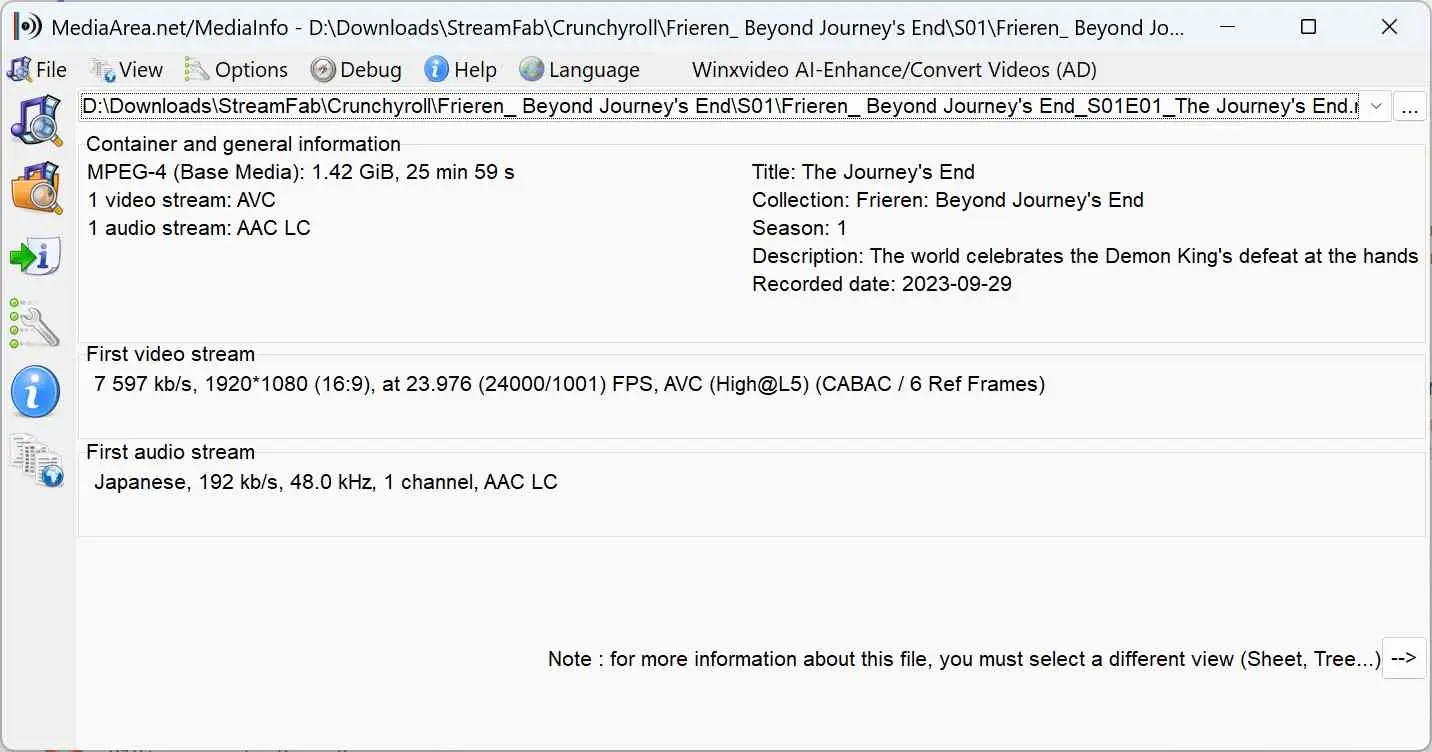
StreamFab produces 1080p anime downloads when the Crunchyroll source offers 1080p, using H.264 video and AAC 2.0 audio. In my testing across 30 episodes from three different series, every output file matched the source resolution available on Crunchyroll. I verified each file in MediaInfo: the bitrate was consistently in the 4–6 Mbps range for 1080p content.
MP4 is the practical default for broad playback support, while MKV is useful when you want multiple audio or subtitle tracks in one container.
Subtitle Handling for Anime
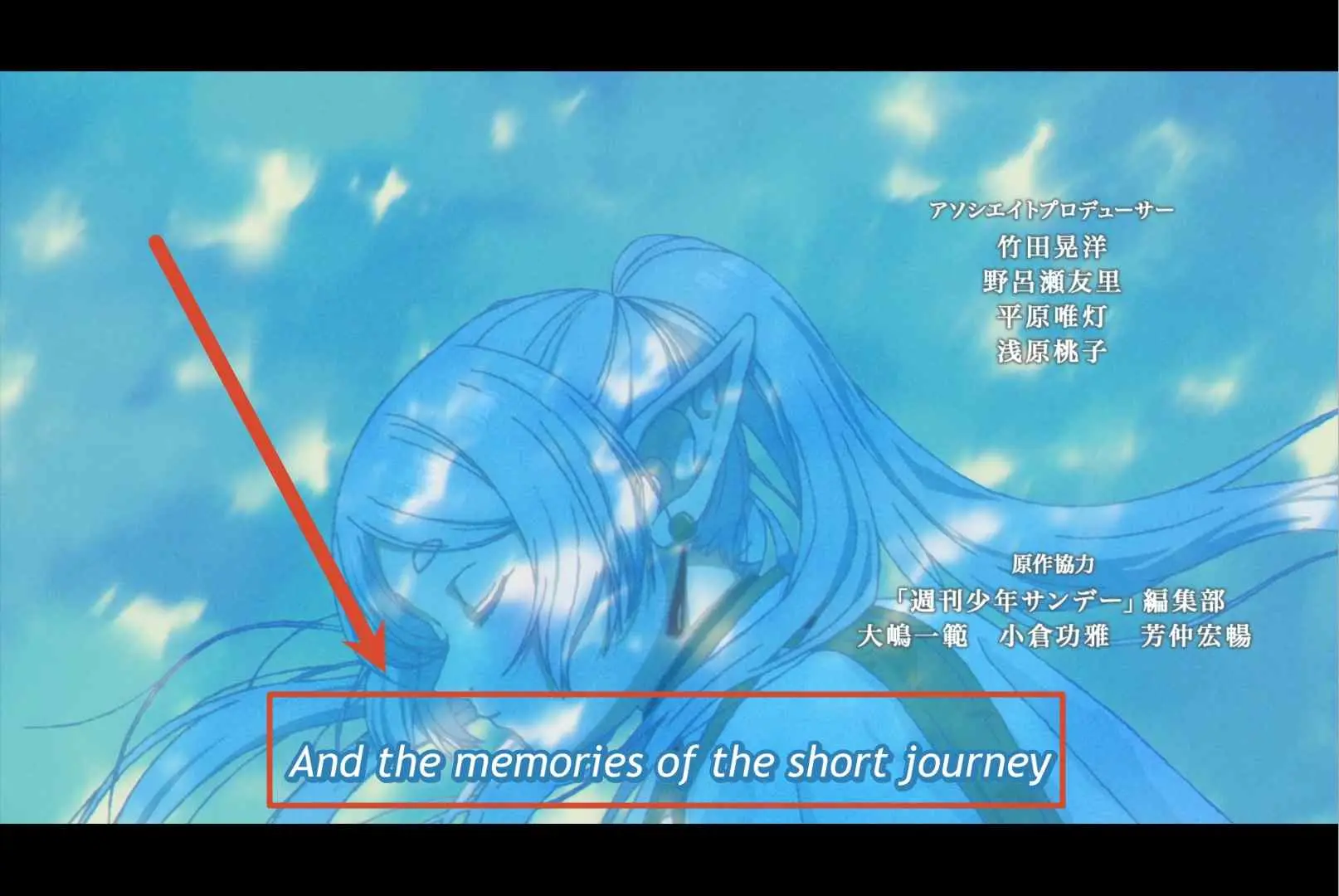
ASS subtitles are the distinguishing option here because anime often places translated signs, songs, and background dialogue away from the bottom of the frame. SRT is easier to move between players, while hard subtitles trade flexibility for predictable display.
- External SRT files: Clean, widely compatible subtitle files saved alongside the video. They work in VLC, Plex, and Kodi.
- External ASS files: Preserve styled formatting for signs, songs, and on-screen text, which matters for dialogue placed around the frame.
- Hard subtitles: Render text directly in the video frame. No separate file is needed, but the subtitles cannot be turned off later.
In my testing with 15 episodes that included styled sign subtitles, the ASS output retained formatting correctly in every case. MKV output with embedded soft subtitles also preserved styling and allowed toggling between Japanese and English tracks during playback.
Batch and Scheduled Downloads
Batch season downloads remove the repetitive part of selecting episodes one by one. I tested downloading the complete first season of Frieren (28 episodes). StreamFab queued and processed all episodes automatically after selecting the season from the episode list. The full season completed in approximately 45 minutes on my connection, averaging under 2 minutes per 24-minute episode. No failed downloads in the batch.
Scheduled monitoring is more useful for currently airing series than for a completed library. I enabled this for Solo Leveling S2 and confirmed it pulled the latest episode within 6 hours of Crunchyroll's release.
How to Download Crunchyroll Episodes
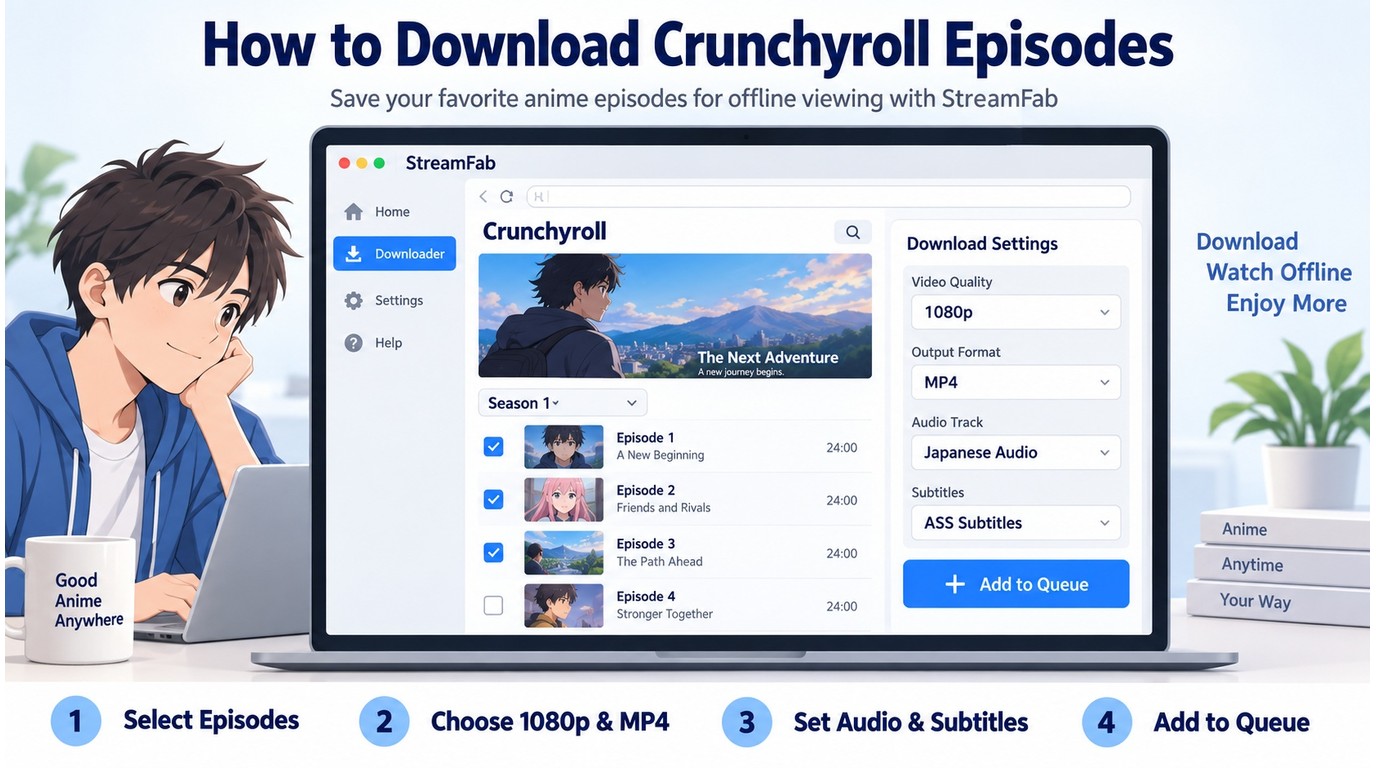
Start with an active Crunchyroll subscription and content you are authorized to access. The workflow is sign in, choose episodes, set video, audio, and subtitle options, then monitor the queue.
The broader StreamFab usage guide explains the shared interface. The Crunchyroll-specific path is contained in the step card below.
Confirm that your Crunchyroll subscription is active, launch StreamFab, and select "Crunchyroll" from the streaming service list in the left panel. The built-in browser opens Crunchyroll's homepage. Log in with your Crunchyroll account credentials.
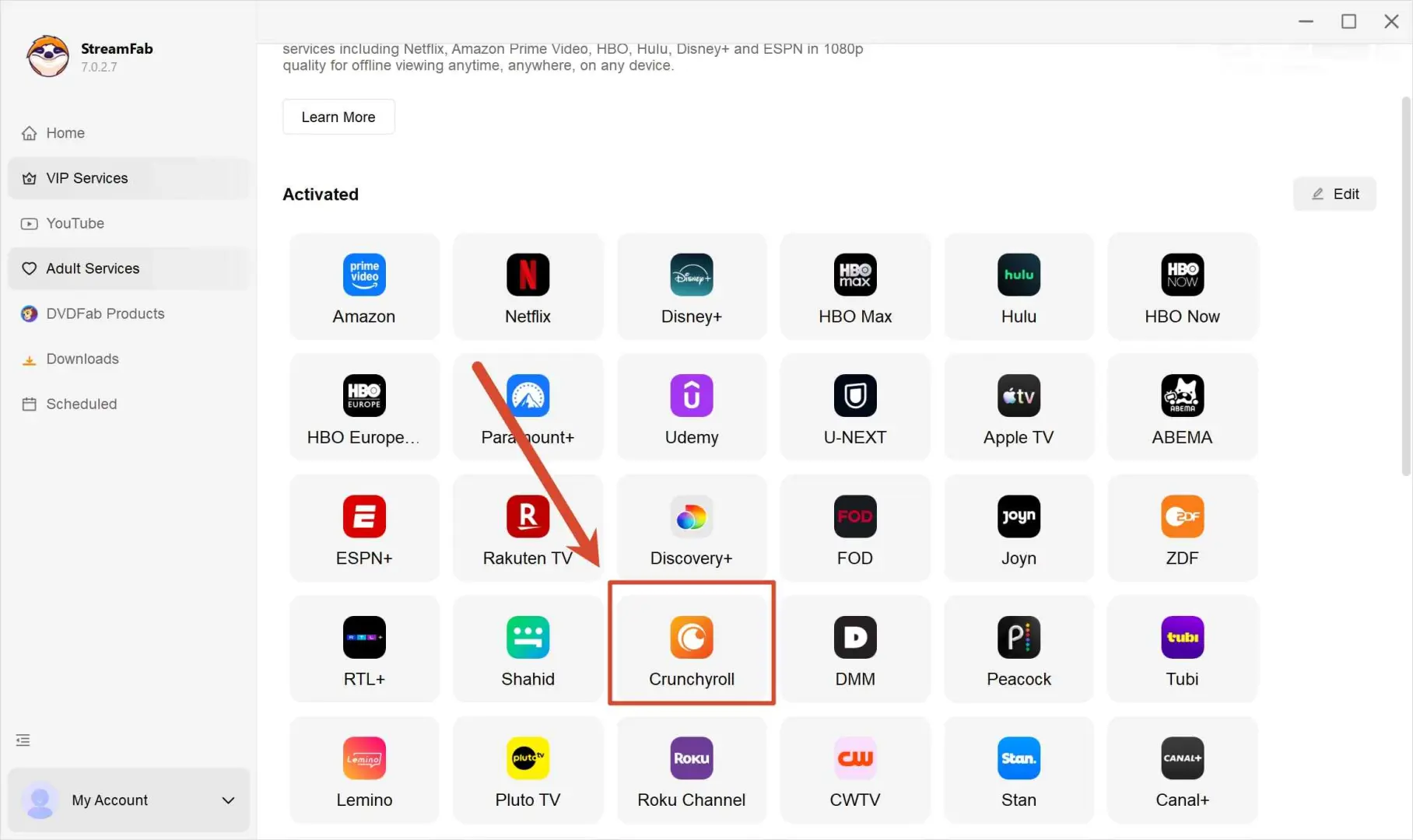
Navigate to the anime series you want to download. Browse Crunchyroll's library or paste a series URL directly into the address bar. Select individual episodes or the entire season.
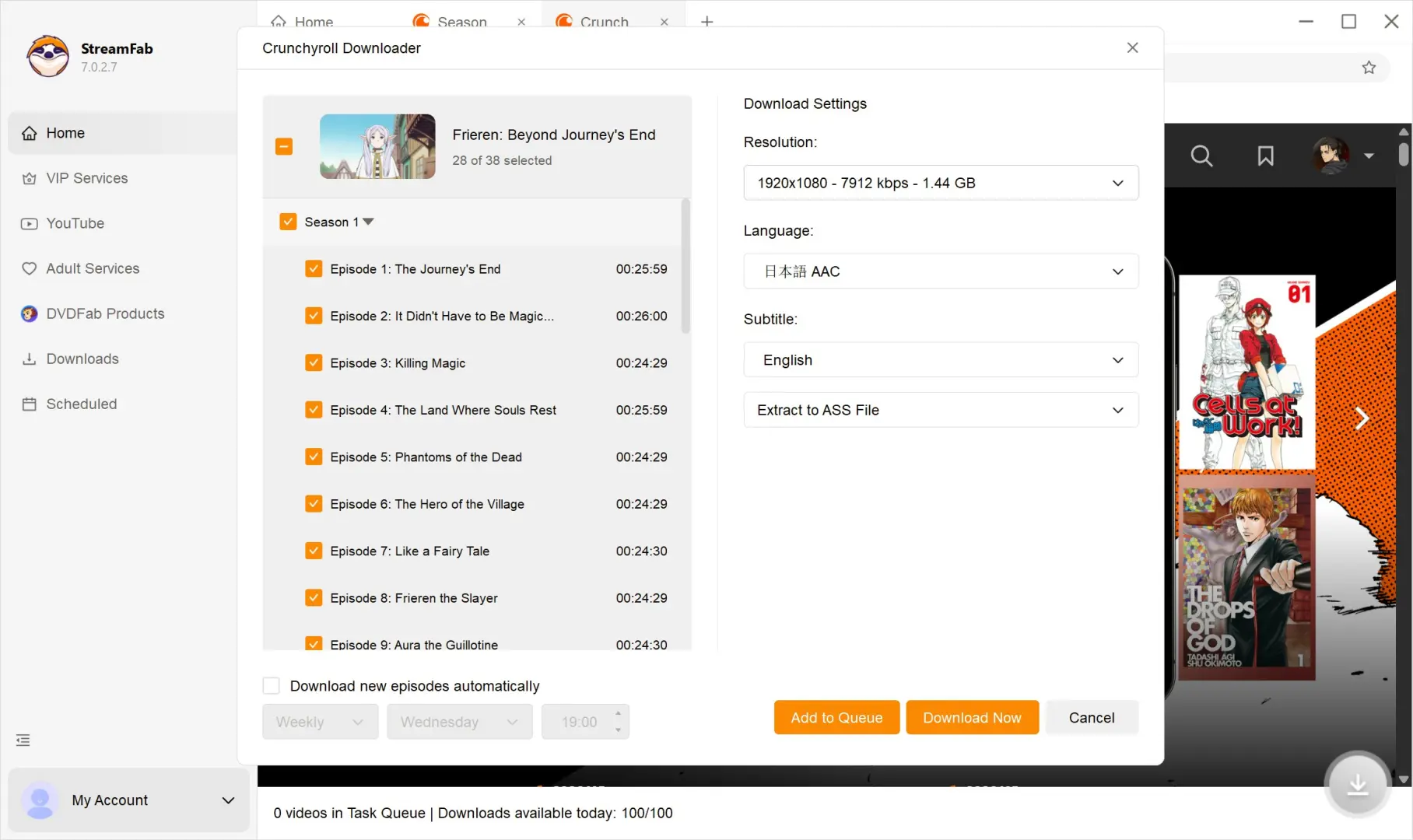
In the download dialog, select video quality up to 1080p, an available audio language, and SRT, ASS, or hard subtitles. Click "Download Now" to start the batch, then monitor progress in the "Downloading" tab.
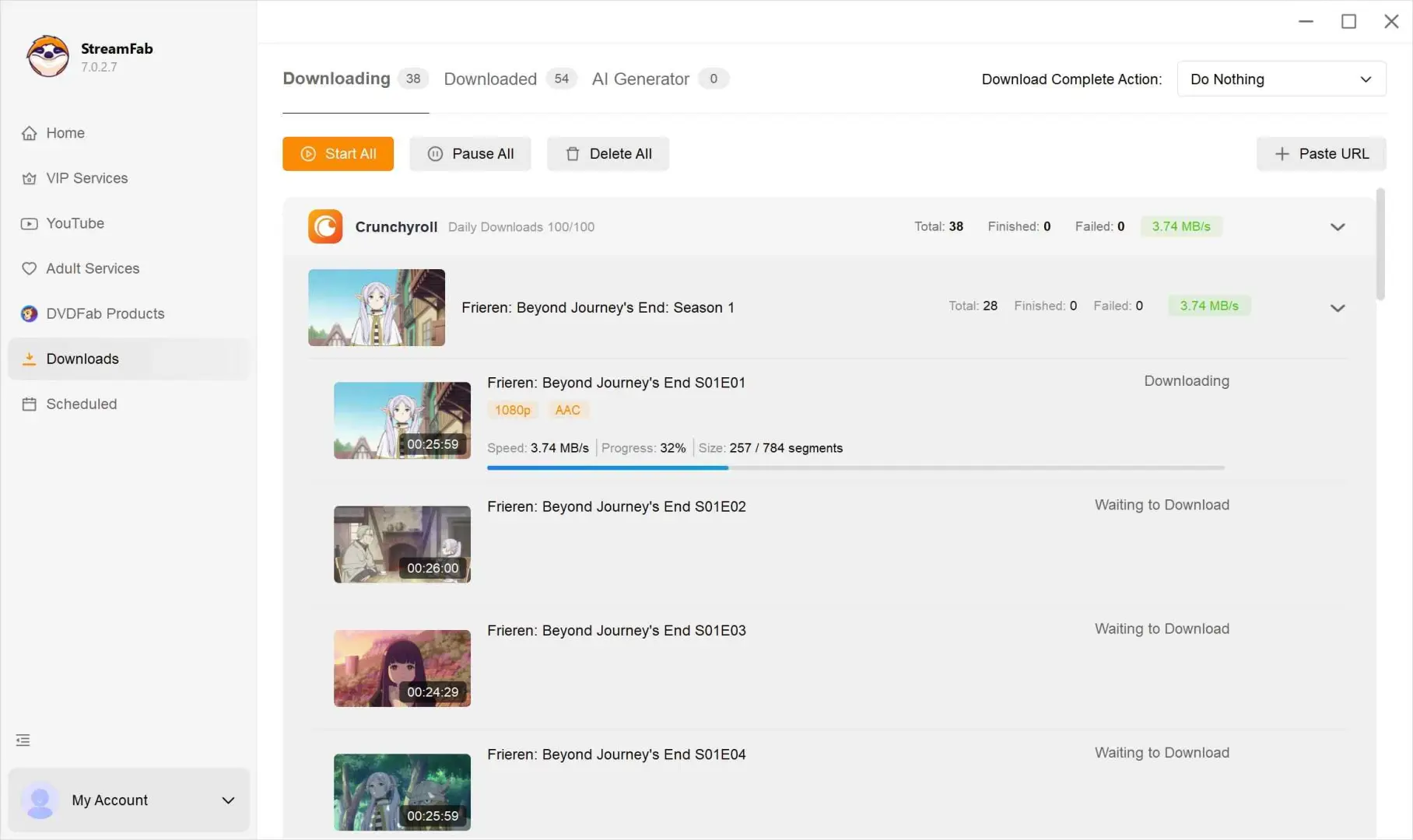
If the download dialog does not appear, refresh the title page in the built-in browser and retry. If the dialog is still missing, update StreamFab before rebuilding the queue.
StreamFab vs Other Crunchyroll Download Methods
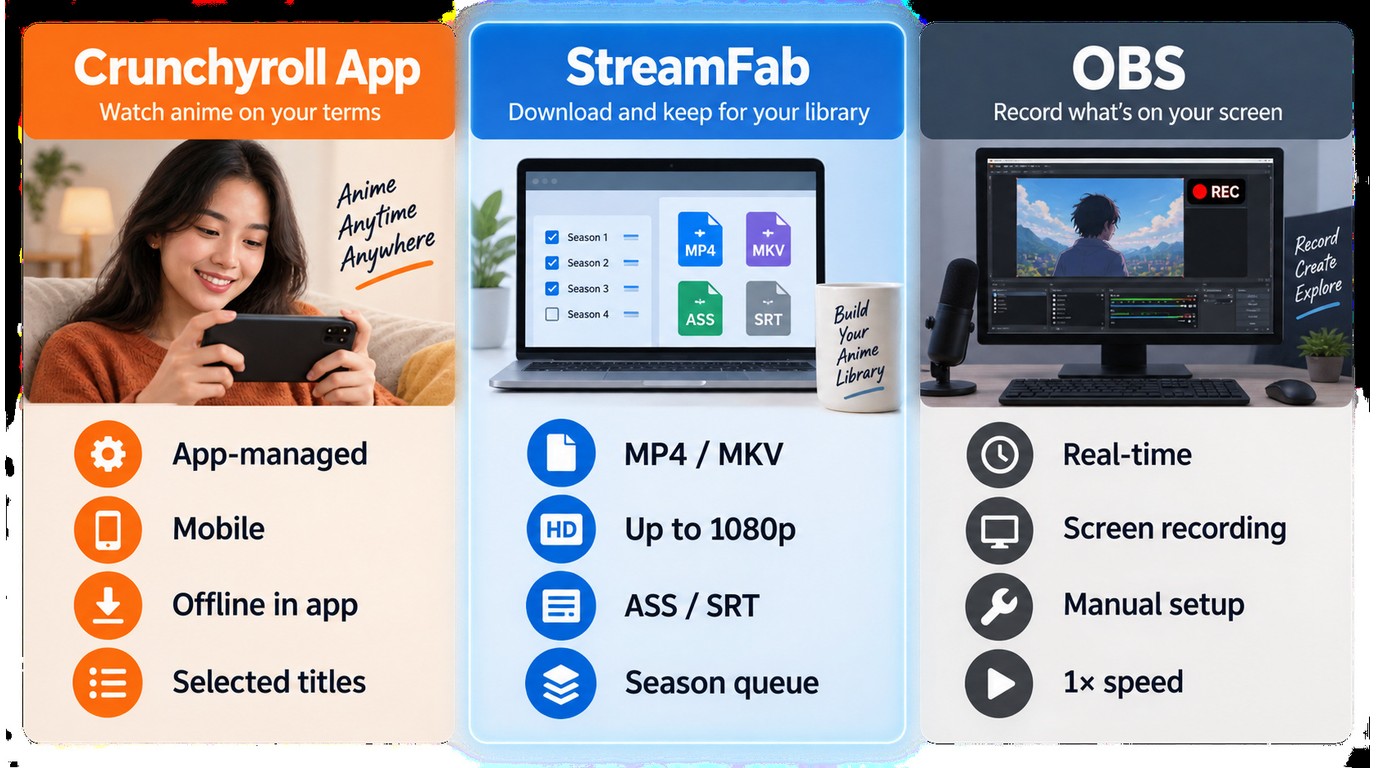
The right method follows the device and file model you actually need. Use the official app for simple mobile or console offline viewing, StreamFab for local desktop files and season queues, and OBS Studio when a manual real-time recording workflow is acceptable.
| Method | Device and file model | Batch workflow | Subtitle options | Best fit |
|---|---|---|---|---|
| Crunchyroll official app | Supported apps; app-managed downloads | App queue with device limits | Built into the app | Short-term mobile or console viewing |
| StreamFab Crunchyroll Downloader | Windows/macOS; local MP4/MKV | Full seasons plus scheduling | SRT, ASS, or hard subtitles | Desktop libraries and styled subtitles |
| OBS Studio | Desktop; real-time recording | One title at a time | Rendered with playback | Manual one-off capture |
| Browser extensions | Browser-dependent files | No dependable season queue | Extension-dependent | Light web-video tasks |
StreamFab’s practical advantage is the combination of a local file model, subtitle choice, metadata, and automated episode queues. OBS records in real time, so a 24-minute episode takes roughly 24 minutes to capture; the official app remains faster when its supported-device workflow is enough.
Pricing and Plans Overview
The Crunchyroll downloader price makes the most sense when the license matches your viewing: choose the standalone module for Crunchyroll, or All-In-One if you already use several supported streaming services.
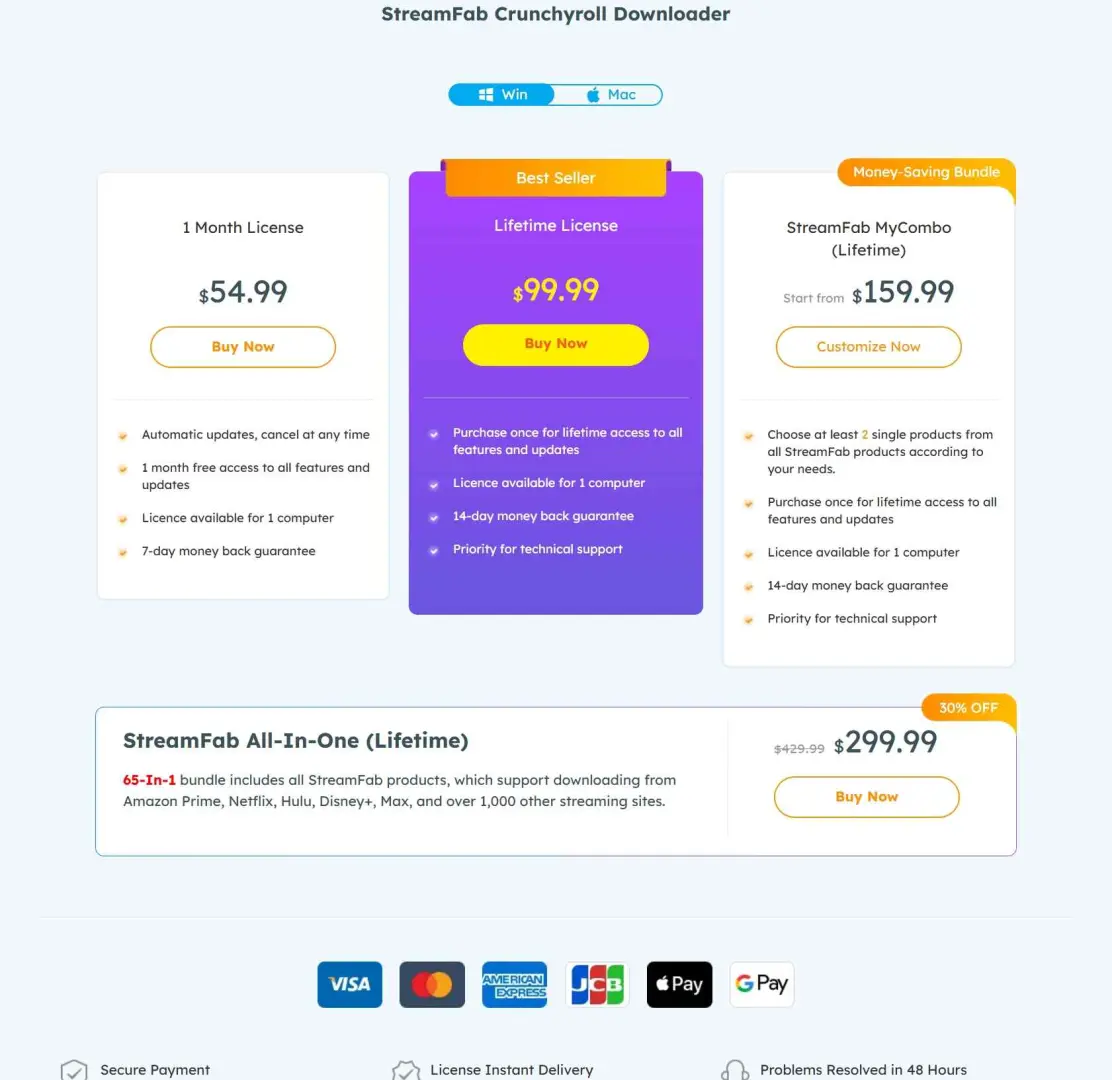
As of September 2026, the free StreamFab trial runs for 30 days and allows three full-length downloads per service. That is enough to check one familiar title, your preferred subtitle mode, and the resulting MP4 or MKV file before choosing a license.
Use the standalone module for Crunchyroll-focused viewing; All-In-One serves multi-service libraries. Promotions change, while the 30-day trial is the practical way to confirm subtitles and output on your setup.
If Netflix is also part of your rotation, the StreamFab Netflix Downloader review covers that separate module’s platform-specific workflow and limits.
Known Limitations and Workarounds
The limits are concrete: Crunchyroll output tops out at 1080p, each service has daily and weekly quotas, and platform changes can interrupt a queue. A small authorized test title, current software, and a checked output file catch most problems early.
1080p Maximum Output
StreamFab Crunchyroll Downloader supports up to 1080p, H.264 video, and AAC 2.0 audio. If a title is served below 1080p, the saved file follows that source; a trial download shows the available result before you queue a season.
Daily and Weekly Quotas
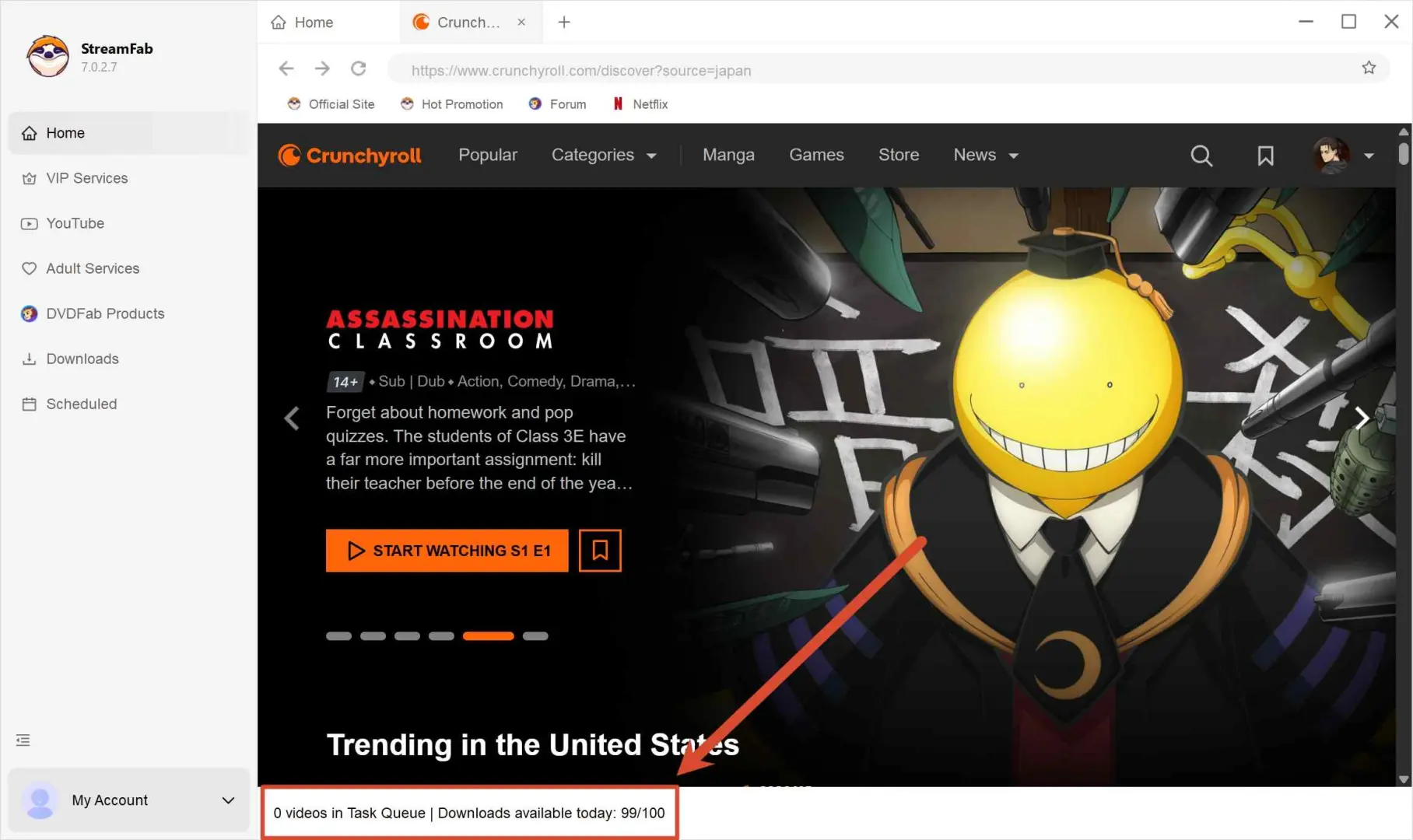
The Crunchyroll download limit is 100 downloads per day and 700 per week for this service. The StreamFab download-limit policy explains how the per-service cycle works; spread a large library across days instead of rebuilding the same queue after the quota is reached.
Compatibility and Retry Steps
Check four points before restarting a large batch:
- Review episode names in the queue so duplicated titles do not create confusing filenames.
- Test one episode in SRT or ASS before applying that subtitle choice to a full season.
- Preview the first file for audio sync before leaving a scheduled batch unattended.
- If analysis or download stops after a platform change, update StreamFab, refresh the title page, and retry the episode.
During the documented two-week sample, two Crunchyroll backend changes temporarily prevented downloads from completing. In both cases, a StreamFab update released within 48 hours restored the workflow.
Desktop-Only Availability
StreamFab Crunchyroll Downloader supports Windows and macOS, not iOS or Android. For phone-only viewing, the official Crunchyroll app is the lighter route. StreamFab’s strength is a desktop workflow for local MP4/MKV files, styled subtitles, batch queues, and metadata.
Is StreamFab Crunchyroll Downloader Safe?
Install StreamFab from the official StreamFab website and keep it up to date. The installer is digitally signed, and the dedicated StreamFab safety analysis explains the broader suite’s installer and scanning checks.
The VirusTotal result below records the scan for the tested build. Download the installer from StreamFab, confirm the digital signature, and avoid modified packages distributed elsewhere.

Responsible use has five boundaries: keep an active Crunchyroll subscription, save only content you are authorized to access, use the files for personal offline viewing, do not redistribute them, and follow applicable law and platform terms.
FAQ
Does Crunchyroll offline viewing work on a Windows PC?
Crunchyroll's official offline feature is app-managed on supported mobile or console devices, not a Windows download path. StreamFab provides a Windows and macOS workflow that saves authorized content as local MP4 or MKV files.
What does the free StreamFab trial let me test?
The 30-day trial allows three full-length downloads per streaming service. Use those downloads to check a familiar episode, your preferred subtitle format, and playback in the device or media library you plan to use.
Why might a Crunchyroll download take longer than expected?
A large queue, connection changes, subtitle processing, or a temporary platform update can slow or stop analysis. Refresh the title page, retry one episode, and install the current StreamFab update before rebuilding the full queue.
Is there a daily limit for StreamFab Crunchyroll downloads?
Yes. The documented quota is 100 downloads per day and 700 per week for each supported service. Schedule a large season library across several days rather than trying to process the full archive in one cycle.
Conclusion: Who Should Use StreamFab?
StreamFab fits regular Windows and Mac anime viewers who value local MP4/MKV files, styled subtitles, metadata, batch season downloads, or scheduled episode monitoring. Those needs are specific enough to justify a desktop tool.
For occasional phone-only viewing, the official Crunchyroll app is simpler. StreamFab’s value begins when you want a desktop library and control over file, subtitle, and queue choices.
My take is conditional: choose the official route for short trips on supported apps, and choose StreamFab when the desktop file workflow solves a recurring need. The 1080p ceiling, quotas, and post-update retries should be acceptable parts of that decision, not surprises after purchase.

StreamFab All-In-One combines the Crunchyroll module with modules for other supported streaming services in one package.
Environment: Windows 11 Pro (24H2), StreamFab v7.0.2.8, Crunchyroll Mega Fan account, 100 Mbps fiber connection.
Streaming platforms regularly update their infrastructure, which can affect compatibility and available features. Use saved content within each platform's terms and your authorized access.