
Peacock's download button does not solve offline viewing on a laptop. My take: StreamFab is worth considering for authorized on-demand viewing on Windows or Mac; Premium Plus is the simpler route for app-based mobile downloads. This StreamFab Peacock Downloader review covers quality options, Peacock download limits, reliability, and trial terms.
StreamFab Peacock Downloader is a third-party desktop tool relative to Peacock's official download feature, for personal offline viewing of content you're authorized to access, where permitted by platform terms and applicable law.


Quick Summary: Is StreamFab Peacock Downloader Worth It?
StreamFab suits a desktop library of Peacock movies and episodes. You get local-file output and a queue for on-demand viewing. StreamFab Peacock reliability also includes title compatibility: use the included trial on the shows you intend to save, and install updates when a title fails.
- Quality options: Up to 4K, including 1080p, with options shown for the selected title.
- Audio choices: Dolby Atoms, EAC3 5.1, and AAC 2.0 are supported options.
- Title check: Play a completed trial file to check picture, sound, and subtitles.
- File choice: Choose MP4 for broad playback support or MKV for multiple tracks.
- Account limits: Licensed downloads have daily and weekly quotas, with automatic cycle resets.
- Access requirement: Your Peacock plan must include the movie or episode you select.
Free Download macOS 11.0 or later
Peacock Official Download Devices and Limits

Peacock's official downloads require Premium Plus and stay inside its mobile app. They cover eligible titles on supported iOS, Android, and Fire Tablet devices. Windows and Mac do not have this official offline route. That device gap explains the appeal of a Peacock video downloader.
- Library size: Up to 25 titles across devices and profiles, with 10 downloads per title per account.
- Time Windows: Unplayed downloads expire after 30 days; starting playback opens a 48-hour viewing window.
- Playback location: Official downloads play inside Peacock, rather than as MP4 or MKV files in a separate player.
- Storage management: Logging out or uninstalling the app removes its downloaded content. Finish your viewing before changing the installation.
These limits matter most when you load several episodes before traveling. Start playback when you are ready to watch, and keep room for the next download. Eligible devices and title availability change; Peacock's official download help lists current support.
How StreamFab Peacock Downloader Works
StreamFab uses a built-in browser to open Peacock and save selected on-demand titles as local files. You sign in, open a title, and choose the offered output settings. Peacock MP4 downloads then open in a compatible player instead of Peacock's mobile Downloads screen.
Before You Begin
An active Peacock subscription and a Windows or Mac computer are required. Your plan must include the title. Have storage space available and keep the app updated; the trial gives you a way to check compatibility with your intended viewing.
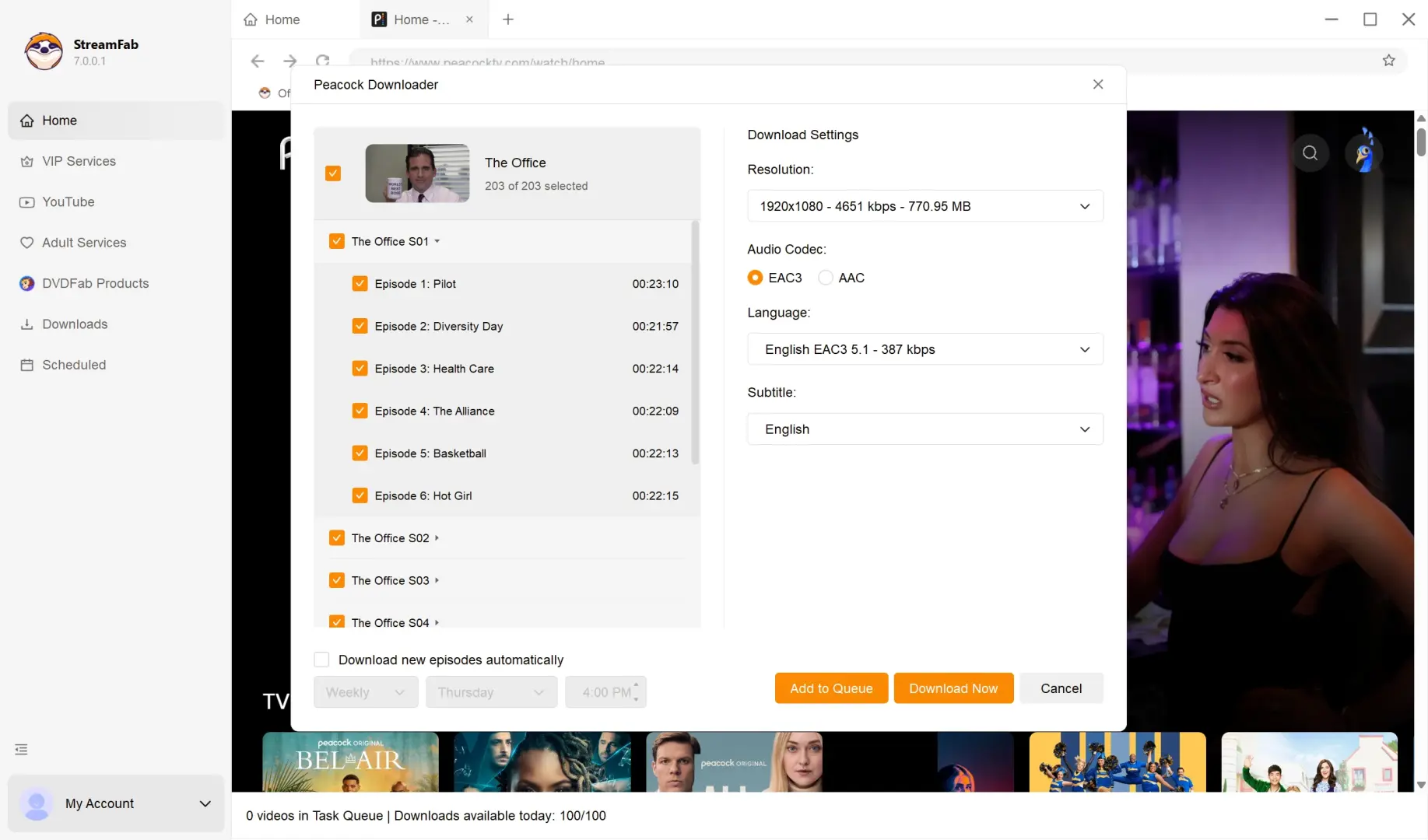
Open Peacock within StreamFab, sign in, and select an on-demand movie or episode. The download dialog presents the available video, audio, and subtitle choices.
Save the authorized title to your selected folder, then open the completed file in your intended player to check playback.
Key Peacock Download Features
The useful distinction is a library workflow: batch downloads, local files, and selectable tracks. You do not need to start each episode separately. MKV is a practical choice when you want multiple audio tracks and subtitles together; MP4 favors broad device support.
The service browser, queue, and output folder are shared parts of how you use StreamFab across modules. Peacock appears within that same interface.
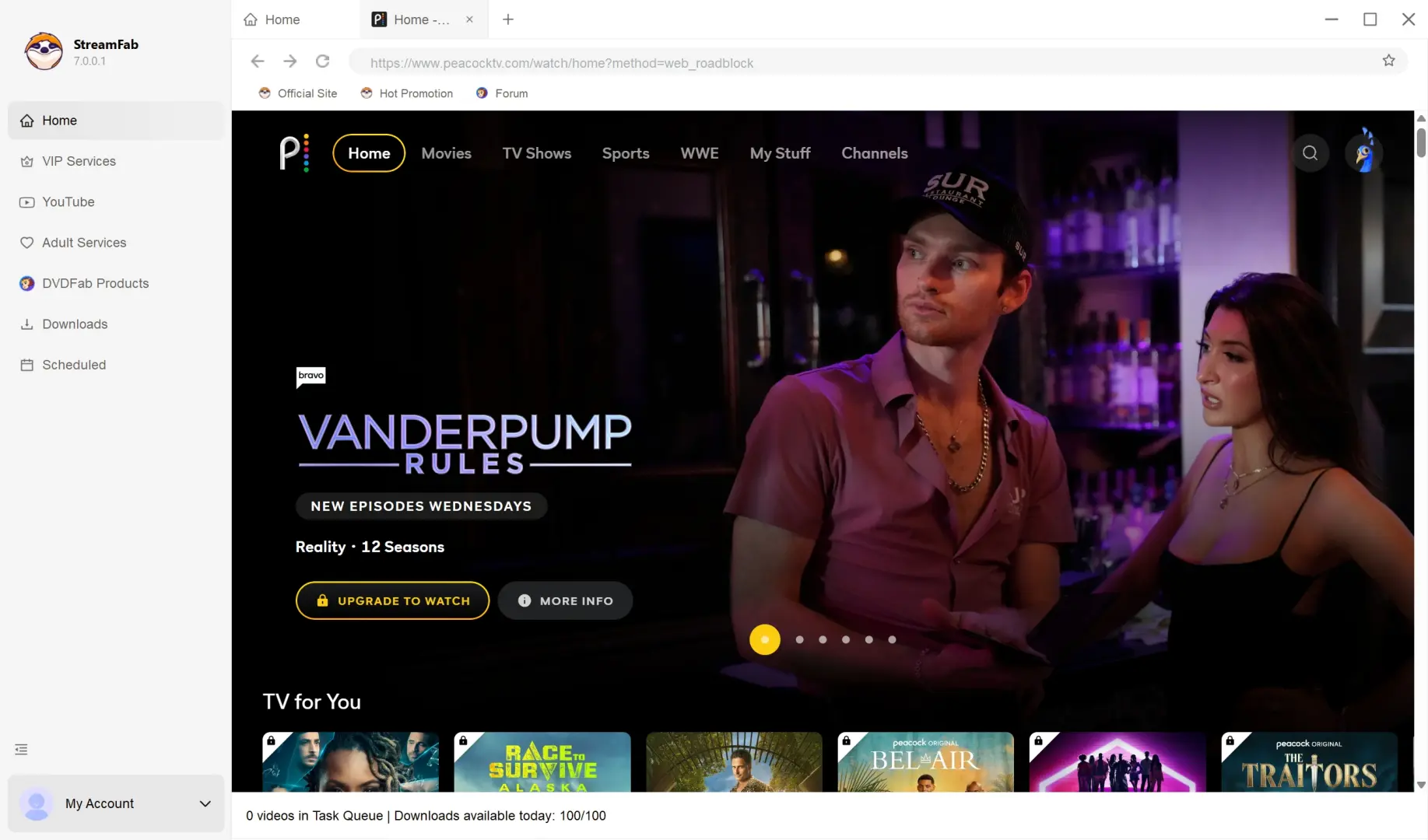
Download Peacock Videos on PC or Mac
Peacock laptop downloads follow a browse, select, and save workflow. Keep your account credentials ready. The screenshots below follow the same sequence.
Regional access: This workflow concerns Peacock's US service and content included in your subscription.
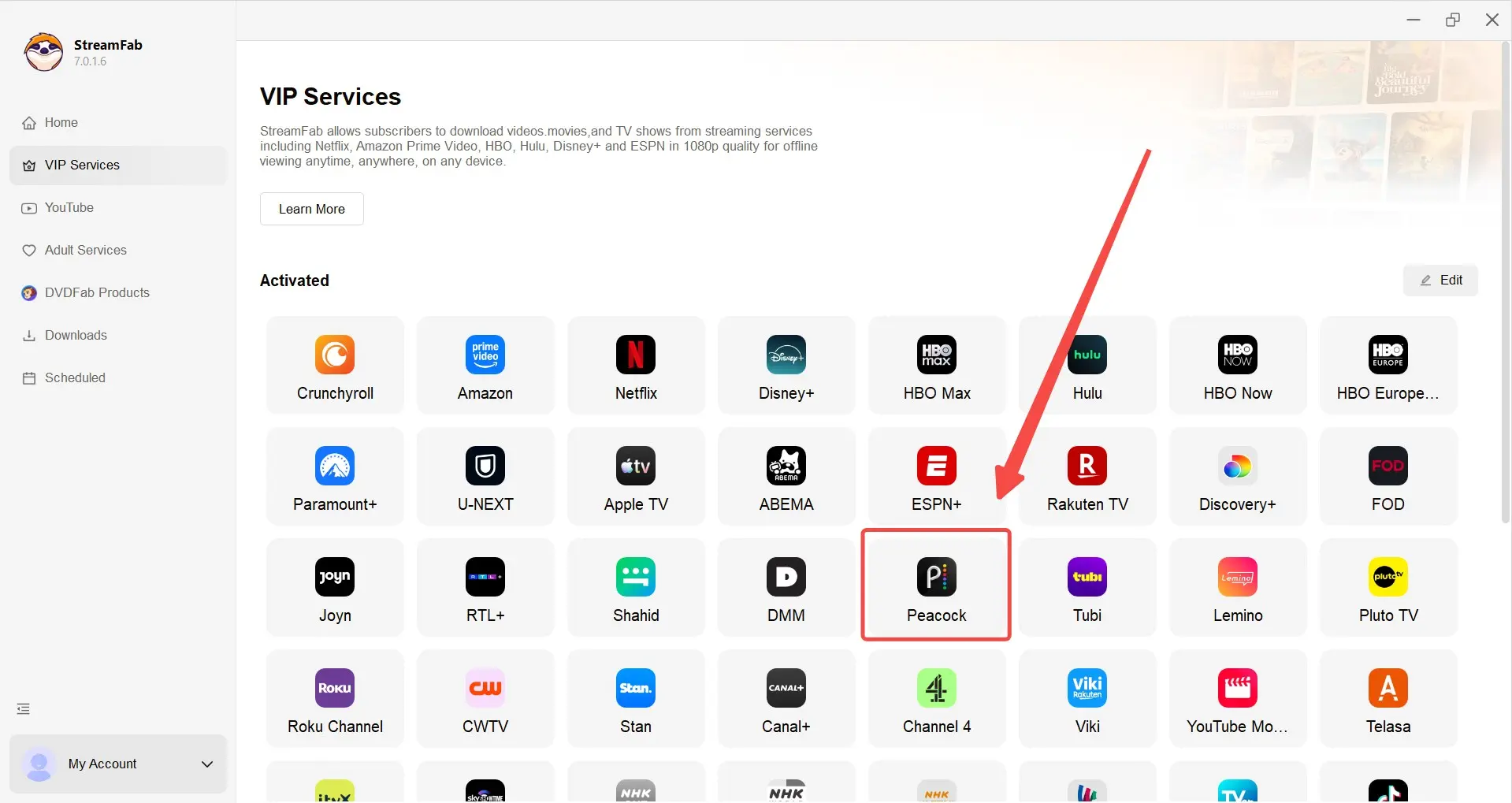
Download and install StreamFab. Run the official Windows or Mac installer. Launch the app, choose Streaming Services, and select Peacock to open its website.
100% Safe & Clean100% Safe & CleanSign in and select content. Enter your Peacock credentials. Browse to an on-demand movie or open a series season to choose episodes.
Configure and start the download. Play the title to open the download dialog. Choose the offered resolution, audio, and subtitles. Select Download Now or Add to Queue.
Find the completed file. Click the folder icon beside the finished item in the download list. Open the file in your intended media player and check the selected tracks.
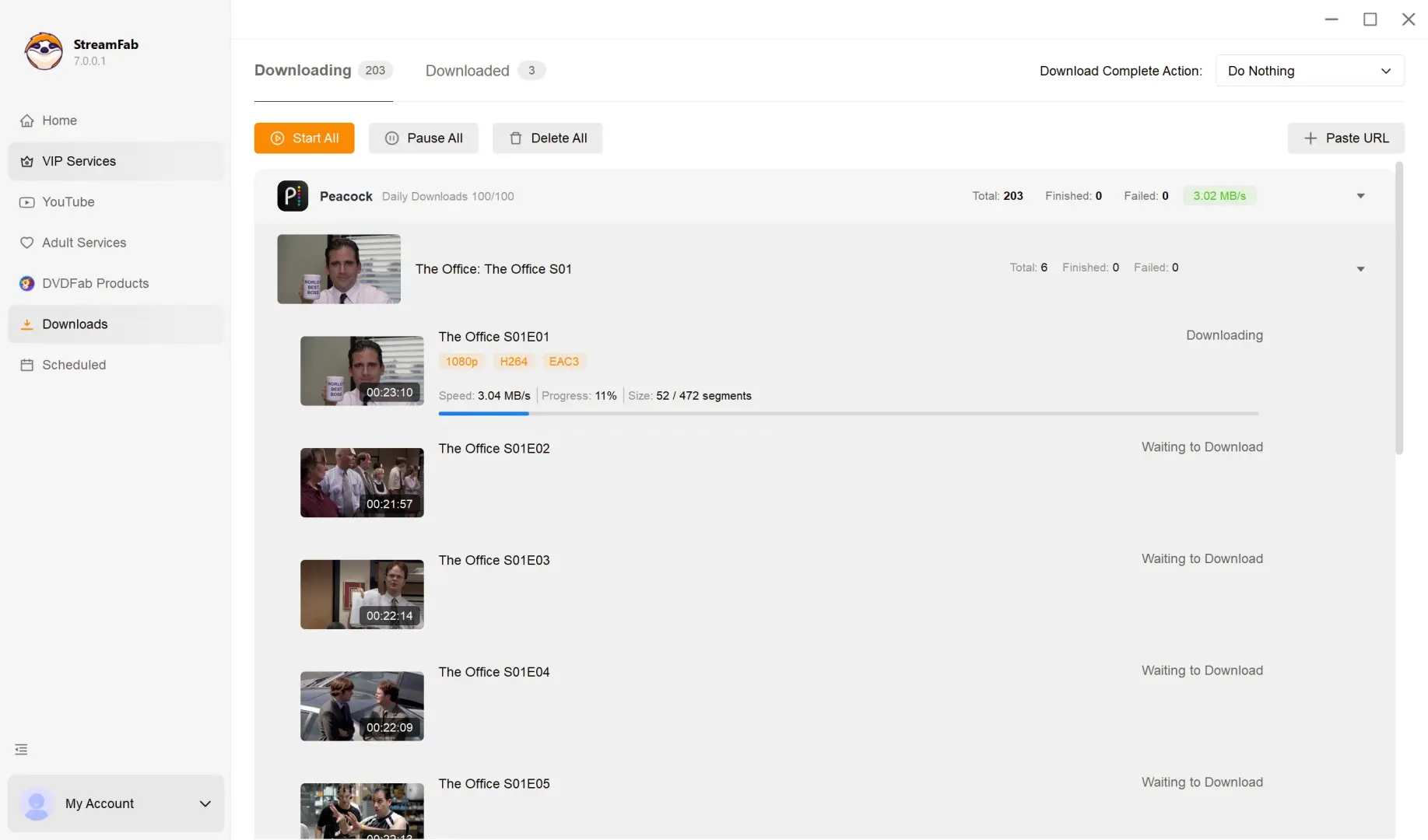
Quality Options and Current Test Results
StreamFab Peacock Downloader supports Windows and Mac, MP4 and MKV output, and video up to 4K with H.264 or H.265. Available options also include HDR10, Dolby Vision, Dolby Atoms, EAC3 5.1, and AAC 2.0. Your selected title's download dialog shows its choices.
Playback check: Confirm the selected resolution, audio track, and subtitles in the completed file on your intended player.
Peacock 4K downloads are an option, not a promise for every title. Select 4K when it appears in the dialog; use the trial to check that file on your screen. I would favor a file that plays correctly on the destination device over a larger file chosen for its resolution label.
Format choice: MP4 suits broad playback support. MKV keeps multiple audio and subtitle tracks together for players that support them.
What Current Users Report About Peacock Reliability
Peacock-specific community reports identify separate title and browser problems. They are individual experiences, not a success-rate measure. For you, the useful next step is matching the symptom to an update or troubleshooting action.
One r/StreamFab user reported Peacock's connection-error page inside StreamFab while the same service opened in a normal browser. Updating StreamFab and refreshing its browser session are the first checks for that symptom. The troubleshooting sequence below separates those two environments.
Another r/StreamFab post asked about problems with certain Peacock titles after version 7.0.2.4. Use the trial for the affected title after updating the app. Broader questions about StreamFab on community forums do not establish how a particular Peacock movie will behave.
StreamFab vs. Official Downloads vs. Screen Recording
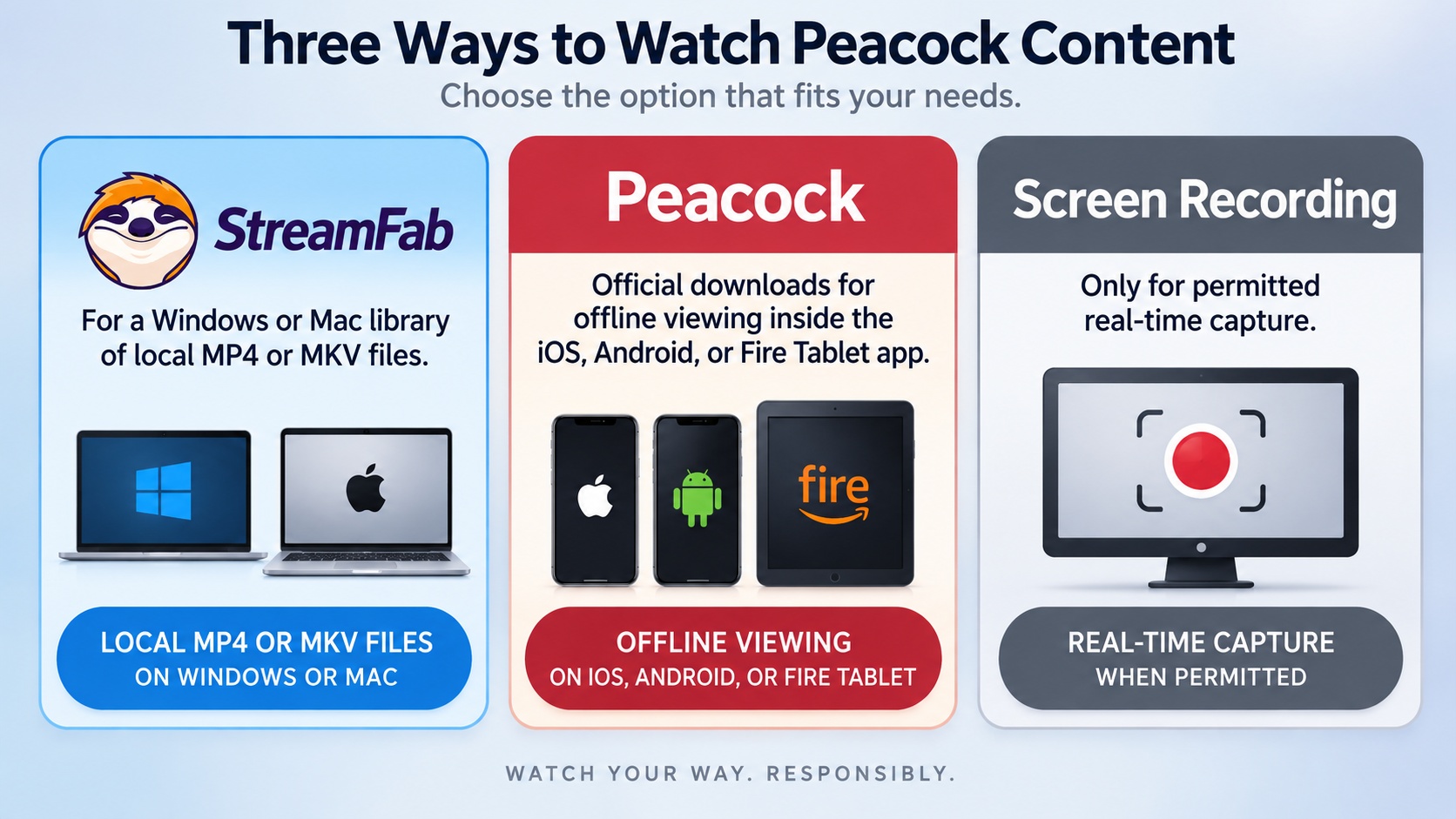
Choose StreamFab for desktop files, official downloads for eligible mobile viewing, or screen recording for content you are permitted to capture in real time. The main tradeoff is the playback destination. A screen recorder also occupies the computer for the duration of playback.
| Method | Devices and access | Output | Limits and timing |
|---|---|---|---|
| StreamFab Peacock Downloader | Windows/Mac; paid Peacock access | MP4 or MKV | Licensed daily and weekly quotas |
| Official Peacock downloads | Mobile/tablet; Premium Plus | Peacock app playback | 25 titles; 30 days/48 hours after playback |
| Screen recording | Computer; authorized playback | Recorded video file | Real-time capture; storage needed |
My choice for a laptop library is StreamFab's local-file workflow. Official downloads are convenient when your trip revolves around a phone or tablet. Screen recording fits permitted capture tasks, but protected playback can produce a black screen; use an authorized offline option instead when capture is blocked.
Pricing and Free Trial
StreamFab Peacock pricing covers a software license separate from your Peacock subscription. The module is available on its own or within All-In-One. You still need paid access to the content.
US Peacock plans: official StreamFab Peacock Downloader page As of September 2026, Select costs $8.99/month, Premium $12.99/month, and Premium Plus $19.99/month. Moving from Premium to Premium Plus adds $7/month.
The StreamFab free trial runs for 30 days with three full video downloads per streaming service during that period. It includes the paid version's quality, batch, subtitle, and format options. Reinstalling does not reset the count.
Use those downloads to check the files you intend to watch. The trial's limit is quantity, so you can judge a complete movie or episode. It is a practical way to start your desktop library.
Known Issues and Troubleshooting
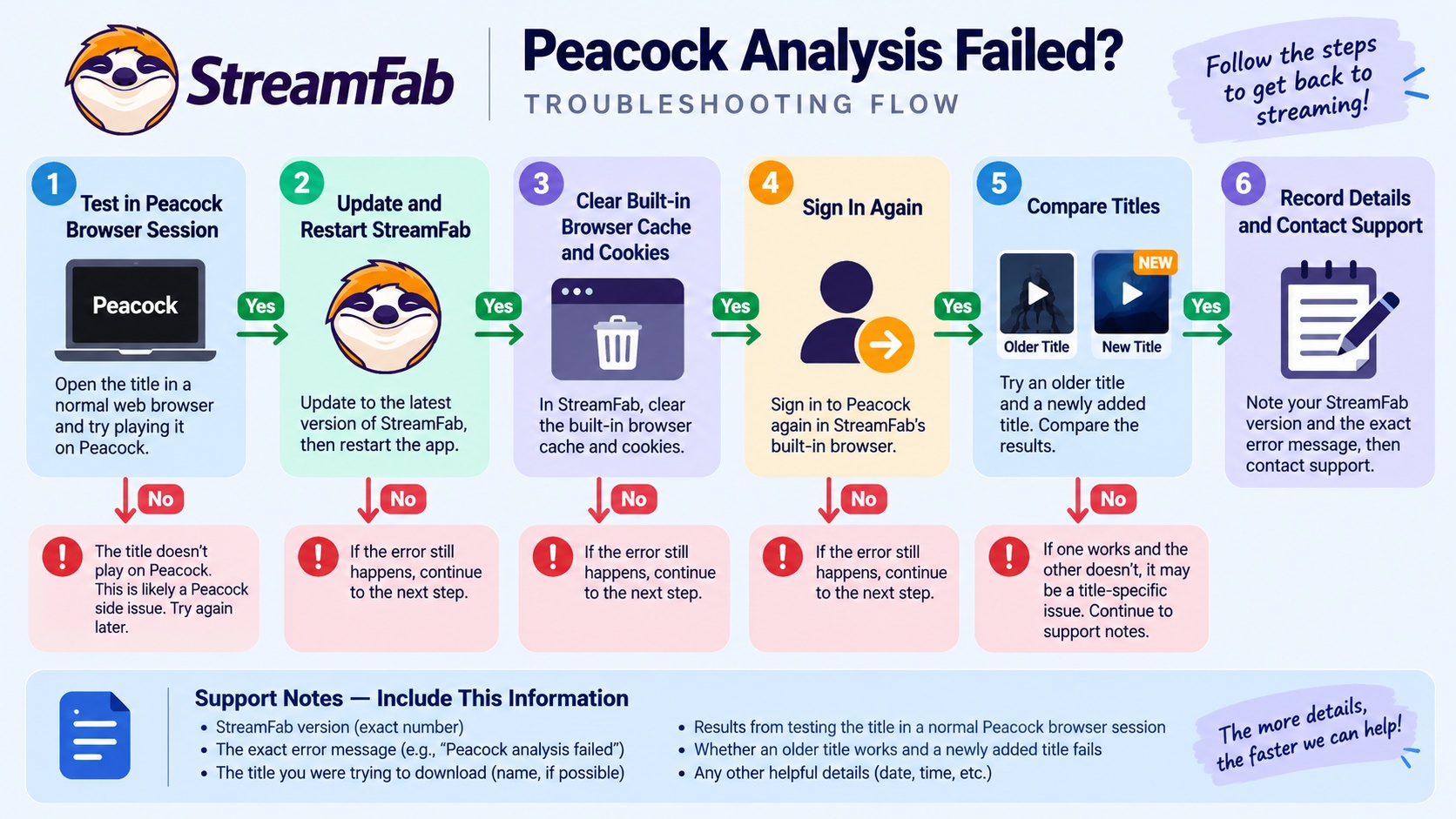
A Peacock analysis failed message calls for checking the browser session and the selected title first. Start with ordinary playback, then work through the app. Keep the title and version number handy so a repeated failure is identifiable.
Session check: Clear the built-in browser cache and cookies, then sign in again if Peacock loops at login or shows a connection error.
- Open the affected Peacock title in a normal browser. Confirm that your account plays it there.
- Update StreamFab and restart the application.
- Clear the built-in browser cache and cookies, sign in again, and retry the same title.
- Try an older catalog title and a newly added title. Keep the results separate so a single failure does not obscure a working queue.
- Record the app version, title, selected format, and error message. Installation, crash, and activation symptoms belong to the StreamFab not working troubleshooting path.
I would put more weight on a mixed-age title set than one successful download. That small check shows whether the problem follows one title or the session. Use the resulting error details when following the troubleshooting guidance.
Frequently Asked Questions
Conclusion
StreamFab is a practical choice for authorized Peacock on-demand viewing on Windows and Mac. Choose it when local files and episode queues solve your viewing problem; choose Peacock's official downloads when app-based mobile playback is enough.
The [complete StreamFab review](https://streamfab.com/streamfab-review) covers the broader platform offering, while the Peacock module serves an on-demand desktop library. complete StreamFab review
Start with the Peacock module's full-length trial downloads and open the results on your intended screen. That gives you a concrete basis for choosing the desktop workflow.
