- Download Tubi videos on PC (Win/Mac): Best for repeat desktop use, batch tasks, and configurable local files up to 1080p.
- Download Tubi videos on Android: Best for technically comfortable users testing a free option on an individual title.
- Download Tubi videos on iOS: Transfer a computer-created file to an iPhone or iPad for mobile playback after an extra desktop step.
Whichever workflow you choose, keep legal compliance and platform terms, authorization, and applicable law in mind when saving Tubi videos for personal viewing.
Tubi does not offer an official offline-download mode. To download Tubi movies for travel, a disappearing title, or playback on another device, choose a workflow that fits the title and device. Results vary by title, so no method is universally reliable.
Bottom line: a maintained desktop workflow fits repeat use, while free and phone-based options are better treated as title-by-title fallbacks. This guide compares desktop, Android, iPhone transfer, browser, online, command-line, and recording workflows, plus the failure signals that show when a free option is no longer worth retrying.
What Tubi Lets You Download
Official Offline Availability
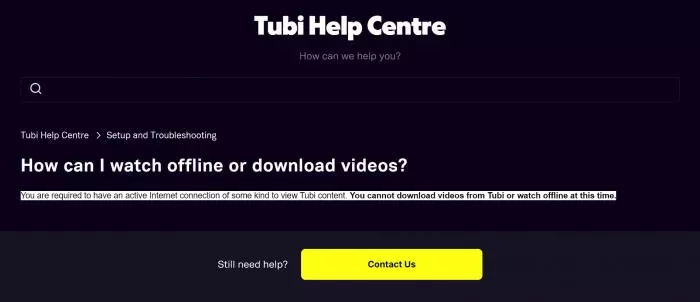
Tubi does not provide an official offline-download feature. You can stream in a supported browser or app, but playback is different from receiving a downloadable file.
Why Results Vary by Title
A method that recognizes one title may not recognize another. Protection, regional availability, app changes, and the workflow itself can affect whether a download prompt appears or whether a file completes.
Common Failure Signals
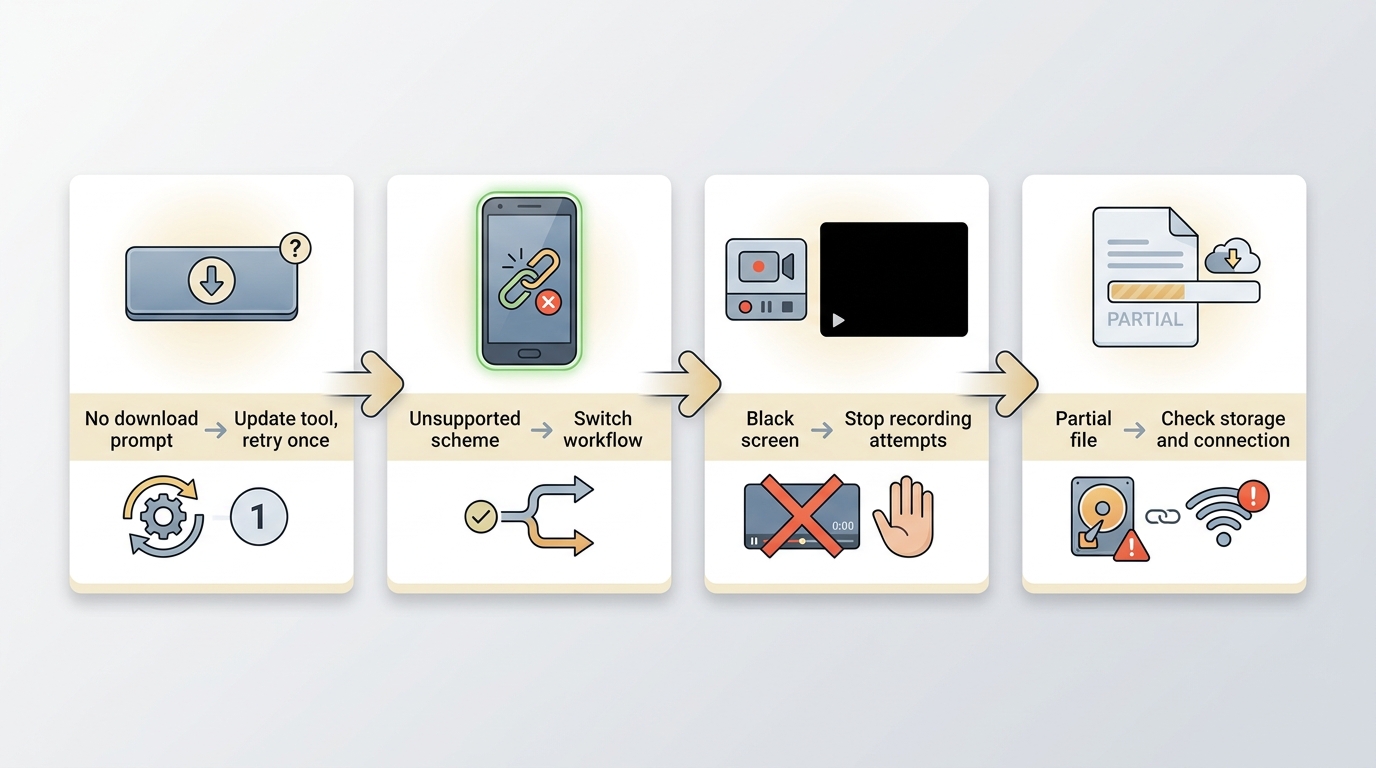
If a video plays but no prompt appears, update the tool and retry once with the same title. An unsupported-scheme message on mobile means that workflow is not handling the request, while a black recording window is a sign to stop repeated recording attempts. For partial files, remove the incomplete copy and retry only after checking storage and connection. If region settings or a VPN are involved, restore your normal region settings before retrying once. A daily limit or counter error is a support issue, not evidence that repeated retries will restore title detection; stop retrying and contact the relevant product’s support.
Tubi Download Methods and Their Limits
The methods below are not interchangeable. A maintained desktop workflow offers more control over output, including the format choices covered in this guide to convert Tubi to MP4, while phone-based and free options are more dependent on the individual title and current platform behavior. I would judge a method by whether it fits your device and tolerance for troubleshooting, not by a permanent headline rate.
Before comparing methods, have a supported device, sufficient local storage, a stable connection, and authorization to access the title. Keep any saved file within personal viewing where permitted by platform terms and applicable law.
| Workflow | Device | Cost model | Typical output | Controls and automation | Protected-title limitation | Best fit | Not ideal for |
|---|---|---|---|---|---|---|---|
| Maintained desktop downloader | Windows or Mac | Commercial workflow with a free plan that has feature limits | MP4 or MKV | Resolution, subtitle, metadata, batch, and scheduling options | Results can vary by title and current service behavior | Repeat use, episodic tasks, and local libraries | Phone-only or entirely free use |
| Seal | Android | No-cost app | Varies by title and app behavior | Limited controls; no predictable batch workflow | Unsupported-scheme and protected-title errors can occur | A technically comfortable user testing one title | Reliable repeat tasks |
| Computer-to-iPhone or iPad transfer | iPhone or iPad with a computer | Uses an existing computer-created file | Matches the source file | Transfer through USB, AirDrop, Files, or iCloud Drive | It is not a direct Tubi download method | Travelers who accept an extra desktop step | Phone-only downloading |
| Browser extension | Desktop browser | Usually no-cost | Varies by extension and title | Few consistent subtitle or batch controls | May stop detecting a title after a platform change | Testing a simple, accessible title | Protected or changing titles |
| Online downloader | Browser on desktop or mobile | Usually no-cost | Varies by service | Few file and metadata controls | Title detection can be volatile | Occasional experiments with a single title | Private libraries or predictable output |
| Command-line tool | Computer | Usually no-cost | Varies by tool and title | More technical control, but setup is manual | Faces the same title-level detection limits | Experienced users troubleshooting one workflow | Readers who want a simple interface |
| Real-time screen recording | Computer or mobile device | Often included with recording software | A recording file | No dependable batch automation | May show a black screen or create partial files | A fragile last resort | Reliable, efficient repeat use |
This matrix summarizes method fit and configured product specifications available as of July 2026. Supported devices and availability may change; Tubi's official site lists current availability.
- Desktop workflow: Best suited to repeat use, local libraries, batch tasks, and users who want configurable output.
- Computer-to-iOS transfer: Useful when you accept a desktop step and want to play an existing local file on an iPhone or iPad.
- Android fallback: Best reserved for a technically comfortable user trying one title and accepting that support can change.
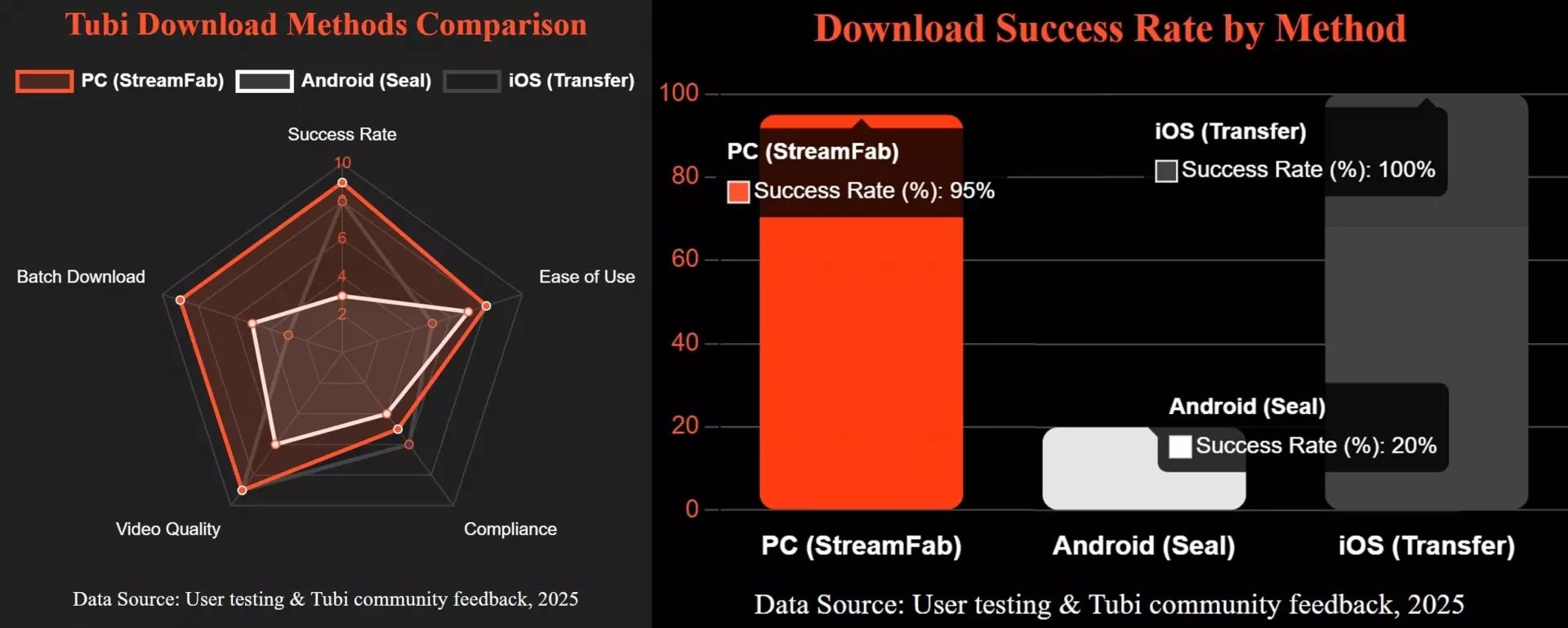
Treat the illustration as a workflow overview rather than a current scorecard, since title behavior can change.
The main trade-off is control versus convenience:
- StreamFab on PC or Mac: A maintained desktop option for authorized personal offline viewing when batch processing and scheduled episodic tasks matter.
- Seal on Android: A free fallback for individual attempts, not a predictable workflow for protected or changing titles.
- Transfer to iPhone or iPad: A practical playback route when a computer-created file is already available.

-
My Insight: Free options can be useful for a single title, but they are more exposed to title-level and platform changes. For a repeat workflow, I would rather use a maintained desktop process than keep troubleshooting a mobile attempt that has already shown an unsupported-scheme or detection error.
The next sections explain the three device-oriented workflows, followed by the limits of other free approaches.
1. Desktop Downloader: StreamFab
For the desktop workflow, use a Windows or Mac computer with enough local storage and a stable connection.
- • Test data:Output options include up to 1080p resolution with AAC 2.0 audio. Results depend on the title, computer, network, and current service behavior.
- • Best for: Windows or Mac users who want a maintained workflow for repeat viewing, batch tasks, or a personal local media library

- Save authorized Tubi viewing at up to 1080p or 720p with AAC 2.0 audio, depending on title availability.
- Download Tubi videos in compatible MP4 and MKV formats for flexible playback.
- Ad handling is available in the desktop workflow, subject to the service and title.
- Download subtitles in the language you prefer to watch based on your choice.
- Schedule supported episodic tasks for a time that fits your routine.
- Batch mode to add a whole season or multiple movies to the task queue for downloading.
Separate from Tubi’s official features, StreamFab Tubi Downloader is a Windows and Mac desktop app that can save authorized Tubi viewing to MP4 or MKV at up to 1080p, with AAC 2.0 audio, subtitle choices, metadata, batch processing, and scheduled tasks. A free plan is available with feature limits. This is a strong fit for repeat desktop use, not for readers who need a phone-only or entirely free process.
After creating a file on your computer, you can watch Tubi offline on mobile and PC through the playback options that fit your device.
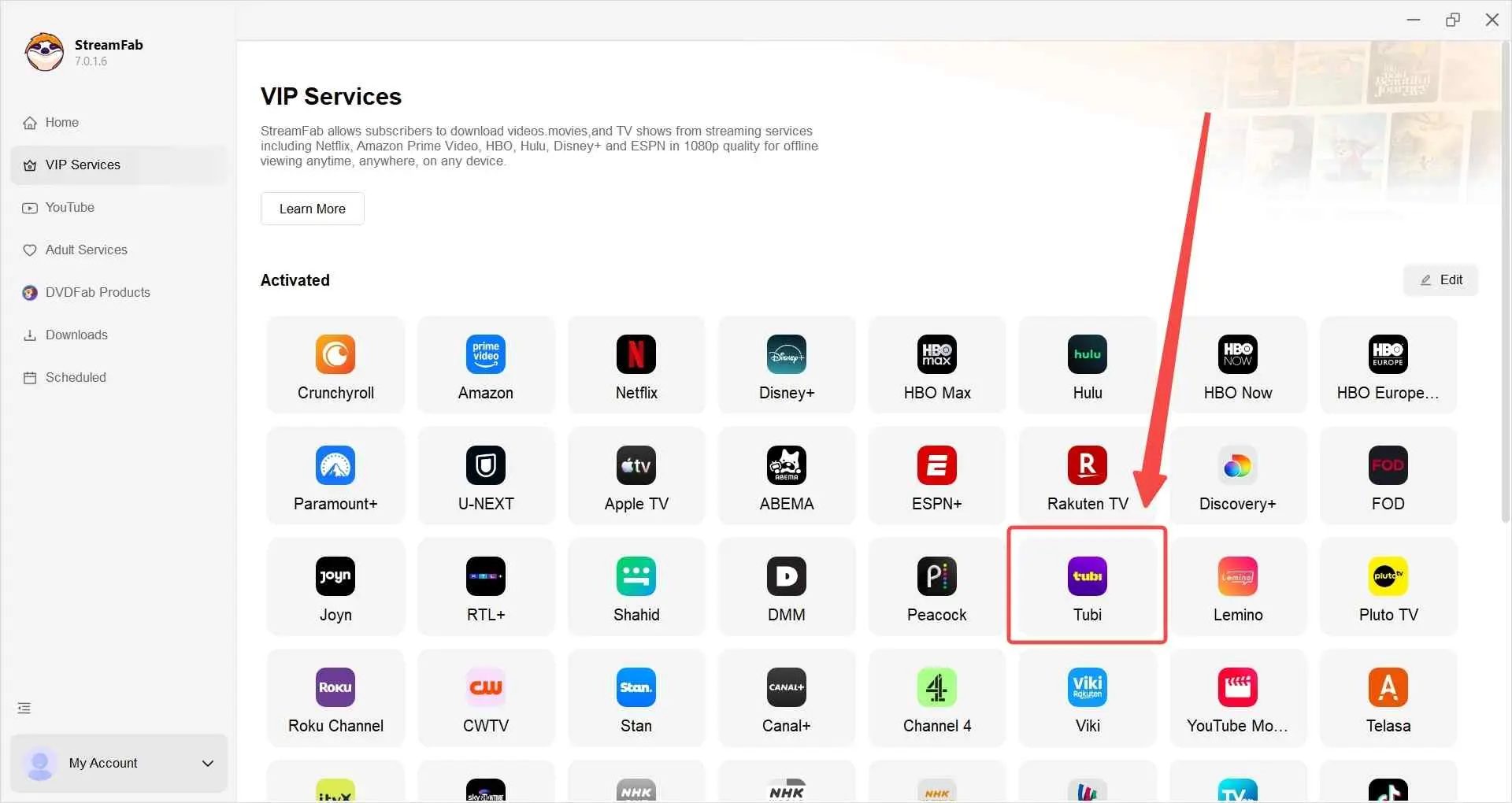
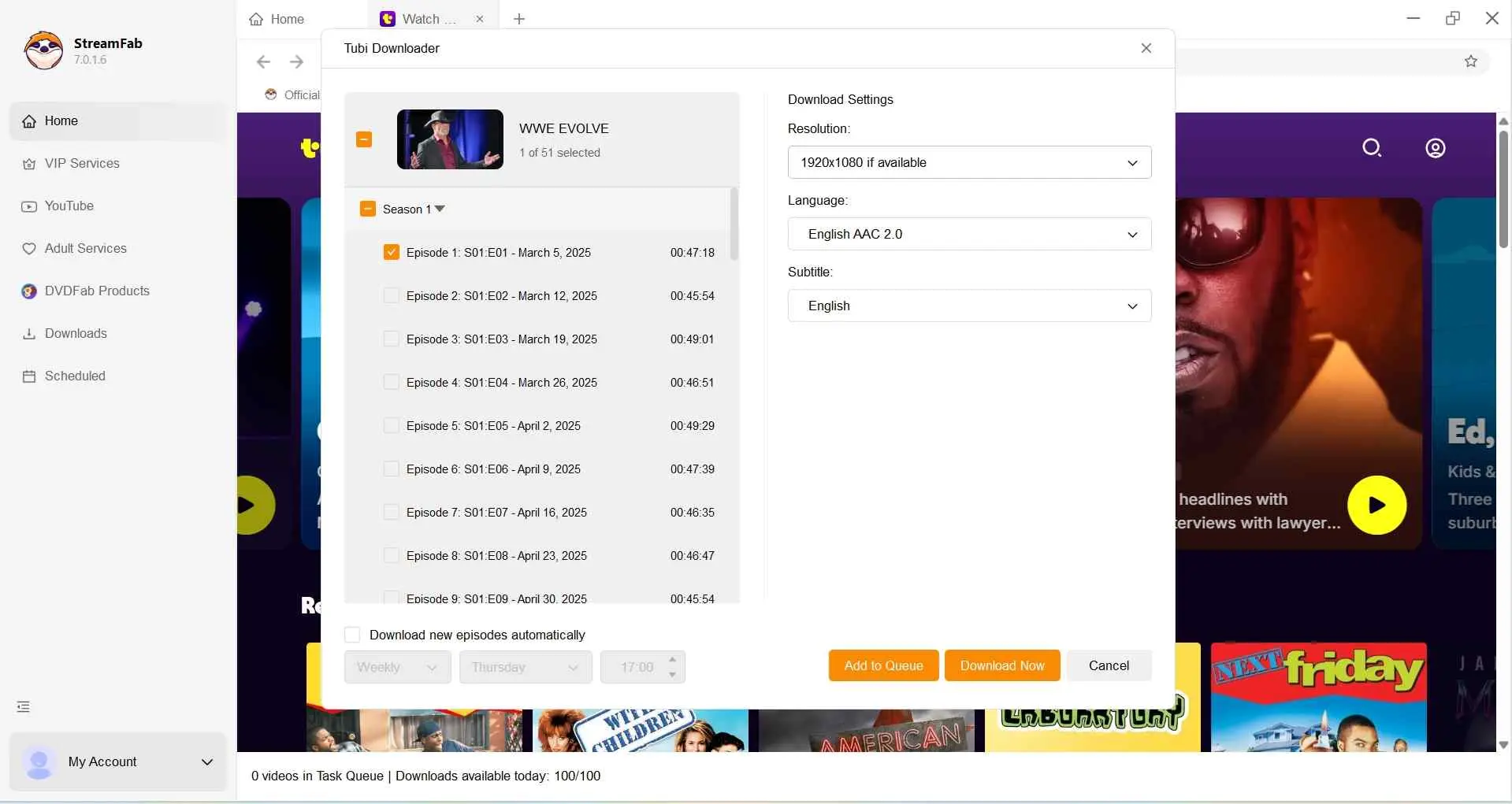
- The image below illustrates the desktop workflow. Output quality depends on the selected settings, the title, the computer, the network, and current service behavior.
- Whether you are using a Windows computer or a Mac device, StreamFab operates remarkably smoothly.

- My Insight: Output quality depends on the selected workflow, the title, and current service behavior. StreamFab Tubi Downloader is configured for output up to 1080p in MP4 or MKV. For a local library, I would prioritize a method with the output controls and batch workflow that match how often you expect to use it.
2. Android Fallback: Seal
- • Test data:Title support and output behavior can change; unsupported-scheme and protected-title errors are possible on Android.
- • Best for: Users looking for a free option to test on an individual Tubi title directly from their phone.
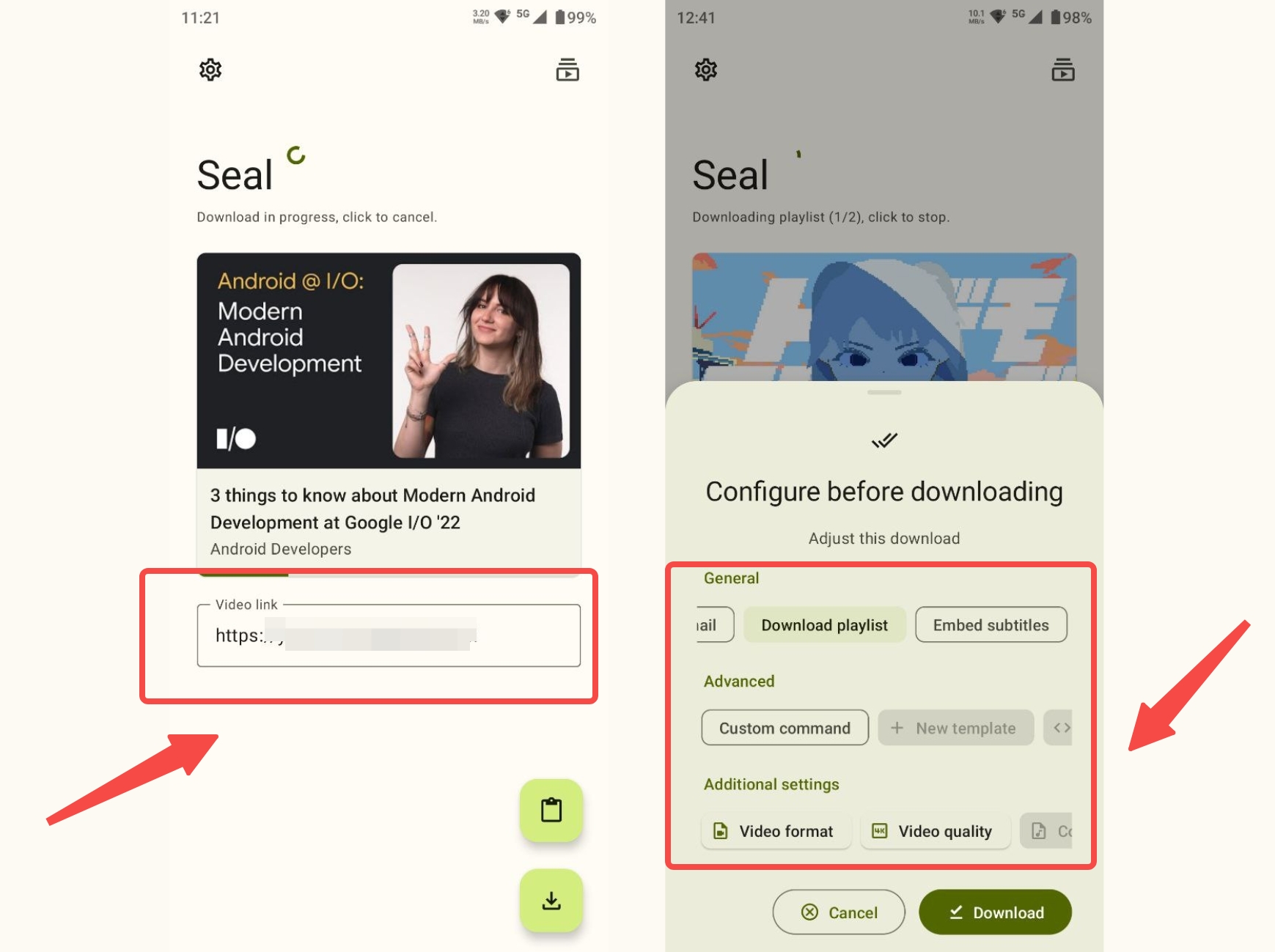
Seal is an active open-source Android app, but support for a given Tubi title can change. It is worth trying if you are comfortable diagnosing a one-off attempt, but an unsupported-scheme message or a failed title is a reason to switch workflows rather than keep retrying.
Seal is best for technically comfortable users who want to test a free option on a single title. It is not ideal for predictable batch tasks or titles that already show an unsupported scheme or detection error.
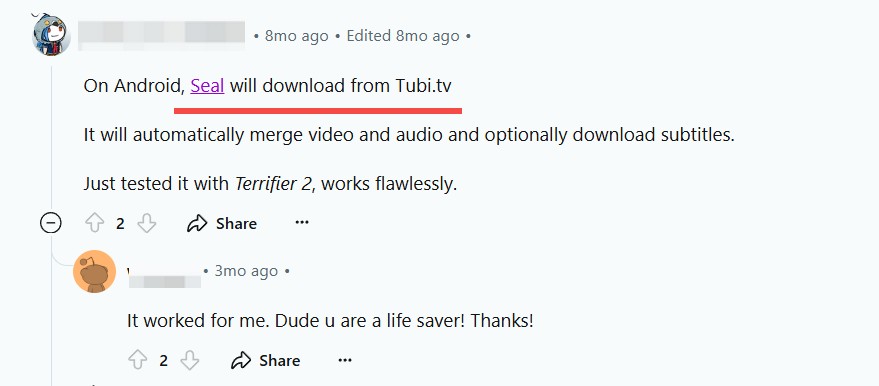
Seal's official repository is available on GitHub. Review its installation guidance and use the official release path.

3. iPhone and iPad: Transfer from a Computer
- • Test data:The final result depends on the computer-created source file and the transfer method; this is not a direct Tubi download feature.
- • Best for: Travelers who accept an extra desktop step before playing a local file on an iPhone or iPad.
Tubi does not offer an official iPhone or iPad offline-download feature. For iOS, this article treats the practical route as transferring a file that was created on a computer, not as downloading directly from the Tubi app.
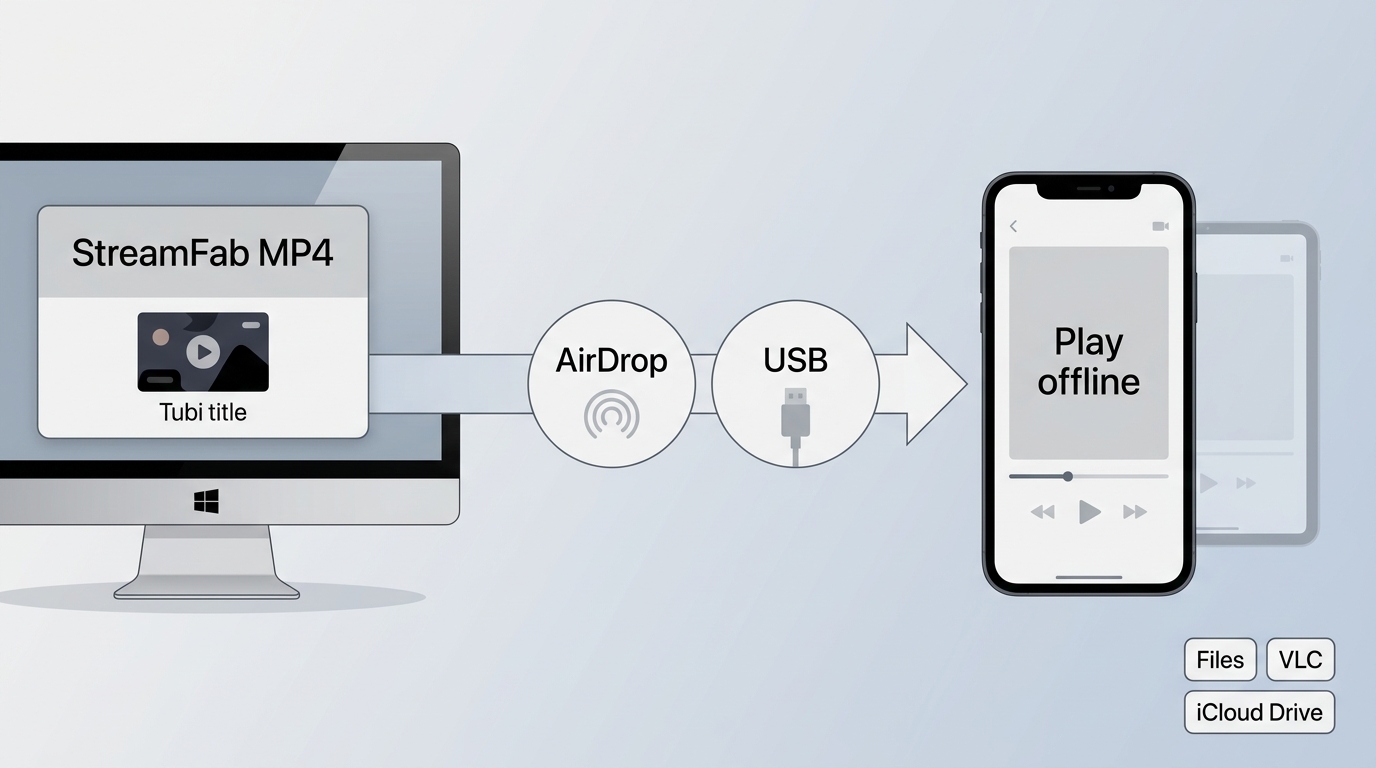
Move the computer-created file to your iPhone or iPad with USB transfer, AirDrop, Files, or iCloud Drive. Final playback quality depends on that source file, and this route is useful for travelers but not for phone-only users.
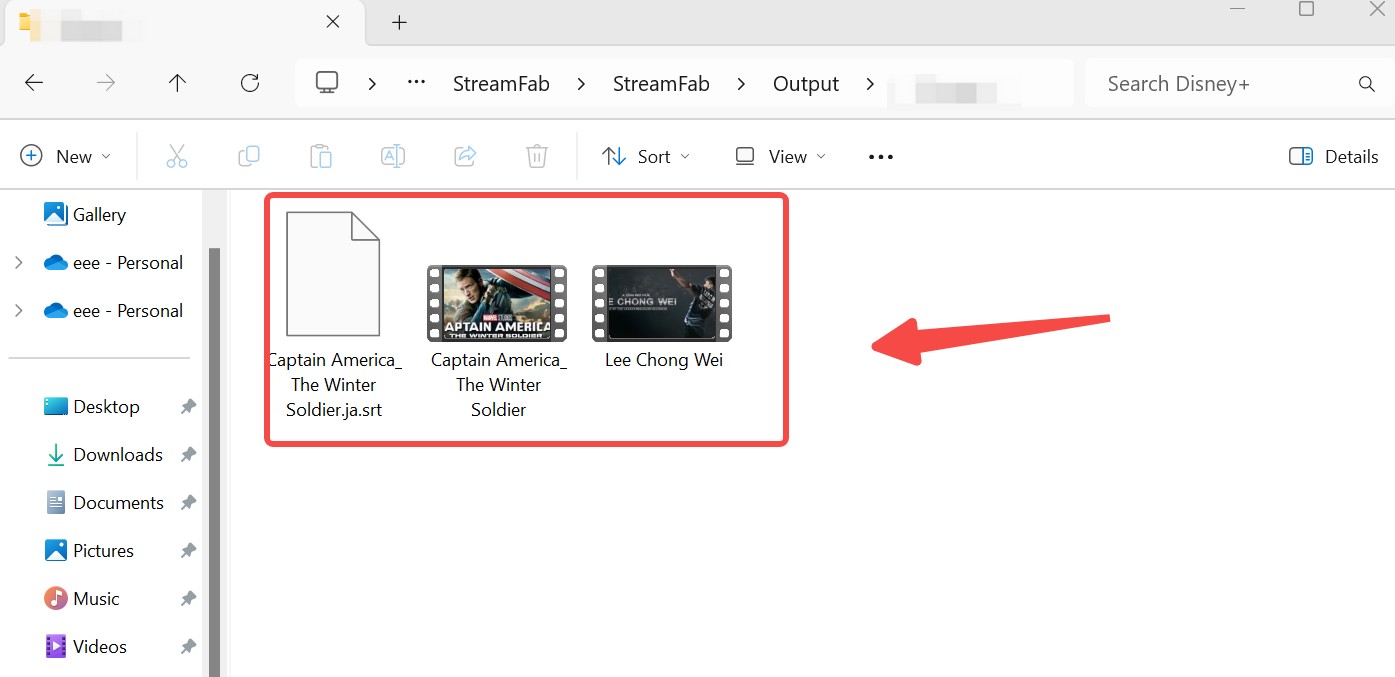
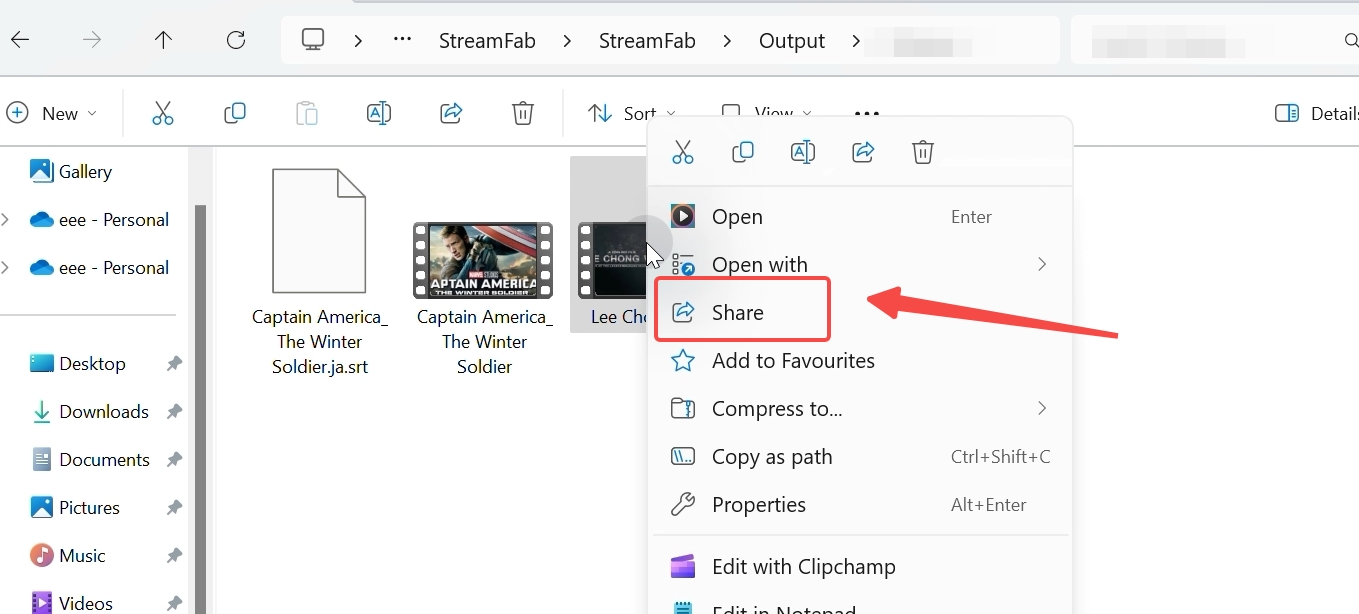
Many users find the transfer step "annoying," but in 2026, it is actually the most time-efficient method. Attempting to download directly on a phone often results in corrupted files or 480p resolution. By downloading on my PC first, I ensure I have a pristine 1080p master file. From there, transferring via a USB or iCloud takes less than two minutes—far less time than troubleshooting a failed mobile download.
Free Tools and Their Limits
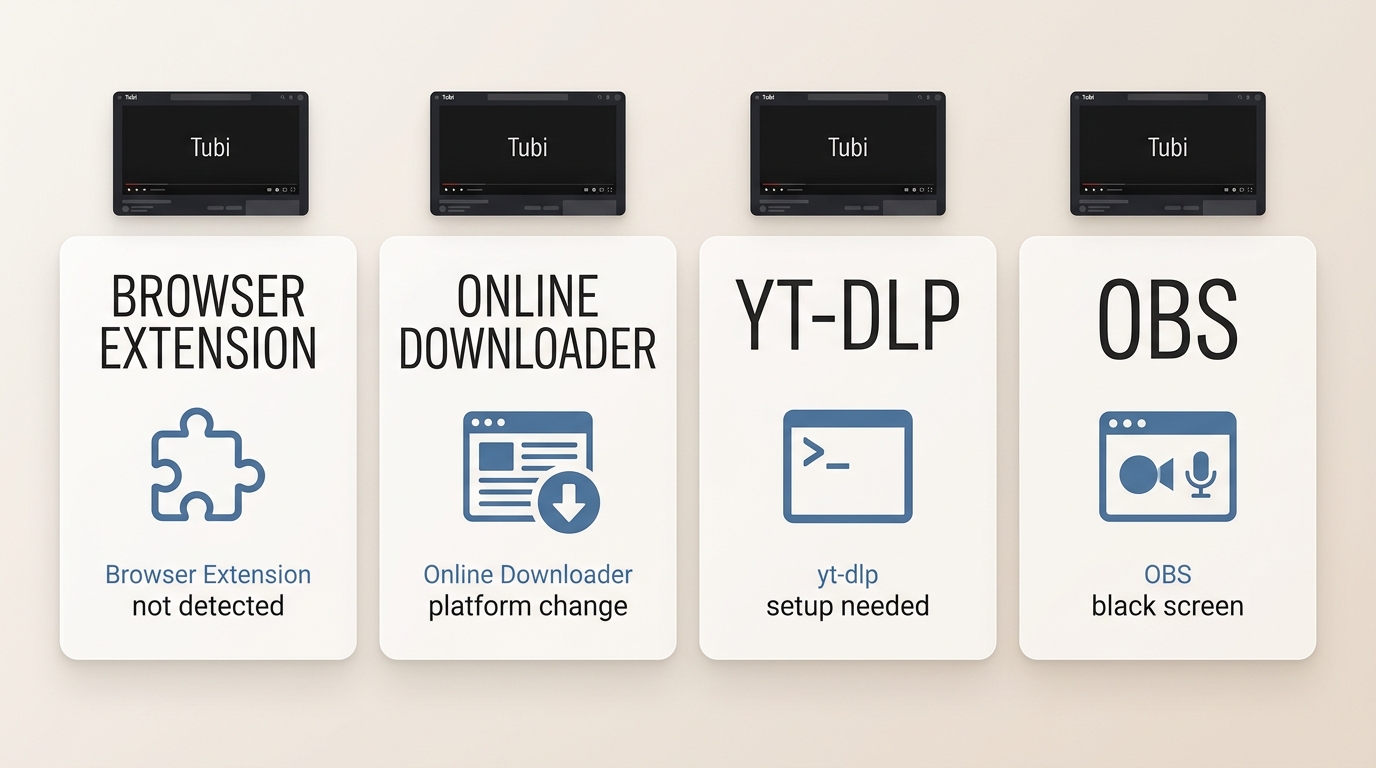
Browser extensions and online downloaders can be convenient for an individual attempt, but they are volatile for Tubi titles and may stop detecting a title after a platform change. They generally offer fewer reliable controls for quality, subtitles, metadata, and batch tasks than a maintained desktop workflow.
Browser extensions and online tools
Use these only when you are comfortable testing one title and accepting a failed detection result. If the title plays but no download option appears, retry once after updating the extension or page, then stop rather than cycling through repeated attempts.
Command-line tools
Command-line tools can suit experienced users who want manual control over a specific workflow. They do not provide a dependable answer for titles that already fail detection, and the added setup is rarely worthwhile for a one-off mobile need.
Real-time recording
Recording is a fragile last resort. A black preview, incomplete file, or capture failure means that workflow is not handling the title; stop the attempt instead of treating recording as a reliable fallback.
Personal-Use Boundaries for Tubi Downloads
When it comes to downloading from a free, ad-supported platform like Tubi, distinguishing between personal convenience and copyright infringement matters a lot for every user.
1. Authorized Personal Viewing
For content you’re authorized to access, where permitted by platform terms and applicable law, a desktop tool can save a local copy for personal offline viewing. An account alone does not settle every permission question, so keep the use limited to your own viewing context.
2. Do Not Share or Redistribute
Do not share files with others, redistribute them, upload them publicly, or use them commercially. Those uses go beyond a personal offline-viewing workflow and can conflict with platform terms and copyright rules.
3. Where Each Method Fits
Use a maintained desktop workflow when repeat tasks, configurable files, and a local library matter. Use a free Android, browser, online, or command-line option only when you are comfortable with title-level volatility. Use computer-to-iPhone transfer when mobile playback matters more than a phone-only process.
- Do not share downloaded files with others.
- Do not use the software for commercial purposes.
- Keep your access and use within the applicable platform terms and local rules.

-
StreamFab works as a bridge for video watching accessibility, not for piracy. By keeping your downloads private, you respect Tubi rules while gaining the flexibility to watch Tubi on your own terms.
-
StreamFab works as a bridge for video watching accessibility, not for piracy. By keeping your downloads private, you respect Tubi rules while gaining the flexibility to watch Tubi on your own terms.
Tubi Download FAQs
Why does Tubi play but show no download button?
Playback and title detection are separate. Update the tool, retry the same title once, and check your normal region settings. If playback continues but no prompt appears, treat that title or workflow as unsupported for now rather than expecting repeated retries to fix it. If a daily-limit or counter error appears, treat it as a support issue rather than a title-detection problem.
Can a Tubi download include subtitles and metadata?
It can, but the result depends on the method, title, and available language tracks. StreamFab Tubi Downloader supports subtitle choices and metadata options, while free tools may provide fewer controls.
Why does screen recording show a black screen on Tubi?
A black video area usually means the recording workflow cannot capture that title. Stop repeated attempts when this happens; recording is a fragile fallback and may also produce incomplete files.
Does Tubi have a PC app that supports offline downloads?
No. Tubi does not provide an official PC app with offline downloads. You can stream in a supported desktop browser, while the desktop workflows in this article are alternatives rather than an official Tubi download feature.
Conclusion: Which Tubi Method Fits You?
Choose by your device, how often you need local files, and how much troubleshooting you are willing to accept:
- PC / Mac: Choose a maintained desktop workflow for repeat use, batch tasks, or a local library.
- Android: Try Seal or another free option for a single title only if you accept changing support and troubleshooting.
- iPhone / iPad: Transfer a computer-created file when you want mobile playback and accept the extra step.

I would choose by fit and current title behavior, not by a blanket reliability claim. Use a maintained desktop workflow for repeat, batch, or library use; use a free option for one title only when you accept volatility; transfer a computer-created file for iPhone or iPad playback; and treat recording as a fragile last resort. Keep any local file within authorized personal viewing, where permitted by platform terms and applicable law, and do not share, redistribute, upload, or use it commercially.
-
This guide focuses on method fit, title-level limitations, and personal-use boundaries for Tubi viewing. 
-
In July 2026, this guide was updated to:
- • Revised standing success-rate claims and clarified that results vary by title and workflow
- • Expanded the method guidance to distinguish desktop, Android, iPhone transfer, and free fallback workflows
- • Clarified authorization, platform terms, applicable law, and the limits on sharing or commercial use.
This guide was updated by Stella Smith, StreamFab Editor.
“My goal is to make the platform rules, method limits, and practical choices easier to understand."
